1. ആമുഖം
This manual provides detailed instructions for the Waveshare Industrial Modbus RTU 4-Channel Relay Module. This module is designed for industrial control applications, offering robust RS485 communication, high current switching capabilities, and comprehensive protection features. It is suitable for various scenarios requiring intelligent and automated control.

ചിത്രം 1.1: കഴിഞ്ഞുview of the Waveshare Industrial Modbus RTU 4-Channel Relay Module.
2 പ്രധാന സവിശേഷതകൾ
- Configurable RS485 Communication: Device address is configurable (1~255), allowing multiple devices to be cascaded on the RS485 bus for flexible networking.
- Relay Control with Flash-on/Flash-off: Supports flash-on/flash-off function, enabling relay activation for a specific period before automatically turning off via command arguments.
- വൈഡ് വോളിയംtage Range & Isolation: ഓൺബോർഡ് വോളിയംtage regulator supports 7V~36V wide voltage supply, with unibody power supply isolation for stable, isolated voltage without requiring an extra power supply for the isolated terminal.
- വിപുലമായ സംരക്ഷണ സവിശേഷതകൾ: Includes onboard resettable fuse, TVS (Transient Voltage Suppressor), optocoupler isolation, and relay driver chip with flyback diode protection for surge suppression, anti-electrostatic, and high-voltage interference prevention.
- Reliable, Easy Installation: High-quality relay with a contact rating of ≤30A 250V AC or ≤30A 28V DC, housed in a rail-mounted ABS plastic enclosure with 3 LEDs to indicate MCU and signal transceiving status.
- Rich Wiki Resources: Additional resources are available on the official Waveshare Wiki.
3. പാക്കേജ് ഉള്ളടക്കം
പാക്കേജിൽ ഇനിപ്പറയുന്ന ഇനങ്ങൾ ഉൾപ്പെടുന്നു:
- Modbus RTU Relay 4CH x1
Note: The power supply for this product is not included. A 12V power supply is recommended. A USB to RS232/485/TTL or USB to RS485 converter may be useful for testing and communication setup.
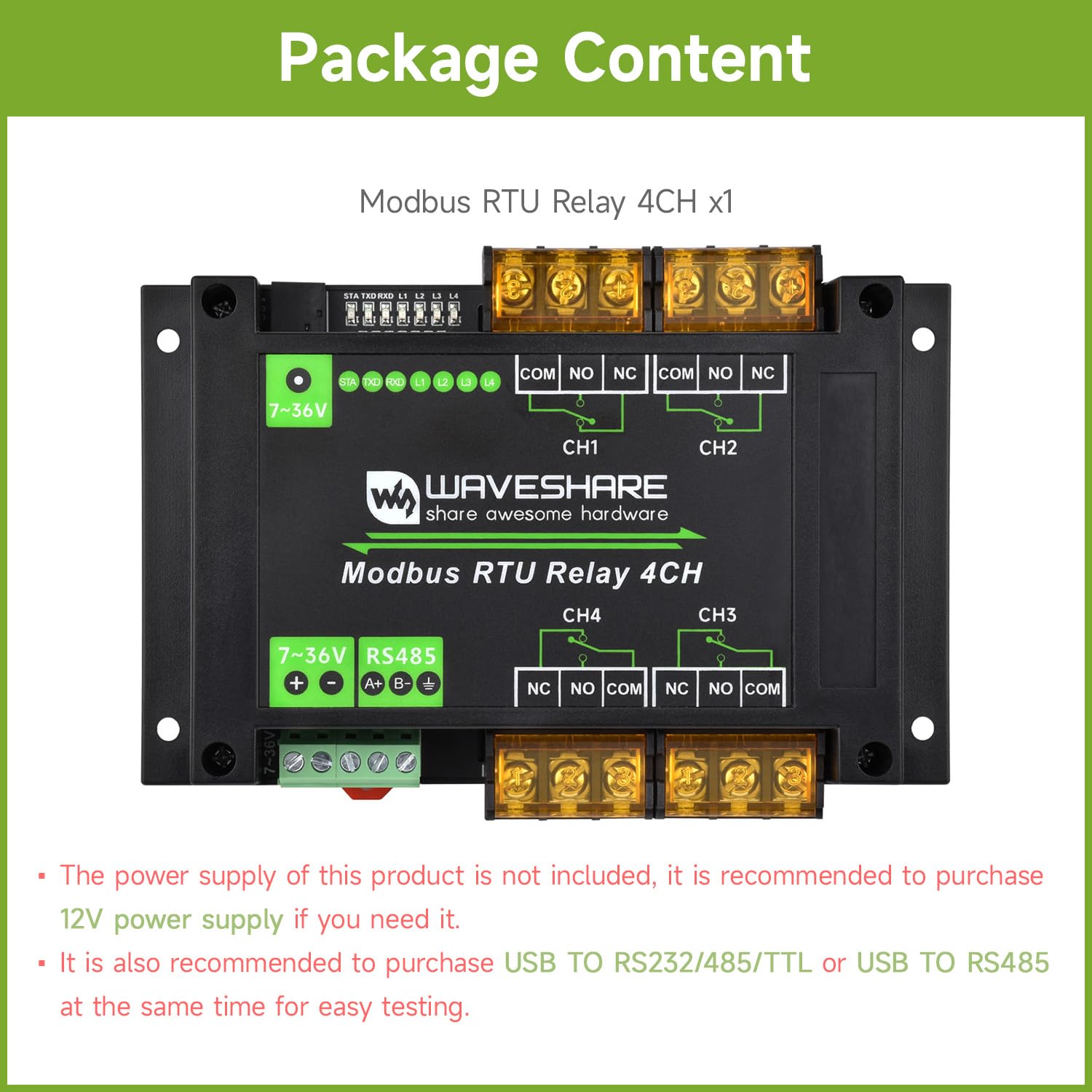
Image 3.1: Contents of the product package, showing the Modbus RTU Relay 4CH module.
4 സ്പെസിഫിക്കേഷനുകൾ
| പരാമീറ്റർ | മൂല്യം |
|---|---|
| വൈദ്യുതി വിതരണം | 7-36V |
| ആശയവിനിമയ ഇൻ്റർഫേസ് | RS485 |
| ബ ud ഡ്രേറ്റ് | 4800, 9600, 19200, 38400, 57600, 115200, 128000, 256000 |
| Default Communication Format | 9600, N, 8, 1 |
| റിലേ ചാനലുകൾ | 4 |
| ബന്ധപ്പെടാനുള്ള ഫോം | 1NO 1NC (Normally Open, Normally Closed) |
| കോൺടാക്റ്റ് റേറ്റിംഗ് | ≤30A 250V AC or ≤30A 28V DC |
| ആശയവിനിമയ പ്രോട്ടോക്കോൾ | Standard Modbus RTU protocol |
| RS485 വിലാസം | 1-255 (Configurable) |
| LED സൂചകങ്ങൾ | STA: MCU indicator (keeps flashing when MCU is working normally) TXD: TX indicator (lights up when sending data) RXD: RX indicator (lights up when receiving data) |
| മൗണ്ടിംഗ് തരം | DIN റെയിൽ മ .ണ്ട് |
| കോൺടാക്റ്റ് മെറ്റീരിയൽ | വെള്ളി |
| കണക്റ്റർ തരം | സ്ക്രൂ ടെർമിനലുകൾ |

Image 4.1: Visual representation of the module's features and technical specifications.
5. സജ്ജീകരണവും ഇൻസ്റ്റാളേഷനും
5.1 പവർ സപ്ലൈ കണക്ഷൻ
Connect a 7V to 36V DC power supply to the designated power input terminals on the module. Ensure correct polarity (+ and -). The module features an onboard voltage regulator and power supply isolation for stable operation.
5.2 RS485 Interface Connection
Connect the RS485 A+ and B- terminals of the module to your RS485 master device (e.g., a computer via a USB to RS485 converter). For multi-device setups, ensure proper cascading and consider using RS485 repeaters for long communication distances.

Image 5.1: Diagram illustrating RS485 communication setup with multiple modules and examples of AC and DC relay connections.
5.3 റിലേ ഔട്ട്പുട്ട് കണക്ഷൻ
Each of the 4 relay channels provides Normally Open (NO) and Normally Closed (NC) contacts, along with a Common (COM) terminal. Connect your target device (e.g., light, motor, valve) to the appropriate relay contacts based on your control requirements. The high current screw terminals are designed for secure wiring of devices up to 30A.

ചിത്രം 5.2: വിശദമായത് view of the high current screw terminals and a hardware analysis showing internal components like optocoupler isolation and TVS protection.
5.4 Rail-Mount Installation
The module is housed in a rail-mounted ABS plastic enclosure, facilitating easy installation and removal on standard DIN rails in industrial control cabinets.

Image 5.3: Illustration of the module's interfaces, LED indicators, and its rail-mount enclosure design.
6. പ്രവർത്തന നിർദ്ദേശങ്ങൾ
6.1 Modbus RTU Communication
The module communicates using the standard Modbus RTU protocol over the RS485 interface. You can send Modbus commands from a master device to control the relays and read their status. The device address is configurable from 1 to 255.
For detailed Modbus command structures and register maps, refer to the official Waveshare Wiki resources.
6.2 റിലേ നിയന്ത്രണം
Relays can be controlled individually or in groups using Modbus commands. The module supports standard ON/OFF commands. Additionally, a flash-on/flash-off function allows a relay to be activated for a specified duration before automatically deactivating.
6.3 LED സൂചകങ്ങൾ
- STA (Status) LED: Flashes continuously when the Microcontroller Unit (MCU) is operating normally.
- TXD (Transmit) LED: Lights up when the module is sending data over RS485.
- RXD (Receive) LED: Lights up when the module is receiving data over RS485.
These indicators provide visual feedback on the module's operational status and communication activity.
6.4 ഉദാample of Modbus Control
The following video demonstrates the Modbus RTU Relay series, including connection and basic operation using Modbus commands. This can serve as a practical guide for controlling the module.
വീഡിയോ 6.1: ഒരു ഓവർview of the Waveshare Modbus RTU Relay series, demonstrating various models and their operational principles. This video highlights the features and application scenarios of the relay modules.
7. അപേക്ഷകൾ
The Waveshare Modbus RTU Relay Module is versatile and can be applied in various fields:
- Industrial Control: Ideal for valve control, pump station control, and unattended industrial control systems.
- സ്മാർട്ട് ഹോം: Suitable for controlling appliances like air conditioners, access control systems, purifiers, and water heaters.
- Smart Agriculture: Can be used for controlling door curtain motors, air blowers, and other agricultural equipment.
- Breeding & Farming: Useful for controlling ventilators, lighting, water supply systems, and feeding systems in breeding and farming environments.

ചിത്രം 7.1: ഉദാamples of diverse applications for the Modbus RTU Relay Module.
8. പരിപാലനം
The Waveshare Modbus RTU Relay Module is designed for reliable operation with minimal maintenance. To ensure longevity and optimal performance:
- Keep the module clean and free from dust and debris.
- അടച്ചിട്ട സ്ഥലത്ത് സ്ഥാപിച്ചിട്ടുണ്ടെങ്കിൽ ശരിയായ വായുസഞ്ചാരം ഉറപ്പാക്കുക.
- Regularly check all wiring connections for tightness and integrity.
- Avoid exposing the module to extreme temperatures or humidity beyond its specified operating conditions.
9. പ്രശ്നപരിഹാരം
If you encounter issues with your Modbus RTU Relay Module, consider the following troubleshooting steps:
- പവർ/എൽഇഡികൾ ഓഫല്ല: വൈദ്യുതി വിതരണം വോളിയം പരിശോധിക്കുകtage (7-36V) and ensure correct polarity. Check power connections.
- ആശയവിനിമയ പരാജയം:
- Check RS485 wiring (A+ to A+, B- to B-).
- Confirm baudrate, data bits, parity, and stop bits settings match between the master device and the module (default: 9600, N, 8, 1).
- Ensure the device address is correctly configured and unique on the bus.
- Check for proper termination resistors on the RS485 bus if applicable (not explicitly mentioned for this module, but good practice for RS485).
- Observe TXD/RXD LEDs for data transmission activity.
- Relay Not Activating:
- Verify the Modbus command sent is correct for the desired relay and action.
- Check the load connected to the relay for proper wiring and functionality.
- Ensure the load current and voltage do not exceed the relay's contact rating (≤30A 250V AC or ≤30A 28V DC).
- മൊഡ്യൂൾ അമിത ചൂടാക്കൽ: Ensure adequate ventilation around the module. Reduce load if consistently operating at maximum capacity.
For further assistance, consult the Waveshare Wiki or contact technical support.
10. വാറൻ്റിയും പിന്തുണയും
For detailed warranty information, please refer to the official Waveshare website or the documentation provided with your purchase. Waveshare provides comprehensive resources and support for its products.
- ഓൺലൈൻ ഉറവിടങ്ങൾ: Visit the official Waveshare Wiki for detailed documentation, examples, and software resources. The Wiki is a primary source for technical information.
- സാങ്കേതിക സഹായം: For specific technical inquiries or issues not covered in this manual or the Wiki, please contact Waveshare customer support through their official channels.


