1. ആമുഖം
Thank you for choosing the KZ Sora True Wireless Earbuds. These earbuds are designed to provide a superior audio experience with HiFi deep bass stereo sound, advanced Bluetooth 5.4 connectivity, and a comfortable, sweat-resistant design. This manual will guide you through the setup, operation, and maintenance of your new earbuds to ensure optimal performance and longevity.

Image: KZ Sora True Wireless Earbuds resting in their open charging case, showcasinഅവരുടെ മിനുസമാർന്ന ഡിസൈൻ.
2. ബോക്സിൽ എന്താണുള്ളത്?
എല്ലാ ഇനങ്ങളും ഉണ്ടെന്ന് ഉറപ്പാക്കാൻ പാക്കേജ് ഉള്ളടക്കങ്ങൾ പരിശോധിക്കുക:
- KZ Sora True Wireless Earbuds (Left and Right)
- ചാർജിംഗ് സ്റ്റേഷൻ
- Ear Cushions (S/M/L sizes)
- ഉപയോക്തൃ മാനുവൽ (ഈ പ്രമാണം)
- USB-A to USB-C Charging Cable (not explicitly listed in 'whats_in_the_box' but implied by 'fast-charging USB A to USB C cable' in feature bullets)
3. ഉൽപ്പന്നം കഴിഞ്ഞുview
The KZ Sora earbuds feature a compact and ergonomic design for comfortable wear. The charging case not only protects your earbuds but also provides extended battery life.

Image: The KZ Sora earbuds displayed within their charging case, highlighting their HiFi audio capabilities and professional design.
3.1 പ്രധാന ഘടകങ്ങൾ
- ഇയർബഡുകൾ: Left and Right earbuds with touch control surfaces.
- ചാർജിംഗ് കേസ്: Houses and charges the earbuds, with a USB-C charging port and LED indicator.
- ചെവി ടിപ്പുകൾ: Silicone ear tips in various sizes (S, M, L) for a secure and comfortable fit.
3.2 Super Linear Internal Magnetic Driver
The KZ Sora incorporates a super-linear wide-band internal magnetic dynamic driver. This advanced technology ensures exceptional depth, accuracy, and resolution across low, mid, and high frequencies, delivering a truly immersive audio experience.

ചിത്രം: പൊട്ടിത്തെറിച്ച ഒരു view diagram illustrating the components of the Super Linear Wideband Internal Magnetic Driver within the KZ Sora earbuds.
4. സജ്ജീകരണം
4.1 ഇയർബഡുകളും കേസും ചാർജ് ചെയ്യുന്നു
ആദ്യമായി ഉപയോഗിക്കുന്നതിന് മുമ്പ്, ഇയർബഡുകളും ചാർജിംഗ് കേസും പൂർണ്ണമായും ചാർജ് ചെയ്യുക.
- ഇയർബഡുകൾ ചാർജിംഗ് കേസിൽ വയ്ക്കുക, അവ ശരിയായി ഇട്ടിട്ടുണ്ടെന്ന് ഉറപ്പാക്കുക.
- Connect the USB-C charging cable to the charging port on the case and the other end to a USB power source.
- കേസിലെ എൽഇഡി ഇൻഡിക്കേറ്റർ ചാർജിംഗ് നില കാണിക്കും. കേസ് പൂർണ്ണമായി ചാർജ് ചെയ്യാൻ ഏകദേശം 1.5 മണിക്കൂർ എടുക്കും.
The earbuds offer over 5 hours of playtime on a single charge, with a total of 25 hours using the charging case.

Image: The KZ Sora earbuds in their charging case, illustrating the fast charging capability and extended battery life of 25 hours total playtime.
4.2 നിങ്ങളുടെ ഉപകരണവുമായി ജോടിയാക്കൽ
The KZ Sora earbuds feature one-step pairing for convenience.
- ചാർജിംഗ് കെയ്സ് തുറന്ന് രണ്ട് ഇയർബഡുകളും പുറത്തെടുക്കുക. അവ യാന്ത്രികമായി പവർ ചെയ്ത് പരസ്പരം കണക്റ്റ് ചെയ്യും.
- Enable Bluetooth on your mobile phone or audio device.
- ഇതിനായി തിരയുക "KZ Sora" in the list of available Bluetooth devices and select it to pair.
- ജോടിയാക്കിക്കഴിഞ്ഞാൽ, ഇയർബഡുകൾ ഉപയോഗത്തിന് തയ്യാറാകും.
5. പ്രവർത്തിക്കുന്നു
5.1 ടച്ച് നിയന്ത്രണങ്ങൾ
The KZ Sora earbuds utilize intuitive touch controls for various functions:
| ആക്ഷൻ | ഫംഗ്ഷൻ |
|---|---|
| Tap once (either earbud) | Play/Pause music, Answer/Hang up call |
| വലതുവശത്തെ ഇയർബഡിൽ 2 സെക്കൻഡ് ദീർഘനേരം അമർത്തുക | സിരി / വോയ്സ് അസിസ്റ്റന്റ് സജീവമാക്കുക |
| ഇടത് ഇയർബഡിൽ രണ്ടുതവണ ടാപ്പ് ചെയ്യുക | മുൻ ഗാനം |
| വലത് ഇയർബഡിൽ രണ്ടുതവണ ടാപ്പ് ചെയ്യുക | അടുത്ത ഗാനം |
| Long press either earbud for 2 seconds during incoming call | ഇൻകമിംഗ് കോൾ നിരസിക്കുക |
| Touch either earphone for three seconds | Switch between High-Performance Mode and Standard Mode |
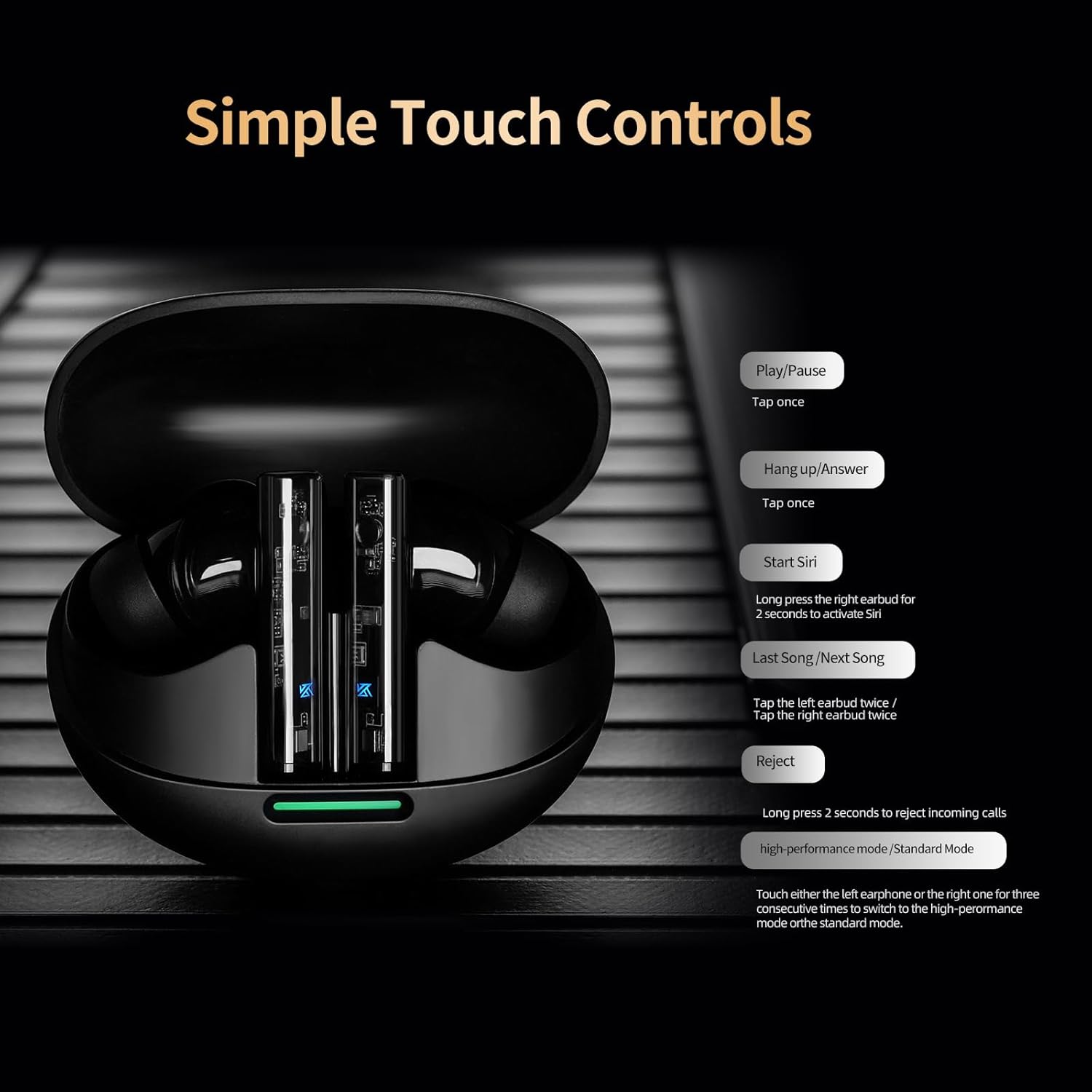
Image: A visual guide to the simple touch controls on the KZ Sora earbuds, detailing actions for music playback, calls, and voice assistant activation.
5.2 Standard and High-Performance Modes
The KZ Sora supports both SBC and AAC transmission protocols, allowing you to switch between standard and high-performance modes.
- സ്റ്റാൻഡേർഡ് മോഡ്: Ideal for music listening, delivering powerful resolution, a grand soundstage, and balanced frequencies.
- High-Performance Mode: Reduces latency to as low as 55ms, perfect for gaming to pinpoint sounds and enhance the experience.

Image: Comparison illustrating the KZ Sora's Standard Mode for music listening and High-Performance Mode for gaming, highlighting the low latency.
5.3 ഇയർബഡുകൾ ധരിക്കൽ
Choose the ear tips that provide the most comfortable and secure fit. A proper seal is crucial for optimal sound quality and bass response. Insert the earbuds gently into your ear canal and twist slightly to secure them.
6. പരിപാലനം
Proper maintenance ensures the longevity and performance of your KZ Sora earbuds.
- വൃത്തിയാക്കൽ: ഇയർബഡുകൾ, പ്രത്യേകിച്ച് ഇയർ ടിപ്പുകൾ, ചാർജിംഗ് കോൺടാക്റ്റുകൾ എന്നിവ മൃദുവായതും ഉണങ്ങിയതും ലിന്റ് രഹിതവുമായ തുണി ഉപയോഗിച്ച് പതിവായി വൃത്തിയാക്കുക. കഠിനമായ രാസവസ്തുക്കളോ ഉരച്ചിലുകളോ ഉള്ള വസ്തുക്കൾ ഉപയോഗിക്കരുത്.
- സംഭരണം: ഉപയോഗത്തിലില്ലാത്തപ്പോൾ, പൊടി, അഴുക്ക്, ശാരീരിക കേടുപാടുകൾ എന്നിവയിൽ നിന്ന് സംരക്ഷിക്കുന്നതിന് ഇയർബഡുകൾ എല്ലായ്പ്പോഴും അവയുടെ ചാർജിംഗ് കേസിൽ സൂക്ഷിക്കുക.
- ജല പ്രതിരോധം: The earbuds are sweat-resistant and water-resistant. However, they are not waterproof. Avoid submerging them in water or exposing them to heavy rain. Dry them thoroughly if they get wet.
- ബാറ്ററി കെയർ: ബാറ്ററി ലൈഫ് നിലനിർത്താൻ, ഇയർബഡുകളും കെയ്സും ഇടയ്ക്കിടെ പൂർണ്ണമായും ഡിസ്ചാർജ് ചെയ്യുന്നത് ഒഴിവാക്കുക. തുടർച്ചയായ ഉപയോഗത്തിലല്ലെങ്കിൽ പോലും അവ പതിവായി ചാർജ് ചെയ്യുക.
7. പ്രശ്നപരിഹാരം
If you encounter any issues with your KZ Sora earbuds, refer to the following common solutions:
- പരസ്പരം ജോടിയാക്കാത്ത ഇയർബഡുകൾ: രണ്ട് ഇയർബഡുകളും ചാർജിംഗ് കെയ്സിലേക്ക് തിരികെ വയ്ക്കുക, ലിഡ് അടയ്ക്കുക, കുറച്ച് സെക്കൻഡ് കാത്തിരിക്കുക, തുടർന്ന് ലിഡ് തുറന്ന് വീണ്ടും പുറത്തെടുക്കുക. അവ സ്വയമേവ കണക്റ്റ് ചെയ്യപ്പെടും.
- ഇയർബഡുകൾ ഉപകരണത്തിലേക്ക് കണക്റ്റ് ചെയ്യുന്നില്ല: Ensure Bluetooth is enabled on your device and the earbuds are in pairing mode. Forget "KZ Sora" from your device's Bluetooth list and try pairing again.
- ഒരു ഇയർബഡിൽ നിന്ന് ശബ്ദമില്ല: Check if both earbuds are charged. Try resetting them by placing them in the case and then taking them out.
- ചാർജിംഗ് പ്രശ്നങ്ങൾ: Ensure the charging cable is securely connected and the charging contacts on both the earbuds and case are clean and free of debris. Try a different USB power source or cable.
- കുറഞ്ഞ ശബ്ദം അല്ലെങ്കിൽ മോശം ശബ്ദ നിലവാരം: Ensure ear tips are properly sealed in your ear canal. Clean any earwax or debris from the earbud nozzles.
If the issue persists, please contact KZ customer support for further assistance.
8 സ്പെസിഫിക്കേഷനുകൾ
Detailed technical specifications for the KZ Sora True Wireless Earbuds:
| ഫീച്ചർ | സ്പെസിഫിക്കേഷൻ |
|---|---|
| മോഡലിൻ്റെ പേര് | KZ Sora |
| കണക്റ്റിവിറ്റി ടെക്നോളജി | വയർലെസ്സ് (ബ്ലൂടൂത്ത് 5.4) |
| ബ്ലൂടൂത്ത് ശ്രേണി | 50 അടി |
| ഓഡിയോ ഡ്രൈവർ തരം | ഡൈനാമിക് ഡ്രൈവർ |
| ഓഡിയോ ഡ്രൈവർ വലിപ്പം | 10 മില്ലിമീറ്റർ |
| ഫ്രീക്വൻസി പ്രതികരണം | 20 ഹെർട്സ് - 20 കിലോ ഹെർട്സ് |
| സംവേദനക്ഷമത | 105 ഡി.ബി |
| പ്രതിരോധം | 22 ഓം |
| ശബ്ദ നിയന്ത്രണം | സൗണ്ട് ഐസൊലേഷൻ |
| നിയന്ത്രണ രീതി | സ്പർശിക്കുക |
| കാരിയർ കെയ്സ് ബാറ്ററി കപ്പാസിറ്റി | 300 മില്ലിamp മണിക്കൂറുകൾ |
| കെയ്സ് ബാറ്ററിയുടെ ശരാശരി ആയുസ്സ് | 25 മണിക്കൂർ (കേസിനൊപ്പം) |
| കേസ് ബാറ്ററി ചാർജ് ചെയ്യാനുള്ള സമയം | 1.5 മണിക്കൂർ |
| ഓഡിയോ ലേറ്റൻസി | 55 Milliseconds (High-Performance Mode) |
| ജല പ്രതിരോധ നില | Water Resistant (Sweat Resistant) |
| മെറ്റീരിയൽ | അക്രിലോണിട്രൈൽ ബ്യൂട്ടാഡീൻ സ്റ്റൈറൈൻ (എബിഎസ്) |
| ഇനത്തിൻ്റെ ഭാരം | 3.52 ഔൺസ് |

Image: A graph illustrating the excellent acoustic curve of the KZ Sora earbuds, demonstrating their sound performance across frequencies.
9. വാറൻ്റിയും പിന്തുണയും
KZ products are manufactured to high-quality standards. For warranty information and customer support, please refer to the warranty card included in your product packaging or visit the official KZ webസൈറ്റ്. ഏതെങ്കിലും വാറന്റി ക്ലെയിമുകൾക്ക് നിങ്ങളുടെ വാങ്ങലിന്റെ തെളിവ് സൂക്ഷിക്കുക.
For technical assistance or inquiries, please contact KZ customer service through their official channels.