ആമുഖം
Thank you for choosing the Macap MI20 Touch Instant Burr Coffee Grinder. This manual provides essential information for the safe and efficient operation, maintenance, and troubleshooting of your new coffee grinder. Please read this manual thoroughly before first use and keep it for future reference.

ചിത്രം 1: മുൻഭാഗം view of the Macap MI20 Touch Coffee Grinder in black.
പ്രധാനപ്പെട്ട സുരക്ഷാ വിവരങ്ങൾ
തീപിടുത്തം, വൈദ്യുതാഘാതം അല്ലെങ്കിൽ പരിക്ക് എന്നിവ കുറയ്ക്കുന്നതിന്, വൈദ്യുത ഉപകരണങ്ങൾ ഉപയോഗിക്കുമ്പോൾ എല്ലായ്പ്പോഴും അടിസ്ഥാന സുരക്ഷാ മുൻകരുതലുകൾ പാലിക്കുക.
- ഉപകരണം പ്രവർത്തിപ്പിക്കുന്നതിന് മുമ്പ് എല്ലാ നിർദ്ദേശങ്ങളും വായിക്കുക.
- അപ്ലയൻസ്, ചരട്, പ്ലഗ് എന്നിവ വെള്ളത്തിലോ മറ്റ് ദ്രാവകങ്ങളിലോ മുക്കരുത്.
- ഉപയോഗത്തിലില്ലാത്തപ്പോൾ, ഭാഗങ്ങൾ ധരിക്കുന്നതിനോ എടുക്കുന്നതിനോ മുമ്പ്, വൃത്തിയാക്കുന്നതിന് മുമ്പ് ഔട്ട്ലെറ്റിൽ നിന്ന് അൺപ്ലഗ് ചെയ്യുക.
- കുട്ടികളോ സമീപത്തോ ഏതെങ്കിലും ഉപകരണം ഉപയോഗിക്കുമ്പോൾ സൂക്ഷ്മ മേൽനോട്ടം ആവശ്യമാണ്.
- ചലിക്കുന്ന ഭാഗങ്ങളുമായുള്ള സമ്പർക്കം ഒഴിവാക്കുക.
- ഒരു ഉപകരണവും കേടായ കോർഡ് അല്ലെങ്കിൽ പ്ലഗ് ഉപയോഗിച്ച് പ്രവർത്തിപ്പിക്കരുത്, അല്ലെങ്കിൽ ഉപകരണം തകരാറിലായതിന് ശേഷം അല്ലെങ്കിൽ ഏതെങ്കിലും വിധത്തിൽ വീഴുകയോ കേടുപാടുകൾ സംഭവിക്കുകയോ ചെയ്യരുത്.
- നിർമ്മാതാവ് ശുപാർശ ചെയ്യാത്തതോ വിൽക്കുന്നതോ ആയ അറ്റാച്ച്മെൻ്റുകളുടെ ഉപയോഗം തീ, വൈദ്യുതാഘാതം അല്ലെങ്കിൽ പരിക്കിന് കാരണമാകാം.
- വെളിയിൽ ഉപയോഗിക്കരുത്.
- മേശയുടെയോ കൗണ്ടറിൻ്റെയോ അരികിൽ ചരട് തൂങ്ങിക്കിടക്കാനോ ചൂടുള്ള പ്രതലങ്ങളിൽ തൊടാനോ അനുവദിക്കരുത്.
- ചൂടുള്ള വാതകത്തിലോ ഇലക്ട്രിക് ബർണറിലോ ചൂടാക്കിയ അടുപ്പിലോ വയ്ക്കരുത്.
ഉൽപ്പന്നം കഴിഞ്ഞുview കൂടാതെ പ്രധാന സവിശേഷതകൾ
The Macap MI20 Touch is a high-performance coffee grinder designed for precision and ease of use, featuring a modern design with a colored touchscreen interface.
പ്രധാന സവിശേഷതകൾ:
- 3.5'' TOUCHSCREEN & LED LIGHT: Large display with 4 programmable doses and user-friendly interface. Built-in LED for visibility in low-light kitchens or cafés.
- MULTI-MODE GRINDING: Choose from Standard, Push and Grind, or Barista Hands-Free mode—tailored workflow for every espresso prep style.
- HANDS-FREE OPERATION: Insert portafilter and grinding begins automatically—ensures consistent dosing with minimal effort.
- STEPLESS ADJUSTMENT SYSTEM: Micrometric grind control with zero setting—dial in perfect texture for espresso, drip, moka pot, or cold brew.
- DURABLE, QUIET, CLEAN: 58mm flat burrs and anti-vibration fork ensure stable grinding. Quiet motor with low retention and mess-reducing design.
- HIGH-CAPACITY HOPPER: 500g bean hopper built for daily use in high-demand environments—ideal for home baristas or light commercial use.

ചിത്രം 2: ഓവർview of the Macap MI20 Touch's main features, including 58mm flat burrs, 500g coffee hopper capacity, instant productivity of 2-2.6 g/s, and 300W motor power.
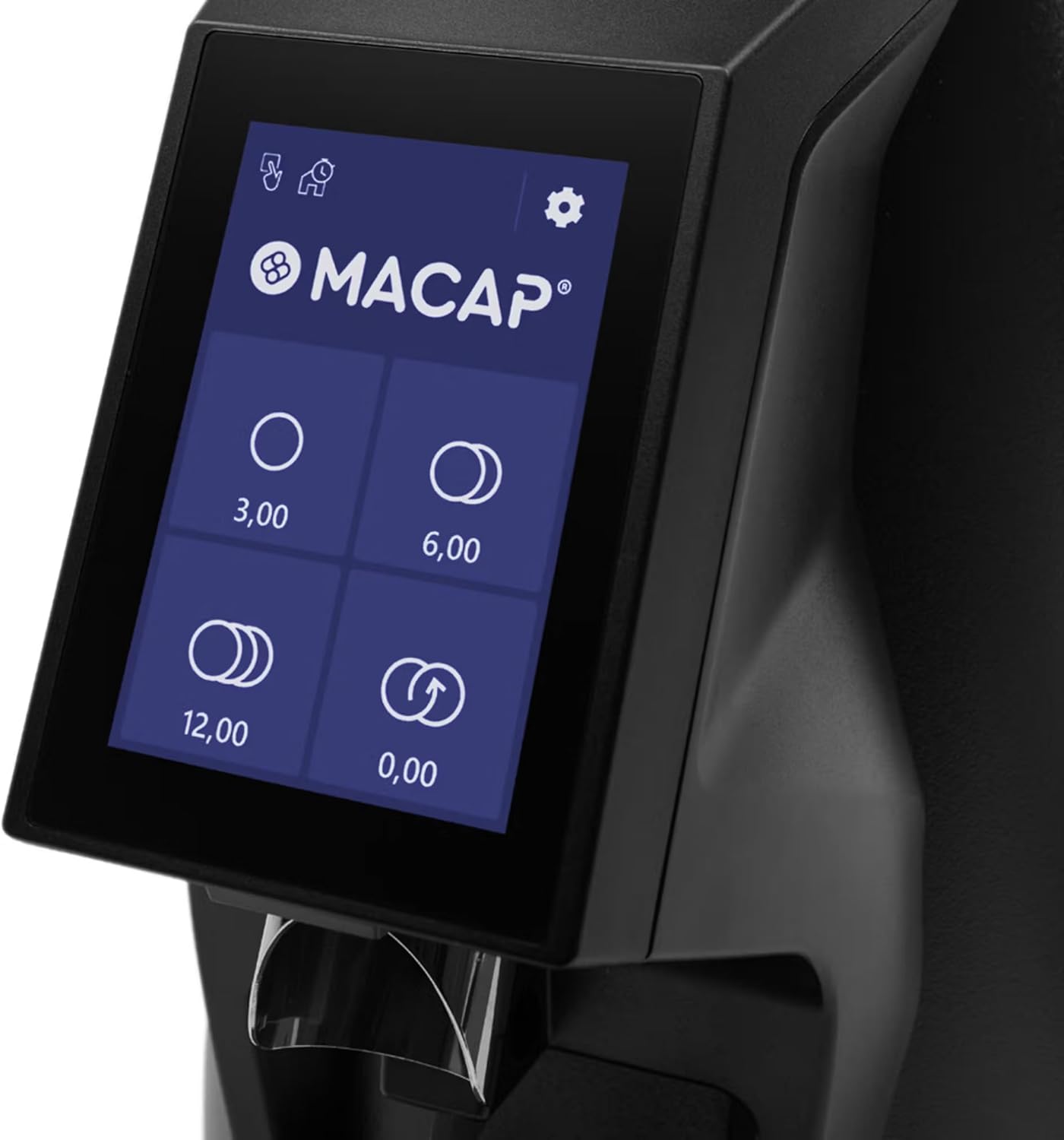
Figure 3: Close-up of the 3.5-inch colored touchscreen display, showing dose programming options.

Figure 4: Detail of the USB-C socket and the adjustable LED light for illuminating the working area.

ചിത്രം 5: View of the stepless grind adjustment ring, allowing for precise control over grind size.

Figure 6: Close-up of the 500g bean hopper, showing the internal design for efficient bean feeding.
സജ്ജമാക്കുക
അൺപാക്ക് ചെയ്യുന്നു
- പാക്കേജിംഗിൽ നിന്ന് ഗ്രൈൻഡറും എല്ലാ അനുബന്ധ ഉപകരണങ്ങളും ശ്രദ്ധാപൂർവ്വം നീക്കം ചെയ്യുക.
- Check for any signs of damage during transit. If damaged, contact your retailer immediately.
- Retain the original packaging for future storage or shipping.
പ്രാരംഭ അസംബ്ലി
- ഗ്രൈൻഡർ സ്ഥിരതയുള്ളതും പരന്നതും വരണ്ടതുമായ ഒരു പ്രതലത്തിൽ വയ്ക്കുക.
- പവർ സ്വിച്ച് ഓഫ് നിലയിലാണെന്ന് ഉറപ്പാക്കുക.
- Attach the bean hopper to the top of the grinder by aligning the tabs and twisting until it locks securely in place.
- Insert the removable tray into its designated slot at the base of the grinder.

ചിത്രം 7: വശം view of the Macap MI20 Touch Coffee Grinder, showing the hopper and removable tray.
പ്രവർത്തന നിർദ്ദേശങ്ങൾ
ഹോപ്പർ പൂരിപ്പിക്കൽ
Lift the hopper lid and pour fresh, whole coffee beans into the hopper. The hopper has a capacity of 500g. Close the lid securely after filling.
ഗ്രൈൻഡ് വലുപ്പം ക്രമീകരിക്കുന്നു
The MI20 Touch features a stepless micrometric grind adjustment system. To adjust the grind size, rotate the grind adjustment ring located below the bean hopper. Turn clockwise for a finer grind and counter-clockwise for a coarser grind. Make small adjustments and test the grind to achieve your desired consistency.
Grinding Modes
The grinder offers three distinct grinding modes, selectable via the touchscreen:
- സ്റ്റാൻഡേർഡ് മോഡ്: Manually activate grinding for a set duration or until stopped.
- പുഷ് ആൻഡ് ഗ്രൈൻഡ് മോഡ്: Grinding starts when the portafilter activates the button and stops when the portafilter is removed.
- Barista Hands-Free Mode: Grinding automatically starts when the portafilter is inserted and stops after dispensing the programmed dose.
Programming Doses
The 3.5-inch touchscreen allows for programming up to four different doses. Refer to the on-screen menu for detailed instructions on setting and saving your preferred dose quantities. The display also provides options for adjusting LED lighting intensity, customizing the interface, and viewing daily, weekly, and total dose counts.

Figure 8: The Macap MI20 Touch Coffee Grinder positioned in a kitchen environment, ready for use.
Video 1: Official video detailing the specifications and features of the MACAP MI20 Touch coffee grinder. This video provides a visual guide to the grinder's capabilities and design elements.
പരിപാലനവും ശുചീകരണവും
Regular cleaning and maintenance will ensure the longevity and optimal performance of your Macap MI20 Touch grinder.
പ്രതിദിന ക്ലീനിംഗ്
- Empty any remaining beans from the hopper.
- Remove the removable tray and discard any spilled grounds. Wipe the tray clean with a damp തുണി.
- Use a soft brush or dry cloth to wipe down the exterior of the grinder and the grinding chute to remove coffee dust.
Deep Cleaning (Monthly or as needed)
- പവർ ഔട്ട്ലെറ്റിൽ നിന്ന് ഗ്രൈൻഡർ അൺപ്ലഗ് ചെയ്യുക.
- Remove the bean hopper and clean it with warm, soapy water. Ensure it is completely dry before reattaching.
- Carefully remove the upper burr. Use a brush or vacuum cleaner to remove any accumulated coffee grounds from the burrs and grinding chamber.
- Do not wash the burrs with water.
- Reassemble the burrs and hopper, ensuring all parts are securely in place.
ട്രബിൾഷൂട്ടിംഗ്
If you encounter issues with your grinder, refer to the table below for common problems and solutions.
| പ്രശ്നം | സാധ്യമായ കാരണം | പരിഹാരം |
|---|---|---|
| ഗ്രൈൻഡർ ഓണാക്കുന്നില്ല | പ്ലഗ് ഇൻ ചെയ്തിട്ടില്ല; പവർ സ്വിച്ച് ഓഫാക്കി; സർക്യൂട്ട് ബ്രേക്കർ ട്രിപ്പ് ചെയ്തു | Ensure plug is securely in outlet; Turn power switch ON; Reset circuit breaker |
| No coffee grinding | No beans in hopper; Hopper not properly seated; Grinding mechanism jammed | Fill hopper with beans; Securely attach hopper; Clean grinding chamber and burrs |
| പൊരുത്തമില്ലാത്ത ഗ്രൈൻഡ് | Burrs are worn; Improper grind setting | Consider replacing burrs; Adjust grind setting incrementally |
| അരക്കൽ ശബ്ദായമാനമാണ് | Foreign object in grinding chamber; Loose components | Unplug and inspect/remove foreign objects; Check for loose parts and tighten if possible |
സ്പെസിഫിക്കേഷനുകൾ
| ആട്രിബ്യൂട്ട് | മൂല്യം |
|---|---|
| മോഡൽ നമ്പർ | MI20 Touch |
| ബ്രാൻഡ് | Macap |
| നിറം | കറുപ്പ് |
| ഉൽപ്പന്ന അളവുകൾ (L x W x H) | 12"L x 7.6"W x 17.3"H |
| Capacity (Bean Hopper) | 0.5 കിലോഗ്രാം (500 ഗ്രാം) |
| ഇനത്തിൻ്റെ ഭാരം | 16.5 പൗണ്ട് |
| ബർ തരം | 58mm Flat Burrs |
| മോട്ടോർ പവർ | 300 W |
| Instant Productivity (Espresso) | 2 - 2.6 g/s |
| നിർമ്മാതാവ് | MACAP |
| ASIN | B0F2293LY3 |
| ആദ്യ തീയതി ലഭ്യമാണ് | 20 മാർച്ച് 2025 |
വാറൻ്റിയും പിന്തുണയും
Macap products are manufactured to the highest quality standards and are backed by a manufacturer's warranty. For specific warranty details, please refer to the warranty card included with your product or visit the official Macap webസൈറ്റ്.
For technical support, service, or replacement parts, please contact your authorized Macap dealer or the customer support team. When contacting support, please have your product model number (MI20 Touch) and serial number ready.
ഓൺലൈൻ ഉറവിടങ്ങൾ: For additional information, FAQs, and video tutorials, please visit the official Macap support page.


