ആമുഖം
This manual provides instructions for the safe and efficient operation of your LoraTap Remote Control Timer Outlet. Please read this manual thoroughly before use and retain it for future reference.

Image: The LoraTap Remote Control Timer Outlet and its accompanying remote control, showcasinഅവയുടെ ഒതുക്കമുള്ള ഡിസൈൻ.
ബോക്സിൽ എന്താണുള്ളത്
- ഒരു റിമോട്ട് കൺട്രോൾ
- One Wall Plate (for remote mounting)
- One Timer Outlet
- One Hand Lanyard for Remote Control
ഉൽപ്പന്നം കഴിഞ്ഞുview
The LoraTap Remote Control Timer Outlet consists of two main components: the timer outlet and the remote control. The outlet plugs into a standard wall socket, and the remote allows for wireless control of connected devices.
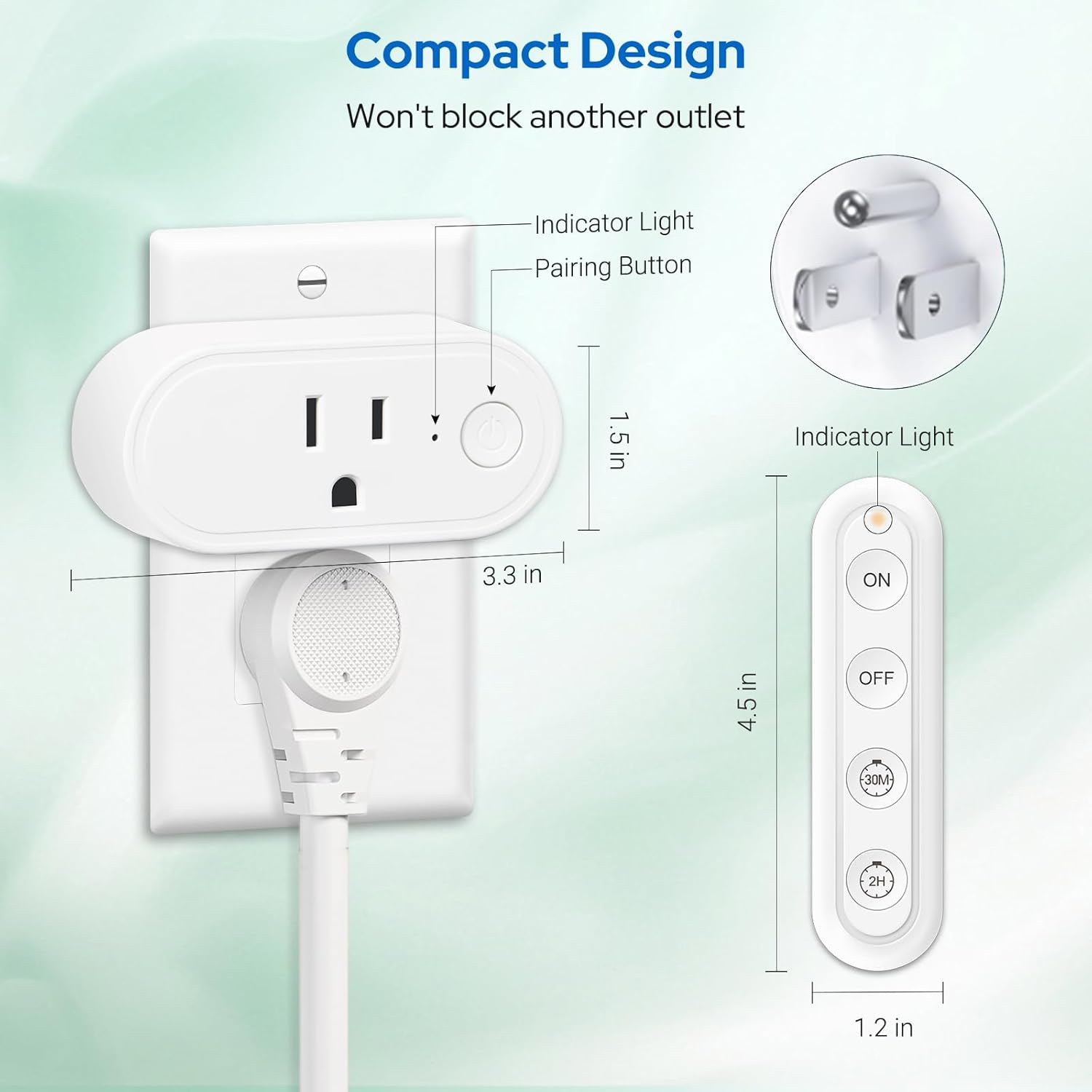
Image: A diagram illustrating the compact design and dimensions of the LoraTap Timer Outlet and its remote control, highlighting the indicator light and pairing button on the outlet.
വിദൂര നിയന്ത്രണ ബട്ടണുകൾ:

Image: An illustration detailing the functions of each button on the LoraTap remote control: ON, OFF, 30 Min Countdown, and 2H Countdown.
- ഓൺ ബട്ടണിൽ: Powers on connected appliances. This function does not include a countdown timer.
- ഓഫ് ബട്ടൺ: Powers off the outlet. Any active timer settings will be cleared.
- 30 Min Countdown Button: Initiates a 30-minute countdown. The appliance will automatically power off when the 30 minutes expire.
- 2H Countdown Button: Initiates a 2-hour countdown. The appliance will automatically power off when the 2 hours expire.
സജ്ജമാക്കുക
- അൺപാക്ക്: Carefully remove the timer outlet and remote control from the packaging.
- റിമോട്ട് ബാറ്ററി ഇടുക: The remote control comes with a CR2032 battery pre-installed. If needed, remove the battery tab or replace the battery.
- ഔട്ട്ലെറ്റ് പ്ലഗ് ഇൻ ചെയ്യുക: Insert the LoraTap Timer Outlet into a standard 120V AC wall socket. Ensure it is securely plugged in. The compact design allows it to occupy only one jack position, leaving the other outlet free.
- Pairing (Pre-programmed): The timer outlet and remote control are pre-programmed for immediate use. No manual pairing is typically required for initial setup. If re-pairing is ever needed, refer to the troubleshooting section.
- ഉപകരണം ബന്ധിപ്പിക്കുക: Plug the appliance you wish to control into the LoraTap Timer Outlet.

Image: The LoraTap Timer Outlet plugged into a wall socket, controlling a television and a lamp, demonstrating its plug-and-play functionality.

Image: A person comfortably using the LoraTap remote control from a couch, illustrating the ease of use without wiring or Wi-Fi.
പ്രവർത്തന നിർദ്ദേശങ്ങൾ
The LoraTap Remote Control Timer Outlet offers both instant ON/OFF control and timed countdown functions.
Instant ON/OFF Control:
- To turn on a connected appliance, press the ON റിമോട്ട് കൺട്രോളിലെ ബട്ടൺ.
- To turn off a connected appliance, press the ഓഫ് റിമോട്ട് കൺട്രോളിലെ ബട്ടൺ.
Countdown Timer Functions:
These functions automatically power off the connected appliance after a set duration, preventing overheating and saving energy.
- To set a 30-minute countdown, press the 30 മി button on the remote control. The appliance will operate for 30 minutes and then automatically power off.
- To set a 2-hour countdown, press the 2H button on the remote control. The appliance will operate for 2 hours and then automatically power off.
- ഒരു സജീവ കൗണ്ട്ഡൗൺ റദ്ദാക്കാൻ, അമർത്തുക ഓഫ് ബട്ടൺ.

Image: Visual representation of the 30-minute countdown for a baby's night light and the 2-hour countdown for a bedroom lamp, demonstrating the automatic shut-off feature.

Image: Various application scenarios for the LoraTap Timer Outlet, including daily ON/OFF mode for decorative lights and countdown mode for appliances like irons or hair curlers.
The remote control utilizes a strong RF signal, allowing control of the outlet up to 100 feet away, even through walls and floors.

Image: An illustration highlighting the 100-foot RF signal range of the LoraTap remote control, capable of penetrating walls and floors.
മെയിൻ്റനൻസ്
- വൃത്തിയാക്കൽ: Disconnect the outlet from the power source before cleaning. Wipe the surface with a soft, dry cloth. Do not use liquid cleaners or abrasive materials.
- ബാറ്ററി മാറ്റിസ്ഥാപിക്കൽ: The remote control uses one CR2032 battery. When the remote's range decreases or it becomes unresponsive, replace the battery. Ensure correct polarity when inserting the new battery.
- സംഭരണം: ദീർഘനേരം ഉപയോഗിക്കാത്തപ്പോൾ നേരിട്ടുള്ള സൂര്യപ്രകാശത്തിൽ നിന്നും തീവ്രമായ താപനിലയിൽ നിന്നും മാറി തണുത്തതും വരണ്ടതുമായ സ്ഥലത്ത് ഉപകരണം സൂക്ഷിക്കുക.
ട്രബിൾഷൂട്ടിംഗ്
| പ്രശ്നം | സാധ്യമായ കാരണം | പരിഹാരം |
|---|---|---|
| ഔട്ട്ലെറ്റ് റിമോട്ടിനോട് പ്രതികരിക്കുന്നില്ല. | റിമോട്ട് ബാറ്ററി കുറവാണ് അല്ലെങ്കിൽ തീർന്നു. | റിമോട്ട് കൺട്രോളിൽ CR2032 ബാറ്ററി മാറ്റിസ്ഥാപിക്കുക. |
| Outlet is unplugged or not receiving power. | Ensure the outlet is securely plugged into a live wall socket. Check the wall socket with another device. | |
| Remote and outlet are out of range or signal interference. | Move closer to the outlet. Ensure no large metal objects are blocking the signal path. | |
| Appliance connected to outlet does not turn on. | Appliance is not powered on or is faulty. | Ensure the appliance itself is switched on (if it has a physical switch) and functioning correctly when plugged directly into a wall socket. |
| Countdown function does not work. | തെറ്റായ ബട്ടൺ അമർത്തി. | Ensure you are pressing the '30M' or '2H' button for countdown. Pressing 'ON' provides continuous power. |
| Previous timer was cancelled by 'OFF' button. | Re-initiate the desired countdown by pressing '30M' or '2H'. |
സ്പെസിഫിക്കേഷനുകൾ
| ഫീച്ചർ | വിശദാംശങ്ങൾ |
|---|---|
| ഉൽപ്പന്ന അളവുകൾ | 3.27 x 1.1 x 1.5 ഇഞ്ച് |
| ഭാരം | 4.66 ഔൺസ് |
| നിലവിലെ റേറ്റിംഗ് | 15 Amps |
| ഓപ്പറേറ്റിംഗ് വോളിയംtage | 120 വോൾട്ട് |
| പരമാവധി പവർ | 1800 വാട്ട്സ് |
| ഓപ്പറേഷൻ മോഡ് | ON-OFF, 30-min Countdown, 2-hour Countdown |
| റിമോട്ട് കൺട്രോൾ റേഞ്ച് | Up to 100 feet (RF signal, works through walls) |
| റിമോട്ട് ബാറ്ററി തരം | 1 x CR2032 (ഉൾപ്പെടുത്തിയിരിക്കുന്നു) |
| മെറ്റീരിയൽ | ചെമ്പ് (സമ്പർക്ക മെറ്റീരിയൽ) |
| നിർമ്മാതാവ് | ലോറടാപ്പ് |
| മോഡൽ നമ്പർ | B0F26RP4F8 |
വാറൻ്റിയും പിന്തുണയും
For warranty information and customer support, please refer to the official LoraTap website or contact their customer service directly. Contact details are typically found on the product packaging or the manufacturer's webസൈറ്റ്.
നിർമ്മാതാവ്: ലോറടാപ്പ്
ASIN: B0F26RP4F8
ആദ്യം ലഭ്യമായ തീയതി: 22 മാർച്ച് 2025


