1. ആമുഖം
This manual provides essential information for setting up, operating, and maintaining your MOREFINE Mini PC M9. Please read these instructions carefully before using the device to ensure optimal performance and safety.
The MOREFINE Mini PC M9 is a compact desktop computer designed for various applications, including office work, business tasks, and home entertainment. It features a 13th Generation Twin Lake N150 processor, 8GB DDR4 RAM, and a 256GB PCIe M.2 SSD, offering efficient performance in a small form factor.
2 സുരക്ഷാ വിവരങ്ങൾ
- പവർ അഡാപ്റ്റർ നിങ്ങളുടെ പ്രാദേശിക പവർ സപ്ലൈയുമായി പൊരുത്തപ്പെടുന്നുണ്ടെന്ന് ഉറപ്പാക്കുക.
- ഉപകരണം വെള്ളം, ഈർപ്പം അല്ലെങ്കിൽ തീവ്രമായ താപനില എന്നിവയിൽ തുറന്നുകാട്ടരുത്.
- നേരിട്ട് സൂര്യപ്രകാശത്തിലോ ചൂട് സ്രോതസ്സുകൾക്ക് സമീപമോ ഉപകരണം സ്ഥാപിക്കുന്നത് ഒഴിവാക്കുക.
- സി തുറക്കരുത്.asing or attempt to repair the device yourself. Refer to qualified service personnel.
- അമിതമായി ചൂടാകുന്നത് തടയാൻ വെൻ്റിലേഷൻ ഓപ്പണിംഗുകൾ വ്യക്തമായി സൂക്ഷിക്കുക.
- അംഗീകൃത ആക്സസറികളും അനുബന്ധ ഉപകരണങ്ങളും മാത്രം ഉപയോഗിക്കുക.
3. പാക്കേജ് ഉള്ളടക്കം
പാക്കേജിൽ എല്ലാ ഇനങ്ങളും ഉണ്ടെന്ന് ഉറപ്പാക്കുക:
- MOREFINE Mini PC M9 Unit
- പവർ അഡാപ്റ്റർ
- HDMI കേബിൾ
- ഉപയോക്തൃ മാനുവൽ
- VESA Mount (optional, may vary by package)
4. ഉൽപ്പന്നം കഴിഞ്ഞുview
The MOREFINE Mini PC M9 is designed for efficiency and connectivity. Below are the key features and port layouts.
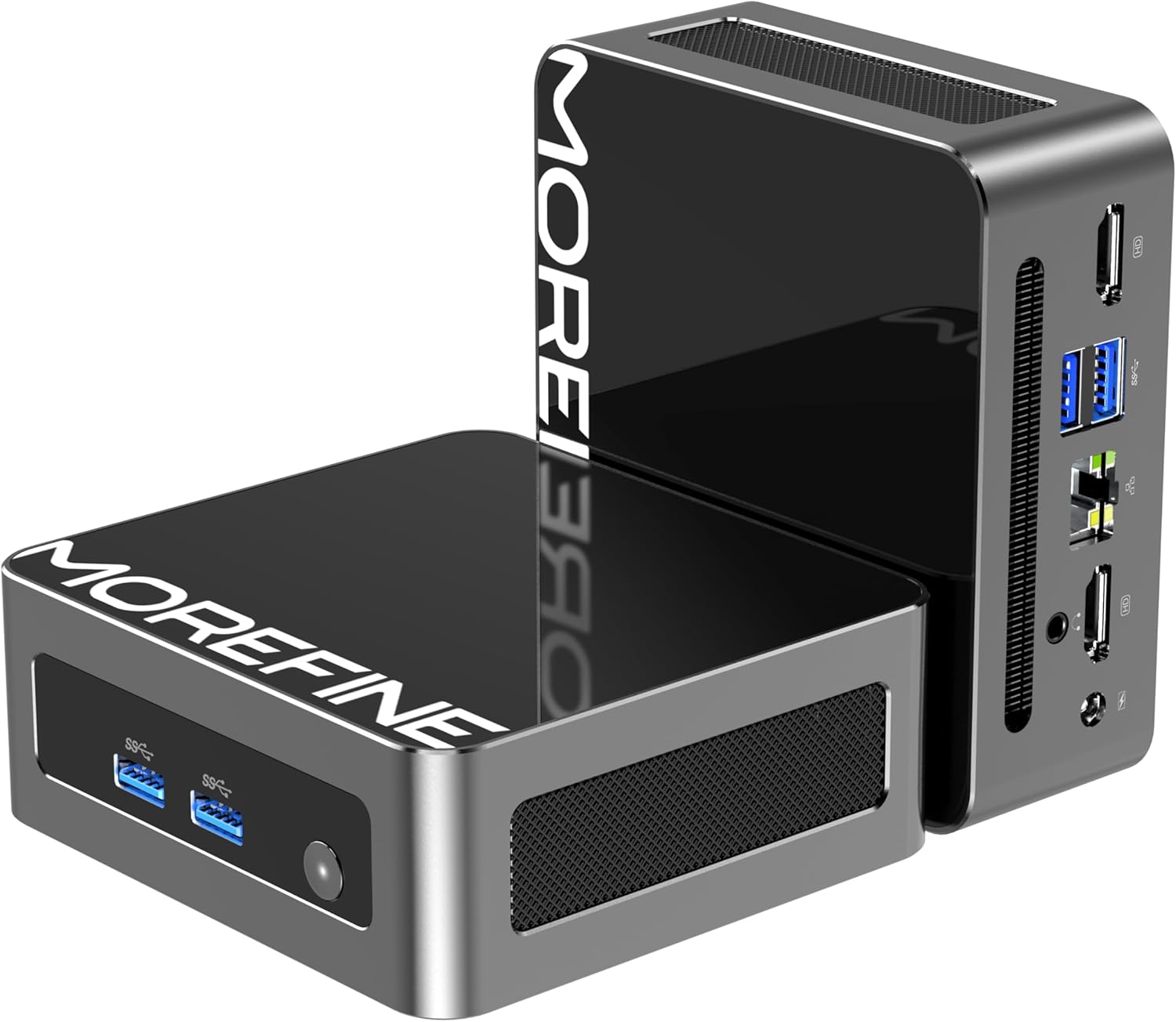
ചിത്രം: മുൻവശവും വശവും view of the MOREFINE Mini PC M9, showcasing its compact design and accessible ports.

ചിത്രം: കഴിഞ്ഞുview of the Mini PC's features including Twin Lake N150 processor, dual 4K output, space-saving design, quiet fan, DDR4 RAM, WiFi+Bluetooth, and 2.5G LAN.
പോർട്ട് ലേഔട്ട്
- ഫ്രണ്ട് പോർട്ടുകൾ: Power Button, USB 3.2 x 2
- പിൻ തുറമുഖങ്ങൾ: USB 3.2 x 2, 2.5GbE RJ45 x 1, HDMI 2.0 x 2, 3.5mm Audio Jack x 1, DC Power Input x 1

Image: Close-up of the side ports on the MOREFINE Mini PC M9, showing USB 3.2 ports and the power button.

ചിത്രം: പിൻഭാഗം view of the MOREFINE Mini PC M9, detailing the HDMI, USB, RJ45, and power input ports.
5. സജ്ജീകരണം
Follow these steps to set up your MOREFINE Mini PC M9:
- പെരിഫറലുകൾ ബന്ധിപ്പിക്കുക: Connect your monitor(s) to the HDMI ports using HDMI cables. Connect your keyboard and mouse to the USB ports.
- നെറ്റ്വർക്ക് കണക്ഷൻ: For a wired connection, connect an Ethernet cable to the 2.5GbE RJ45 port. For wireless, the device supports WiFi 6 and Bluetooth 5.2, which can be configured after initial boot.
- പവർ കണക്ഷൻ: Connect the power adapter to the DC power input port on the Mini PC, then plug the adapter into a power outlet.
- പവർ ഓൺ: Press the power button located on the front of the device. The system will boot up.
- പ്രാരംഭ സജ്ജീകരണം: Follow the on-screen instructions to complete the operating system setup (e.g., Windows 11). This typically involves selecting language, region, and creating a user account.

Image: Demonstrates the compact size and multiple placement options for the Mini PC, including laying flat or mounting on the back of a monitor.
6. പ്രവർത്തിക്കുന്നു
ഡ്യുവൽ ഡിസ്പ്ലേ സെറ്റപ്പ്
The Mini PC supports dual 4K display output via its two HDMI 2.0 ports. To set up dual monitors:
- Connect both monitors to the HDMI ports on the Mini PC.
- Power on the Mini PC and both monitors.
- Once the operating system loads, right-click on the desktop and select 'Display settings' (Windows) or similar.
- Configure the display mode (e.g., Extend, Duplicate) and resolution for each monitor as desired.

Image: Illustration of the Mini PC connected to two monitors, demonstrating its dual 4K display capability for enhanced multitasking.
Network and Bluetooth Connectivity
- വൈഫൈ 6: Access network settings in your operating system to connect to available wireless networks.
- ബ്ലൂടൂത്ത് 5.2: Enable Bluetooth in your operating system settings to pair with compatible devices like keyboards, mice, or headphones.
Auto Power On and Wake On LAN
The Mini PC supports Auto Power On and Wake On LAN features. These settings can typically be configured within the BIOS/UEFI setup. To access BIOS/UEFI, press the 'Del' key repeatedly during startup. You may need to adjust the boot delay in Windows advanced startup options if the default 1-second delay is too short.
7. പരിപാലനം
വൃത്തിയാക്കൽ
- ഉപകരണത്തിൻ്റെ പുറംഭാഗം വൃത്തിയാക്കാൻ മൃദുവായതും ഉണങ്ങിയതുമായ തുണി ഉപയോഗിക്കുക.
- കഠിനമായ അഴുക്കിന്, ചെറുതായി dampതുണിയിൽ വെള്ളം ഒഴിക്കുക. കഠിനമായ രാസവസ്തുക്കൾ ഒഴിവാക്കുക.
- Periodically clean the ventilation openings with a soft brush or compressed air to prevent dust buildup.
Storage and RAM Expansion
The MOREFINE Mini PC M9 supports storage and RAM upgrades:
- റാം: The device has one DDR4 SODIMM slot, supporting up to 32GB DDR4 3200MHz RAM.
- സംഭരണം: It features one M.2 2280 NVMe PCIe 3.0 slot and one M.2 2242 SATA3 slot, supporting up to 4TB of storage expansion.
To perform upgrades, it is recommended to consult a qualified technician or refer to detailed online guides specific to the M9 model to avoid damaging internal components.

ചിത്രം: ആന്തരികം view of the Mini PC, highlighting the DDR4 SODIMM slot, M.2 2280 NVMe PCIe, and M.2 2242 SATA slots for memory and storage expansion.
8. പ്രശ്നപരിഹാരം
If you encounter issues with your Mini PC, refer to the following common problems and solutions:
- ശക്തിയില്ല:
- പവർ അഡാപ്റ്റർ മിനി പിസിയിലേക്കും പ്രവർത്തിക്കുന്ന ഒരു പവർ ഔട്ട്ലെറ്റിലേക്കും സുരക്ഷിതമായി ബന്ധിപ്പിച്ചിട്ടുണ്ടെന്ന് ഉറപ്പാക്കുക.
- മറ്റൊരു ഉപകരണം ഉപയോഗിച്ച് പവർ ഔട്ട്ലെറ്റ് പരിശോധിക്കുക.
- If the power button LED does not illuminate, there might be an issue with the power button or internal power delivery. Contact support if basic checks fail.
- ഡിസ്പ്ലേ ഇല്ല:
- Verify that the HDMI cable(s) are securely connected to both the Mini PC and the monitor(s).
- Ensure the monitor is powered on and set to the correct input source (HDMI 1, HDMI 2, etc.).
- Try connecting to a different monitor or using a different HDMI cable.
- No Network Connection (WiFi/Ethernet):
- ഇതർനെറ്റിന്, കേബിൾ കണക്ഷനും റൂട്ടർ നിലയും പരിശോധിക്കുക.
- For WiFi, ensure WiFi is enabled in the operating system and you are connecting to the correct network with the correct password.
- നിങ്ങളുടെ റൂട്ടർ/മോഡം, മിനി പിസി എന്നിവ പുനരാരംഭിക്കുക.
- Operating System Issues (e.g., updates failing):
- Ensure you have a stable internet connection for updates.
- Check for available disk space.
- Run the operating system's built-in troubleshooters.
- Consider performing a clean installation of the operating system if issues persist and are not resolved by standard troubleshooting.
9 സ്പെസിഫിക്കേഷനുകൾ
Detailed technical specifications for the MOREFINE Mini PC M9:
| ഫീച്ചർ | സ്പെസിഫിക്കേഷൻ |
|---|---|
| മോഡൽ | M9 |
| പ്രോസസ്സർ | Intel 13th Gen Twin Lake N150 (4 Cores, 4 Threads, up to 3.6 GHz) |
| ഗ്രാഫിക്സ് | ഇന്റൽ യുഎച്ച്ഡി ഗ്രാഫിക്സ് (ഇന്റഗ്രേറ്റഡ്) |
| റാം | 8GB DDR4 3200MHz (Expandable up to 32GB) |
| സംഭരണം | 256GB PCIe M.2 SSD (Expandable up to 4TB via M.2 2280 NVMe PCIe 3.0 and M.2 2242 SATA3 slots) |
| ഓപ്പറേറ്റിംഗ് സിസ്റ്റം | OS (Pre-installed, typically Windows) |
| വീഡിയോ ഔട്ട്പുട്ട് | 2 x HDMI 2.0 (Supports Dual 4K@60Hz) |
| USB പോർട്ടുകൾ | 4 x USB 3.2 |
| നെറ്റ്വർക്ക് | 1 x 2.5GbE RJ45, WiFi 6 (802.11ax Dual-band), Bluetooth 5.2 |
| ഓഡിയോ | 1 x 3.5mm ഓഡിയോ ജാക്ക് |
| പവർ ഇൻപുട്ട് | DC 12V/3A |
| അളവുകൾ | ഏകദേശം 4.49 x 4.17 x 1.73 ഇഞ്ച് |
| ഭാരം | ഏകദേശം 1.43 പൗണ്ട് |
10. വാറൻ്റിയും പിന്തുണയും
വാറൻ്റി വിവരങ്ങൾ
Your MOREFINE Mini PC M9 comes with a standard manufacturer's warranty. Please refer to the warranty card included in your package or the product listing for specific terms and duration. Keep your proof of purchase for warranty claims.
സാങ്കേതിക സഹായം
For technical assistance, troubleshooting beyond this manual, or warranty inquiries, please contact MOREFINE customer support through the retailer where you purchased the product or visit the official MOREFINE webബന്ധപ്പെടാനുള്ള വിവരങ്ങൾക്കുള്ള സൈറ്റ്.


