1. ആമുഖം
The TOPDON TC004 Mini is a compact, handheld thermal imaging camera designed for accurate temperature measurement and thermal analysis across various applications. This device utilizes advanced infrared technology to visualize temperature differences, making it an essential tool for professionals and DIY enthusiasts in fields such as home inspection, electrical diagnostics, HVAC troubleshooting, and vehicle maintenance. This manual provides detailed instructions for the safe and effective use of your TC004 Mini.

Figure 1.1: The TOPDON TC004 Mini Handheld Thermal Imaging Camera, showcasing its ergonomic design and display.

ചിത്രം 1.2: ഓവർview of the TC004 Mini's key features including 240x240 TISR resolution, -4°F to 842°F temperature range, 15-hour runtime, and 25Hz refresh rate.
2. ബോക്സിൽ എന്താണുള്ളത്?
Upon opening your TOPDON TC004 Mini package, please verify that all the following items are included:
- TC004 Mini Thermal Imager
- തൂങ്ങിക്കിടക്കുന്ന സ്ട്രാപ്പ്
- USB-A മുതൽ USB-C കേബിൾ വരെ
- ഉപയോക്തൃ ഗൈഡ് (ദ്രുത ആരംഭം)

Figure 2.1: The complete contents of the TOPDON TC004 Mini package, including the thermal imager, hanging strap, USB cable, and quick user guide.
3. ഉൽപ്പന്നം കഴിഞ്ഞുview
The TC004 Mini features a compact, ergonomic design for comfortable handling during extended use. It includes a clear display screen, intuitive navigation buttons, an infrared lens, and a trigger for capturing images.

Figure 3.1: A user operating the TC004 Mini, highlighting its screen and control buttons for high image quality thermal inspections.
4. സജ്ജീകരണം
4.1 പ്രാരംഭ ചാർജിംഗ്
Before first use, fully charge the TC004 Mini using the provided USB-A to USB-C cable. Connect the USB-C end to the device and the USB-A end to a compatible USB power adapter (not included) or a computer USB port. The charging indicator on the device will show the charging status.
4.2 പവർ ഓൺ/ഓഫ്
- പവർ ഓണാക്കാൻ: Press and hold the power button (usually located on the side or top) until the screen illuminates.
- പവർ ഓഫ് ചെയ്യാൻ: Press and hold the power button again until the device shuts down, or utilize the auto-shutdown feature (see Section 6.1).
5. പ്രവർത്തന നിർദ്ദേശങ്ങൾ
5.1 അടിസ്ഥാന താപനില അളക്കൽ
Point the thermal camera at the target object. The screen will display a thermal image with temperature readings. The device automatically identifies and displays the highest, lowest, and central temperature points within the field of view.

Figure 5.1: The TC004 Mini screen showing automatic temperature measurement, highlighting center, hot, and cold spots within the thermal image.
5.2 വർണ്ണ പാലറ്റുകൾ
The TC004 Mini offers five distinct color palettes to visualize thermal data, allowing users to choose the best representation for their specific inspection needs:
- വൈറ്റ് ഹോട്ട്: Higher temperatures appear brighter (white).
- ബ്ലാക്ക് ഹോട്ട്: Higher temperatures appear darker (black).
- ഇരുമ്പ്: A common palette, showing a spectrum from dark blue (cold) to yellow/white (hot).
- മഴവില്ല്: A full spectrum of colors to represent temperature differences.
- റെഡ് ഹോട്ട്: Highlights hotter areas in shades of red.
To change the color palette, navigate through the menu options using the device's buttons.
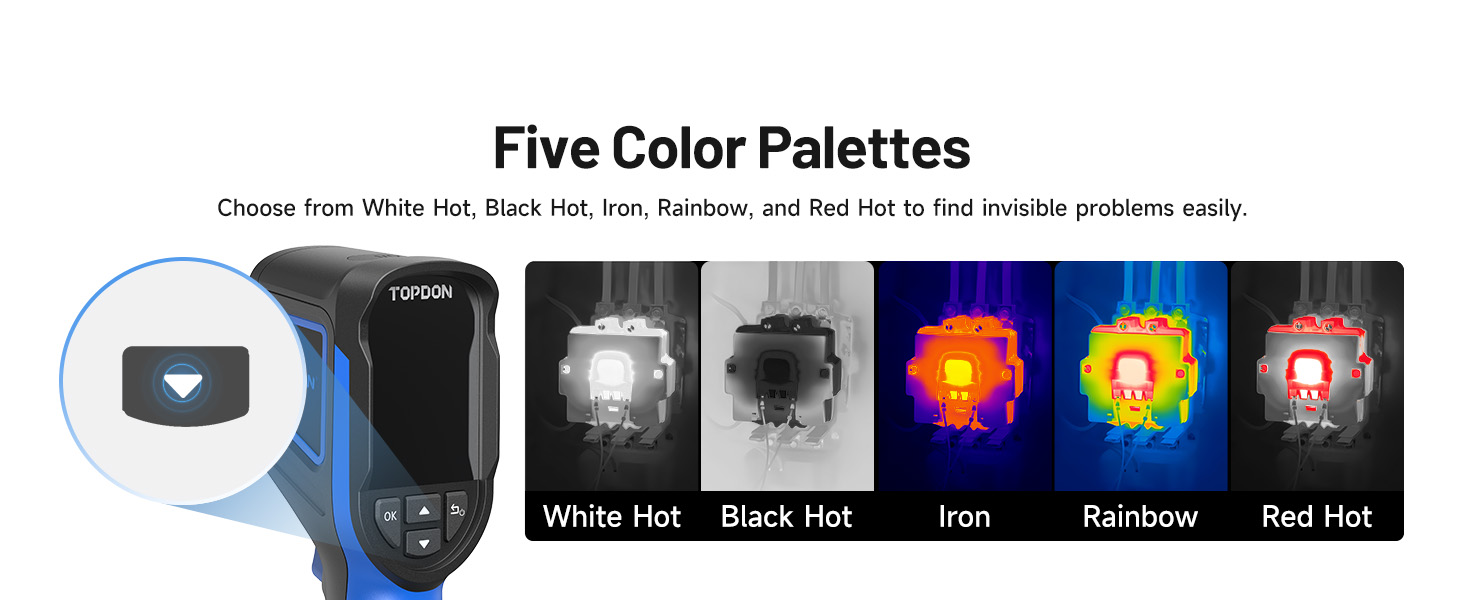
Figure 5.2: Visual representation of the five available color palettes: White Hot, Black Hot, Iron, Rainbow, and Red Hot.
5.3 High/Low Temperature Alerts
The device can be configured to trigger an alert when temperatures exceed or fall below preset thresholds. This feature is useful for monitoring critical components or identifying anomalies quickly. When an alert is triggered, an on-screen warning appears, and the device can automatically capture a photo.

Figure 5.3: The TC004 Mini showing an on-screen alert for high temperatures, indicating a potential issue.
5.4 Photo Capture and Storage
The TC004 Mini supports both manual and automatic photo capture. Press the trigger button to manually save a thermal image. The device has a built-in 512MB eMMC storage, capable of storing up to 8,000 photos. These images can be exported to a computer via a USB connection for further analysis or reporting.

Figure 5.4: The TC004 Mini connected to a laptop, illustrating the process of exporting stored thermal images.
6. TISR Image Enhancement Technology
The TC004 Mini features TISR (Thermal Image Super Resolution) technology, which enhances the native 128x128 infrared resolution to an effective 240x240 resolution. This provides greater detail and clarity in thermal images, allowing for more precise identification of temperature anomalies.

Figure 6.1: A visual comparison demonstrating the enhanced detail when TISR technology is enabled (240x240) versus disabled (128x128).

ചിത്രം 6.2: ഒരു മുൻample of enhanced thermal clarity on an electrical panel when TISR is active, showing finer details.
7. അപേക്ഷകൾ
The TOPDON TC004 Mini is a versatile tool suitable for a wide range of thermal inspection tasks:
- HVAC ട്രബിൾഷൂട്ടിംഗ്: Identifying drafts, insulation gaps, and issues in heating and cooling systems.
- വീട് പരിശോധന: Detecting moisture, water leaks, and energy inefficiencies.
- വൈദ്യുത പരിശോധന: Pinpointing overheating components, loose connections, and circuit overloads.
- വാഹന പരിപാലനം: Diagnosing engine hot spots, brake issues, and exhaust leaks.
- വ്യാവസായിക പരിശോധന: Monitoring machinery, preventing equipment failure, and ensuring operational safety.

Figure 7.1: Collage illustrating the wide range of applications for the TC004 Mini, including HVAC, home, water leak, electrical, vehicle, and industrial inspections.
8. Battery and Power Management
The TC004 Mini is equipped with a long-lasting battery, providing up to 15 hours of continuous operation on a single charge. To conserve battery life, the device features adjustable auto-shutdown options at 5, 10, and 20-minute intervals.

Figure 8.1: Diagram showing the 15-hour battery life and auto power-off settings of the TC004 Mini.

Figure 8.2: Illustration emphasizing the 15-hour extra-long battery life of the TC004 Mini, minimizing the need for frequent recharges.
9. പരിപാലനവും ഈടും
9.1 വൃത്തിയാക്കൽ
Regularly clean the device's exterior with a soft, dry cloth. For the lens, use a specialized lens cleaning cloth and solution to avoid scratches. Do not use abrasive cleaners or solvents.
9.2 ഈട് സവിശേഷതകൾ
The TC004 Mini is engineered for durability, capable of withstanding drops from up to 2 meters. It also boasts an IP54 waterproof rating, providing protection against dust ingress and splashing water from any direction, ensuring reliable performance in various environments.

Figure 9.1: Visual representation of the TC004 Mini's robust construction, highlighting its 2-meter drop-proof capability and IP54 protection against dust and water.
10. പ്രശ്നപരിഹാരം
This section addresses common issues you might encounter with your TC004 Mini.
- ഉപകരണം ഓണാക്കുന്നില്ല: Ensure the battery is sufficiently charged. Connect the device to a power source and attempt to power on after a few minutes of charging.
- കൃത്യമല്ലാത്ത താപനില വായനകൾ: Verify that the emissivity setting is appropriate for the material being measured. Ensure the lens is clean and free from obstructions.
- സ്ക്രീൻ നിശ്ചലമായി അല്ലെങ്കിൽ പ്രതികരിക്കുന്നില്ല: Perform a soft reset by pressing and holding the power button for approximately 10-15 seconds until the device restarts.
- കമ്പ്യൂട്ടറിലേക്ക് ഫോട്ടോകൾ കൈമാറാൻ കഴിയില്ല: Ensure the USB cable is securely connected to both the device and the computer. Check if the computer recognizes the device as a storage drive. Try a different USB port or cable.
- ബാറ്ററി പെട്ടെന്ന് തീർന്നു പോകുന്നു: Reduce screen brightness, disable unnecessary features, and ensure auto-shutdown is enabled. Avoid operating in extreme temperatures.
If you encounter issues not listed here or require further assistance, please contact TOPDON customer support.
11 സ്പെസിഫിക്കേഷനുകൾ
Key technical specifications for the TOPDON TC004 Mini:
| ഫീച്ചർ | സ്പെസിഫിക്കേഷൻ |
|---|---|
| താപ മിഴിവ് | 128x128 (Enhanced to 240x240 with TISR) |
| താപനില പരിധി | -4°F മുതൽ 842°F വരെ (-20°C മുതൽ 450°C വരെ) |
| പുതുക്കിയ നിരക്ക് | 25Hz |
| ഫീൽഡ് View | 40° x 30° |
| ബാറ്ററി ലൈഫ് | 15 മണിക്കൂർ വരെ |
| സംഭരണം | 512MB eMMC (stores up to 8,000 photos) |
| ഡ്രോപ്പ് പ്രൊട്ടക്ഷൻ | 2 മീറ്റർ |
| IP റേറ്റിംഗ് | IP54 |
| ഇനം മോഡൽ നമ്പർ | TC004 Mini Blue |
| ബാറ്ററികൾ ആവശ്യമാണ് | 1 ലിഥിയം അയോൺ (ഉൾപ്പെടുത്തിയിരിക്കുന്നു) |
| നിർമ്മാതാവ് | ടോപ്ഡൺ |
12. വാറൻ്റിയും പിന്തുണയും
TOPDON provides lifetime technical support for the TC004 Mini. For any product-related inquiries, technical assistance, or warranty claims, please contact TOPDON customer service.
12.1 Electronic User Manual
For environmental protection, a detailed paper manual is not included in the package. An electronic version of the user manual is available for download. You can access it by:
- Scanning the QR code located on the back of the product packaging with your mobile phone.
- Navigating to the TC004 Mini webപേജ്.
- Clicking the small arrow in the upper right corner (below the shopping bag icon).
- Selecting "Download" and choosing the manual you wish to save.
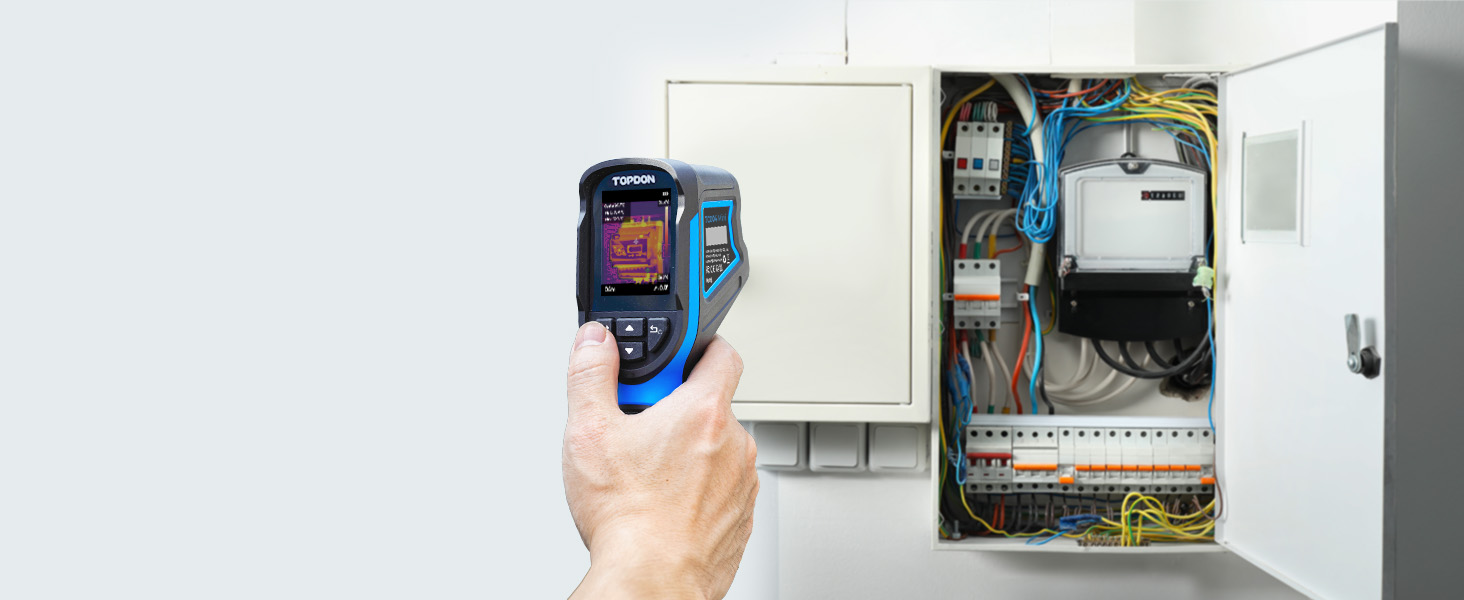
Figure 12.1: Step-by-step guide on how to access and download the digital user manual for the TC004 Mini.
13 സുരക്ഷാ വിവരങ്ങൾ
Please read and understand all safety warnings and instructions before using the device. Failure to follow these instructions may result in electric shock, fire, or serious injury.
- Do not point the camera directly at strong energy sources (e.g., the sun, lasers) as this may damage the detector.
- Do not immerse the device in water, despite its IP54 rating, to prevent internal damage.
- Use only the specified charging cable and power adapters.
- ഉപകരണം കുട്ടികൾക്ക് ലഭ്യമാകാതെ സൂക്ഷിക്കുക.
- Do not attempt to open or modify the device. Repairs should only be performed by authorized service personnel.
- ഉപകരണം അതിന്റെ നിർദ്ദിഷ്ട താപനിലയിലും ഈർപ്പത്തിലും പ്രവർത്തിപ്പിക്കുക.


