1. ആമുഖം
This manual provides essential information for setting up, operating, and maintaining your Telefunken QLED VIDAA QU50VP750S 50-inch 4K UHD Smart TV. Please read these instructions carefully before using the product to ensure proper function and safety. Keep this manual for future reference.
2. ഉൽപ്പന്ന സവിശേഷതകൾ
The Telefunken QLED VIDAA QU50VP750S Smart TV offers an immersive viewing experience with advanced features:
- Stunning 4K Ultra HD QLED Display: Enjoy crisp 4K Ultra HD content on the brilliant QLED screen.
- ശ്രദ്ധേയമായ ദൃശ്യ വിശദാംശങ്ങൾ: Dolby Vision HDR, Super Resolution, and Micro Dimming provide contrasted shots with natural color and impressive detail sharpness.
- Unlimited Smart Entertainment: The VIDAA operating system offers access to numerous applications and media libraries such as Prime Video, Netflix, DAZN, Disney+, YouTube, and more.
- Innovative Audio Experience: Dolby Atmos delivers enhanced sound quality.
- വിപുലമായ കണക്റ്റിവിറ്റി: Features 3 HDMI ports, 2 USB ports with media player, Wi-Fi, and Bluetooth for various external devices.
- Integrated Triple Tuner: Receive programs via antenna (DVB-T2), cable (DVB-C), or satellite (DVB-S2) without an additional receiver.
- HD+ Access: Includes 6 months of non-binding access to the extensive HD+ range for premium television (for satellite reception in Germany).
3. പാക്കേജ് ഉള്ളടക്കം
പാക്കേജിൽ എല്ലാ ഇനങ്ങളും ഉണ്ടോ എന്ന് ദയവായി പരിശോധിക്കുക:
- Telefunken QLED VIDAA QU50VP750S Smart TV
- 2 AAA ബാറ്ററികളുള്ള റിമോട്ട് കൺട്രോൾ
- TV Stand Feet
- ഉപയോക്തൃ മാനുവൽ (ഈ പ്രമാണം)
4. സജ്ജീകരണം
4.1 ഫിസിക്കൽ ഇൻസ്റ്റലേഷൻ
Place the TV on a stable, flat surface or mount it on a wall using a VESA-compatible bracket (M6 200x200). Ensure adequate ventilation around the TV.

ചിത്രം 4.1: Physical dimensions of the 50-inch Telefunken QLED TV. The TV measures 112.0 cm in width, 68.5 cm in height with the stand, and 27.0 cm in depth with the stand. The VESA mounting standard is M6 200x200.
4.2 ഉപകരണങ്ങൾ ബന്ധിപ്പിക്കുന്നു
Connect your external devices such as game consoles, DVD players, sound systems, and antenna/cable/satellite feeds to the appropriate ports on the TV.
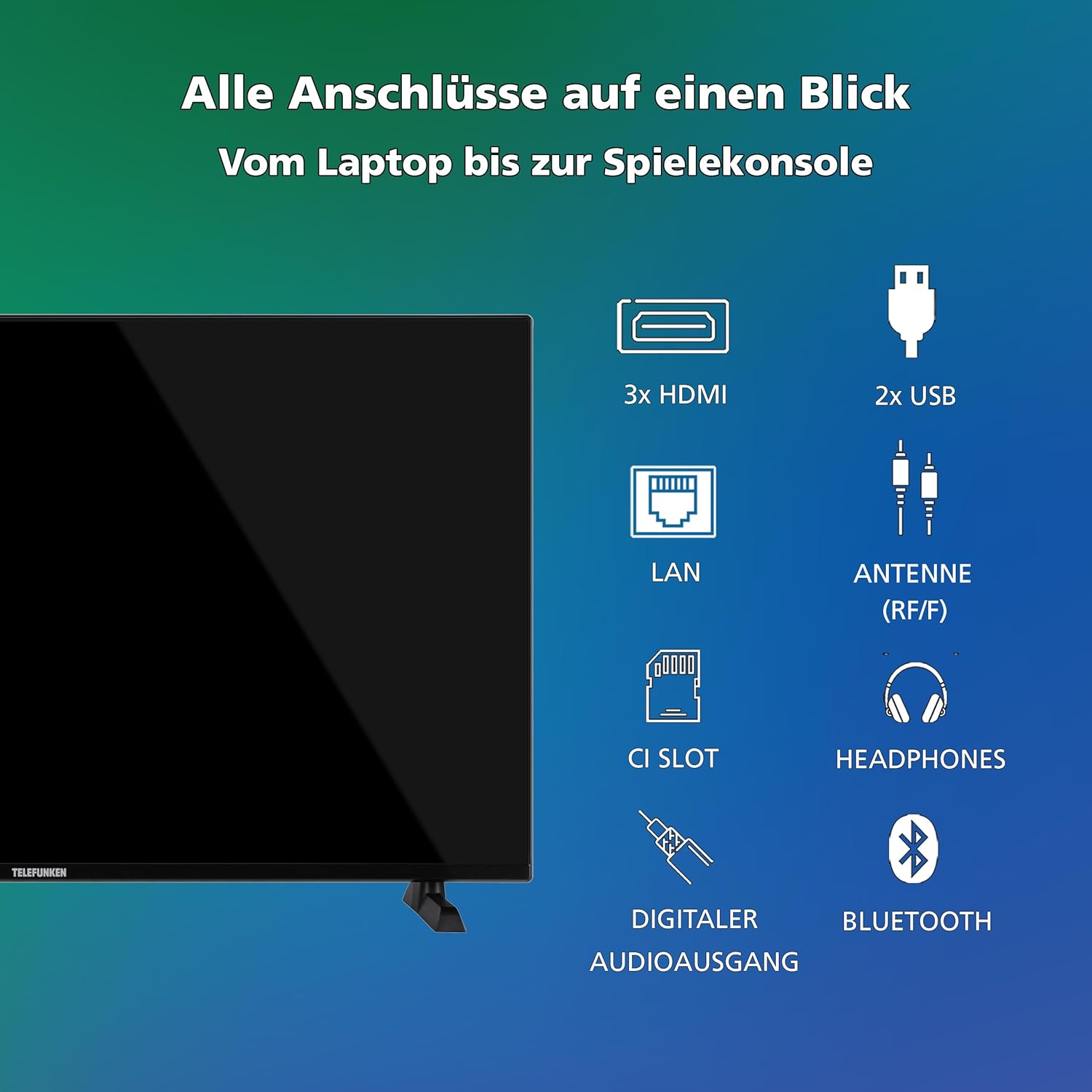
ചിത്രം 4.2: കഴിഞ്ഞുview of all connection ports. The TV includes 3 HDMI ports, 2 USB ports, a LAN port, an Antenna (RF/F) input, a CI Slot, a Headphones output, a Digital Audio Output, and supports Bluetooth.
- പവർ കണക്ഷൻ: പവർ കോർഡ് ടിവിയിലേക്കും പിന്നീട് ഒരു വാൾ ഔട്ട്ലെറ്റിലേക്കും പ്ലഗ് ചെയ്യുക.
- Antenna/Cable/Satellite: Connect your antenna, cable, or satellite feed to the 'ANTENNA (RF/F)' input.
- HDMI ഉപകരണങ്ങൾ: Use HDMI cables to connect devices like Blu-ray players, game consoles, or set-top boxes to the HDMI ports.
- USB ഉപകരണങ്ങൾ: Insert USB drives for media playback into the USB ports.
- നെറ്റ്വർക്ക് കണക്ഷൻ: വയർഡ് ഇന്റർനെറ്റ് കണക്ഷനായി ലാൻ പോർട്ടിലേക്ക് ഒരു ഇതർനെറ്റ് കേബിൾ ബന്ധിപ്പിക്കുക, അല്ലെങ്കിൽ പ്രാരംഭ സജ്ജീകരണ സമയത്ത് വൈ-ഫൈ വഴി വയർലെസ് ആയി ബന്ധിപ്പിക്കുക.
5. പ്രവർത്തന നിർദ്ദേശങ്ങൾ
5.1 ആദ്യ തവണ സജ്ജീകരണം
ആദ്യമായി പവർ-ഓൺ ചെയ്യുമ്പോൾ, ഭാഷ തിരഞ്ഞെടുക്കൽ, നെറ്റ്വർക്ക് കണക്ഷൻ, ചാനൽ സ്കാനിംഗ് എന്നിവയുൾപ്പെടെയുള്ള പ്രാരംഭ സജ്ജീകരണ പ്രക്രിയയിലൂടെ ടിവി നിങ്ങളെ നയിക്കും.
5.2 വിദൂര നിയന്ത്രണ പ്രവർത്തനങ്ങൾ
The included remote control provides access to all TV functions and smart features. Familiarize yourself with the button layout.
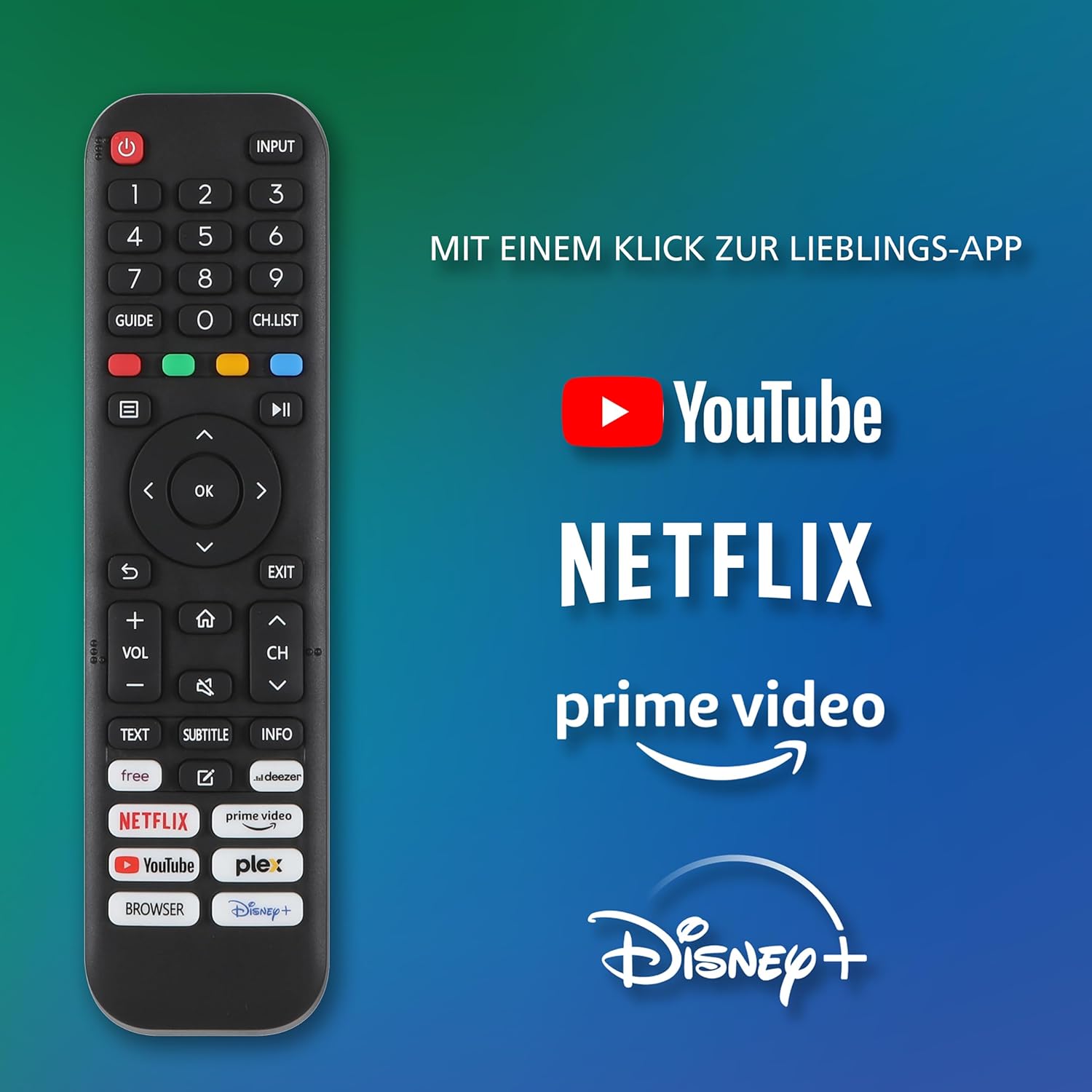
ചിത്രം 5.1: Telefunken Smart TV Remote Control. The remote features dedicated buttons for quick access to YouTube, Netflix, Prime Video, and Disney+, alongside standard controls for power, input, navigation, volume, and channels.
5.3 അടിസ്ഥാന പ്രവർത്തനം
- പവർ ഓൺ/ഓഫ്: റിമോട്ട് കൺട്രോളിലോ ടിവിയിലോ പവർ ബട്ടൺ അമർത്തുക.
- ഇൻപുട്ട് തിരഞ്ഞെടുക്കൽ: Use the 'INPUT' button to switch between connected sources (HDMI, USB, TV tuner).
- വോളിയം നിയന്ത്രണം: Use the 'VOL +/-' buttons to adjust the volume.
- ചാനൽ തിരഞ്ഞെടുക്കൽ: Use the 'CH +/-' buttons or number pad to change channels.
- മെനു നാവിഗേഷൻ: Use the arrow keys and 'OK' button to navigate through menus and settings.
6. ചിത്ര, ശബ്ദ ക്രമീകരണങ്ങൾ
Your TV supports advanced picture and sound technologies for an optimal viewഅനുഭവം.
6.1 ചിത്ര ക്രമീകരണങ്ങൾ
Access the picture settings menu to adjust brightness, contrast, color, sharpness, and select picture modes (e.g., Standard, Dynamic, Movie, Game). The TV supports Dolby Vision HDR and HDR10 for enhanced dynamic range.

ചിത്രം 6.1: Dolby Vision HDR vs. HDR10. This image illustrates the superior picture quality offered by Dolby Vision HDR, characterized by more vibrant colors and deeper contrast compared to standard HDR10.
6.2 ശബ്ദ ക്രമീകരണങ്ങൾ
Adjust audio settings such as sound mode (e.g., Standard, Music, Movie, Speech), equalizer, and surround sound options. The TV features Dolby Atmos for an immersive audio experience.
7. സ്മാർട്ട് ടിവി ഫീച്ചറുകൾ (VIDAA OS)
The Telefunken Smart TV runs on the VIDAA operating system, providing a user-friendly interface for accessing a wide range of applications and online content.

ചിത്രം 7.1: VIDAA Smart TV Interface. The home screen displays a selection of popular streaming applications such as Netflix, YouTube, Pluto TV, Disney+, Prime Video, DAZN, and Rakuten TV, along with personalized content recommendations.
7.1 ആപ്പുകൾ ആക്സസ് ചെയ്യൽ
From the home screen, navigate to and select your desired application. Popular apps like Netflix, Prime Video, Disney+, and YouTube are pre-installed or easily accessible.

ചിത്രം 7.2: Telefunken Smart TV in a living room setting. The TV is displaying the VIDAA interface, highlighting its smart capabilities and integration into a modern home entertainment system.
7.2 നെറ്റ്വർക്ക് കണക്ഷൻ
Ensure your TV is connected to the internet via Wi-Fi or Ethernet to utilize all Smart TV features. You can manage network settings in the TV's main menu.
8. ഒപ്റ്റിമൽ Viewing ദൂരം
മികച്ചതിന് viewing experience, position yourself at an appropriate distance from the screen based on the TV size and content resolution.
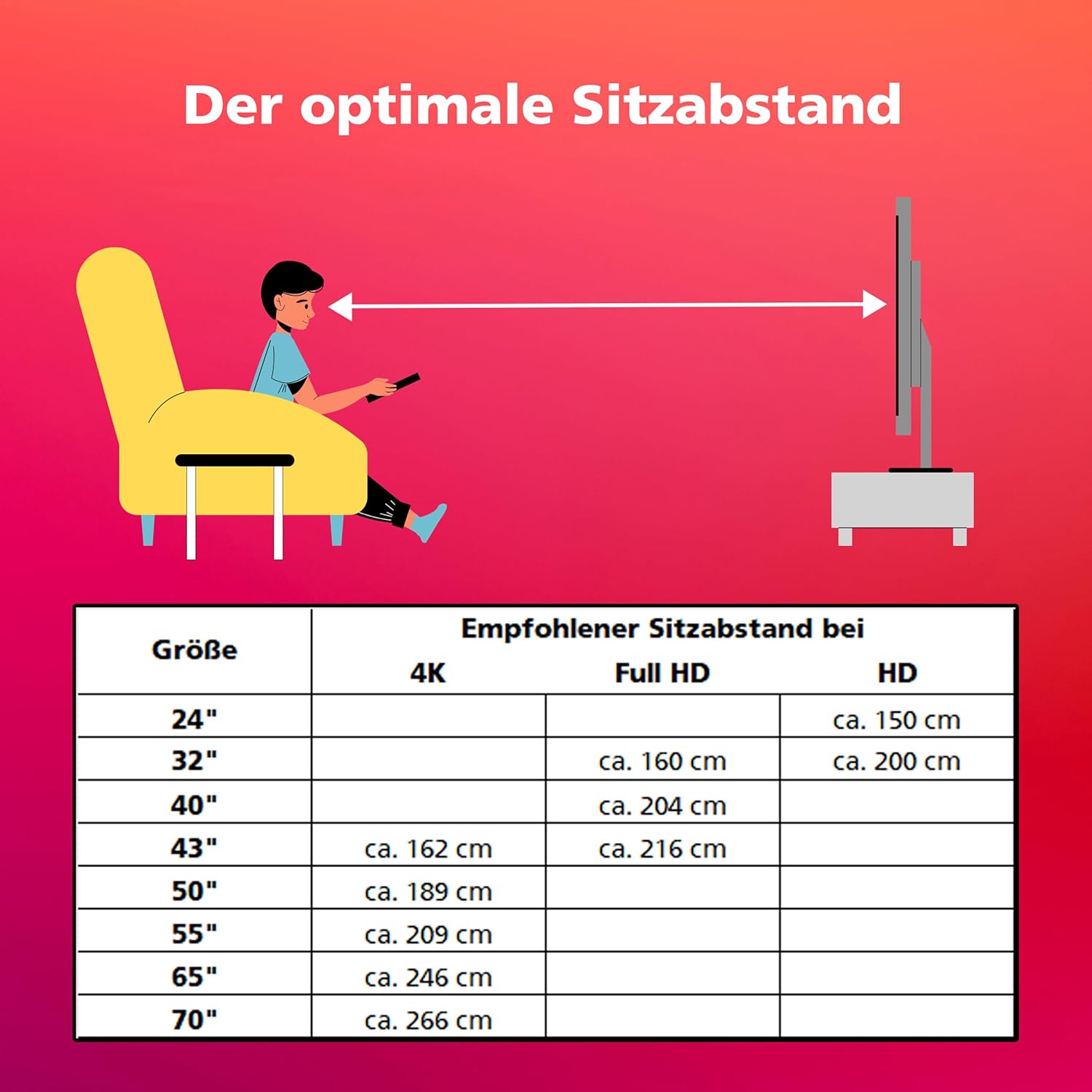
ചിത്രം 8.1: Recommended Optimal Viewing Distance. This table provides guidelines for the ideal seating distance from the TV screen, varying by screen size and resolution (4K, Full HD, HD).
| സ്ക്രീൻ വലിപ്പം | Recommended Seating Distance | ||
|---|---|---|---|
| 4K | ഫുൾ എച്ച്.ഡി | HD | |
| 24" | ഏകദേശം 150 സെ.മീ | ||
| 32" | ഏകദേശം 160 സെ.മീ | ഏകദേശം 200 സെ.മീ | |
| 40" | ഏകദേശം 204 സെ.മീ | ||
| 43" | ഏകദേശം 162 സെ.മീ | ഏകദേശം 216 സെ.മീ | |
| 50" | ഏകദേശം 189 സെ.മീ | ||
| 55" | ഏകദേശം 209 സെ.മീ | ||
| 65" | ഏകദേശം 246 സെ.മീ | ||
| 70" | ഏകദേശം 266 സെ.മീ | ||
9. HD+ Service
For satellite reception in Germany, your TV includes 6 months of non-binding access to the HD+ service. This service provides private channels in HD and UHD quality, along with features like restart and media libraries.

ചിത്രം 9.1: HD+ Service Information. This image highlights the benefits of HD+, including HD and UHD quality private channels, restart features, media libraries, and a 6-month free trial. Activation is recommended during initial TV installation.
Activate the HD+ service directly during the initial TV installation process to enjoy its benefits.
10 സ്പെസിഫിക്കേഷനുകൾ
Detailed technical specifications for the Telefunken QLED VIDAA QU50VP750S TV:
| ഫീച്ചർ | സ്പെസിഫിക്കേഷൻ |
|---|---|
| ബ്രാൻഡ് | ടെലിഫങ്കൻ |
| മോഡൽ നമ്പർ | QU50VP750S |
| നിറം | കറുപ്പ് |
| ഓപ്പറേറ്റിംഗ് സിസ്റ്റം | VIDAA |
| സ്ക്രീൻ വലിപ്പം | 50 ഇഞ്ച് (126 സെ.മീ) |
| ഡിസ്പ്ലേ ടെക്നോളജി | ക്യുഎൽഇഡി |
| റെസലൂഷൻ | 4K (3840x2160 Pixels) |
| പുതുക്കിയ നിരക്ക് | 120 Hz |
| വീക്ഷണാനുപാതം | 16:9 |
| പ്രത്യേക സവിശേഷതകൾ | 6 months HD+ included, Dolby Atmos, Dolby Vision HDR, QLED, VIDAA Smart TV |
| കണക്റ്റിവിറ്റി ടെക്നോളജി | ബ്ലൂടൂത്ത്, HDMI, USB, വൈ-ഫൈ |
| കണക്ഷനുകൾ | 3x HDMI, 2x USB, Wi-Fi |
| മൊത്തം USB പോർട്ടുകൾ | 2 |
| ഉൽപ്പന്ന അളവുകൾ (DxWxH) | 27P x 112lx 68,5H സെന്റീമീറ്റർ |
| നിർമ്മാതാവ് | ടെലിഫങ്കൻ |
| മാതൃരാജ്യം | ടർക്കി |
| സ്പെയർ പാർട്സ് ലഭ്യത | 7 വർഷം |
| ബാറ്ററികൾ | 2 AAA - ഉൾപ്പെടുത്തിയിട്ടുണ്ട് |
| എനർജി എഫിഷ്യൻസി ക്ലാസ് (SDR) | E |
| എനർജി എഫിഷ്യൻസി ക്ലാസ് (HDR) | G |
| വൈദ്യുതി ഉപഭോഗം (SDR) | 54.0 W |
| വൈദ്യുതി ഉപഭോഗം (HDR) | 104 W |
| വൈദ്യുതി ഉപഭോഗം (സ്റ്റാൻഡ്ബൈ) | 0.5 W |
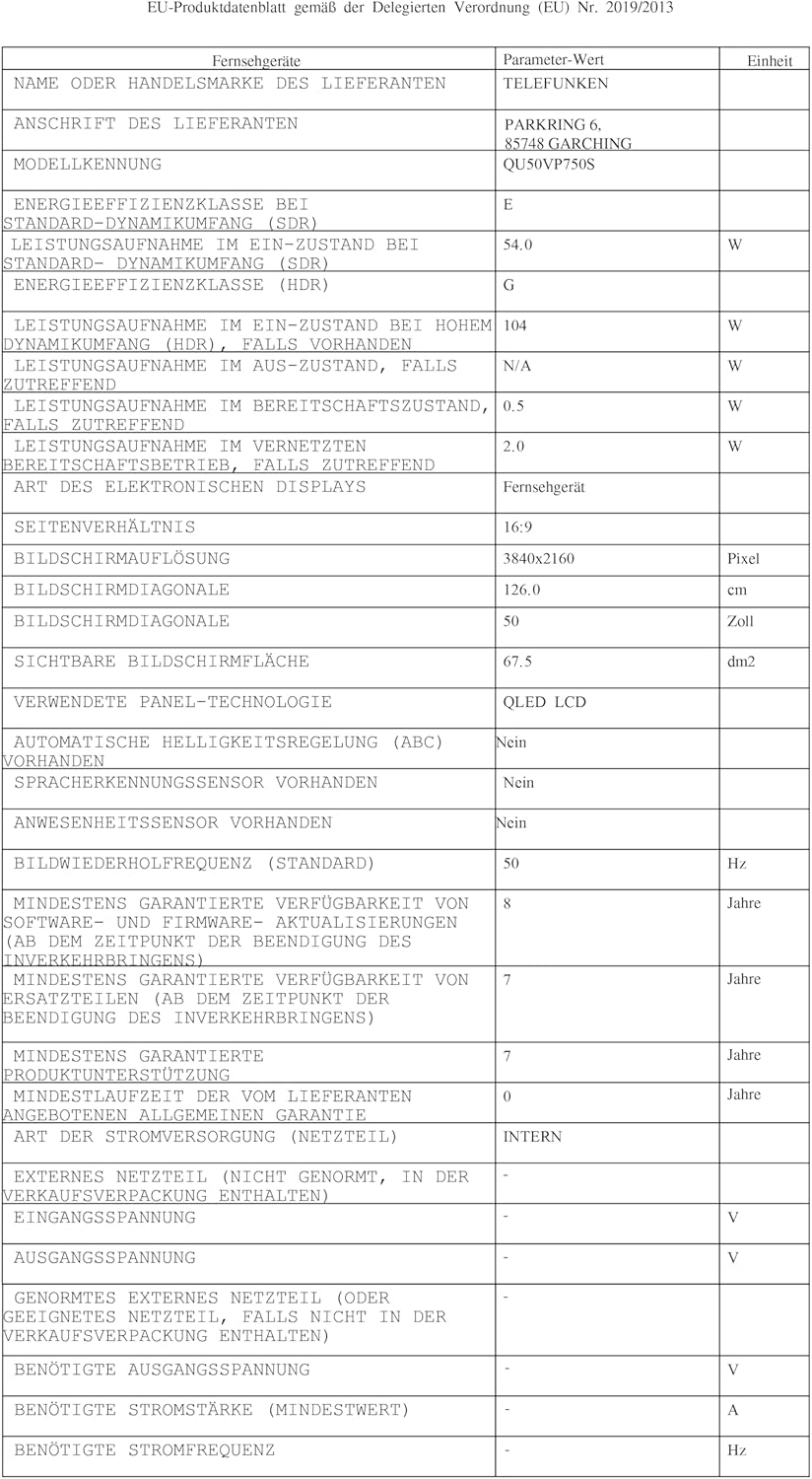
ചിത്രം 10.1: EU Product Data Sheet. This document provides comprehensive technical details and compliance information for the Telefunken QU50VP750S television.
For more details, refer to the EPREL database: https://eprel.ec.europa.eu/qr/2243408

ചിത്രം 10.2: EU Energy Label. This label indicates the energy efficiency class of the Telefunken QU50VP750S TV, showing 'E' for SDR and 'G' for HDR, along with power consumption in kWh per 1000 hours.
11. പ്രശ്നപരിഹാരം
നിങ്ങളുടെ ടിവിയിൽ പ്രശ്നങ്ങൾ നേരിടുകയാണെങ്കിൽ, ഇനിപ്പറയുന്ന പൊതുവായ ട്രബിൾഷൂട്ടിംഗ് ഘട്ടങ്ങൾ പരിശോധിക്കുക:
- ശക്തിയില്ല: Ensure the power cord is securely connected to both the TV and the wall outlet. Check if the outlet is working.
- ചിത്രം/ശബ്ദം ഇല്ല: Verify that the correct input source is selected. Check all cable connections (HDMI, antenna). Try restarting the TV.
- റിമോട്ട് കൺട്രോൾ പ്രവർത്തിക്കുന്നില്ല: Check the batteries in the remote control and ensure there are no obstructions between the remote and the TV's IR sensor.
- ഇൻ്റർനെറ്റ് കണക്ഷൻ ഇല്ല: Check your Wi-Fi router or Ethernet cable connection. Re-enter Wi-Fi password if necessary.
- Smart Apps Not Loading: Ensure a stable internet connection. Try restarting the app or the TV.
For more complex issues, consult the full electronic manual or contact customer support.
12. പരിപാലനം
Proper care and maintenance will extend the life of your Telefunken TV.
- സ്ക്രീൻ വൃത്തിയാക്കൽ: മൃദുവായതും ഉണങ്ങിയതും ലിന്റ് രഹിതവുമായ ഒരു തുണി ഉപയോഗിച്ച് സ്ക്രീൻ സൌമ്യമായി തുടയ്ക്കുക. കഠിനമായ പാടുകൾക്ക്, സ്ക്രീനിൽ നേരിട്ട് പുരട്ടുന്നതിനു പകരം, തുണിയിൽ പുരട്ടിയ ഒരു സ്ക്രീൻ നിർദ്ദിഷ്ട ക്ലീനിംഗ് ലായനി ഉപയോഗിക്കുക.
- കാബിനറ്റ് വൃത്തിയാക്കൽ: ടിവി കാബിനറ്റ് വൃത്തിയാക്കാൻ മൃദുവായതും ഉണങ്ങിയതുമായ തുണി ഉപയോഗിക്കുക. അബ്രസീവ് ക്ലീനറുകളോ ലായകങ്ങളോ ഉപയോഗിക്കുന്നത് ഒഴിവാക്കുക.
- വെൻ്റിലേഷൻ: ടിവിയിലെ വെന്റിലേഷൻ ഓപ്പണിംഗുകൾ അമിതമായി ചൂടാകുന്നത് തടയാൻ അടഞ്ഞിട്ടില്ലെന്ന് ഉറപ്പാക്കുക.
- ഉപയോഗത്തിലില്ലാത്തപ്പോൾ പവർ ഓഫ്: ദീർഘനേരം നിഷ്ക്രിയമായിരിക്കുമ്പോൾ, പവർ ഔട്ട്ലെറ്റിൽ നിന്ന് ടിവി ഊരിവെക്കുക.
13. വാറൻ്റിയും പിന്തുണയും
Your Telefunken QLED VIDAA QU50VP750S TV comes with a manufacturer's warranty. Please refer to the warranty card included in your package for specific terms and conditions.
- സ്പെയർ പാർട്സ് ലഭ്യത: ഈ മോഡലിന്റെ സ്പെയർ പാർട്സ് വാങ്ങിയ തീയതി മുതൽ 7 വർഷത്തേക്ക് ലഭ്യമാകുമെന്ന് ഉറപ്പുനൽകുന്നു.
- ഉപഭോക്തൃ പിന്തുണ: For technical assistance or service inquiries, please contact Telefunken customer support through their official webസൈറ്റ് അല്ലെങ്കിൽ നിങ്ങളുടെ വാറന്റി ഡോക്യുമെന്റേഷനിൽ നൽകിയിരിക്കുന്ന ബന്ധപ്പെടാനുള്ള വിവരങ്ങൾ.