1. ആമുഖം
Welcome to the CATLINK RFID Automatic Cat Feeder (Model F04 Pro) instruction manual. This guide provides comprehensive instructions for setting up, operating, and maintaining your feeder, ensuring optimal and convenient feeding for your feline companions. Please read this manual thoroughly before first use.

The CATLINK RFID Automatic Cat Feeder F04 Pro, shown with its included RFID collars and a smartphone displaying the companion app interface.
2 പ്രധാന സവിശേഷതകൾ
- Exclusive Feeder for Your Cat: Utilizes RFID technology with dedicated collars to ensure each cat in a multi-cat household accesses its own exclusive feeder, preventing food theft.
- ആരോഗ്യ നിരീക്ഷണം: The Fresh 2 system recognizes individual cats, records their diet, and generates health reports viewable in the app. Abnormal diet patterns trigger alert messages.
- Scheduled Automatic Feeding: Easily set up and schedule feedings based on your pet's needs through the app, ensuring timely meals even when you are away.
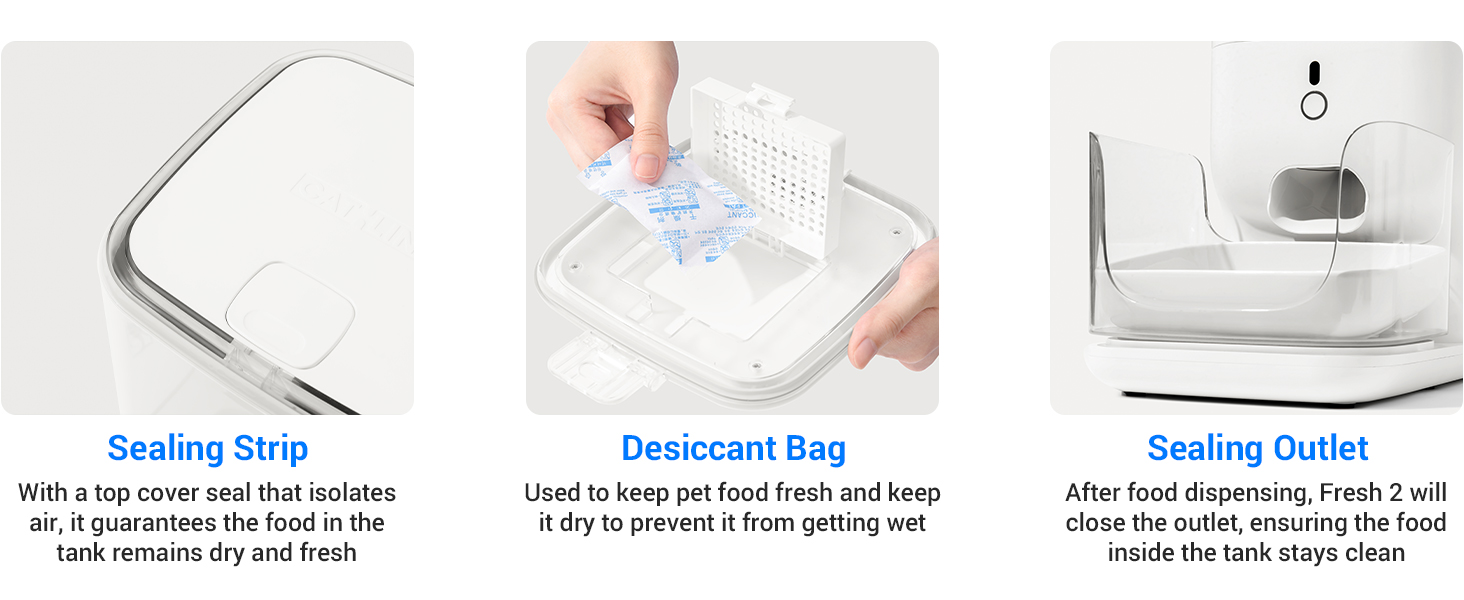
- Multiple Seals to Keep Food Fresh: Features rubber seals between the lid and container, a desiccant bag for moisture control, and a sealed revolving door to prevent oxidation, odor, and dust.
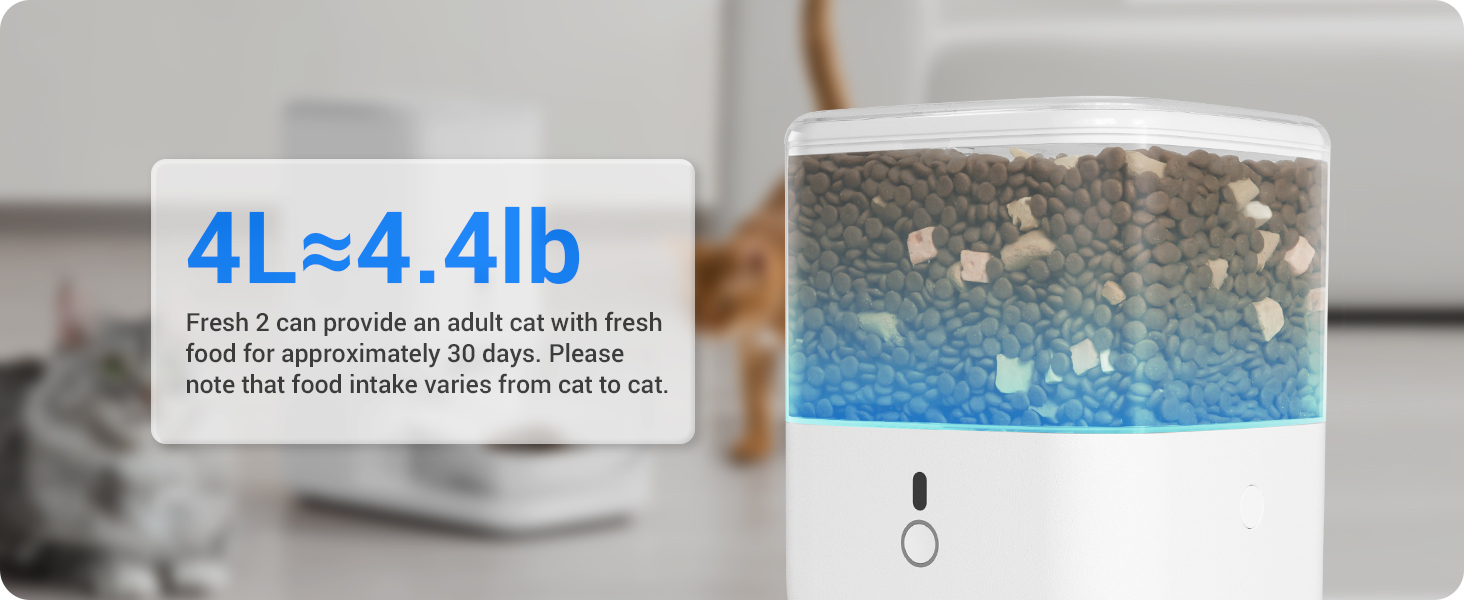
- Long-Lasting Feeding Capacity: Stores 4L of food (grains or freeze-dried pellets up to 15mm diameter), providing nourishment for one cat for up to 30 days.
- Pet Safe Design: The top lid is designed to be difficult for pets to open, preventing unauthorized access to food. A nylon braided cable prevents pet chewing and reduces electrical risk.
3. ഉൽപ്പന്ന ഘടകങ്ങൾ
The CATLINK RFID Automatic Cat Feeder (F04 Pro) package includes the following components:
- 1 x Automatic Cat Feeder Unit
- 2 x RFID Identification Tags
- 2 x Collars for RFID Tags
- 1 x ഉപയോക്തൃ മാനുവൽ (ഈ പ്രമാണം)
- 1 x പവർ കേബിൾ

Two RFID collars with their respective identification tags, essential for multi-cat recognition.

ഒരു ക്ലോസപ്പ് view of the feeder's sealed food storage compartment, highlighting the mechanism designed to maintain food freshness.
4. സജ്ജീകരണ ഗൈഡ്
4.1 അൺപാക്കിംഗും അസംബ്ലിയും
- പാക്കേജിംഗിൽ നിന്ന് എല്ലാ ഘടകങ്ങളും ശ്രദ്ധാപൂർവ്വം നീക്കം ചെയ്യുക.
- പ്രധാന ഫീഡർ യൂണിറ്റ് പരന്നതും സ്ഥിരതയുള്ളതുമായ ഒരു പ്രതലത്തിൽ സ്ഥാപിക്കുക.
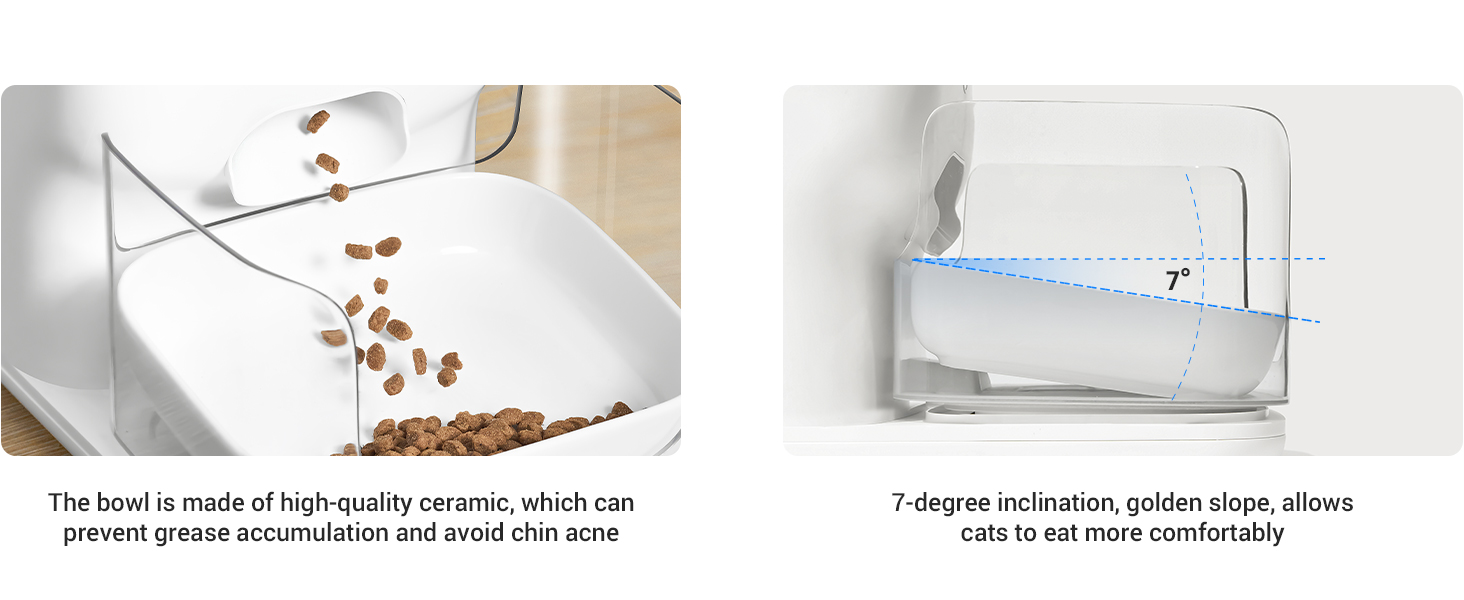
- Insert the food bowl into its designated slot at the front of the feeder.
- Ensure the food tank is clean and dry before proceeding.
4.2 പവർ കണക്ഷൻ
- Connect the power cable to the feeder's power input port.
- ഒരു സാധാരണ മതിൽ ഔട്ട്ലെറ്റിലേക്ക് പവർ അഡാപ്റ്റർ പ്ലഗ് ചെയ്യുക.
- അധികാരത്തിനായിtages, the feeder supports backup batteries (not included). Install 4 D-cell batteries in the battery compartment at the bottom of the unit for uninterrupted operation.
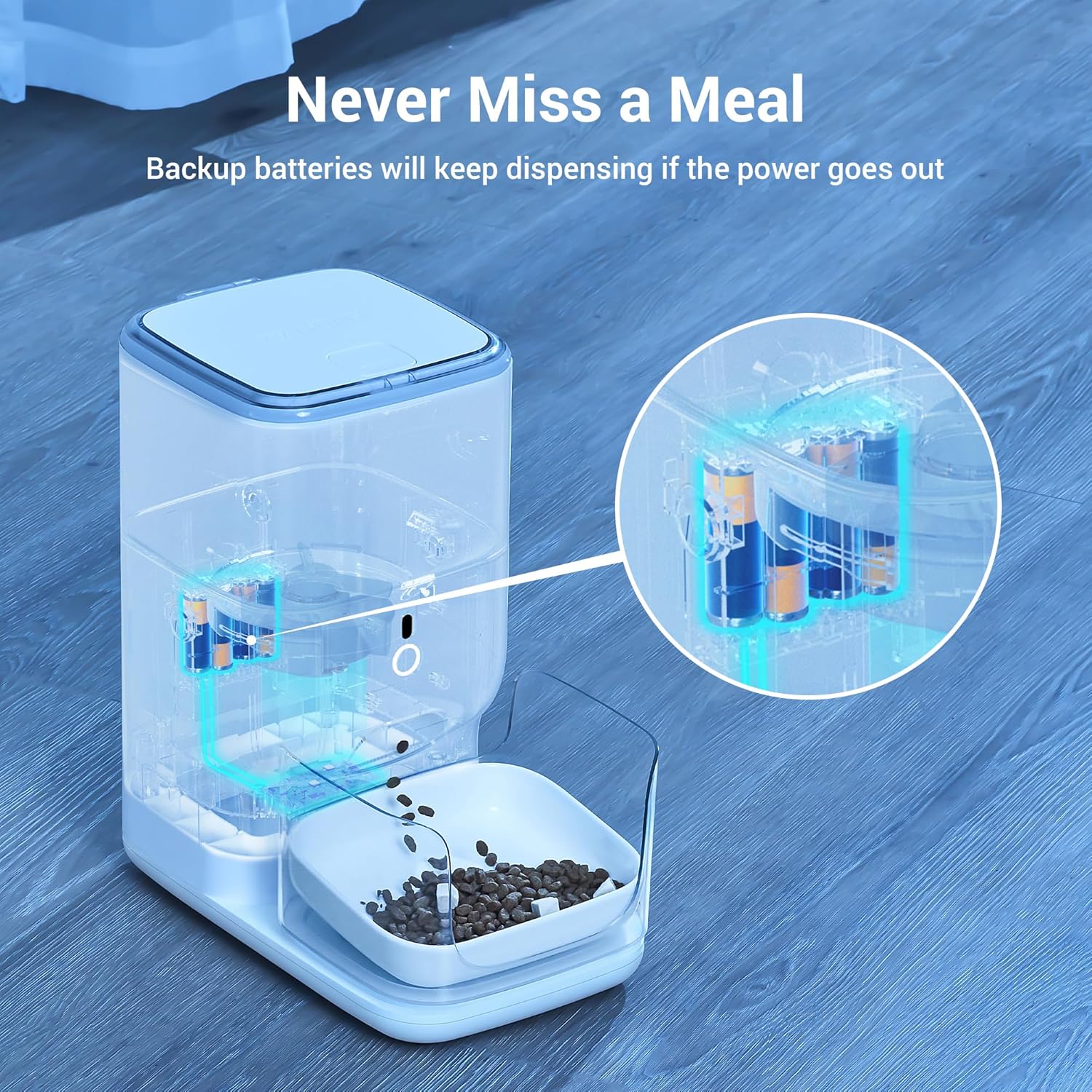
ഒരു സുതാര്യമായ view of the feeder illustrating the internal battery compartment, indicating where backup batteries can be installed to ensure continuous operation during power outages.
4.3 ആപ്പ് ഡൗൺലോഡും കണക്ഷനും
- Download the 'CATLINK' app from your smartphone's app store (available for Android and iOS).
- ഒരു അക്കൗണ്ട് സൃഷ്ടിക്കുന്നതിനോ ലോഗിൻ ചെയ്യുന്നതിനോ ആപ്പ് തുറന്ന് ഓൺ-സ്ക്രീൻ നിർദ്ദേശങ്ങൾ പാലിക്കുക.
- Add your CATLINK F04 Pro feeder to the app by selecting 'Add Device' and following the pairing process. Ensure your phone is connected to a 2.4GHz Wi-Fi network during setup.
- Update the app and feeder firmware to the newest version for optimal performance.
Visual instructions detailing the steps to enable and configure the 'RFID-Auto' mode on the CATLINK Fresh 2 feeder, including app updates and collar pairing.
4.4 RFID Tag ജോടിയാക്കൽ
- Attach an RFID identification tag to each cat's collar.
- Within the CATLINK app, navigate to the feeder settings and follow the instructions to pair each RFID tag with a specific cat profile. This enables multi-cat recognition and personalized feeding.
5. ഓപ്പറേഷൻ
5.1 ഭക്ഷണ ടാങ്ക് നിറയ്ക്കൽ
- Press the lid of the tank and then pull it up to open.
- Pour dry kibble or freeze-dried food into the tank. Ensure the kibble diameter does not exceed 15mm to prevent jamming.
- ഭക്ഷണത്തിന്റെ പുതുമ നിലനിർത്താൻ മൂടി സുരക്ഷിതമായി അടയ്ക്കുക.
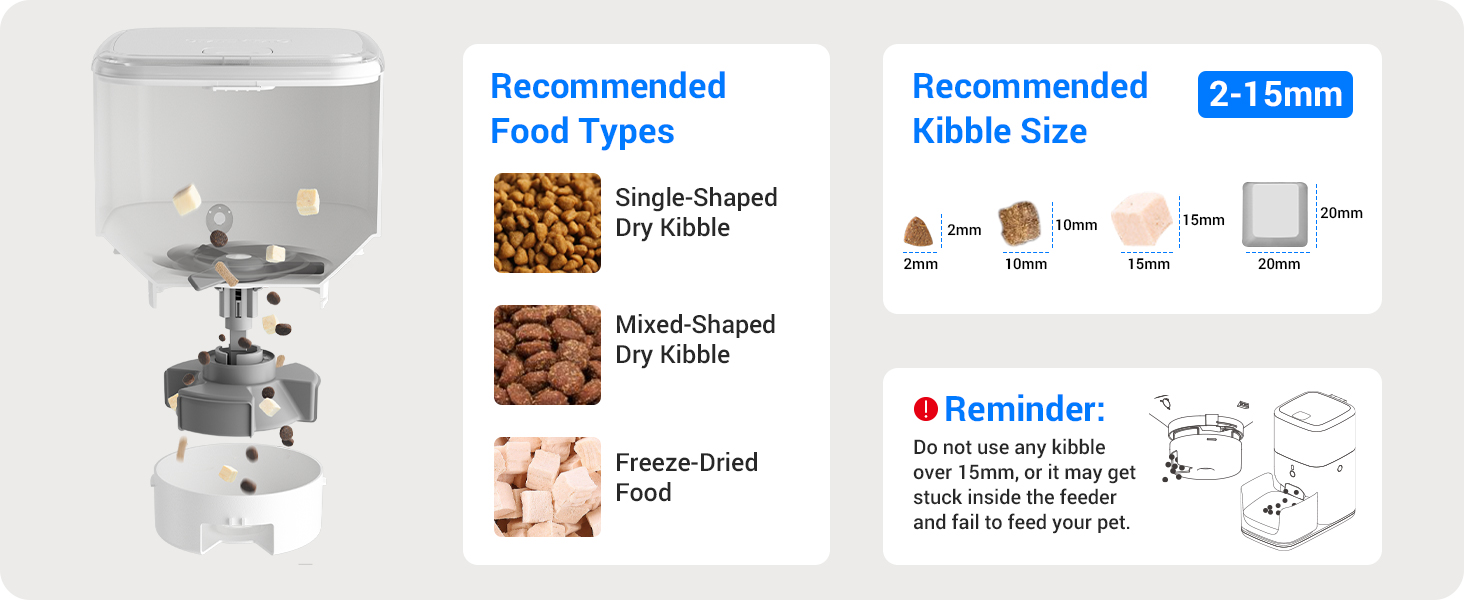
A diagram illustrating recommended food types (single-shaped dry kibble, mixed-shaped dry kibble, freeze-dried food) and acceptable kibble sizes (2-15mm) for the feeder.
5.2 ആപ്പ് നിയന്ത്രണവും ഷെഡ്യൂളിംഗും
The CATLINK app provides full control over your feeder:
- റിമോട്ട് ഫീഡിംഗ്: Dispense food manually from anywhere using the app.
- ഭക്ഷണ പദ്ധതി: Set up customized feeding schedules with specific times and portion sizes for each cat.
- ആരോഗ്യ റിപ്പോർട്ട്: Monitor your cat's eating habits and view detailed health reports based on their food intake.
- Multi-cat Recognition: Manage feeding for multiple cats, ensuring each receives their designated portion.

The app interface displaying scheduled feeding times and corresponding portion sizes, demonstrating the feeder's automated meal delivery capabilities.

A smartphone screen displaying health reports for multiple cats, including diet and duration metrics, highlighting the multi-cat recognition feature.
5.3 RFID Feeding Mechanism
When a cat wearing an RFID collar approaches the feeder, the feeder recognizes the tag and dispenses the pre-set portion for that specific cat. This ensures personalized feeding in multi-cat households.
5.4 Button Lock Feature
The feeder includes a button lock feature to prevent pets from accidentally or intentionally dispensing food. Activate this feature via the app to secure the feeder's controls.
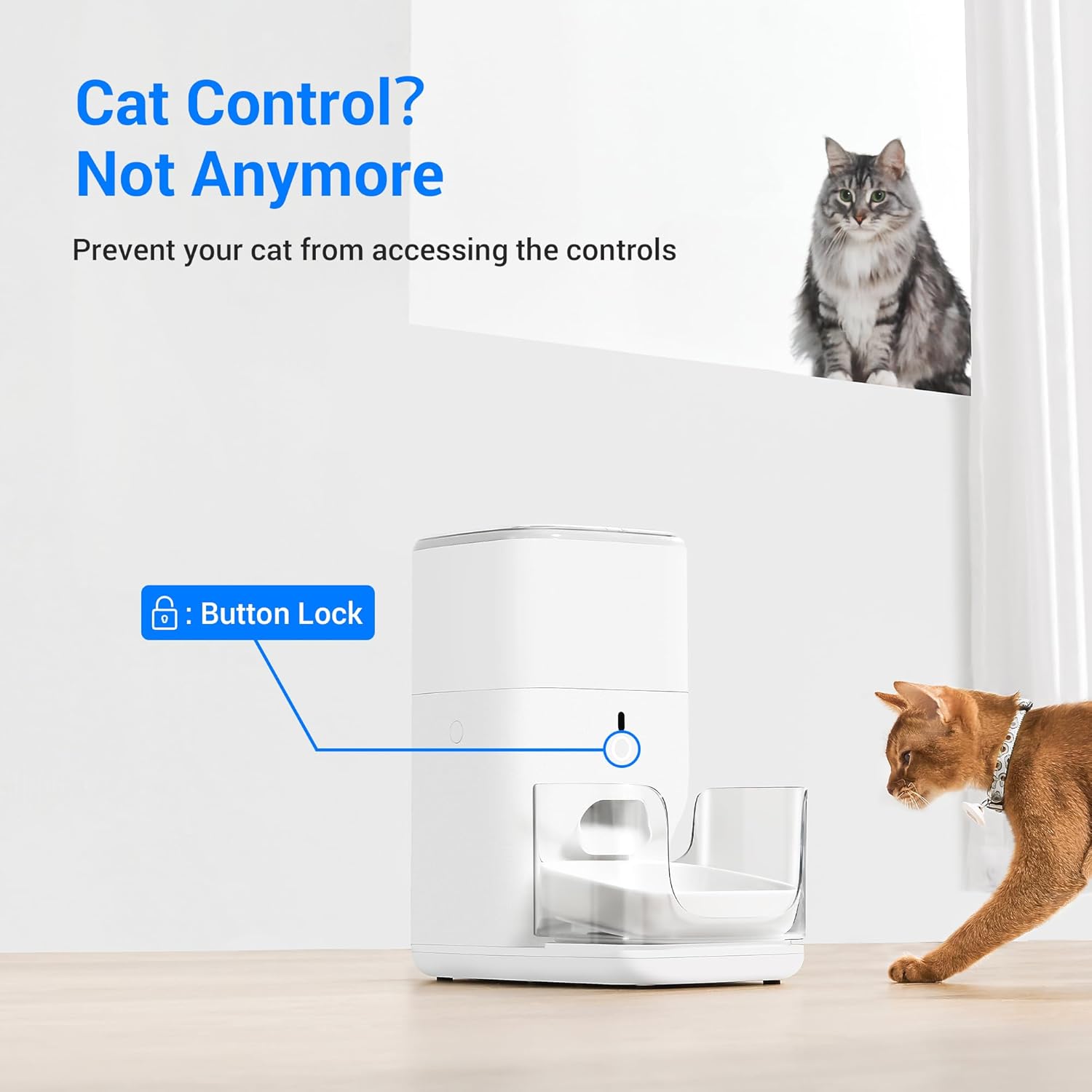
The feeder unit with a visual indicator pointing to the control button, labeled 'Button Lock', demonstrating the feature designed to prevent accidental activation by pets.
6. പരിപാലനം
6.1 ക്ലീനിംഗ് നിർദ്ദേശങ്ങൾ
Regular cleaning is essential for hygiene and proper functioning. All parts of the feeder, except the base unit (which contains electronics), are washable.
- Unplug the feeder from the power outlet.
- Remove the food tank, food bowl, and lid.
- Wash these removable parts with mild soap and water. Rinse thoroughly and dry completely before reassembling.
- പരസ്യം ഉപയോഗിച്ച് അടിസ്ഥാന യൂണിറ്റ് തുടയ്ക്കുകamp cloth. Do not submerge the base unit in water.
A step-by-step diagram illustrating the four simple steps to disassemble the feeder for cleaning, emphasizing that all parts except the base can be washed.
6.2 ഡെസിക്കന്റ് ബാഗ് മാറ്റിസ്ഥാപിക്കൽ
The desiccant bag helps absorb moisture and keep food fresh. Replace the desiccant bag periodically (e.g., every 1-2 months) to ensure optimal food preservation.
6.3 Food Freshness Features
The feeder is designed with multiple features to maintain food freshness:
- സീലിംഗ് സ്ട്രിപ്പ്: A top cover seal isolates air, guaranteeing dry and fresh food in the tank.
- Sealing Outlet: The unique sealed revolving door automatically closes after each feeding to prevent dust and maintain freshness.
Images demonstrating the proper method to open the feeder's lid by pressing and pulling, and a close-up of the durable nylon braided power cable designed to prevent pet chewing.
7. പ്രശ്നപരിഹാരം
| പ്രശ്നം | സാധ്യമായ കാരണം | പരിഹാരം |
|---|---|---|
| Feeder not connecting to Wi-Fi. | Incorrect Wi-Fi password, 5GHz network, temporary network issue. | Ensure you are connecting to a 2.4GHz Wi-Fi network. Double-check the password. Try restarting your router and the feeder. Patience may be required, as some users report it connects after multiple attempts. |
| RFID not recognizing cat or dispensing food. | RFID tag not properly attached/paired, cat not close enough, rapid re-triggering. | RFID ഉറപ്പാക്കുക tag is securely attached to the collar and correctly paired in the app. Make sure the cat is positioned directly in front of the feeder. If testing, note that the feeder may have a short delay (a few minutes) before dispensing again after a recent RFID activation to prevent overfeeding. |
| ഭക്ഷണം വിതരണം ചെയ്യുന്നില്ല. | Food tank empty, kibble jammed, dispenser mechanism blocked. | Check if the food tank is empty and refill if necessary. Ensure kibble size is within 2-15mm. Clean the dispenser mechanism to remove any blockages. Check the app for any error notifications. |
| App alerts for abnormal diet. | Changes in cat's eating habits, feeder malfunction. | Review the health report in the app for detailed information. Observe your cat's behavior. If concerns persist, consult a veterinarian. Check feeder for proper operation. |
For further assistance, refer to the detailed information within the CATLINK app or contact customer support.
8 സ്പെസിഫിക്കേഷനുകൾ
| ആട്രിബ്യൂട്ട് | വിശദാംശങ്ങൾ |
|---|---|
| ബ്രാൻഡ് | CATLINK |
| മോഡലിൻ്റെ പേര് | F04 PRO |
| ഇനം മോഡൽ നമ്പർ | സിഎൽ-എഫ്ഡി-01 |
| ശേഷി | 4 Liters (approx. 4.4 lbs of dry food) |
| അളവുകൾ (L x W x H) | 16 x 15 x 9 ഇഞ്ച് |
| നിറം | വെള്ള |
| ശുപാർശ ചെയ്യുന്ന കിബിൾ വലുപ്പം | 2-15 മിമി വ്യാസം |
| പ്രത്യേക സവിശേഷതകൾ | Automatic, RFID Multi-cat Recognition, App Control, Health Reports, Timed Feeding, Freshness Seals, Button Lock |
| പവർ ഉറവിടം | Power Cable, Optional D-cell Battery Backup |
| ടാർഗെറ്റ് സ്പീഷീസ് | പൂച്ച |
| ശുപാർശ ചെയ്യുന്ന ഉപയോഗം | ഇൻഡോർ |
9. വാറൻ്റിയും പിന്തുണയും
9.1 വാറൻ്റി വിവരങ്ങൾ
The CATLINK RFID Automatic Cat Feeder (Model F04 Pro) comes with a 1 വർഷത്തെ വാറൻ്റി വാങ്ങിയ തീയതി മുതൽ. സാധാരണ ഉപയോഗത്തിലുള്ള നിർമ്മാണ വൈകല്യങ്ങളും തകരാറുകളും ഈ വാറന്റി ഉൾക്കൊള്ളുന്നു. വാറന്റി ക്ലെയിമുകൾക്കായി നിങ്ങളുടെ വാങ്ങിയതിന്റെ തെളിവ് സൂക്ഷിക്കുക.
9.2 ഉപഭോക്തൃ പിന്തുണ
For technical support, troubleshooting assistance, or warranty inquiries, please contact CATLINK customer service. Contact details can typically be found on the official CATLINK website or within the CATLINK mobile application.


