ആമുഖം
Thank you for choosing the taopodo L37 Multifunctional Cell Phone Stand with Wireless Bluetooth Speaker. This device combines a stable phone/tablet stand with a high-quality Bluetooth speaker, offering convenience for various activities such as watching videos, making video calls, and listening to music. This manual provides detailed instructions for setup, operation, maintenance, and troubleshooting to ensure optimal performance and longevity of your device.
ഉൽപ്പന്നം കഴിഞ്ഞുview
The taopodo L37 integrates three core functions: a phone holder, a Bluetooth speaker, and a microphone for hands-free calls. It is designed for wide compatibility with most 4-13 inch smartphones, tablets, and e-readers.
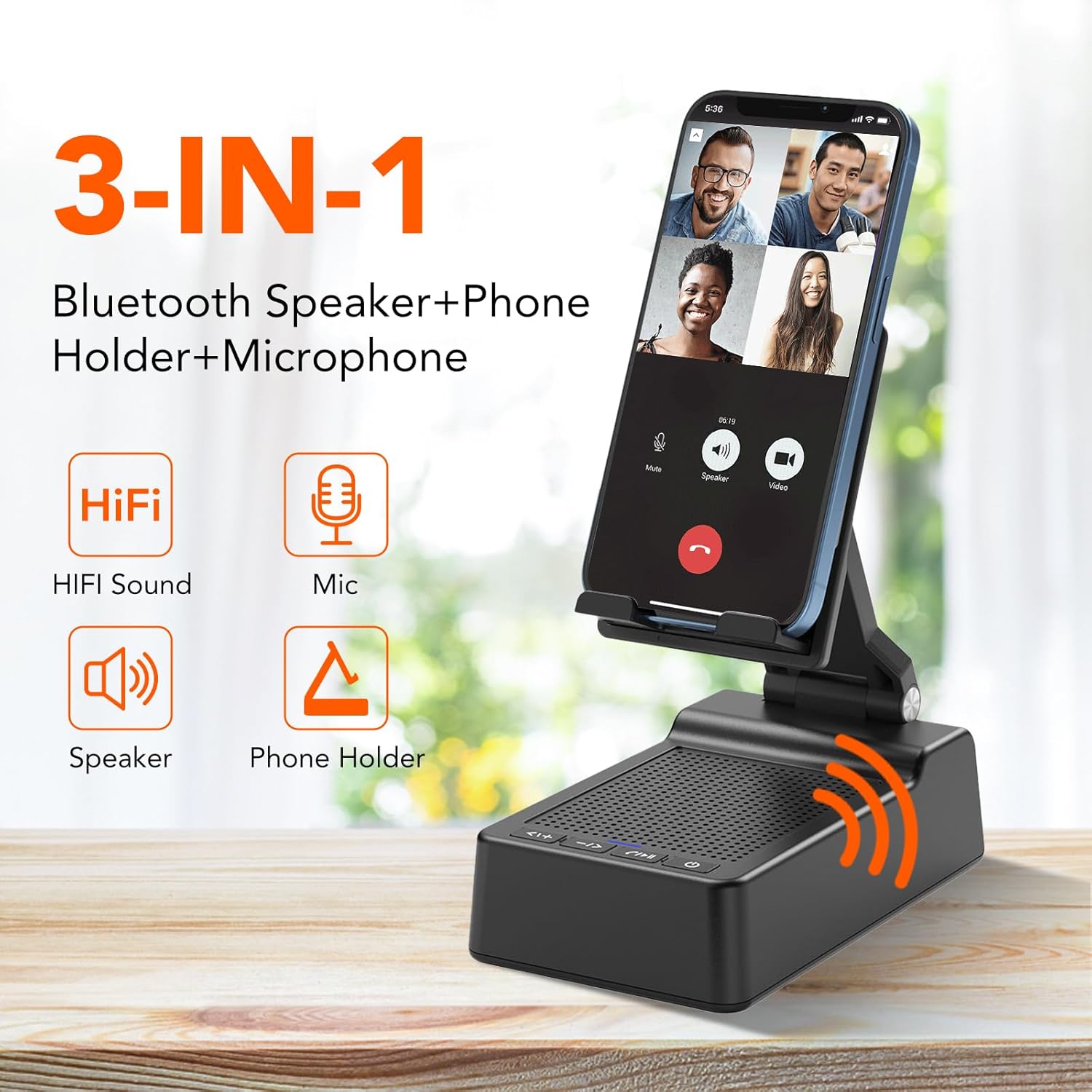
Image: The taopodo L37 device highlighting its 3-in-1 functionality: Bluetooth Speaker, Phone Holder, and Microphone.
പ്രധാന സവിശേഷതകൾ:
- സംയോജിത ഡിസൈൻ: Combines a cell phone stand with a Bluetooth speaker and microphone.
- വിശാലമായ അനുയോജ്യത: Supports most 4-13 inch smartphones, tablets, and e-readers with Bluetooth functionality.
- ക്രമീകരിക്കാവുന്ന Viewഇൻ ആംഗിൾ: Flexible design allows for multiple angle adjustments (90° to 145°) and height adjustments.
- സുസ്ഥിരവും ഈടുനിൽക്കുന്നതും: Constructed with high-quality materials, featuring a metal holder and anti-slip silicone pads for device security.
- ഉയർന്ന നിലവാരമുള്ള ശബ്ദം: Equipped with high-quality Bluetooth speakers for rich bass and clear audio.
- റീചാർജ് ചെയ്യാവുന്ന ബാറ്ററി: Offers up to 96 hours of battery life with a full charge in less than 3 hours.
- IPX7 വാട്ടർപ്രൂഫ്: Provides protection against water immersion.
ബോക്സിൽ എന്താണുള്ളത്:
- taopodo L37 Multifunctional Cell Phone Stand with Wireless Bluetooth Speaker
- USB-A to Type-C charger cable *1
- ഉപയോക്തൃ മാനുവൽ
സജ്ജമാക്കുക
1. ഉപകരണം ചാർജ് ചെയ്യുന്നു:
Before first use, fully charge the taopodo L37. Connect the provided USB-A to Type-C charger cable to the charging port on the device and a suitable USB power adapter (not included). The charging indicator light will show the charging status. A full charge typically takes less than 3 hours.

Image: The taopodo L37 device illustrating its rechargeable battery features, including up to 96 hours of battery life and quick charging.
2. പവർ ഓൺ/ഓഫ്:
- To power on, press and hold the Power ON/OFF button until the indicator light illuminates.
- To power off, press and hold the Power ON/OFF button again until the indicator light turns off.
3. ബ്ലൂടൂത്ത് ജോടിയാക്കൽ:
- Ensure the device is powered on and in pairing mode (the Bluetooth indicator light will typically flash).
- On your smartphone, tablet, or e-reader, navigate to the Bluetooth settings.
- ഇതിനായി തിരയുക available devices and select "taopodo L37" from the list.
- കണക്റ്റ് ചെയ്തുകഴിഞ്ഞാൽ, ബ്ലൂടൂത്ത് ഇൻഡിക്കേറ്റർ ലൈറ്റ് ഉറച്ചതായിത്തീരും, കൂടാതെ നിങ്ങൾക്ക് കേൾക്കാവുന്ന ഒരു സ്ഥിരീകരണം കേൾക്കാനും കഴിയും.
പ്രവർത്തന നിർദ്ദേശങ്ങൾ
1. സ്റ്റാൻഡ് ക്രമീകരിക്കൽ:
The taopodo L37 features an adjustable design for optimal viewing angles and height. The stand can be adjusted from 90° to 145° and includes multiple height settings. Gently adjust the hinges to achieve your desired position. The anti-slip silicone pads on the base and panel ensure stability for your device.
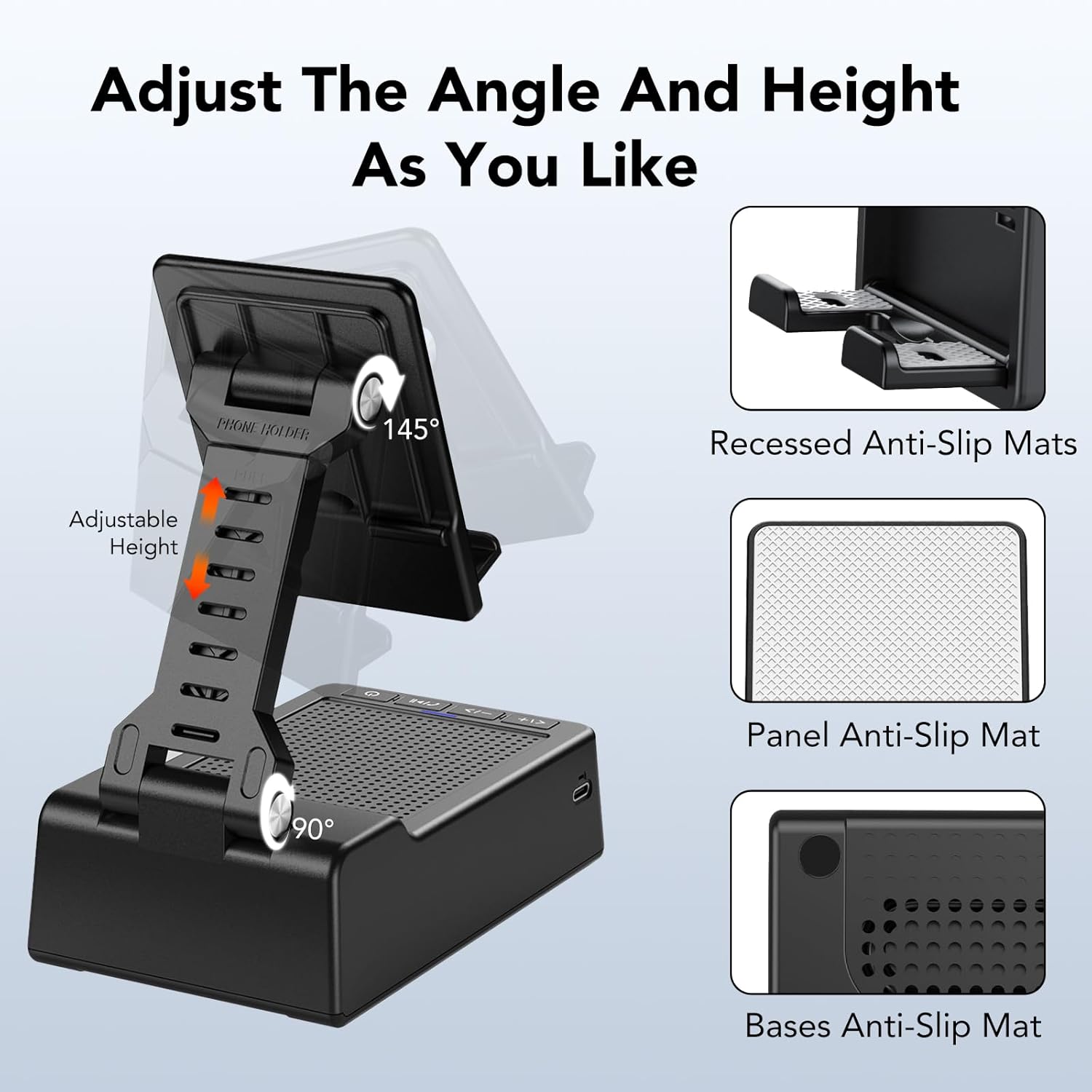
Image: The taopodo L37 stand demonstrating its adjustable angle (90° to 145°) and height features, along with recessed and panel anti-slip mats.
2. Using the Bluetooth Speaker:
After successful Bluetooth pairing, audio from your connected device will play through the taopodo L37 speaker. Use the control buttons on the device or your connected device to manage playback.
3. നിയന്ത്രണ ബട്ടണുകൾ:
The taopodo L37 features intuitive control buttons located on the front panel:

Image: A detailed diagram of the multi-function buttons on the taopodo L37, indicating their respective controls for volume, track selection, playback, call management, and power.
- Previous / VOL +: Short press for previous track, long press for volume up.
- Next / VOL -: Short press for next track, long press for volume down.
- Play/Pause / Answer/Hang up: Short press to play/pause music. Short press to answer an incoming call, long press to hang up.
- പവർ ഓൺ/ഓഫ്: ഉപകരണം ഓൺ അല്ലെങ്കിൽ ഓഫ് ചെയ്യാൻ അമർത്തിപ്പിടിക്കുക.
4. ഹാൻഡ്സ് ഫ്രീ കോളിംഗ്:
When a call comes in while connected via Bluetooth, press the Play/Pause / Answer/Hang up button to answer. The built-in microphone allows for hands-free communication. Press the button again to end the call.
മെയിൻ്റനൻസ്
1. വൃത്തിയാക്കൽ:
Wipe the device with a soft, dry cloth. Do not use abrasive cleaners, solvents, or strong chemicals, as these may damage the surface or internal components.
2. Water Resistance (IPX7):
The taopodo L37 is IPX7 waterproof, meaning it can withstand immersion in water up to 1 meter for 30 minutes. While it offers protection against splashes and brief immersion, it is not recommended for prolonged underwater use. Ensure the charging port cover is securely closed before exposure to water.

Image: The taopodo L37 in a kitchen and bathroom setting, demonstrating its IPX7 waterproof capability for use in various environments.
3. സംഭരണം:
Store the device in a cool, dry place away from direct sunlight and extreme temperatures. When not in use for extended periods, charge the battery periodically to maintain its health.
ട്രബിൾഷൂട്ടിംഗ്
- ഉപകരണം പവർ ഓൺ ആകുന്നില്ല: ബാറ്ററി ചാർജ് ചെയ്തിട്ടുണ്ടെന്ന് ഉറപ്പാക്കുക. ചാർജിംഗ് കേബിൾ ബന്ധിപ്പിച്ച് വീണ്ടും ശ്രമിക്കുക.
- ബ്ലൂടൂത്ത് വഴി ബന്ധിപ്പിക്കാൻ കഴിയില്ല:
- Ensure the taopodo L37 is powered on and in pairing mode.
- Make sure Bluetooth is enabled on your source device (phone/tablet).
- ഉപകരണങ്ങൾ പരസ്പരം അടുത്തേക്ക് നീക്കുക.
- നിങ്ങളുടെ ഫോണിന്റെ ബ്ലൂടൂത്ത് ക്രമീകരണങ്ങളിൽ ഉപകരണം മറന്ന് വീണ്ടും ജോടിയാക്കാൻ ശ്രമിക്കുക.
- ശബ്ദമില്ല അല്ലെങ്കിൽ കുറഞ്ഞ ശബ്ദം:
- Check the volume levels on both the taopodo L37 and your connected device.
- Ensure the device is properly connected via Bluetooth.
- വ്യത്യസ്തമായ ഒരു ഓഡിയോ ഉറവിടം പ്ലേ ചെയ്യാൻ ശ്രമിക്കുക.
- മോശം ശബ്ദ നിലവാരം: Ensure there are no obstructions between the taopodo L37 and your connected device. Move away from potential sources of interference (e.g., Wi-Fi routers, other Bluetooth devices).
- സ്റ്റാൻഡ് സ്ഥിരതയുള്ളതല്ല: Ensure your device is placed correctly on the stand. Verify that the anti-slip silicone pads are clean and intact.
സ്പെസിഫിക്കേഷനുകൾ
| ഫീച്ചർ | സ്പെസിഫിക്കേഷൻ |
|---|---|
| മോഡലിൻ്റെ പേര് | L37 |
| മെറ്റീരിയൽ | Plastic + Non-slip Silicone |
| ഉൽപ്പന്ന അളവുകൾ | 4"D x 1.9"W x 2.5"H |
| ഇനത്തിൻ്റെ ഭാരം | 12.8 ഔൺസ് (362 ഗ്രാം) |
| നിറം | കറുപ്പ് |
| സ്പീക്കർ തരം | 3D |
| സ്പീക്കർ പരമാവധി ഔട്ട്പുട്ട് പവർ | 10 വാട്ട്സ് |
| ഓഡിയോ put ട്ട്പുട്ട് മോഡ് | സ്റ്റീരിയോ |
| വയർലെസ് കമ്മ്യൂണിക്കേഷൻ ടെക്നോളജി | ബ്ലൂടൂത്ത് |
| ബ്ലൂടൂത്ത് പതിപ്പ് | 5.3 |
| പവർ ഉറവിടം | ബാറ്ററി പവർ |
| നിയന്ത്രണ രീതി | സ്പർശിക്കുക |
| വാട്ടർപ്രൂഫ് ആണ് | IPX7 |
| അനുയോജ്യമായ ഉപകരണങ്ങൾ | സ്മാർട്ട്ഫോണുകൾ, ടാബ്ലെറ്റുകൾ |
| മൗണ്ടിംഗ് തരം | ടേബിൾടോപ്പ് മൗണ്ട് |
വാറൻ്റി വിവരങ്ങൾ
The taopodo L37 Multifunctional Cell Phone Stand with Wireless Bluetooth Speaker comes with a full warranty. Please refer to the product packaging or contact customer support for specific details regarding the warranty period and coverage.
പിന്തുണ
For further assistance, technical support, or warranty claims, please refer to the contact information provided on the product packaging or the official taopodo webസൈറ്റ്. വാറന്റി സേവനങ്ങൾക്കുള്ള വാങ്ങിയതിന്റെ തെളിവായി നിങ്ങളുടെ വാങ്ങൽ രസീത് സൂക്ഷിക്കുക.


