1. ആമുഖം
This manual provides essential information for setting up, operating, maintaining, and troubleshooting your HONOR 200 5G Smartphone. Please read this manual carefully to ensure proper use and to maximize the performance of your device.
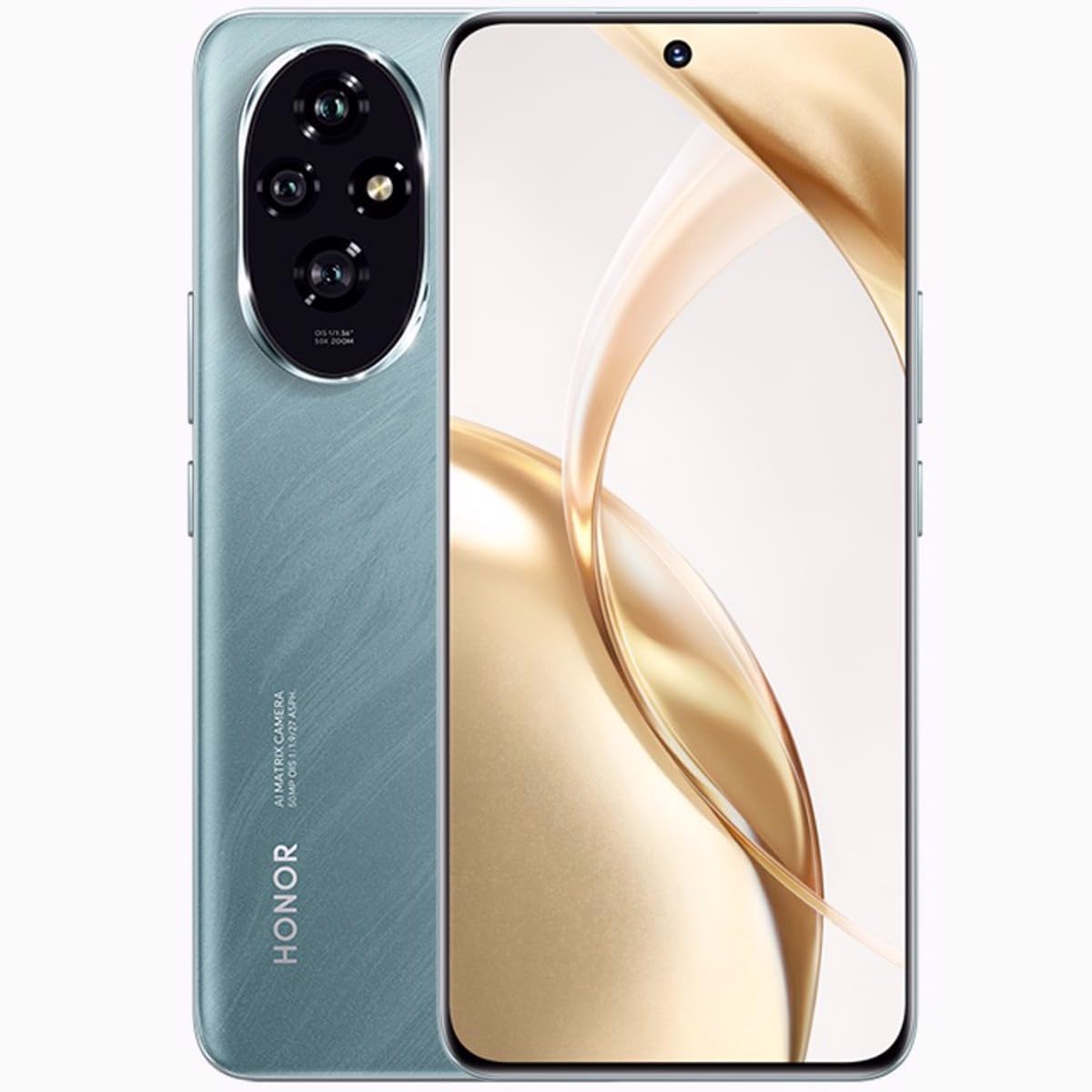
ചിത്രം 1.1: മുൻഭാഗം view of the HONOR 200 5G Smartphone in Emerald Green.
2. ബോക്സിൽ എന്താണുള്ളത്?
നിങ്ങളുടെ ഉൽപ്പന്ന പാക്കേജിൽ എല്ലാ ഇനങ്ങളും ഉണ്ടെന്ന് ഉറപ്പാക്കുക:
- HONOR 200 5G സ്മാർട്ട്ഫോൺ
- USB കേബിൾ
- ദ്രുത ആരംഭ ഗൈഡ് (പ്രദേശത്തിനനുസരിച്ച് വ്യത്യാസപ്പെടാം)
- Safety Information (may vary by region)
3. സജ്ജീകരണം
3.1. സിം കാർഡ് ഇൻസ്റ്റാളേഷൻ
The HONOR 200 supports Dual SIM functionality. Ensure your device is powered off before inserting or removing SIM cards.
- നിങ്ങളുടെ ഉപകരണത്തിന്റെ വശത്ത് സിം കാർഡ് ട്രേ കണ്ടെത്തുക.
- Insert the SIM ejector tool (not included) into the small hole next to the tray and push gently until the tray pops out.
- Place your Nano-SIM cards into the designated slots on the tray, ensuring the gold contacts face down and the cut corner aligns correctly.
- Carefully push the SIM card tray back into the slot until it is flush with the device.
3.2. പ്രാരംഭ പവർ ഓണും സജ്ജീകരണവും
To power on your device, press and hold the Power button until the HONOR logo appears. Follow the on-screen instructions to complete the initial setup, including language selection, Wi-Fi connection, Google account setup, and security settings.
3.3 ബാറ്ററി ചാർജ് ചെയ്യുന്നു
Connect the provided USB cable to the charging port on your phone and the other end to a compatible power adapter (not included) or a computer's USB port. The device features a 5200mAh non-removable battery. For optimal performance, use HONOR-approved chargers and cables.
4. നിങ്ങളുടെ ഉപകരണം പ്രവർത്തിപ്പിക്കുന്നു
4.1. ഡിസ്പ്ലേയും നാവിഗേഷനും
The HONOR 200 features a 6.7-inch OLED display with 1200 x 2664 pixels resolution and 1 billion colors. Navigate the interface using touch gestures: tap to select, swipe to scroll, pinch to zoom.
4.2. ക്യാമറ ഉപയോഗം
നിങ്ങളുടെ ഉപകരണത്തിൽ വൈവിധ്യമാർന്ന ക്യാമറ സിസ്റ്റം സജ്ജീകരിച്ചിരിക്കുന്നു:
- പിൻ ക്യാമറകൾ: 50 MP (main), 50 MP, 12 MP
- മുൻ ക്യാമറ: 50 എം.പി
Open the Camera app from the home screen or app drawer. Tap the shutter button to take a photo. Swipe left or right to switch between different camera modes (e.g., Photo, Video, Portrait).
4.3. കണക്റ്റിവിറ്റി
The HONOR 200 supports various connectivity options:
- സെല്ലുലാർ നെറ്റ്വർക്കുകൾ: GSM, 3G, 4G LTE, 5G (SA/NSA + ESIM). Ensure compatibility with your network provider.
- വൈഫൈ: ഇന്റർനെറ്റ് ആക്സസ്സിനായി വയർലെസ് നെറ്റ്വർക്കുകളിലേക്ക് കണക്റ്റുചെയ്യുക.
- ബ്ലൂടൂത്ത്: ഹെഡ്ഫോണുകൾ അല്ലെങ്കിൽ സ്പീക്കറുകൾ പോലുള്ള വയർലെസ് ആക്സസറികളുമായി ജോടിയാക്കുക.
- ജിപിഎസ്: Utilize for location services and navigation.
4.4. ഡ്യുവൽ സിം പ്രവർത്തനം
With Dual SIM support, you can use two different phone numbers or network plans simultaneously. Manage your SIM preferences for calls, messages, and mobile data in the Settings menu under 'Mobile network' or 'SIM management'.
5. പരിപാലനം
5.1. ബാറ്ററി പരിചരണം
ബാറ്ററി ആയുസ്സ് വർദ്ധിപ്പിക്കാൻ:
- തീവ്രമായ താപനില ഒഴിവാക്കുക.
- ബാറ്ററി ഇടയ്ക്കിടെ പൂർണ്ണമായും ഡിസ്ചാർജ് ചെയ്യരുത്.
- Use the provided or HONOR-approved charging accessories.
- Optimize battery settings in the device's 'Battery' menu.
5.2. നിങ്ങളുടെ ഉപകരണം വൃത്തിയാക്കൽ
നിങ്ങളുടെ ഫോണിന്റെ സ്ക്രീനും ബോഡിയും വൃത്തിയാക്കാൻ മൃദുവായ, ലിന്റ് രഹിത തുണി ഉപയോഗിക്കുക. കഠിനമായ രാസവസ്തുക്കളോ ഉരച്ചിലുകളോ ഉള്ള വസ്തുക്കൾ ഉപയോഗിക്കുന്നത് ഒഴിവാക്കുക. ഉപകരണത്തിൽ അമിതമായ ഈർപ്പം ഉണ്ടാകരുത്.
5.3. സോഫ്റ്റ്വെയർ അപ്ഡേറ്റുകൾ
Regularly check for and install software updates to ensure your device has the latest features, security patches, and performance improvements. You can check for updates in 'Settings' > 'System & updates' > 'Software update'.
6. പ്രശ്നപരിഹാരം
6.1. ഉപകരണം ഓണാക്കുന്നില്ല
- Ensure the battery is charged. Connect the device to a charger for at least 10 minutes before attempting to power on again.
- റീസ്റ്റാർട്ട് ചെയ്യാൻ പവർ ബട്ടൺ 10-15 സെക്കൻഡ് അമർത്തിപ്പിടിക്കുക.
6.2. നെറ്റ്വർക്ക് കണക്റ്റിവിറ്റി പ്രശ്നങ്ങൾ
- നിങ്ങളുടെ സിം കാർഡ് ശരിയായി ചേർത്തിട്ടുണ്ടോ എന്ന് പരിശോധിക്കുക.
- Verify that mobile data is enabled in your device settings.
- നിങ്ങളുടെ ഉപകരണം പുനരാരംഭിക്കുക.
- Contact your network provider to confirm service availability in your area.
6.3. ആപ്പുകൾ ക്രാഷാകുകയോ മരവിപ്പിക്കുകയോ ചെയ്യുന്നു
- ആപ്പ് അടച്ച് വീണ്ടും തുറക്കുക.
- Clear the app's cache and data in 'Settings' > 'Apps' > [App Name] > 'Storage'.
- ആപ്പ് അതിന്റെ ഏറ്റവും പുതിയ പതിപ്പിലേക്ക് അപ്ഡേറ്റ് ചെയ്തിട്ടുണ്ടെന്ന് ഉറപ്പാക്കുക.
6.4. ഫാക്ടറി റീസെറ്റ്
If persistent issues occur, you may consider a factory reset. മുന്നറിയിപ്പ്: This will erase all data on your device. Back up important data before proceeding. Go to 'Settings' > 'System & updates' > 'Reset' > 'Reset phone'.
7 സ്പെസിഫിക്കേഷനുകൾ
| ഫീച്ചർ | വിശദാംശങ്ങൾ |
|---|---|
| മോഡലിൻ്റെ പേര് | ബഹുമതി 200 |
| ഓപ്പറേറ്റിംഗ് സിസ്റ്റം | ആൻഡ്രോയിഡ് 14 |
| പ്രോസസ്സർ | Qualcomm SM7550-AB Snapdragon 7 Gen 3 (4 nm), Octa-core (1x2.63 GHz Cortex-A715 & 4x2.4 GHz Cortex-A715 & 3x1.8 GHz Cortex-A510) |
| റാം | 12 ജിബി |
| ആന്തരിക സംഭരണം | 512 ജിബി |
| പ്രദർശിപ്പിക്കുക | 6.7 inches OLED, 1B colors, 1200 x 2664 pixels resolution |
| പിൻ ക്യാമറ | 50 MP, 50 MP, 12 MP |
| മുൻ ക്യാമറ | 50 എം.പി |
| ബാറ്ററി ശേഷി | 5200 mAh (നീക്കം ചെയ്യാനാവാത്തത്) |
| അളവുകൾ (H x W x D) | 161.5 x 74.6 x 7.7 മിമി (6.36 x 2.94 x 0.30 ഇഞ്ച്) |
| ഭാരം | 187 ഗ്രാം (6.60 ഔൺസ്) |
| കണക്റ്റിവിറ്റി | GSM, 3G, 4G, 5G, GPS |
| പ്രത്യേക സവിശേഷതകൾ | ഡ്യുവൽ സിം |
8. വാറൻ്റിയും പിന്തുണയും
Your HONOR 200 5G Smartphone is covered by a limited warranty. Please refer to the warranty card included in your product package or visit the official HONOR webനിങ്ങളുടെ പ്രദേശത്തിന് പ്രത്യേകമായുള്ള വിശദമായ വാറന്റി നിബന്ധനകൾക്കും വ്യവസ്ഥകൾക്കും സൈറ്റ് സന്ദർശിക്കുക.
For technical support, service inquiries, or further assistance, please visit the official HONOR support webസൈറ്റിൽ ബന്ധപ്പെടുക അല്ലെങ്കിൽ അവരുടെ ഉപഭോക്തൃ സേവനവുമായി ബന്ധപ്പെടുക. വാറന്റി ക്ലെയിമുകൾക്കായി നിങ്ങളുടെ വാങ്ങിയതിന്റെ തെളിവ് സൂക്ഷിക്കുക.
Official HONOR Webസൈറ്റ്: https://www.hihonor.com/global/support/


