ആമുഖം
Thank you for choosing the Nacon PCCH-380 Ergonomic Gaming Chair. This manual provides essential information for the safe and effective use of your new chair. Please read these instructions carefully before assembly and use, and retain them for future reference.
സുരക്ഷാ വിവരങ്ങൾ
മുന്നറിയിപ്പ്:
- Do not use the chair for extended periods without taking adequate breaks.
- Always use the height adjustment function safely and follow the manufacturer's instructions to prevent injuries.
- ഉപയോഗിക്കുന്നതിന് മുമ്പ് എല്ലാ ഘടകങ്ങളും സുരക്ഷിതമായി ഉറപ്പിച്ചിട്ടുണ്ടെന്ന് ഉറപ്പാക്കുക.
- കസേരയിൽ നിൽക്കുകയോ സ്റ്റെപ്പ് സ്റ്റൂൾ ആയി ഉപയോഗിക്കുകയോ ചെയ്യരുത്.
- അസംബ്ലി സമയത്ത് കുട്ടികളെയും വളർത്തുമൃഗങ്ങളെയും കസേരയിൽ നിന്ന് അകറ്റി നിർത്തുക.
ഉൽപ്പന്നം കഴിഞ്ഞുview
The Nacon PCCH-380 is an ergonomic gaming chair designed for comfort and support during long sessions. It features 2D adjustable armrests, a lumbar cushion, and a reclinable backrest.
പ്രധാന സവിശേഷതകൾ:
- Ergonomic design for M-L users.
- 2D adjustable armrests.
- Adjustable lumbar cushion.
- Reclinable backrest up to 135°.
- Textile fabric in dark grey.
- 5-star base with smooth-rolling wheels.
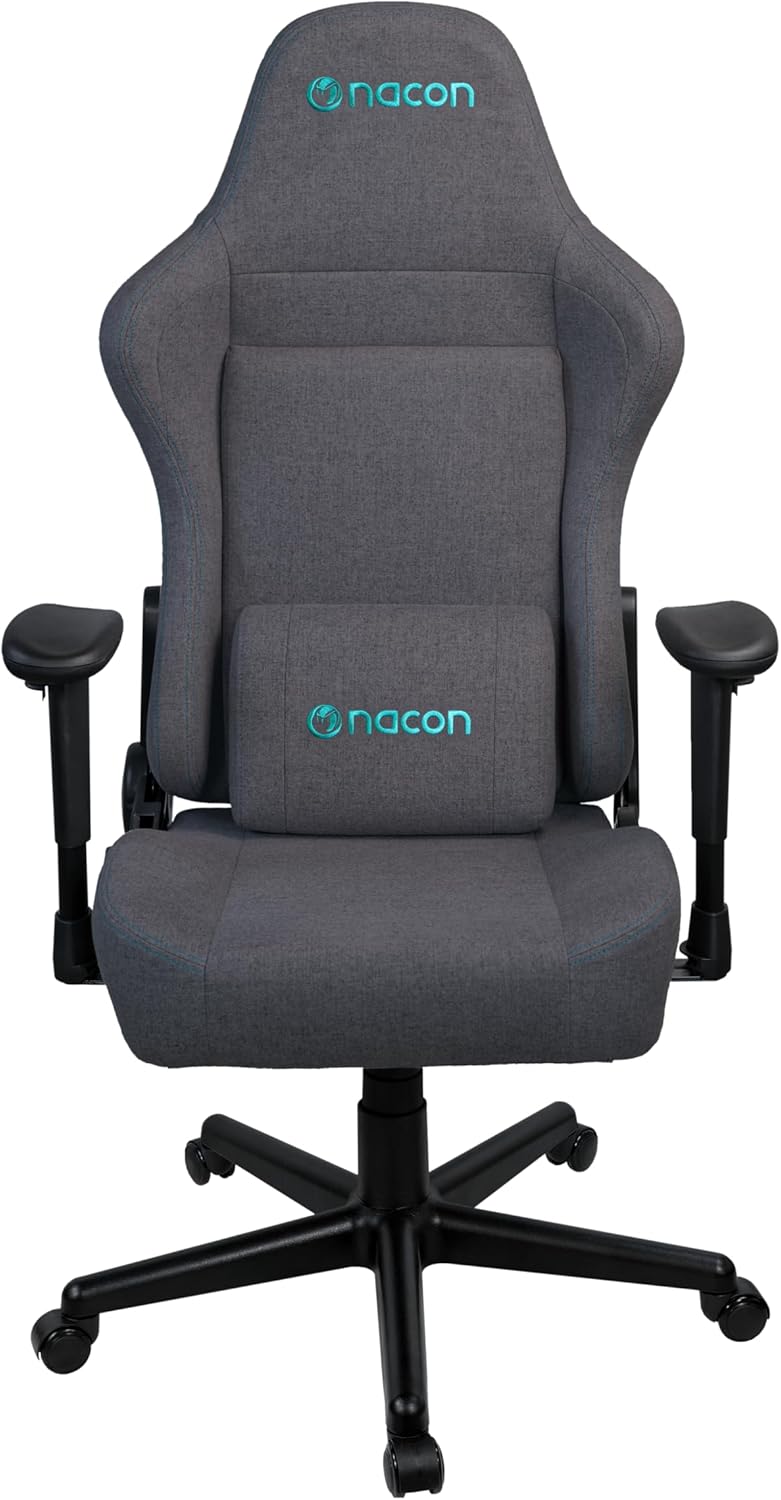
ചിത്രം 1: മുൻഭാഗം view of the Nacon PCCH-380 Ergonomic Gaming Chair in dark grey.

ചിത്രം 2: പിന്നിലേക്ക് view of the Nacon PCCH-380 Ergonomic Gaming Chair, highlighting the backrest design.
അസംബ്ലി നിർദ്ദേശങ്ങൾ
The Nacon PCCH-380 gaming chair requires assembly. Please follow the detailed instructions provided in the separate assembly guide included with your product packaging. Ensure all parts are present before beginning assembly.
പൊതുസമ്മേളന ഘട്ടങ്ങൾ:
- എല്ലാ ഘടകങ്ങളും അൺപാക്ക് ചെയ്ത് പാർട്സ് ലിസ്റ്റുമായി താരതമ്യം ചെയ്യുക.
- Attach the wheels to the 5-star base.
- ഗ്യാസ് ലിഫ്റ്റ് സിലിണ്ടർ അടിത്തറയുടെ മധ്യഭാഗത്ത് തിരുകുക.
- Attach the seat mechanism to the bottom of the seat.
- Secure the backrest to the seat assembly.
- Install the 2D armrests.
- കൂട്ടിച്ചേർത്ത കസേര ഗ്യാസ് ലിഫ്റ്റ് സിലിണ്ടറിൽ വയ്ക്കുക.
- Attach the lumbar cushion as desired.

Figure 3: Packaging box for the Nacon PCCH-380 Gaming Chair, indicating assembly is required.
പ്രവർത്തന നിർദ്ദേശങ്ങൾ
Your Nacon PCCH-380 gaming chair offers several adjustment options to customize your seating experience for maximum comfort and ergonomic support.
1. ഉയര ക്രമീകരണം:
To adjust the chair's height, locate the lever on the right side beneath the seat. While seated, pull the lever up to lower the chair. To raise the chair, stand up and pull the lever up. Release the lever at your desired height.
2. Backrest Recline:
The backrest can be reclined up to 135 degrees. Locate the recline lever on the left side of the chair. Pull the lever up and lean back to your desired angle. Release the lever to lock the backrest in position. To return to an upright position, pull the lever and lean forward slightly.

Figure 4: The Nacon PCCH-380 Gaming Chair shown in a reclined position, demonstrating its flexibility.
3. Armrest Adjustment (2D):
The 2D armrests can be adjusted in two dimensions: height and rotation. Use the buttons or levers on the armrests to adjust them to your preferred height and angle for optimal arm and wrist support.
4. Lumbar Cushion:
The included lumbar cushion provides additional support for your lower back. Position it along the backrest to align with the natural curve of your spine for enhanced comfort. The cushion can be removed if not desired.

ചിത്രം 5: ക്ലോസപ്പ് view of the adjustable lumbar cushion on the Nacon PCCH-380 Gaming Chair.
5. Swivel Function:
The chair features a 360-degree swivel function, allowing for easy movement and access to different areas of your workspace without needing to reposition the entire chair.
പരിപാലനവും പരിചരണവും
Proper maintenance will ensure the longevity and appearance of your Nacon PCCH-380 gaming chair.
വൃത്തിയാക്കൽ:
- For general cleaning, wipe the textile fabric with a damp തുണി.
- For stubborn stains, use a mild fabric cleaner and follow the product's instructions. Test on an inconspicuous area first.
- Avoid using harsh chemicals or abrasive cleaners, as these can damage the fabric and components.
- Regularly vacuum the chair to remove dust and debris.

ചിത്രം 6: വിശദമായി view of the dark grey textile fabric used on the Nacon PCCH-380 Gaming Chair.
പൊതു പരിചരണം:
- എല്ലാ സ്ക്രൂകളും ബോൾട്ടുകളും ഇറുകിയതാണെന്ന് ഉറപ്പാക്കാൻ ഇടയ്ക്കിടെ പരിശോധിക്കുക. ആവശ്യമെങ്കിൽ വീണ്ടും മുറുക്കുക.
- കസേര മങ്ങുന്നത് തടയാൻ ദീർഘനേരം നേരിട്ട് സൂര്യപ്രകാശം ഏൽക്കുന്നത് ഒഴിവാക്കുക.
- Do not place hot items directly on the chair's surface.
ട്രബിൾഷൂട്ടിംഗ്
If you encounter any issues with your Nacon PCCH-380 gaming chair, refer to the following common problems and solutions:
1. Chair does not adjust height:
- Ensure the height adjustment lever is fully engaged.
- Check if the gas lift cylinder is properly installed and not damaged.
2. Backrest does not recline or lock:
- Verify that the recline lever is functioning correctly and not obstructed.
- Inspect the recline mechanism for any visible damage or loose connections.
3. Wheels are not rolling smoothly:
- Check for any debris (hair, dust, etc.) caught in the wheels and clean them.
- Ensure the wheels are securely attached to the base.
ഈ പരിഹാരങ്ങൾ പ്രശ്നം പരിഹരിക്കുന്നില്ലെങ്കിൽ, ദയവായി ഉപഭോക്തൃ പിന്തുണയുമായി ബന്ധപ്പെടുക.
സ്പെസിഫിക്കേഷനുകൾ
| ഫീച്ചർ | വിശദാംശങ്ങൾ |
|---|---|
| മോഡൽ നമ്പർ | പിസിഎച്ച്-380 |
| ബ്രാൻഡ് | നാക്കൺ |
| നിറം | ഇരുണ്ട ചാരനിറം |
| മെറ്റീരിയൽ | Textile Fabric |
| ഉൽപ്പന്ന അളവുകൾ (D x W x H) | 58 x 57 x 121-131 സെ.മീ |
| ഭാരം | 18 കി.ഗ്രാം |
| പരമാവധി ഉപയോക്തൃ ഭാരം | 100 കി.ഗ്രാം |
| ശുപാർശ ചെയ്യുന്ന ഉപയോക്തൃ ഉയരം | 170 സെ.മീ വരെ |
| ആംറെസ്റ്റുകൾ | 2D ക്രമീകരിക്കാവുന്നത് |
| ചരിഞ്ഞ ആംഗിൾ | 135° വരെ |
| ലംബർ സപ്പോർട്ട് | Adjustable Lumbar Cushion Included |
| അസംബ്ലി ആവശ്യമാണ് | അതെ |
വാറൻ്റിയും പിന്തുണയും
For warranty information and customer support, please refer to the documentation provided with your purchase or contact your retailer. You can also visit the official NACON webകൂടുതൽ സഹായത്തിനുള്ള സൈറ്റ്.
NACON is committed to providing high-quality products and support. If you have any questions or require service, please do not hesitate to reach out.


