1. ആമുഖം
വാങ്ങിയതിന് നന്ദി.asing the Sofirn HS21 and D25S headlamps. These headlamps are designed for various outdoor activities, offering reliable illumination and convenient features. This manual provides detailed instructions for the safe and effective use, setup, operation, and maintenance of your new headlamps. Please read this manual thoroughly before use and retain it for future reference.
2. സുരക്ഷാ നിർദ്ദേശങ്ങൾ
- Do not shine the light directly into eyes. The powerful beam can cause temporary vision impairment or permanent eye damage.
- കുട്ടികൾക്ക് ലഭ്യമാകാതെ സൂക്ഷിക്കുക.
- ഹെഡ്ഡൽ ഡിസ്അസംബ്ലിംഗ് ചെയ്യരുത്amp. This may damage the device and void the warranty.
- Use only the recommended battery types. Improper battery use can lead to fire, explosion, or leakage.
- തല വെളിവാക്കുന്നത് ഒഴിവാക്കുകamp തീവ്രമായ താപനിലകളിലേക്കോ ദീർഘനേരം നേരിട്ട് സൂര്യപ്രകാശത്തിലേക്കോ.
- Ensure the USB-C charging port cover is securely closed when not charging to maintain water resistance.
3. പാക്കേജ് ഉള്ളടക്കം
- 1 x Sofirn HS21 Headlamp
- 1 x Sofirn D25S Headlamp
- 2 x ഹെഡ്ബാൻഡ്സ്
- 2 x USB-C ചാർജിംഗ് കേബിളുകൾ
- 2 x Rechargeable Batteries (pre-installed or separate)
- 1 x ഉപയോക്തൃ മാനുവൽ
4. ഉൽപ്പന്നം കഴിഞ്ഞുview
4.1 Sofirn HS21 Headlamp
The Sofirn HS21 is a versatile headlamp featuring a combination of spotlight, floodlight, and red light. It is equipped with a convenient rotary switch for easy mode selection and offers a wide 130° rotation adjustment for optimal illumination angle.

Image 1: Sofirn HS21 Headlamp showing its various light modes including red light, spotlight, and floodlight.

Image 2: The Sofirn HS21 headlamp demonstrating its 130-degree rotation capability for adjustable light direction.
4.2 Sofirn D25S Headlamp
The Sofirn D25S is a compact and powerful headlamp utilizing an SST40 LED, offering multiple brightness levels. It features a hidden USB-C charging port for convenient recharging and a simple user interface with memory mode.

Image 3: Sofirn D25S Headlamp highlighting its comfortable switch and simple user interface.
5. സജ്ജീകരണം
5.1 ബാറ്ററി ഇൻസ്റ്റാളേഷൻ
Both HS21 and D25S headlamps typically come with batteries pre-installed. If not, or if replacing batteries:
- ഹെഡ്ലിന്റെ ടെയിൽ ക്യാപ്പ് അഴിക്കുകamp ശരീരം.
- Insert the rechargeable battery with the positive (+) terminal facing towards the head of the lamp.
- ശരിയായ സമ്പർക്കവും ജല പ്രതിരോധവും ഉറപ്പാക്കാൻ ടെയിൽ ക്യാപ്പ് വീണ്ടും മുറുകെ ഉറപ്പിക്കുക.
5.2 ചാർജിംഗ്
രണ്ടും തലamps feature a built-in USB-C charging port.
For HS21:
- ഹെഡ്ലിന്റെ വശത്ത് USB-C ചാർജിംഗ് പോർട്ട് കണ്ടെത്തുക.amp ശരീരം.
- Gently lift the protective rubber cover to expose the port.
- നൽകിയിരിക്കുന്ന USB-C കേബിൾ ഹെഡ്ലുമായി ബന്ധിപ്പിക്കുകamp and to a USB power source (e.g., wall adapter, power bank, computer).
- The indicator light will show red during charging and turn green when fully charged.
- Once charging is complete, securely close the rubber cover to protect the port from dust and water.
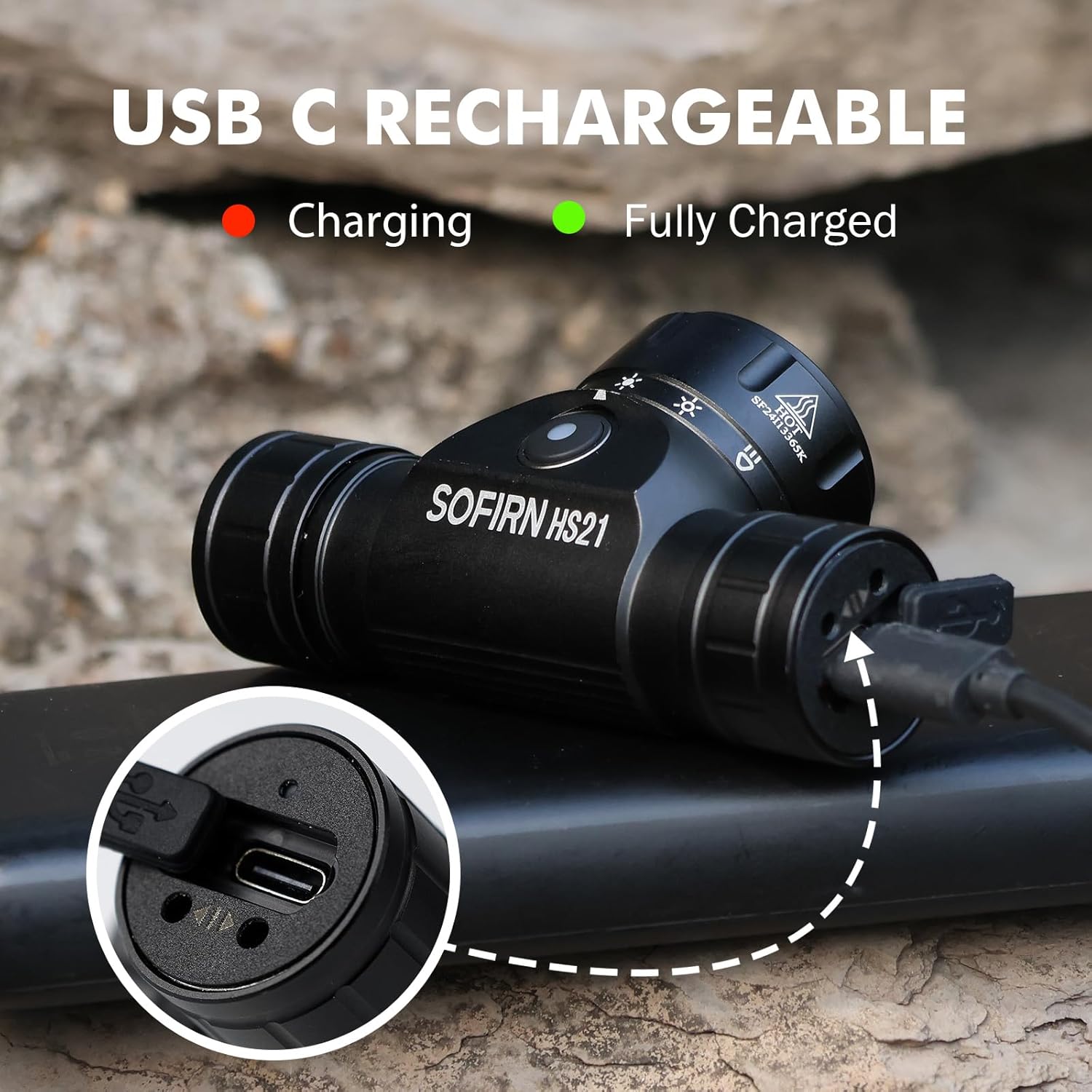
Image 4: Sofirn HS21 Headlamp connected to a USB-C charging cable, showing the charging indicator light.
For D25S:
- Unscrew the head of the D25S headlamp to reveal the hidden USB-C charging port.
- നൽകിയിരിക്കുന്ന USB-C കേബിൾ ഹെഡ്ലുമായി ബന്ധിപ്പിക്കുകamp and to a USB power source.
- The indicator light will show red during charging and turn green when fully charged.
- After charging, screw the head back on tightly to ensure water resistance.

Image 5: Sofirn D25S Headlamp with its head unscrewed, revealing the built-in USB-C charging port.
6. പ്രവർത്തന നിർദ്ദേശങ്ങൾ
6.1 Sofirn HS21 Headlamp ഓപ്പറേഷൻ
The HS21 features a rotary switch for easy mode selection and a separate power button.
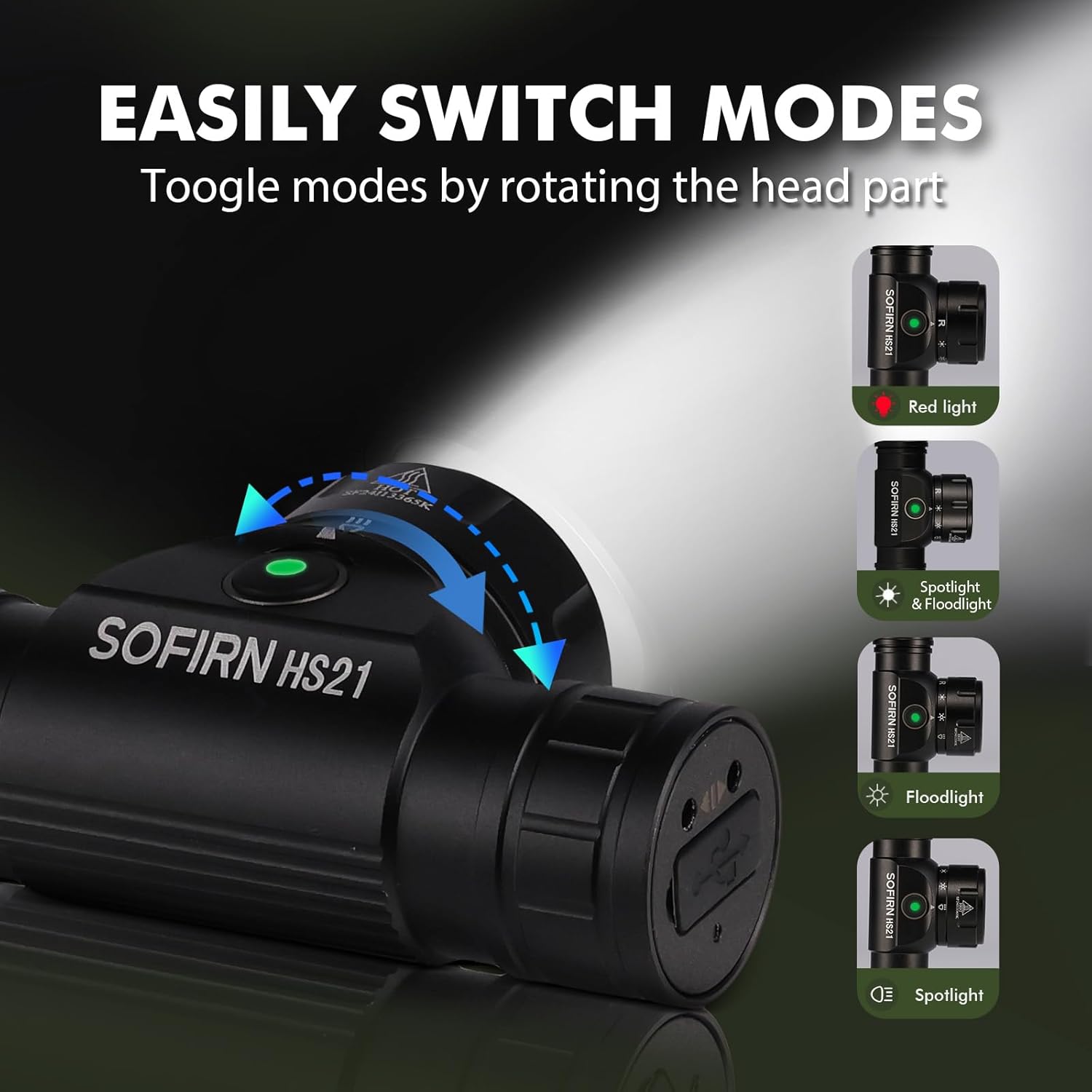
Image 6: Illustration of the Sofirn HS21's rotary switch mechanism for changing light modes.
- പവർ ഓൺ/ഓഫ്: ഹെഡ്ൽ തിരിക്കാൻ പവർ ബട്ടൺ ഒരിക്കൽ അമർത്തുക.amp ഓൺ അല്ലെങ്കിൽ ഓഫ്.
- മോഡ് തിരഞ്ഞെടുക്കൽ: Rotate the head part of the headlamp to cycle through the main light modes: Red Light, Spotlight, Floodlight, and Spotlight + Floodlight (combined).
- തെളിച്ച ക്രമീകരണം: While a mode is active, press and hold the power button to cycle through brightness levels (Low, Medium, High). Release the button at your desired brightness.
- Red Light Activation: Rotate to the red light setting. Press and hold the power button for additional red light modes (e.g., red strobe, red beacon).
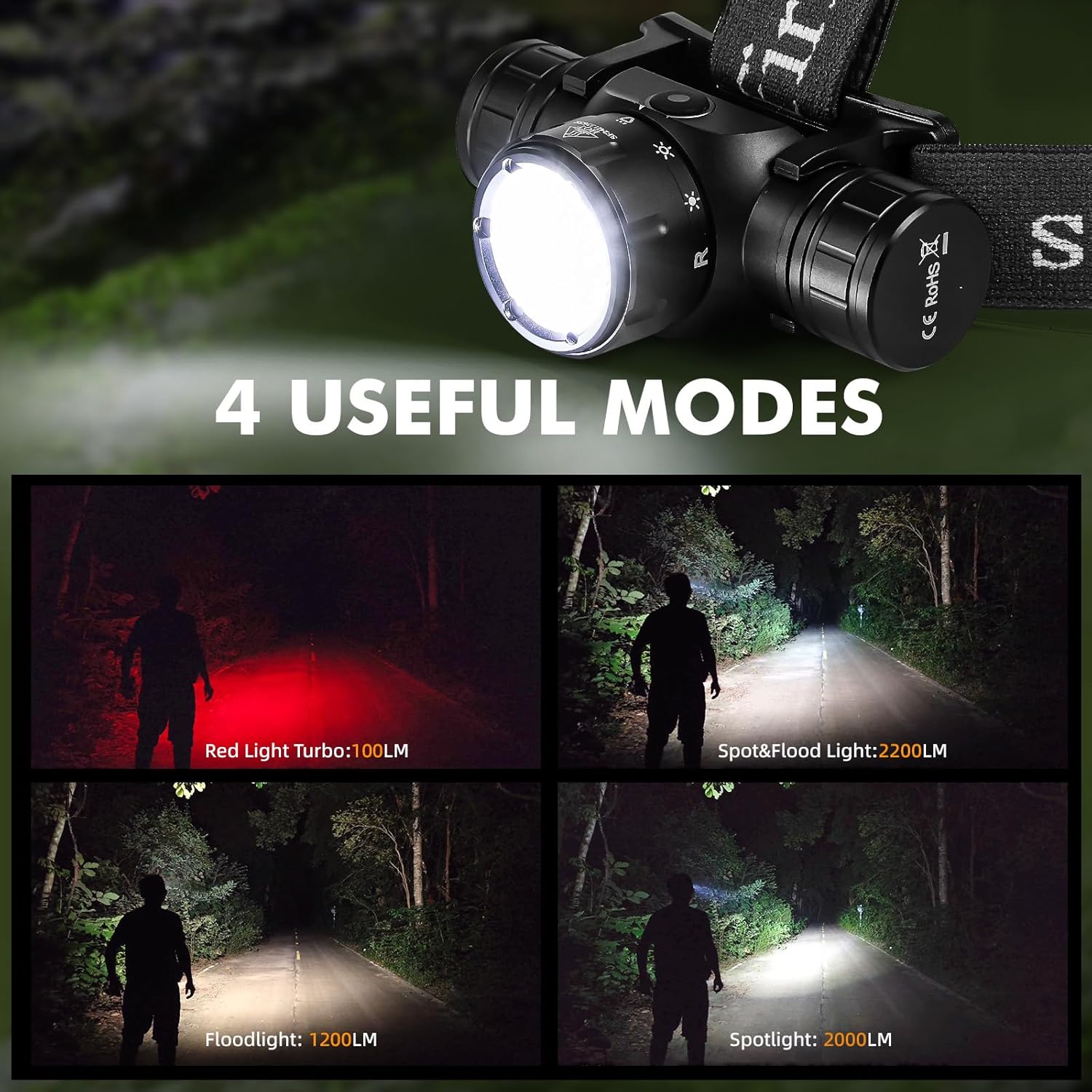
Image 7: The Sofirn HS21 headlamp displaying its four primary light modes: Red Light, Spot & Flood, Floodlight, and Spotlight.
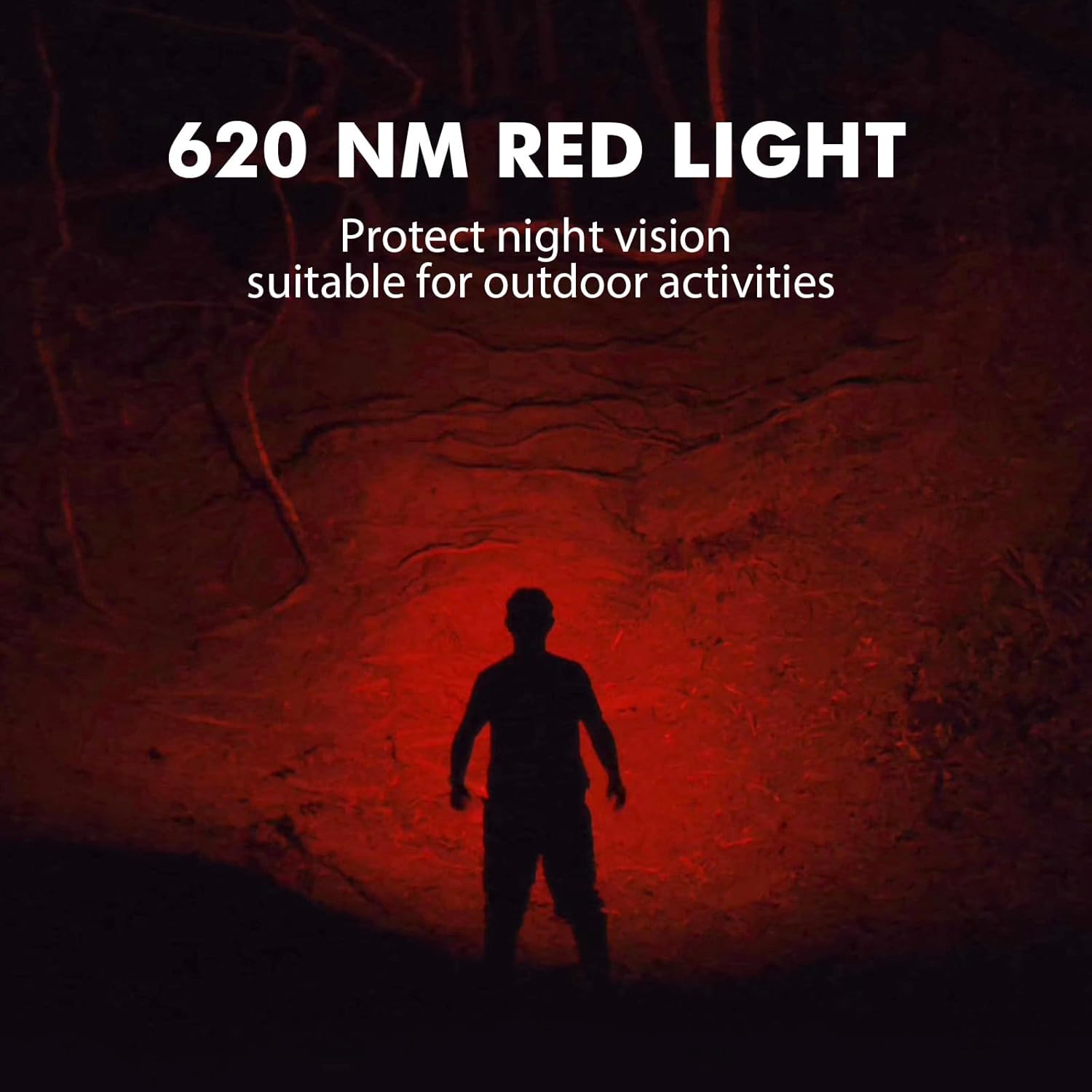
Image 8: The Sofirn HS21 headlamp emitting a 620 NM red light, suitable for preserving night vision.
6.2 Sofirn D25S Headlamp ഓപ്പറേഷൻ
The D25S operates with a single button interface.
- പവർ ഓൺ/ഓഫ്: Press the button once to turn the headlamp ഓൺ അല്ലെങ്കിൽ ഓഫ്.
- സൈക്ലിംഗ് മോഡ്: തലയെടുപ്പ് സമയത്ത്amp is on, press and hold the button to cycle through brightness modes: Low → Medium 1 → Medium 2 → High. Release the button at your desired mode.
- ടർബോ മോഡ്: From any mode, double-click the button to activate Turbo mode. Double-click again to return to the previous mode.
- മെമ്മറി പ്രവർത്തനം: The D25S will remember the last used brightness level (excluding Turbo) and turn on in that mode.
7. പരിപാലനം
- വൃത്തിയാക്കൽ: തല തുടയ്ക്കുകamp മൃദുവായ, ഡിamp തുണി. ഉരച്ചിലുകളുള്ള ക്ലീനറുകളോ ലായകങ്ങളോ ഉപയോഗിക്കരുത്.
- ഒ-വളയങ്ങൾ: Periodically check and lubricate the O-rings with silicone grease to maintain water resistance. Replace damaged O-rings.
- ബാറ്ററി കെയർ: തലയാണെങ്കിൽamp will not be used for an extended period, remove the battery to prevent leakage. Recharge batteries regularly to prolong their lifespan.
- സംഭരണം: തലക്കെട്ട് സൂക്ഷിക്കുകamp നേരിട്ട് സൂര്യപ്രകാശത്തിൽ നിന്ന് അകലെ തണുത്ത വരണ്ട സ്ഥലത്ത്.
8. പ്രശ്നപരിഹാരം
| പ്രശ്നം | സാധ്യമായ കാരണം | പരിഹാരം |
|---|---|---|
| ഹെഡ്amp ഓണാക്കുന്നില്ല | Low battery; Battery incorrectly installed; Loose tail cap; Faulty battery. | Charge battery; Reinstall battery with correct polarity; Tighten tail cap; Replace battery. |
| ലൈറ്റ് ഔട്ട്പുട്ട് മങ്ങിയതാണ് | Low battery; Lens is dirty. | Charge battery; Clean the lens. |
| ചാർജിംഗ് പ്രവർത്തിക്കുന്നില്ല | Cable not connected properly; Faulty cable or power source; Charging port obstructed. | Ensure secure connection; Try a different cable/power source; Clean charging port. |
| വെള്ളം ഉൾപ്പെടുത്തൽ | O-rings damaged or missing; Tail cap/charging port cover not sealed properly. | Check and replace O-rings; Ensure all caps are tightly sealed. |
9 സ്പെസിഫിക്കേഷനുകൾ
9.1 Sofirn HS21 Headlamp
| ഫീച്ചർ | വിശദാംശങ്ങൾ |
|---|---|
| പ്രകാശ സ്രോതസ്സ് | LED (Spotlight, Floodlight, Red Light) |
| പരമാവധി ഔട്ട്പുട്ട് | 2200 Lumens (Spotlight + Floodlight) |
| ചുവന്ന പ്രകാശ തരംഗദൈർഘ്യം | 620 എൻഎം |
| സ്വിച്ച് തരം | Rotary Switch + Push Button |
| ചാർജിംഗ് | USB-C റീചാർജ് ചെയ്യാവുന്നത് |
| ഭ്രമണം | 130° ക്രമീകരിക്കാവുന്നത് |
| അളവുകൾ | 3.4 x 1.8 x 1.4 ഇഞ്ച് |
| ഭാരം | 0.3 പൗണ്ട് (ബാറ്ററി ഉൾപ്പെടെ) |
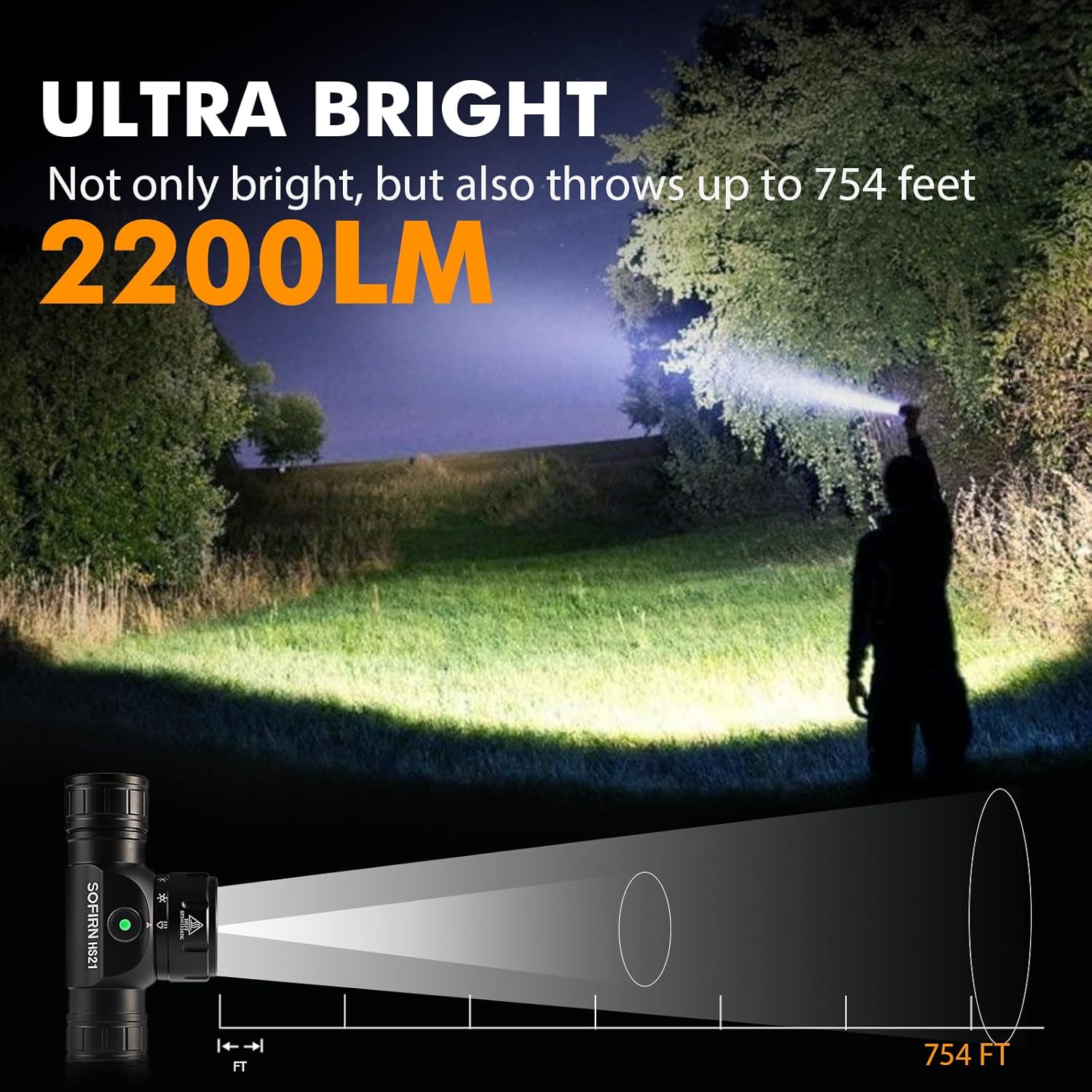
Image 9: The Sofirn HS21 headlamp demonstrating its ultra-bright output and beam distance of up to 754 feet.
9.2 Sofirn D25S Headlamp
| ഫീച്ചർ | വിശദാംശങ്ങൾ |
|---|---|
| പ്രകാശ സ്രോതസ്സ് | എസ്എസ്ടി40 എൽഇഡി |
| പരമാവധി ഔട്ട്പുട്ട് | 1200 ല്യൂമെൻസ് |
| മോഡുകൾ | Low, Medium 1, Medium 2, High, Turbo |
| ചാർജിംഗ് | Hidden USB-C Rechargeable |
| പ്രത്യേക സവിശേഷതകൾ | മെമ്മറി മോഡ് |
10. വാറൻ്റിയും പിന്തുണയും
Sofirn products are covered by a limited warranty. For specific warranty details, please refer to the warranty card included with your product or visit the official Sofirn website. For technical support, troubleshooting assistance, or warranty claims, please contact Sofirn customer service through the retailer where you purchased the product or via the contact information provided on the official Sofirn webസൈറ്റ്.