ENGLAON X Series Wireless 7" Monitor Reverse Camera Kit User Manual
Model: X7MCK1
ആമുഖം
Thank you for choosing the ENGLAON X Series Wireless Reversing Camera & Monitor System. This system is designed to enhance your driving safety by providing clear, real-time video feedback for caravans, motorhomes, and RVs. With its advanced wireless transmission and robust design, it ensures reliable performance in various conditions, making parking and reversing safer and more convenient.
പ്രധാനപ്പെട്ട സുരക്ഷാ വിവരങ്ങൾ
- Ensure the power supply is within the specified range of DC 12V-32V. Incorrect voltage ഉപകരണത്തിന് കേടുപാടുകൾ വരുത്തിയേക്കാം.
- ഒപ്റ്റിമൽ പ്രകടനത്തിനും സുരക്ഷയ്ക്കും പ്രൊഫഷണൽ ഇൻസ്റ്റാളേഷൻ ശുപാർശ ചെയ്യുന്നു.
- Do not attempt to disassemble or modify the unit. This will void the warranty and may cause damage.
- Keep the monitor and camera lenses clean for clear visibility. Use a soft, dry cloth.
- Ensure all cables are securely connected and routed away from moving parts or heat sources.
- This system is an aid for reversing and parking; always check your surroundings visually before maneuvering.
പാക്കേജ് ഉള്ളടക്കം
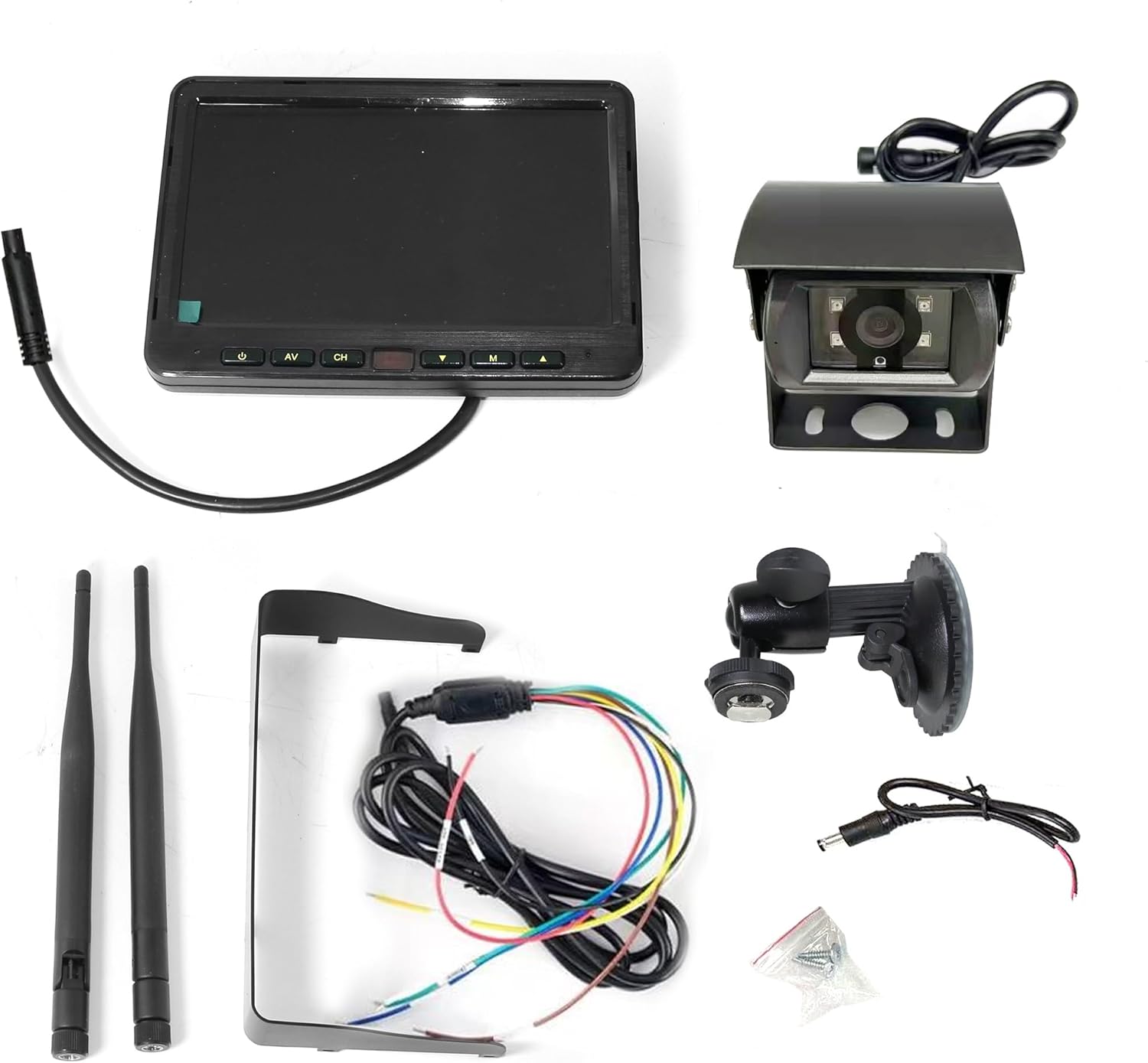
Image: All components included in the ENGLAON X Series Wireless Camera Kit, neatly laid out. This includes the 7-inch monitor, the wireless camera, two antennas, a monitor stand, power cables, and mounting screws.
താഴെ പറയുന്ന എല്ലാ ഇനങ്ങളും നിങ്ങളുടെ പാക്കേജിൽ ഉൾപ്പെടുത്തിയിട്ടുണ്ടോ എന്ന് ദയവായി പരിശോധിക്കുക:
- 7-ഇഞ്ച് വയർലെസ് മോണിറ്റർ
- വയർലെസ് റിവേഴ്സിംഗ് ക്യാമറ
- Monitor Stand (with suction cup mount)
- മോണിറ്ററിനുള്ള പവർ കേബിൾ
- ക്യാമറയ്ക്കുള്ള പവർ കേബിൾ
- 2 x ആന്റിന
- മൗണ്ടിംഗ് സ്ക്രൂകൾ
ഉൽപ്പന്നം കഴിഞ്ഞുview
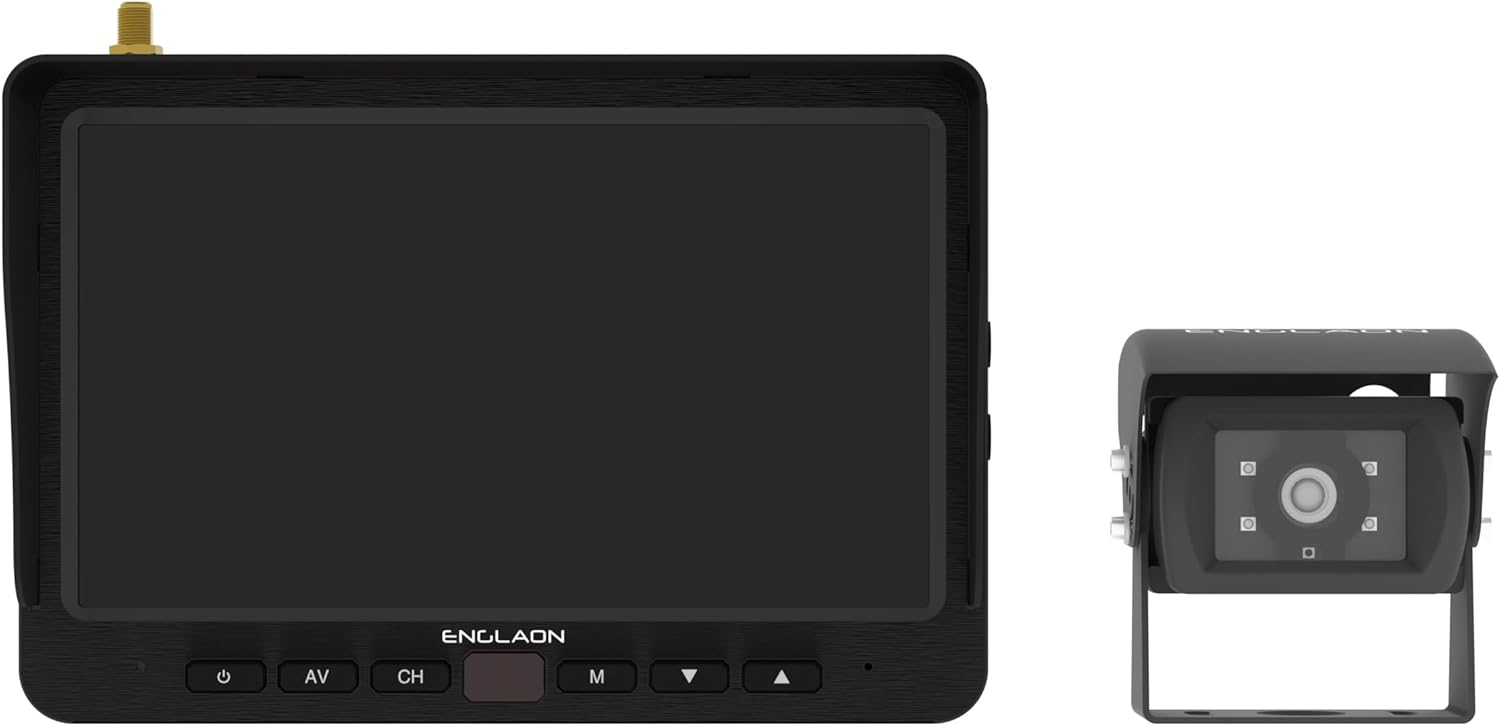
Image: The ENGLAON 7-inch wireless monitor is shown on the left, featuring control buttons below the screen. The wireless camera is on the right, showcasing അതിന്റെ ഒതുക്കമുള്ള രൂപകൽപ്പനയും ലെൻസും.
7-ഇഞ്ച് വയർലെസ് മോണിറ്റർ
- ഡിസ്പ്ലേ: 7-inch LCD with 1024 × 600 RGB resolution.
- തെളിച്ചം: 450cd/m² for clear visibility in various lighting conditions.
- ദൃശ്യതീവ്രത അനുപാതം: 500:1.
- Viewകോണുകൾ: U: 50° / D: 70°, R/L: 70°.
- നിയന്ത്രണങ്ങൾ: Power, AV input, Channel selection, Menu, Up/Down navigation.
- കണക്റ്റിവിറ്റി: Supports up to 4 cameras (additional cameras sold separately).
- റെക്കോർഡിംഗ്: SD card slot for video recording (up to 128GB, SD card not included).
വയർലെസ് റിവേഴ്സിംഗ് ക്യാമറ
- ഫീൽഡ് View (FOV): 120° wide-angle for comprehensive coverage.
- ഈട്: Waterproof, dustproof, and shockproof design for harsh environments.
- രാത്രി കാഴ്ച: Equipped with 4 high-intensity LED lights for enhanced low-light visibility.
- വയർലെസ് ട്രാൻസ്മിഷൻ: Advanced RF transmit chip for stable connection.
സജ്ജീകരണവും ഇൻസ്റ്റാളേഷനും
1. പവർ കണക്ഷൻ
- Connect the monitor's power cable to a DC 12V-32V power source in your vehicle. Ensure proper polarity.
- Connect the camera's power cable to a suitable DC 12V-32V power source, typically linked to your vehicle's reverse lights for automatic activation, or a constant power source if continuous monitoring is desired.
2. Monitor Mounting
- Attach the monitor stand to the back of the monitor.
- നിങ്ങളുടെ ഡാഷ്ബോർഡിലോ വിൻഡ്ഷീൽഡിലോ തടസ്സമില്ലാത്ത അനുയോജ്യമായ ഒരു സ്ഥലം തിരഞ്ഞെടുക്കുക view അല്ലെങ്കിൽ എയർബാഗുകളിൽ ഇടപെടുക.
- Secure the monitor using the suction cup mount, ensuring it is firmly attached. Adjust the angle for optimal viewing.
3. ക്യാമറ ഇൻസ്റ്റാളേഷൻ
- Mount the camera securely at the rear of your vehicle, typically above the license plate or on the bumper, ensuring a clear, unobstructed view.
- Ensure the camera is positioned to capture the desired field of view, ബ്ലൈൻഡ് സ്പോട്ടുകൾ കുറയ്ക്കുന്നു.
- Connect the camera's antenna to the camera unit.
- Connect the monitor's antenna to the monitor unit.

Image: The ENGLAON 7-inch wireless monitor and the wireless camera are shown with their antennas extended, illustrating their readiness for wireless operation after installation.
നിങ്ങളുടെ സിസ്റ്റം പ്രവർത്തിപ്പിക്കുന്നു
പവർ ചെയ്യുന്നത് ഓൺ/ഓഫ്
Press the power button on the monitor to turn the system on or off. The monitor will automatically display the camera feed when powered on and receiving a signal.
ചാനൽ തിരഞ്ഞെടുക്കൽ
If you have multiple cameras connected (up to 4 supported), use the 'CH' button on the monitor to cycle through the camera channels. The monitor can display one camera at a time or multiple views simultaneously if configured.
Video Recording (Optional)
Insert a compatible SD card (up to 128GB, not included) into the monitor's SD card slot. The system supports video recording, allowing you to capture and store footage. Refer to the on-screen menu for recording settings and playback options.
പരിപാലനവും പരിചരണവും
- വൃത്തിയാക്കൽ: Use a soft, lint-free cloth to clean the monitor screen and camera lens. Do not use abrasive cleaners or solvents.
- കണക്ഷനുകൾ: എല്ലാ കേബിൾ കണക്ഷനുകളും സുരക്ഷിതമാണെന്നും നാശത്തിൽ നിന്ന് മുക്തമാണെന്നും ഉറപ്പാക്കാൻ ഇടയ്ക്കിടെ പരിശോധിക്കുക.
- ക്യാമറ ലെൻസ്: Ensure the camera lens is free from dirt, mud, or ice, especially before driving, to maintain clear visibility.
- ആന്റിന: Ensure antennas are securely attached and not damaged to maintain optimal wireless signal strength.
ട്രബിൾഷൂട്ടിംഗ്
| പ്രശ്നം | സാധ്യമായ കാരണം | പരിഹാരം |
|---|---|---|
| മോണിറ്ററിൽ ചിത്രമില്ല | Monitor not powered on; Camera not powered; Loose connections; Out of range; Interference. | Ensure monitor and camera are powered. Check all cable connections. Move closer to the camera or reduce obstacles. Check for strong interference sources. |
| ചിത്രം മിന്നിമറയുന്നു അല്ലെങ്കിൽ വികലമാകുന്നു | Weak signal; Interference; Damaged antenna. | Ensure antennas are securely connected. Reduce distance between camera and monitor. Avoid strong electromagnetic interference. Check for antenna damage. |
| രാത്രി കാഴ്ച പ്രവർത്തിക്കുന്നില്ല | LEDs obstructed; Power issue to camera. | Clean camera lens and ensure LEDs are clear. Verify camera is receiving adequate power. |
| മോണിറ്റർ ബട്ടണുകളോട് പ്രതികരിക്കുന്നില്ല. | Temporary software glitch; Power issue. | Power off and restart the monitor. Check power connection. |
സാങ്കേതിക സവിശേഷതകൾ
| ഫീച്ചർ | സ്പെസിഫിക്കേഷൻ |
|---|---|
| ബ്രാൻഡ് | ഇംഗ്ലണ്ട് |
| മോഡൽ | X7MCK1 |
| സ്ക്രീൻ വലിപ്പം | 7 ഇഞ്ച് |
| ഡിസ്പ്ലേ റെസല്യൂഷൻ | 1024 × 600 RGB |
| വാല്യംtage | 12-32 വോൾട്ട് |
| ക്യാമറ FOV | 120° വൈഡ് ആംഗിൾ |
| Wireless Transmission Range (Open Space) | 500 മീറ്റർ വരെ |
| Wireless Transmission Range (Real-world) | 120 മീറ്റർ വരെ |
| ലേറ്റൻസി | 120ms കുറഞ്ഞ ലേറ്റൻസി |
| SD കാർഡ് പിന്തുണ | 128GB വരെ (SD കാർഡ് ഉൾപ്പെടുത്തിയിട്ടില്ല) |
| Camera Durability | വാട്ടർപ്രൂഫ്, ഡസ്റ്റ് പ്രൂഫ്, ഷോക്ക് പ്രൂഫ് |
| ഉൽപ്പന്ന അളവുകൾ | 35L x 20W x 10H സെൻ്റീമീറ്റർ |
വാറൻ്റിയും ഉപഭോക്തൃ പിന്തുണയും
This ENGLAON product comes with a standard manufacturer's warranty. For detailed warranty information, please refer to the warranty card included in your package or visit the official ENGLAON website. If you encounter any issues or require technical assistance, please contact ENGLAON customer support through their official channels. Please have your model number (X7MCK1) and purchase details ready when contacting support.


