1. ആമുഖം
വാങ്ങിയതിന് നന്ദി.asing the UPERFECT 15.6-inch 4K Portable Monitor. This device is designed to enhance your productivity and entertainment experience with its stunning 4K UHD resolution, vibrant color reproduction, and versatile connectivity. This manual provides essential information for proper setup, operation, and maintenance to ensure optimal performance and longevity of your monitor.

Figure 1: UPERFECT 15.6-inch 4K Portable Monitor
2. പാക്കേജ് ഉള്ളടക്കം
പാക്കേജിൽ ഇനിപ്പറയുന്ന ഇനങ്ങൾ ഉണ്ടോ എന്ന് പരിശോധിക്കുക:
- മികച്ച 15.6 ഇഞ്ച് 4K പോർട്ടബിൾ മോണിറ്റർ
- Magnetic Protective Cover (doubles as a stand)
- USB Type-C to Type-C Cable (x2)
- HDMI to Mini HDMI Cable (x1)
- USB Type-A Power Adapter (PSE certified) (x1)
- ഉപയോക്തൃ മാനുവൽ (ഈ പ്രമാണം)
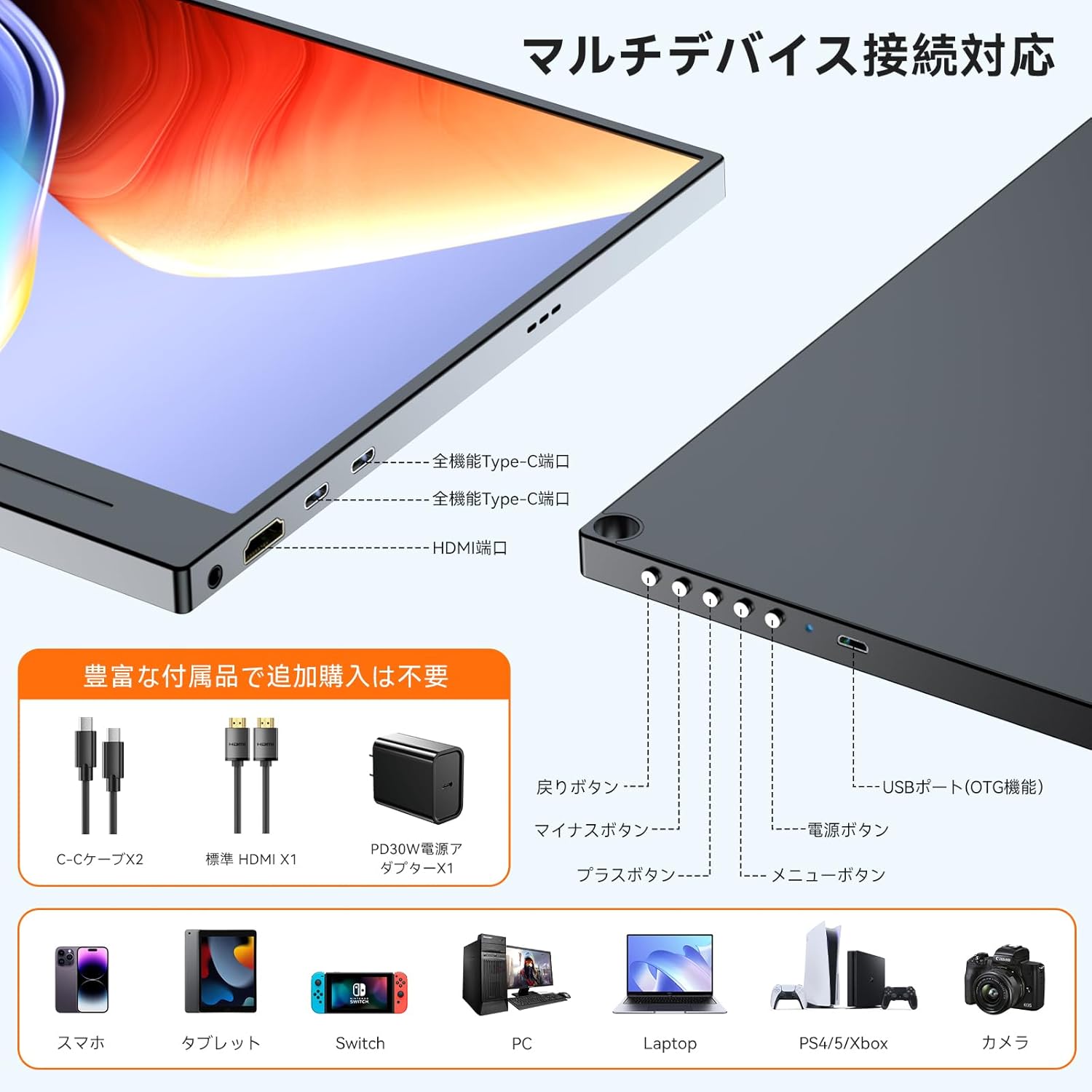
ചിത്രം 2: ഉൾപ്പെടുത്തിയ ആക്സസറികൾ
3. ഉൽപ്പന്നം കഴിഞ്ഞുview
Familiarize yourself with the monitor's components and ports.
3.1. Monitor Components
- പ്രദർശന പാനൽ: 15.6-inch 4K UHD (3840x2160) IPS non-glare screen.
- Magnetic Cover: Protects the screen and functions as a multi-angle stand.
- ബിൽറ്റ്-ഇൻ സ്പീക്കറുകൾ: Two 8Ω 1W speakers for audio output.
- നിയന്ത്രണ ബട്ടണുകൾ: Power, Menu, Up, Down, Back buttons for OSD navigation.
3.2. പോർട്ടുകളും നിയന്ത്രണങ്ങളും

Figure 3: Ports and Controls Layout
- Full-function USB-C Ports (x2): For video signal, data transfer, and power delivery.
- Mini HDMI Port (x1): For video signal input.
- USB-A Port (OTG function) (x1): For connecting peripherals like a keyboard or mouse.
- 3.5mm Audio Jack (x1): ഹെഡ്ഫോണുകളോ ബാഹ്യ സ്പീക്കറുകളോ ബന്ധിപ്പിക്കുന്നതിന്.
- പവർ ബട്ടൺ: മോണിറ്റർ ഓൺ/ഓഫ് ചെയ്യുന്നു.
- മെനു ബട്ടൺ: ഓൺ-സ്ക്രീൻ ഡിസ്പ്ലേ (OSD) മെനു ആക്സസ് ചെയ്യുന്നു.
- നാവിഗേഷൻ ബട്ടണുകൾ (+/-): Used to navigate and adjust settings within the OSD menu.
- ബാക്ക് ബട്ടൺ: Returns to the previous OSD menu level.
4. സജ്ജീകരണം
നിങ്ങളുടെ UPERFECT പോർട്ടബിൾ മോണിറ്റർ സജ്ജീകരിക്കാൻ ഈ ഘട്ടങ്ങൾ പാലിക്കുക.
4.1. Connecting to a Power Source
The monitor can be powered via a USB-C connection from a compatible device or an external power adapter.
- USB-C (സിംഗിൾ കേബിൾ സൊല്യൂഷൻ) വഴി: If your device (e.g., laptop, smartphone) has a full-function USB-C port (supporting DisplayPort Alternate Mode and Power Delivery), connect one end of the provided USB-C to USB-C cable to your device and the other end to one of the monitor's full-function USB-C ports. This single cable can provide both video signal and power. Note: If your device's USB-C port does not support sufficient power delivery, or if it's not Thunderbolt 3/4 compatible, you may need to connect an external power source.
- Via External Power Adapter: Connect the provided USB Type-A power adapter to a power outlet and then to one of the monitor's USB-C ports using a USB-C cable. This ensures stable power delivery, especially when using HDMI for video input or connecting power-intensive devices.
4.2. ഉപകരണങ്ങളിലേക്ക് ബന്ധിപ്പിക്കുന്നു
The monitor supports various devices through USB-C and HDMI connections.
- For Laptops/PCs (USB-C): Connect a USB-C to USB-C cable from your laptop's full-function USB-C port to the monitor. Ensure your laptop's USB-C port supports DisplayPort Alternate Mode.
- For Laptops/PCs (HDMI): Connect the provided HDMI to Mini HDMI cable from your laptop's HDMI port to the monitor's Mini HDMI port. You will also need to connect the monitor to a power source via USB-C.
- സ്മാർട്ട്ഫോണുകൾക്ക്: Connect a USB-C to USB-C cable from your smartphone's full-function USB-C port to the monitor. Ensure your smartphone supports video output via USB-C (DisplayPort Alternate Mode).
- For Gaming Consoles (Nintendo Switch, PS4/PS5, Xbox): Connect the provided HDMI to Mini HDMI cable from your console's HDMI output to the monitor's Mini HDMI port. The monitor must also be powered via its USB-C port using the external power adapter.
- ക്യാമറകൾക്കായി: Connect your camera via HDMI to Mini HDMI. Ensure the monitor is powered externally.

Figure 4: Multi-Device Connectivity
4.3. Using the Magnetic Protective Cover
The included magnetic cover not only protects your monitor but also serves as a versatile stand. Fold the cover into a triangular shape to prop up the monitor at various viewകോണുകൾ.
5. പ്രവർത്തന നിർദ്ദേശങ്ങൾ
Learn how to operate your monitor and adjust its settings.
5.1. പവർ ഓൺ/ഓഫ്
- പവർ ഓൺ: Press the Power button located on the side of the monitor.
- പവർ ഓഫ്: Press and hold the Power button for a few seconds until the screen turns off.
5.2. ഓൺ-സ്ക്രീൻ ഡിസ്പ്ലേ (OSD) മെനു
വിവിധ ഡിസ്പ്ലേ ക്രമീകരണങ്ങൾ ഇഷ്ടാനുസൃതമാക്കാൻ OSD മെനു നിങ്ങളെ അനുവദിക്കുന്നു.
- ആക്സസ് മെനു: OSD മെനു തുറക്കാൻ മെനു ബട്ടൺ അമർത്തുക.
- നാവിഗേറ്റ്: Use the '+' and '-' buttons to move through menu options.
- Select/Confirm: Press the Menu button again to select an option or confirm a setting.
- പുറത്ത്: Press the Back button to go back or exit the OSD menu.
5.3. Key Settings and Features
- തെളിച്ചം/തീവ്രത: Adjust these settings for optimal visibility in different lighting conditions. The monitor features 300 nits brightness and a 1300:1 contrast ratio.
- വർണ്ണ ക്രമീകരണങ്ങൾ: Fine-tune color temperature, hue, and saturation. The monitor offers 100% sRGB color gamut for accurate color reproduction.
- HDR മോഡ്: Enable High Dynamic Range for enhanced visual depth and contrast in compatible content.
- നീല വെളിച്ചം കുറയ്ക്കൽ: Activate this feature to reduce eye strain during prolonged use.
- ഇൻപുട്ട് ഉറവിടം: Manually select between USB-C and HDMI input if auto-detection is not desired.
- വീക്ഷണ അനുപാതം: Adjust the display aspect ratio (e.g., 16:9).
- FreeSync: For compatible gaming setups, enable FreeSync to reduce screen tearing and stuttering.

Figure 5: 4K Resolution Detail

Figure 6: High Contrast Ratio

Figure 7: 100% sRGB Color Gamut

Figure 8: 3ms Response Time and FreeSync
5.4. ഡിസ്പ്ലേ മോഡുകൾ
Depending on your connected device, you can configure the display mode:
- വിപുലീകരണ മോഡ്: Extends your desktop across both screens, providing more workspace.
- ഡ്യൂപ്ലിക്കേറ്റ് മോഡ്: Mirrors your primary display, showing the same content on both screens.
- Portrait/Landscape Mode: The monitor supports both horizontal and vertical orientations. Settings for these modes are typically adjusted on the connected PC or device.

Figure 9: Portrait Mode Usage
6. പരിപാലനം
Proper care will extend the life of your monitor.
- സ്ക്രീൻ വൃത്തിയാക്കൽ: മൃദുവായ, ലിന്റ് രഹിത തുണി ഉപയോഗിച്ച് സ്ക്രീൻ സൌമ്യമായി തുടയ്ക്കുക. കഠിനമായ പാടുകൾക്ക്, ചെറുതായി dampതുണിയിൽ വെള്ളം അല്ലെങ്കിൽ സ്ക്രീൻ-ക്ലീനിംഗ് ലായനി ഉപയോഗിക്കുക. കഠിനമായ രാസവസ്തുക്കളോ ഉരച്ചിലുകളോ ഉള്ള വസ്തുക്കൾ ഒഴിവാക്കുക.
- സി വൃത്തിയാക്കൽasing: മോണിറ്ററിന്റെ സി വൃത്തിയാക്കാൻ മൃദുവായതും ഉണങ്ങിയതുമായ തുണി ഉപയോഗിക്കുക.asing.
- സംഭരണം: When not in use, store the monitor in its protective magnetic cover in a cool, dry place away from direct sunlight and extreme temperatures.
- കൈകാര്യം ചെയ്യൽ: Avoid dropping or subjecting the monitor to strong impacts.
7. പ്രശ്നപരിഹാരം
നിങ്ങൾക്ക് പ്രശ്നങ്ങൾ നേരിടുകയാണെങ്കിൽ, ഇനിപ്പറയുന്ന പൊതുവായ പ്രശ്നങ്ങളും പരിഹാരങ്ങളും പരിശോധിക്കുക.
| പ്രശ്നം | സാധ്യമായ കാരണം | പരിഹാരം |
|---|---|---|
| ഡിസ്പ്ലേ ഇല്ല/സിഗ്നൽ ഇല്ല |
|
|
| Screen flickering/Unstable display |
|
|
| No audio from speakers/headphones |
|
|
| Cannot connect keyboard/mouse via OTG |
|
|
8 സ്പെസിഫിക്കേഷനുകൾ
Detailed technical specifications for the UPERFECT 15.6-inch 4K Portable Monitor.
| ഫീച്ചർ | സ്പെസിഫിക്കേഷൻ |
|---|---|
| ബ്രാൻഡ് | തികഞ്ഞ |
| മോഡൽ നമ്പർ | 15.6-inch 4K Portable Monitor |
| സ്ക്രീൻ വലിപ്പം | 15.6 ഇഞ്ച് |
| റെസലൂഷൻ | 3840 x 2160 (4K UHD) |
| പാനൽ തരം | IPS, Non-glare |
| വീക്ഷണാനുപാതം | 16:9 |
| വർണ്ണ ഗാമറ്റ് | 100% sRGB |
| കോൺട്രാസ്റ്റ് റേഷ്യോ | 1300:1 |
| തെളിച്ചം | 300 നിറ്റ് |
| പ്രതികരണ സമയം | 3മി.എസ് |
| പുതുക്കിയ നിരക്ക് | 60Hz |
| തുറമുഖങ്ങൾ | 2x Full-function USB-C, 1x Mini HDMI, 1x USB-A (OTG), 1x 3.5mm Audio Jack |
| വെസെ മൌണ്ട് | 75mm compatible |
| അളവുകൾ (W x H x D) | 355 x 225 x 11 മിമി |
| ഭാരം | 932 ഗ്രാം |
| വൈദ്യുതി ഉപഭോഗം | 12.00 W |
9. വാറൻ്റിയും പിന്തുണയും
UPERFECT is committed to providing high-quality products and excellent customer service.
- വാറൻ്റി കാലയളവ്: ഈ ഉൽപ്പന്നം എ 12 മാസ വാറൻ്റി വാങ്ങിയ തീയതി മുതൽ.
- PSE Certification: The included power adapter is PSE certified, ensuring compliance with electrical appliance safety standards.
- ഉപഭോക്തൃ പിന്തുണ: UPERFECT offers unlimited customer support. If you have any questions regarding product usage, or encounter any issues such as damage during shipping or defective accessories, please contact our support team. We aim to resolve issues within 12 hours.
- ബന്ധപ്പെടാനുള്ള വിവരങ്ങൾ: Please refer to the contact details provided on the UPERFECT official website or your purchase platform for support.

Figure 10: UPERFECT Customer Support


