1. ആമുഖം
This manual provides essential instructions for the safe and effective use of your AGM H6 Rugged Smartphone. The AGM H6 is designed for durability, featuring IP68/IP69K waterproofing, 1.8m drop resistance, and 360° dust protection. It operates on Android 13 and is equipped with an Octa-Core T606 processor, 16GB RAM, 256GB ROM, and a 6.56-inch 90Hz HD+ touchscreen.

Image 1.1: Front, side, and rear view of the AGM H6 Rugged Smartphone.
2. പാക്കേജ് ഉള്ളടക്കം
നിങ്ങളുടെ ഉൽപ്പന്ന പാക്കേജിൽ എല്ലാ ഇനങ്ങളും ഉണ്ടെന്ന് ഉറപ്പാക്കുക:
- AGM H6 സ്മാർട്ട് ഫോൺ
- പവർ അഡാപ്റ്റർ
- USB കേബിൾ
3. ഡിവൈസ് ഓവർview
Familiarize yourself with the physical components of your AGM H6 smartphone.

ചിത്രം 3.1: കഴിഞ്ഞുview of AGM H6 key features and specifications.
3.1. ഫിസിക്കൽ ബട്ടണുകളും പോർട്ടുകളും
- പവർ ബട്ടൺ: Located on the side, used to power on/off or wake/sleep the screen.
- വോളിയം ബട്ടണുകൾ: മീഡിയ വോളിയവും റിംഗ്ടോൺ വോളിയവും ക്രമീകരിക്കുക.
- ഇഷ്ടാനുസൃതമാക്കാവുന്ന ബട്ടൺ: A dedicated button that can be programmed for quick access to specific applications or functions.
- യുഎസ്ബി-സി പോർട്ട്: ചാർജിംഗിനും ഡാറ്റ കൈമാറ്റത്തിനും.
- സിം/മൈക്രോഎസ്ഡി കാർഡ് സ്ലോട്ട്: Located on the side, for inserting SIM cards and a MicroSD card.
3.2. ക്യാമറ സിസ്റ്റം
- പിൻ ക്യാമറ: 50MP primary lens with a 2MP macro lens.
- മുൻ ക്യാമറ: സെൽഫികൾക്കും വീഡിയോ കോളുകൾക്കും 8MP.

ചിത്രം 3.2: വിശദമായത് view of the AGM H6 camera specifications.
4. പ്രാരംഭ സജ്ജീകരണം
4.1. സിം, മൈക്രോ എസ്ഡി കാർഡുകൾ ഇൻസ്റ്റാൾ ചെയ്യൽ
- Locate the SIM/MicroSD card slot on the side of the phone.
- ട്രേ തുറക്കാൻ നൽകിയിരിക്കുന്ന സിം എജക്റ്റർ ഉപകരണം ഉപയോഗിക്കുക.
- Carefully place your Nano-SIM cards and/or MicroSD card into the designated slots on the tray. Ensure correct orientation.
- ഉപകരണ ബോഡിയുമായി ഫ്ലഷ് ആകുന്നതുവരെ ട്രേ ഫോണിലേക്ക് പതുക്കെ തിരികെ തള്ളുക.

Image 4.1: The 3-card slot for dual SIM and MicroSD expansion.
4.2 ഉപകരണം ചാർജ് ചെയ്യുന്നു
Before first use, fully charge your AGM H6. Connect the USB cable to the phone's USB-C port and the power adapter, then plug the adapter into a wall outlet.
4.3. പവർ ഓൺ, പ്രാരംഭ കോൺഫിഗറേഷൻ
- Press and hold the Power button until the AGM logo appears.
- നിങ്ങളുടെ ഭാഷ തിരഞ്ഞെടുക്കുന്നതിനും, ഒരു Wi-Fi നെറ്റ്വർക്കിലേക്ക് കണക്റ്റുചെയ്യുന്നതിനും, നിങ്ങളുടെ Google അക്കൗണ്ട് സജ്ജീകരിക്കുന്നതിനും ഓൺ-സ്ക്രീൻ നിർദ്ദേശങ്ങൾ പാലിക്കുക.
- Configure fingerprint and face unlock for secure and swift access.
5. പ്രവർത്തന നിർദ്ദേശങ്ങൾ
5.1. അടിസ്ഥാന നാവിഗേഷൻ
- സ്പർശിക്കുക: Tap icons to open apps or select items.
- സ്വൈപ്പ്: Move your finger across the screen to scroll or navigate between screens.
- പിഞ്ച്: ഫോട്ടോകളിൽ സൂം ഇൻ അല്ലെങ്കിൽ ഔട്ട് ചെയ്യാൻ രണ്ട് വിരലുകൾ ഉപയോഗിക്കുക, web പേജുകൾ.
5.2. Power On/Off/Restart
- പവർ ഓൺ: പവർ ബട്ടൺ അമർത്തിപ്പിടിക്കുക.
- പവർ ഓഫ്/റീസ്റ്റാർട്ട്: Press and hold the Power button until the power menu appears, then select 'Power off' or 'Restart'.
5.3. Screen Lock and Unlock
The AGM H6 supports fingerprint and face recognition for secure unlocking.
- ഫിംഗർപ്രിന്റ് അൺലോക്ക്: ക്രമീകരണങ്ങൾ > സുരക്ഷ > വിരലടയാളം എന്നതിൽ നിങ്ങളുടെ വിരലടയാളങ്ങൾ രജിസ്റ്റർ ചെയ്യുക.
- ഫേസ് അൺലോക്ക്: ക്രമീകരണം > സുരക്ഷ > മുഖം അൺലോക്ക് എന്നതിൽ മുഖം തിരിച്ചറിയൽ സജ്ജമാക്കുക.
5.4. കണക്റ്റിവിറ്റി
- വൈഫൈ: ലഭ്യമായ നെറ്റ്വർക്കുകളിലേക്ക് കണക്റ്റുചെയ്യാൻ ക്രമീകരണങ്ങൾ > നെറ്റ്വർക്കും ഇന്റർനെറ്റും > വൈ-ഫൈ എന്നതിലേക്ക് പോകുക.
- ബ്ലൂടൂത്ത്: Enable Bluetooth in Settings > Connected devices to pair with other devices.
- NFC: For contactless payments and quick pairing, enable NFC in Settings > Connected devices > Connection preferences > NFC.
- ജിപിഎസ്: Location services are enabled by default for navigation and location-based apps.
5.5. ക്യാമറ ഉപയോഗം
Open the Camera app to capture photos and videos.
- ഒരു ഫോട്ടോ എടുക്കാൻ ഷട്ടർ ബട്ടൺ ടാപ്പ് ചെയ്യുക.
- Switch between photo, video, and macro modes.
- Use the front camera for selfies.
5.6. ഇഷ്ടാനുസൃതമാക്കാവുന്ന ബട്ടൺ
The dedicated customizable button can be configured in Settings to launch a specific app or perform a quick action. Refer to the phone's settings for customization options.
6. പരിപാലനം
6.1. നിങ്ങളുടെ ഉപകരണം വൃത്തിയാക്കൽ
Use a soft, lint-free cloth to clean the screen and body of the phone. Avoid harsh chemicals or abrasive materials. For waterproof cleaning, rinse with fresh water and dry thoroughly.
6.2. Water and Dust Resistance (IP68/IP69K)
The AGM H6 is rated IP68/IP69K for water and dust resistance. This means it can withstand immersion in water up to 1.5 meters for 30 minutes and is protected against high-pressure, high-temperature water jets and dust ingress. Ensure all ports are securely closed before exposing the phone to water or dust.
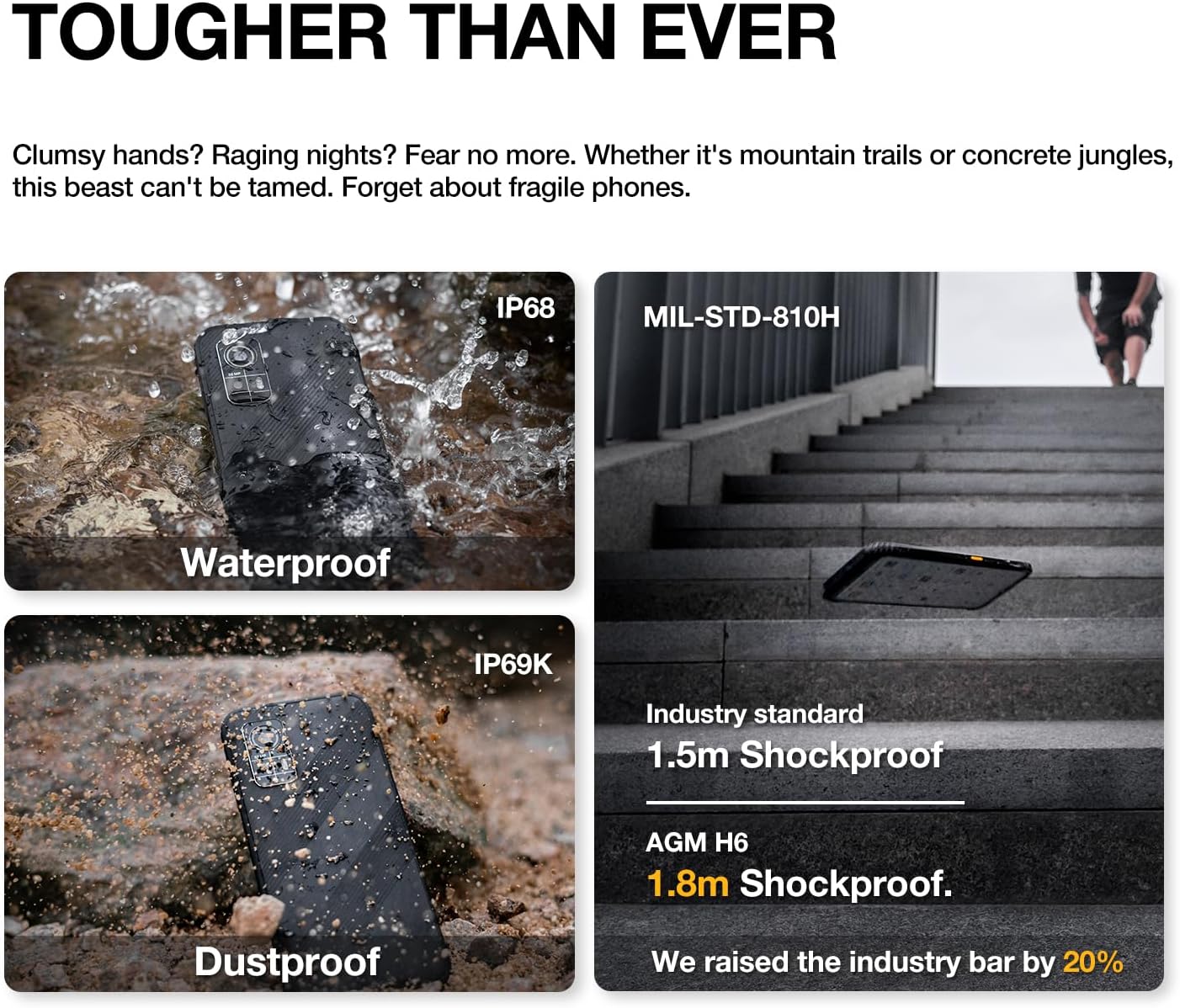
Image 6.1: The AGM H6's rugged features, including waterproof, dustproof, and shockproof ratings.
6.3. ഡ്രോപ്പ് റെസിസ്റ്റൻസ്
The phone is designed to withstand drops up to 1.8 meters. While rugged, extreme impacts can still cause damage. Handle with care.
6.4. ബാറ്ററി പരിചരണം
- ഉയർന്ന താപനിലയിൽ ഫോൺ തുറന്നുവെക്കുന്നത് ഒഴിവാക്കുക.
- നൽകിയിരിക്കുന്ന ചാർജറും കേബിളും മാത്രം ഉപയോഗിക്കുക.
- ബാറ്ററി പതിവായി പൂർണ്ണമായും ഡിസ്ചാർജ് ചെയ്യരുത്.

Image 6.2: Battery performance metrics for the 4900mAh battery.
6.5. സോഫ്റ്റ്വെയർ അപ്ഡേറ്റുകൾ
മികച്ച പ്രകടനവും സുരക്ഷയും ഉറപ്പാക്കാൻ സോഫ്റ്റ്വെയർ അപ്ഡേറ്റുകൾ പതിവായി പരിശോധിച്ച് ഇൻസ്റ്റാൾ ചെയ്യുക. ക്രമീകരണങ്ങൾ > സിസ്റ്റം > സിസ്റ്റം അപ്ഡേറ്റ് എന്നതിലേക്ക് പോകുക.
7. പ്രശ്നപരിഹാരം
If you encounter issues with your AGM H6, refer to the following common solutions:
- ഫോൺ ഓണാക്കുന്നില്ല: ബാറ്ററി ചാർജ് ചെയ്തിട്ടുണ്ടെന്ന് ഉറപ്പാക്കുക. കുറഞ്ഞത് 15 മിനിറ്റെങ്കിലും ചാർജറുമായി കണക്റ്റ് ചെയ്യുക, തുടർന്ന് വീണ്ടും പവർ ചെയ്യാൻ ശ്രമിക്കുക.
- ആപ്പുകൾ ക്രാഷാകുകയോ മരവിക്കുകയോ ചെയ്യുന്നു: Restart the phone. If the issue persists, clear the app's cache (Settings > Apps > [App Name] > Storage & cache > Clear cache).
- നെറ്റ്വർക്ക് പ്രശ്നങ്ങൾ (സിഗ്നൽ/കോളുകൾ ഇല്ല): Check if SIM card is properly inserted. Verify network settings in Settings > Network & internet > Mobile network. Contact your carrier if issues persist.
- മന്ദഗതിയിലുള്ള പ്രകടനം: Close unused apps, clear cache, or consider a factory reset if performance significantly degrades over time (back up data first).
- ടച്ച്സ്ക്രീൻ പ്രതികരിക്കുന്നില്ല: Restart the phone. If unresponsive, force restart by holding the power button for an extended period (usually 10-15 seconds).
7.1. ഫാക്ടറി റീസെറ്റ്
ഫാക്ടറി റീസെറ്റ് നിങ്ങളുടെ ഫോണിലെ എല്ലാ ഡാറ്റയും മായ്ച്ച് അതിന്റെ യഥാർത്ഥ ഫാക്ടറി ക്രമീകരണത്തിലേക്ക് പുനഃസ്ഥാപിക്കും. ഇത് സ്ഥിരമായ സോഫ്റ്റ്വെയർ പ്രശ്നങ്ങൾ പരിഹരിക്കും. തുടരുന്നതിന് മുമ്പ് എല്ലാ പ്രധാനപ്പെട്ട ഡാറ്റയും ബാക്കപ്പ് ചെയ്യുക.
- ക്രമീകരണങ്ങൾ > സിസ്റ്റം > റീസെറ്റ് ഓപ്ഷനുകൾ എന്നതിലേക്ക് പോകുക.
- 'എല്ലാ ഡാറ്റയും മായ്ക്കുക (ഫാക്ടറി റീസെറ്റ്)' തിരഞ്ഞെടുക്കുക.
- നിങ്ങളുടെ തീരുമാനം സ്ഥിരീകരിച്ച് ആവശ്യപ്പെടുകയാണെങ്കിൽ നിങ്ങളുടെ പിൻ/പാസ്വേഡ് നൽകുക.
8 സ്പെസിഫിക്കേഷനുകൾ
Detailed technical specifications for the AGM H6 Rugged Smartphone:
| ഫീച്ചർ | സ്പെസിഫിക്കേഷൻ |
|---|---|
| മോഡലിൻ്റെ പേര് | H6 |
| ഓപ്പറേറ്റിംഗ് സിസ്റ്റം | ആൻഡ്രോയിഡ് 13.0 |
| സിപിയു മോഡൽ | യൂണിസോക്ക് T606 ഒക്ടാ-കോർ (1.6 GHz) |
| ഇൻസ്റ്റാൾ ചെയ്ത RAM മെമ്മറി വലുപ്പം | 16 GB (8GB + 8GB Adaptive) |
| മെമ്മറി സ്റ്റോറേജ് കപ്പാസിറ്റി | 256 ജിബി |
| സ്റ്റാൻഡിംഗ് സ്ക്രീൻ ഡിസ്പ്ലേ വലുപ്പം | 6.56 Inches IPS HD+ |
| പുതുക്കിയ നിരക്ക് | 90 Hz |
| പിൻ ക്യാമറ | 50MP Primary + 2MP Macro |
| മുൻ ക്യാമറ | 8എംപി |
| ബാറ്ററി പവർ റേറ്റിംഗ് | 4900 മില്ലിamp മണിക്കൂറുകൾ |
| കണക്റ്റിവിറ്റി ടെക്നോളജികൾ | Bluetooth, NFC, Wi-Fi, 4G Dual SIM |
| പ്രത്യേക സവിശേഷതകൾ | Dual SIM, Expandable Memory, Rugged Body, Water Resistant, GPS, Fingerprint/Face Unlock, Customizable Button |
| ഈട് റേറ്റിംഗുകൾ | IP68/IP69K Waterproof & Dustproof, 1.8m Drop Resistance (MIL-STD-810H compliant) |
| ഇനത്തിൻ്റെ ഭാരം | 8 ഔൺസ് (240 ഗ്രാം) |
| പാക്കേജ് അളവുകൾ | 6.7 x 3.1 x 0.4 ഇഞ്ച് |
| വയർലെസ് കാരിയർ അനുയോജ്യത | T-Mobile (GSM network) |

Image 8.1: Display features of the AGM H6.
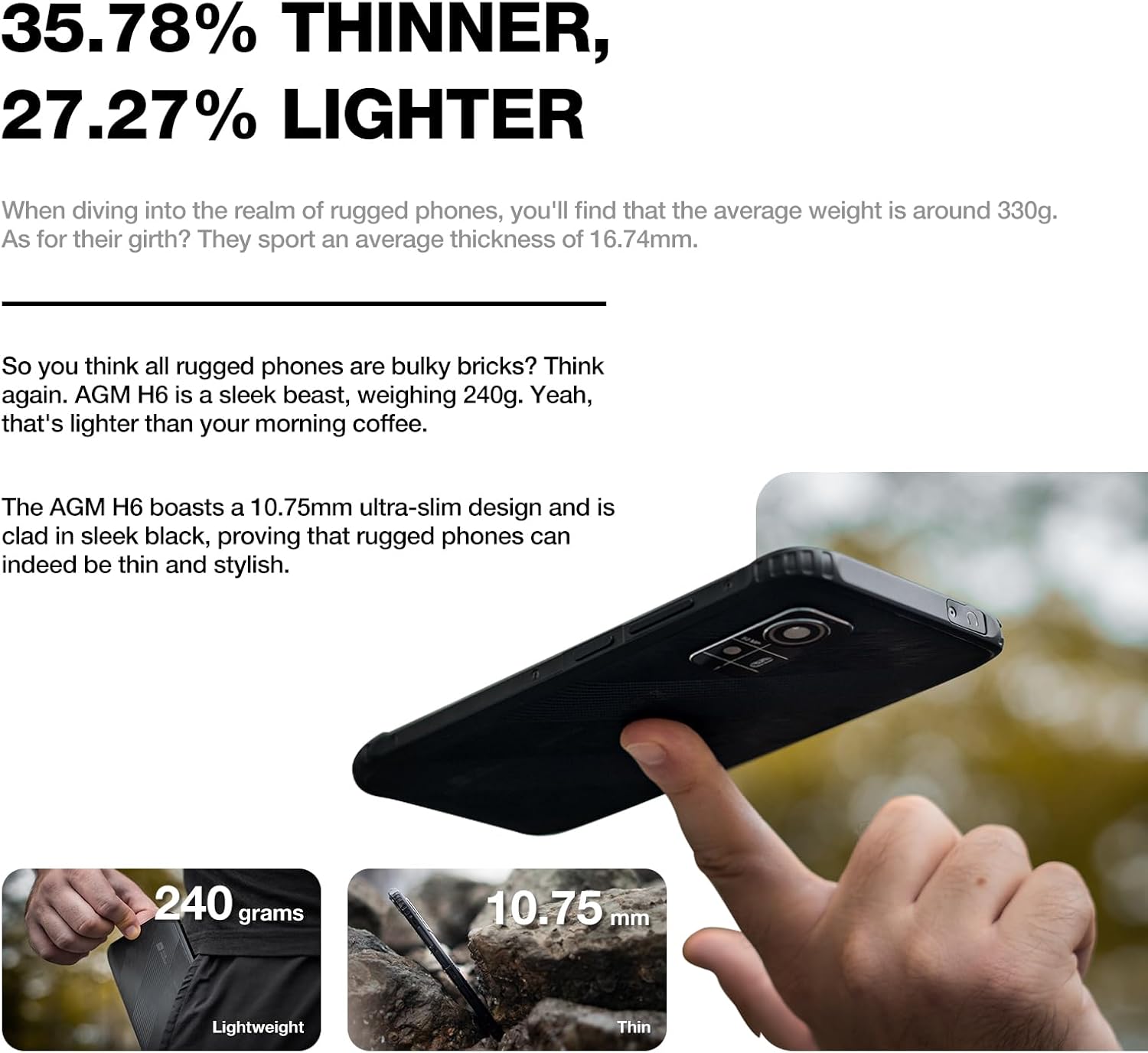
Image 8.2: Physical dimensions and weight comparison.
9. വാറൻ്റിയും പിന്തുണയും
Your AGM H6 smartphone is covered by a manufacturer's warranty. Please refer to the warranty card included in your package for specific terms and conditions.
For technical support, warranty claims, or further assistance, please visit the official AGM website or contact AGM customer service. You can find more information and support resources on the AGM Store on Amazon.


