1. ആമുഖം
This manual provides detailed instructions for the installation, operation, maintenance, and troubleshooting of your GIGABYTE B550M Gaming X WIFI6 AMD AM4 mATX Motherboard. Please read this manual thoroughly before beginning installation to ensure proper setup and optimal performance.

Figure 1: GIGABYTE B550M Gaming X WIFI6 Motherboard Overview
2. സജ്ജീകരണം
2.1 പാക്കേജ് ഉള്ളടക്കം
Before proceeding, verify that all items are present in your motherboard package:
- GIGABYTE B550M Gaming X WIFI6 Motherboard
- SATA കേബിൾ
- Magnetic WiFi Antenna
- ബഹുഭാഷാ ഇൻസ്റ്റലേഷൻ ഗൈഡ്
- Motherboard Driver CD/USB (if included)
Video 1: GIGABYTE B550M Gaming X WIFI6 Unboxing. This video demonstrates the contents of the motherboard package and initial handling.
2.2 മദർബോർഡ് ലേഔട്ടും കണക്ടറുകളും
Familiarize yourself with the motherboard's layout and various connectors before installation.
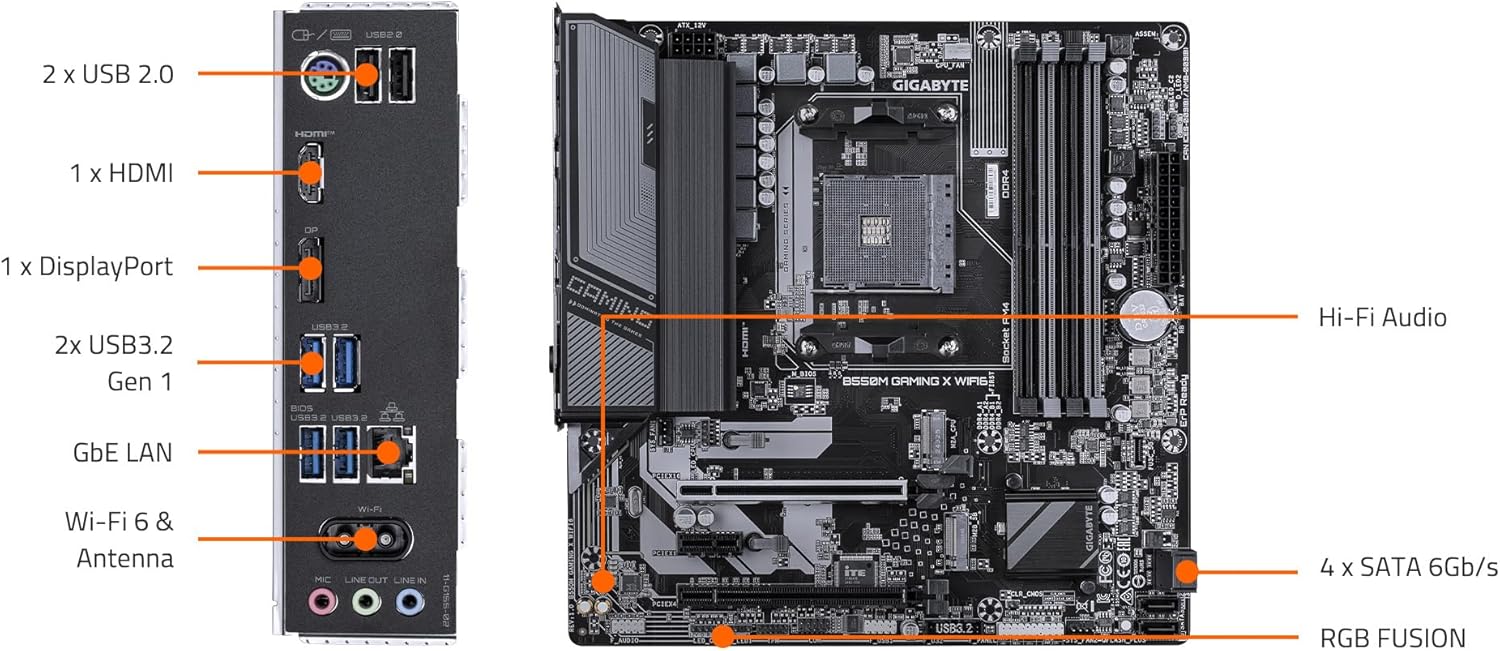
ചിത്രം 2: മദർബോർഡ് ഘടക ലേഔട്ട്
ചിത്രം 3: പിൻഭാഗത്തെ I/O പാനൽ
2.3 ഘടക ഇൻസ്റ്റാളേഷൻ
Follow these steps for installing essential components:
- സിപിയു ഇൻസ്റ്റലേഷൻ: Carefully open the CPU socket lever. Align the triangular mark on the CPU with the mark on the socket. Gently place the CPU into the socket without force. Close the lever to secure the CPU.
- സിപിയു കൂളർ ഇൻസ്റ്റാളേഷൻ: നിർമ്മാതാവിന്റെ നിർദ്ദേശങ്ങൾക്കനുസൃതമായി നിങ്ങളുടെ സിപിയു കൂളർ ഇൻസ്റ്റാൾ ചെയ്യുക. ശരിയായ തെർമൽ പേസ്റ്റ് പ്രയോഗം ഉറപ്പാക്കുക.
- RAM (Memory) Installation: Open the clips on the DDR4 memory slots. Align the notch on the memory module with the key in the slot. Press down firmly on both ends of the module until the clips snap into place. For dual-channel performance, refer to your motherboard manual for specific slot pairing.
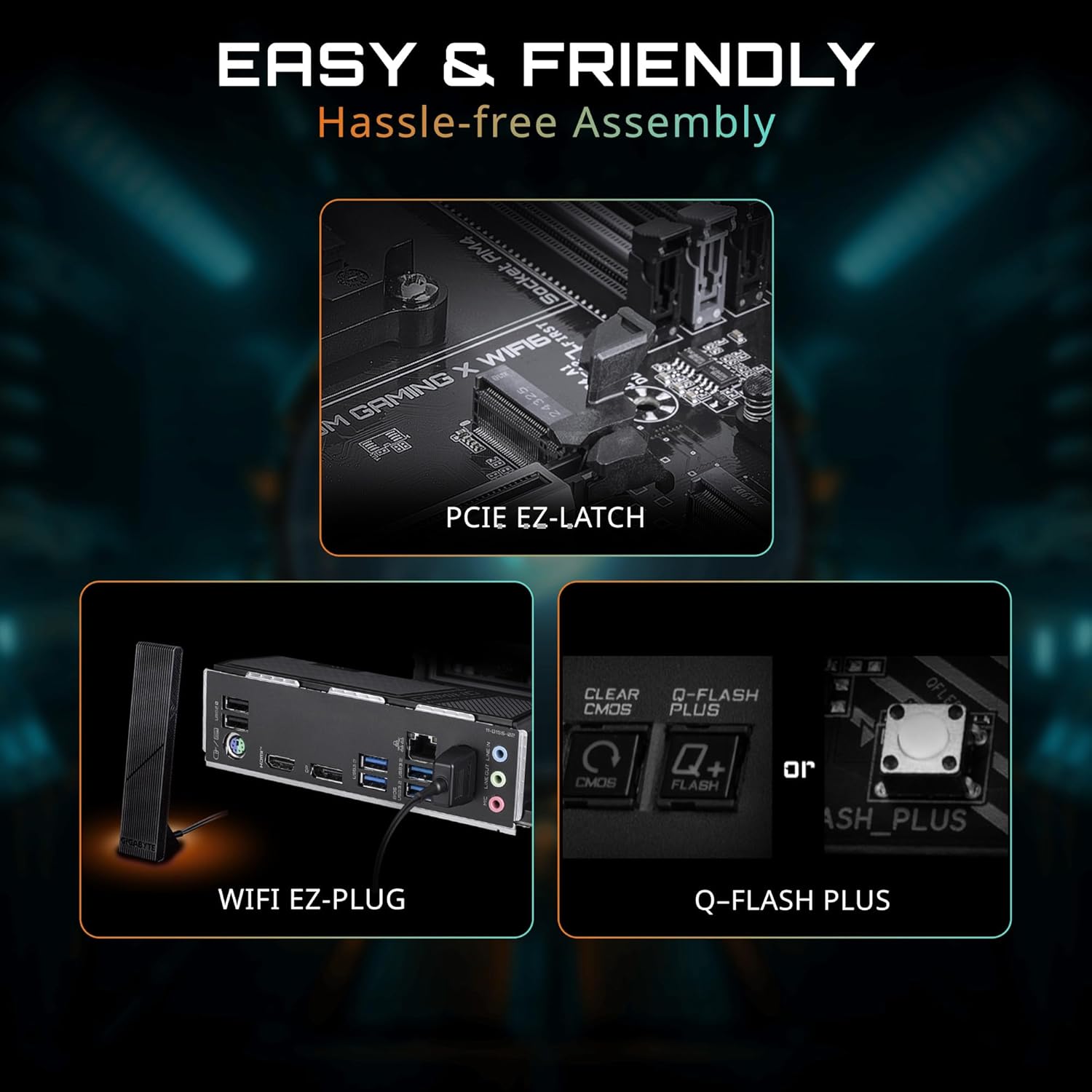
- M.2 SSD ഇൻസ്റ്റലേഷൻ: Locate the M.2 slots. Remove the M.2 screw/standoff. Insert the M.2 SSD at an angle into the slot. Push it down gently and secure it with the screw/standoff. The motherboard features പിസിഐഇ ഇസെഡ്-ലാച്ച് for tool-less M.2 installation.
- ഗ്രാഫിക്സ് കാർഡ് (PCIe) ഇൻസ്റ്റാളേഷൻ: Open the retention clip on the PCIe 4.0 x16 slot. Align your graphics card with the slot and press down firmly until it is seated. The പിസിഐഇ ഇസെഡ്-ലാച്ച് simplifies removal. Secure the card to your chassis with screws.
- SATA Device Installation: Connect SATA data cables from your storage devices (HDDs/SSDs) to the SATA ports on the motherboard. Connect SATA power cables from your power supply to the devices.
- പവർ സപ്ലൈ കണക്ഷനുകൾ: നിങ്ങളുടെ പവർ സപ്ലൈയിൽ നിന്ന് 24-പിൻ ATX പവർ കണക്ടറും 8-പിൻ (അല്ലെങ്കിൽ 4+4-പിൻ) സിപിയു പവർ കണക്ടറും മദർബോർഡിലെ അനുബന്ധ പോർട്ടുകളിലേക്ക് ബന്ധിപ്പിക്കുക.
- ഫ്രണ്ട് പാനൽ കണക്ഷനുകൾ: Connect the power button, reset button, HDD LED, power LED, and front panel USB/audio headers to their respective pins on the motherboard. Refer to the motherboard manual for pin assignments.
- WiFi Antenna Connection: Screw the magnetic WiFi antenna onto the designated connectors on the rear I/O panel. The WiFi EZ-Plug design ensures easy connection.

Figure 4: Easy Assembly Features (PCIe EZ-Latch, WiFi EZ-Plug, Q-Flash Plus)
3. പ്രവർത്തിക്കുന്നു
3.1 പ്രാരംഭ ബൂട്ടും ബയോസ് സജ്ജീകരണവും
After assembling your system, connect a monitor, keyboard, and mouse. Power on your PC. Press the designated key (usually DEL or F2) during startup to enter the BIOS/UEFI setup. Here you can configure boot order, system time, and other advanced settings. The motherboard supports ക്യു-ഫ്ലാഷ് പ്ലസ് for BIOS updates without a CPU, memory, or graphics card installed.
3.2 ഡ്രൈവർ ഇൻസ്റ്റലേഷൻ
Once your operating system is installed, install the necessary drivers for your motherboard components. These can typically be found on the included driver CD/USB or downloaded from the official GIGABYTE website. Essential drivers include chipset, LAN, audio, and Wi-Fi drivers.
3.3 സോഫ്റ്റ്വെയർ യൂട്ടിലിറ്റികൾ
GIGABYTE provides various software utilities to enhance your user experience:
- RGB ഫ്യൂഷൻ: Customize the RGB lighting effects on your motherboard and connected compatible devices.
- സ്മാർട്ട് ഫാൻ 6: Monitor and control your system's fan speeds and temperatures for optimal cooling and noise levels.
- App Center: A centralized platform to manage and update GIGABYTE utilities and drivers.
Video 2: GIGABYTE B550 Motherboards - Overview. ഈ വീഡിയോയിൽ ഒരു പൊതുവായ വിവരണം നൽകുന്നു.view of the features and capabilities of GIGABYTE B550 series motherboards.
4. പരിപാലനം
നിങ്ങളുടെ മദർബോർഡിന്റെ ദീർഘായുസ്സും സ്ഥിരതയുള്ള പ്രകടനവും ഉറപ്പാക്കാൻ പതിവ് അറ്റകുറ്റപ്പണികൾ സഹായിക്കുന്നു.
- വൃത്തിയാക്കൽ: Periodically clean dust from your PC case and motherboard components using compressed air. Ensure the system is powered off and unplugged before cleaning. Avoid using liquids.
- ബയോസ് അപ്ഡേറ്റുകൾ: GIGABYTE പരിശോധിക്കുക website for the latest BIOS updates. BIOS updates can improve compatibility, stability, and performance. Use the Q-Flash or Q-Flash Plus utility for safe updating.
- ഡ്രൈവർ അപ്ഡേറ്റുകൾ: Keep your drivers updated to ensure optimal performance and compatibility with new software and hardware. Download drivers only from the official GIGABYTE webസൈറ്റ്.
5. പ്രശ്നപരിഹാരം
നിങ്ങളുടെ മദർബോർഡിൽ പ്രശ്നങ്ങൾ നേരിടുകയാണെങ്കിൽ, ഇനിപ്പറയുന്ന ട്രബിൾഷൂട്ടിംഗ് ഘട്ടങ്ങൾ പരിഗണിക്കുക:
- പവർ ഇല്ല/ബൂട്ട് ഇല്ല:
- Check all power connections (24-pin ATX, 8-pin CPU, GPU, SATA).
- വൈദ്യുതി വിതരണം സ്വിച്ച് ഓണാണെന്ന് ഉറപ്പാക്കുക.
- Try booting with minimal components (CPU, one RAM stick, graphics card if no integrated graphics).
- ഡിസ്പ്ലേ ഇല്ല:
- Verify monitor cable connections and monitor input selection.
- ഗ്രാഫിക്സ് കാർഡും മെമ്മറി മൊഡ്യൂളുകളും വീണ്ടും സ്ഥാപിക്കുക.
- Test with a different monitor or graphics card if possible.
- സിസ്റ്റം അസ്ഥിരത/ക്രാഷുകൾ:
- സിപിയു, ജിപിയു താപനില പരിശോധിക്കുക. ആവശ്യത്തിന് തണുപ്പിക്കൽ ഉറപ്പാക്കുക.
- റാം പിശകുകൾ പരിശോധിക്കാൻ മെമ്മറി ഡയഗ്നോസ്റ്റിക് ഉപകരണങ്ങൾ പ്രവർത്തിപ്പിക്കുക.
- ബയോസും എല്ലാ ഡ്രൈവറുകളും ഏറ്റവും പുതിയ പതിപ്പുകളിലേക്ക് അപ്ഡേറ്റ് ചെയ്യുക.
- Network Connectivity Issues (Wired/Wireless):
- Ensure LAN cable is properly connected or WiFi antenna is securely attached.
- LAN/WiFi ഡ്രൈവറുകൾ ഇൻസ്റ്റാൾ ചെയ്യുക അല്ലെങ്കിൽ അപ്ഡേറ്റ് ചെയ്യുക.
- നിങ്ങളുടെ ഓപ്പറേറ്റിംഗ് സിസ്റ്റത്തിലെ നെറ്റ്വർക്ക് ക്രമീകരണങ്ങൾ പരിശോധിക്കുക.
If issues persist, consult the GIGABYTE support webസൈറ്റ് അല്ലെങ്കിൽ അവരുടെ സാങ്കേതിക പിന്തുണയുമായി ബന്ധപ്പെടുക.

