ആമുഖം
This manual provides detailed instructions for the installation, operation, and maintenance of your Montech Century II 1050W ATX Gaming Power Supply. Please read this manual thoroughly before installation and keep it for future reference.

Image: The Montech Century II 1050W Power Supply Unit, showcasing അതിന്റെ രൂപകൽപ്പനയും പ്രധാന സവിശേഷതകളും.
സുരക്ഷാ വിവരങ്ങൾ
Always observe the following safety precautions to prevent injury or damage to your equipment:
- ഇൻസ്റ്റാളേഷനോ അറ്റകുറ്റപ്പണിയോ നടത്തുന്നതിന് മുമ്പ് പ്രധാന പവർ ഔട്ട്ലെറ്റിൽ നിന്ന് വൈദ്യുതി വിതരണം വിച്ഛേദിക്കപ്പെട്ടിട്ടുണ്ടെന്ന് ഉറപ്പാക്കുക.
- Do not open the power supply unit casing. ഉയർന്ന വോളിയംtages ഉള്ളിൽ ഉണ്ട്, ഇത് വൈദ്യുതാഘാതത്തിന് കാരണമാകും.
- താപ സ്രോതസ്സുകളിൽ നിന്നും നേരിട്ടുള്ള സൂര്യപ്രകാശത്തിൽ നിന്നും അകന്ന്, നന്നായി വായുസഞ്ചാരമുള്ള സ്ഥലത്ത് വൈദ്യുതി വിതരണം സ്ഥാപിക്കുക.
- ഈ പവർ സപ്ലൈയിൽ നൽകിയിരിക്കുന്ന മോഡുലാർ കേബിളുകൾ മാത്രം ഉപയോഗിക്കുക. പൊരുത്തപ്പെടാത്ത കേബിളുകൾ ഉപയോഗിക്കുന്നത് യൂണിറ്റിനോ ബന്ധിപ്പിച്ചിരിക്കുന്ന ഘടകങ്ങൾക്കോ കേടുവരുത്തിയേക്കാം.
- വൈദ്യുതി വിതരണത്തിൽ ഈർപ്പം അല്ലെങ്കിൽ തീവ്രമായ താപനില ഏൽക്കുന്നത് ഒഴിവാക്കുക.
പാക്കേജ് ഉള്ളടക്കം
നിങ്ങളുടെ പാക്കേജിൽ എല്ലാ ഇനങ്ങളും ഉണ്ടെന്ന് ഉറപ്പാക്കുക:
- Montech Century II 1050W Power Supply Unit
- എസി പവർ കോർഡ്
- Modular Cable Set (including 12V-2x6 cable)
- മൗണ്ടിംഗ് സ്ക്രൂകൾ
- കേബിൾ ബന്ധങ്ങൾ
- ഉപയോക്തൃ മാനുവൽ (ഈ പ്രമാണം)

Image: The Montech Century II Power Supply with its included flat and flexible modular cables, designed for a neat build.
ഉൽപ്പന്നം കഴിഞ്ഞുview
The Montech Century II 1050W is a high-performance ATX gaming power supply designed for modern PC systems. It features 80 Plus Gold and Cybenetics Platinum efficiency ratings, ensuring stable and reliable power delivery. The fully modular design simplifies cable management, and its ATX 3.1 and PCIe 5.1 readiness, including a 12V-2x6 cable, provides compatibility with the latest hardware.
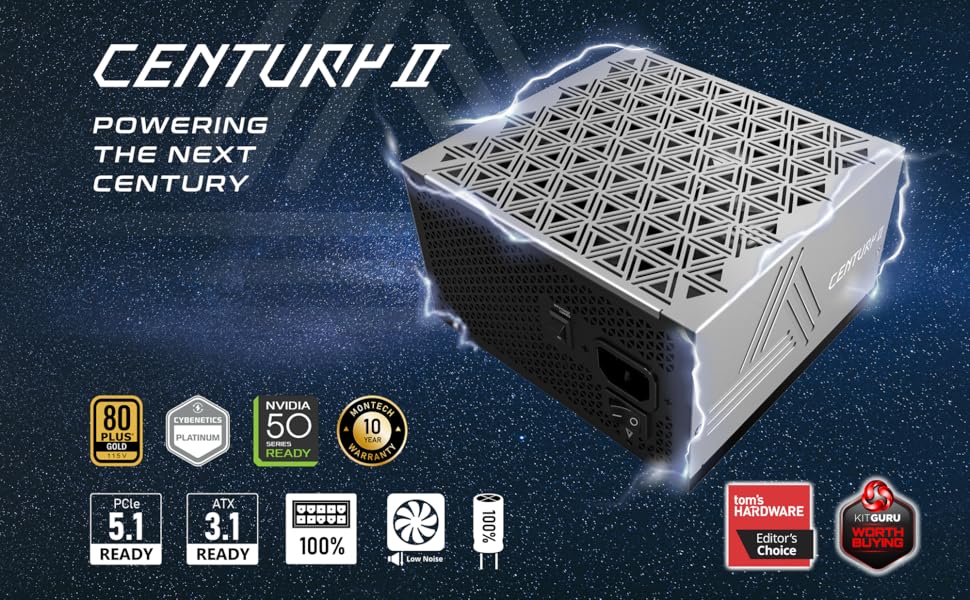
ചിത്രം: കഴിഞ്ഞുview of the Montech Century II Power Supply, highlighting its ATX 3.1 and PCIe 5.1 readiness.
പ്രധാന സവിശേഷതകൾ:
- 80 Plus Gold & Cybenetics Platinum Certified: High efficiency for reduced power consumption and heat.
- പൂർണ്ണ മോഡുലാർ ഡിസൈൻ: Connect only the cables you need for improved airflow and cable management.
- ATX 3.1 & PCIe 5.1 റെഡി: Future-proof compatibility with next-generation components, including a native 12V-2x6 cable.
- Smart Zero Fan Mode: Optimizes cooling and reduces noise by stopping the fan at low loads.
- 100% ജാപ്പനീസ് കപ്പാസിറ്ററുകൾ: Ensures long-term stability and reliability.
സജ്ജീകരണവും ഇൻസ്റ്റാളേഷനും
Follow these steps to install your Montech Century II 1050W Power Supply:
- നിങ്ങളുടെ സിസ്റ്റം തയ്യാറാക്കുക: നിങ്ങളുടെ കമ്പ്യൂട്ടർ പവർ ഓഫ് ചെയ്തിട്ടുണ്ടെന്നും വാൾ ഔട്ട്ലെറ്റിൽ നിന്ന് പ്ലഗ് ഊരിയിട്ടുണ്ടെന്നും ഉറപ്പാക്കുക. പവർ സപ്ലൈ മൗണ്ടിംഗ് ഏരിയയിലേക്ക് പ്രവേശിക്കാൻ നിങ്ങളുടെ പിസി കേസ് തുറക്കുക.
- പഴയ പൊതുമേഖലാ സ്ഥാപനം നീക്കം ചെയ്യുക (ബാധകമെങ്കിൽ): നിങ്ങളുടെ പഴയ പവർ സപ്ലൈയിൽ നിന്ന് എല്ലാ കേബിളുകളും വിച്ഛേദിച്ച് കേസിൽ നിന്ന് അത് നീക്കം ചെയ്യുക.
- പുതിയ PSU ഇൻസ്റ്റാൾ ചെയ്യുക: Carefully place the Montech Century II 1050W PSU into the designated bay in your PC case. Secure it with the provided mounting screws. Ensure the fan is oriented correctly (typically facing downwards if your case has a bottom vent, or upwards if not).
- മോഡുലാർ കേബിളുകൾ ബന്ധിപ്പിക്കുക: Identify the necessary cables for your motherboard, CPU, graphics card(s), and storage devices. Connect them to the corresponding ports on the power supply.
- മദർബോർഡ്: Connect the 24-pin ATX cable.
- സിപിയു: Connect the 4+4-pin or 8-pin EPS cables to your motherboard's CPU power connectors.
- ഗ്രാഫിക്സ് കാർഡ് (GPU): Use the appropriate PCIe cables. For modern GPUs requiring a 12V-2x6 connector, use the dedicated cable provided.
- Storage/Peripherals: Connect SATA power cables for SSDs/HDDs and Molex cables for other peripherals as needed.
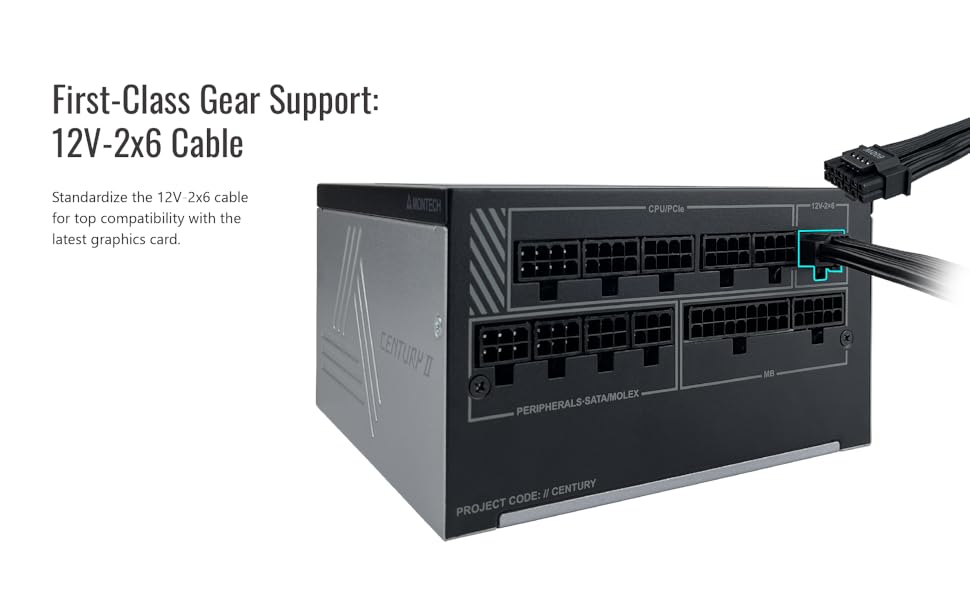
Image: A diagram illustrating the modular cable connection ports on the Montech Century II Power Supply, including the 12V-2x6 connector.
- കേബിൾ മാനേജുമെന്റ്: Route cables neatly to improve airflow and aesthetics. Use the included cable ties to secure them.
- എസി പവർ ബന്ധിപ്പിക്കുക: Plug the AC power cord into the power supply and then into a wall outlet.
- പവർ ഓൺ: Flip the main power switch on the back of the PSU to the "ON" position. You can then power on your computer.
പ്രവർത്തന നിർദ്ദേശങ്ങൾ
Smart Zero Fan Mode:
The Montech Century II 1050W features a Smart Zero Fan mode, which allows the power supply fan to remain off at low loads (typically below 30-40% of total wattage) for silent operation. The fan will automatically activate when the load increases to maintain optimal cooling.
To enable or disable this feature, use the "SMART ZERO FAN" switch located on the back of the power supply unit.
- ഓൺ: Fan operates only when needed (Smart Zero Fan mode active).
- ഓഫാണ്: Fan runs continuously at a low speed, regardless of load.

Image: Rear panel of the Montech Century II Power Supply, highlighting the main power switch and the Smart Zero Fan toggle switch.
മെയിൻ്റനൻസ്
Regular maintenance helps ensure the longevity and optimal performance of your power supply:
- പൊടി നീക്കം: Periodically clean the exterior of the power supply and its fan grille using compressed air or a soft brush to remove dust buildup. Ensure the PSU is powered off and unplugged before cleaning.
- കേബിൾ പരിശോധന: Occasionally check all modular cable connections to ensure they are securely seated.
- പരിസ്ഥിതി: Maintain a clean, cool, and dry environment for your PC to prevent excessive heat and moisture exposure to the PSU.
ട്രബിൾഷൂട്ടിംഗ്
If you encounter issues with your Montech Century II 1050W Power Supply, refer to the following common problems and solutions:
ശക്തിയില്ല:
- പവർ കോർഡ് പരിശോധിക്കുക: എസി പവർ കോർഡ് പിഎസ്യുവിലും വാൾ ഔട്ട്ലെറ്റിലും സുരക്ഷിതമായി പ്ലഗ് ചെയ്തിട്ടുണ്ടെന്ന് ഉറപ്പാക്കുക.
- പ്രധാന പവർ സ്വിച്ച്: Verify that the main power switch on the back of the PSU is in the "ON" position.
- മോഡുലാർ കേബിളുകൾ: Confirm all modular cables (especially the 24-pin motherboard and CPU power cables) are correctly and firmly connected.
- വാൾ ഔട്ട്ലെറ്റ്: Test the wall outlet with another device to ensure it is functioning.
സിസ്റ്റം അസ്ഥിരത/ക്രാഷുകൾ:
- ഓവർലോഡ്: Ensure your system's power requirements do not exceed the PSU's 1050W capacity. Use a power calculator if unsure.
- കേബിൾ കണക്ഷനുകൾ: Recheck all power connections, particularly to the motherboard and graphics card, for secure fit.
- ഘടക പ്രശ്നങ്ങൾ: Rule out other components (RAM, GPU, CPU) as potential causes by testing them if possible.
Fan Not Spinning (Smart Zero Fan ON):
- This is normal behavior if Smart Zero Fan mode is enabled and the system load is low. The fan will activate when the load increases.
- If the fan does not spin even under high load, try disabling Smart Zero Fan mode via the switch on the back of the PSU. If it still doesn't spin, contact support.
If problems persist after attempting these solutions, please contact Montech customer support.
സ്പെസിഫിക്കേഷനുകൾ
Detailed technical specifications for the Montech Century II 1050W Power Supply:
| ഫീച്ചർ | സ്പെസിഫിക്കേഷൻ |
|---|---|
| മോഡലിൻ്റെ പേര് | Century II 1050W |
| വാട്ട്tage | 1050 വാട്ട്സ് |
| കാര്യക്ഷമതാ സർട്ടിഫിക്കേഷൻ | 80 Plus Gold & Cybenetics Platinum |
| ഫോം ഫാക്ടർ | ATX |
| മോഡുലാർ തരം | പൂർണ്ണമായും മോഡുലാർ |
| ATX പതിപ്പ് | ATX 3.1 തയ്യാറാണ് |
| പിസിഐഇ പതിപ്പ് | PCIe 5.1 Ready (with 12V-2x6 Cable) |
| തണുപ്പിക്കൽ രീതി | Air (135mm fan with Smart Zero Fan mode) |
| കപ്പാസിറ്ററുകൾ | 100% ജാപ്പനീസ് കപ്പാസിറ്ററുകൾ |
| ഉൽപ്പന്ന അളവുകൾ (L x W x H) | 10 x 10 x 10 ഇഞ്ച് |
| ഇനത്തിൻ്റെ ഭാരം | 5.29 പൗണ്ട് |

Image: Graphs illustrating the efficiency curve and efficiency levels of the Montech Century II Power Supply, demonstrating its 80 Plus Gold and Cybenetics Platinum performance.

ചിത്രം: ഒരു ക്ലോസ്-അപ്പ് view of the 100% Japanese capacitors used in the Montech Century II Power Supply, indicating high-quality internal components.
വാറൻ്റിയും പിന്തുണയും
The Montech Century II 1050W Power Supply comes with a 10 വർഷത്തെ വാറൻ്റി, ensuring long-term reliability and peace of mind. For warranty claims, technical support, or any inquiries not covered in this manual, please contact Montech customer service through their official webഉൽപ്പന്നം വാങ്ങിയ സൈറ്റ് അല്ലെങ്കിൽ റീട്ടെയിലർ.
വാറന്റി സാധൂകരണത്തിനായി നിങ്ങളുടെ വാങ്ങിയതിന്റെ തെളിവ് സൂക്ഷിക്കുക.
ഉൽപ്പന്ന വീഡിയോ കഴിഞ്ഞുview
വീഡിയോ: ഒരു അൺബോക്സിംഗ് കൂടിview of the Montech Century II 850W Power Supply. While this video features the 850W model, it provides a general look at the design, packaging, and modular cables common to the Century II series, including the 1050W model.


