ആമുഖം
The LETSHUOER DX1 earphones are designed for high-fidelity audio reproduction, featuring an 11mm dynamic driver with an aluminum-magnesium alloy topological diaphragm. This manual provides essential information for the proper use and maintenance of your DX1 earphones.
പാക്കേജ് ഉള്ളടക്കം
പാക്കേജിൽ എല്ലാ ഇനങ്ങളും ഉണ്ടെന്ന് ഉറപ്പാക്കുക:
- 2 x DX1 Earphone Units
- 1 x Earphone Cable (256-Core silver-plated monocrystalline copper, 0.78mm dual-pin, 3.5mm termination)
- 9 x Pairs of Ear Tips (various sizes and materials)
- 1 x Earphone Storage Case
- 1 x ഉപയോക്തൃ മാനുവൽ (ഈ പ്രമാണം)
- 1 x വാറൻ്റി കാർഡ്

Image: Contents of the LETSHUOER DX1 earphone package, showing the earphones, detachable cable, multiple ear tips, a storage case, user manual, and warranty card.
സജ്ജമാക്കുക
1. Attaching the Earphone Cable
- Identify the left (L) and right (R) earphone units and cable connectors. The cable connectors are typically marked with 'L' and 'R'.
- Align the 0.78mm dual-pin connector on the cable with the corresponding sockets on the earphone units. Ensure the pins are correctly oriented.
- Gently push the cable connector into the earphone unit until it is securely seated. Do not force the connection.
- Repeat for the other earphone unit.
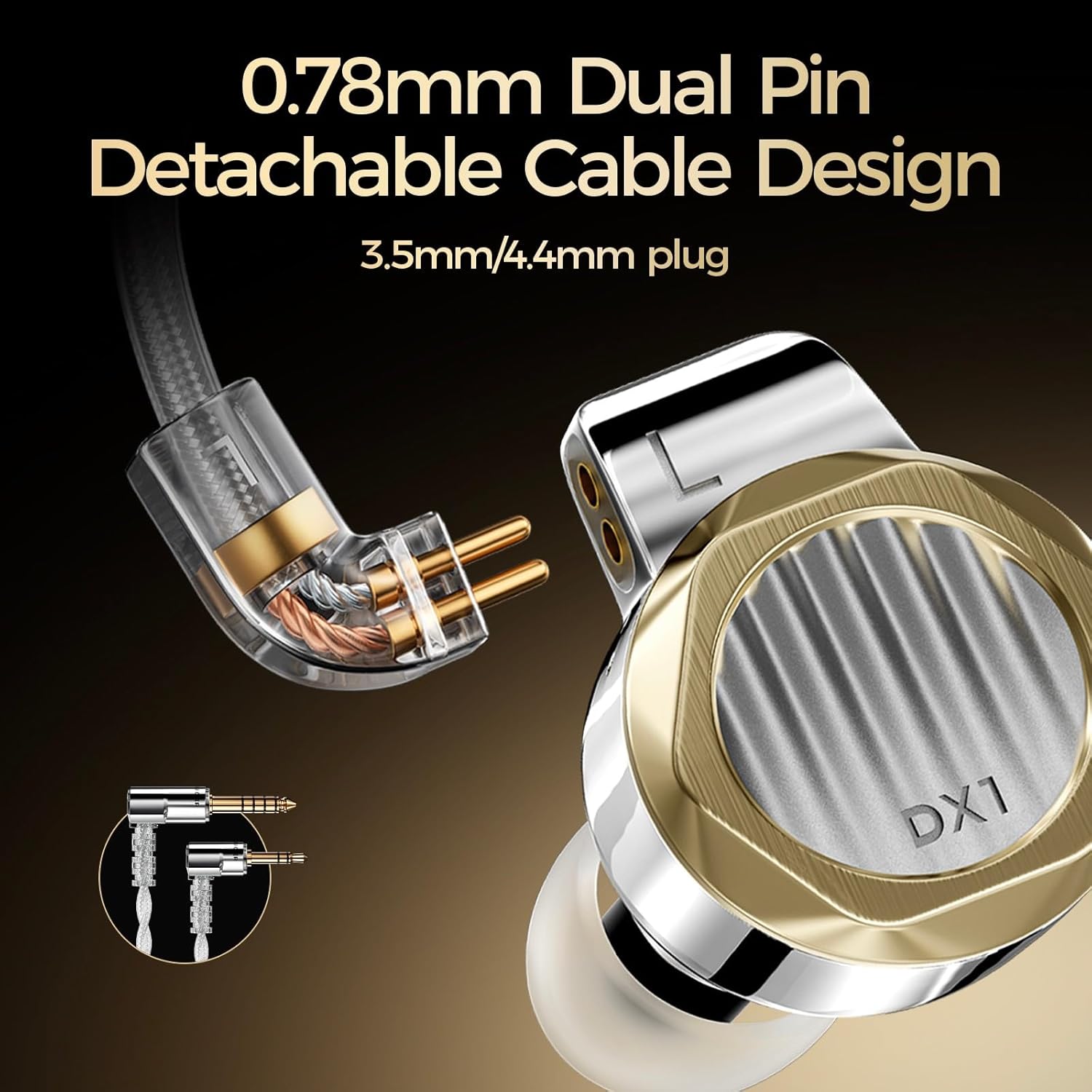
ചിത്രം: വിശദമായത് view of the 0.78mm dual-pin detachable cable being connected to the earphone unit, highlighting the secure connection mechanism.
2. Selecting and Installing Ear Tips
The correct ear tips are crucial for sound quality and comfort. Experiment with the included ear tips to find the best fit for your ears.
- Gently remove the pre-installed ear tips by pulling them off the nozzle.
- Select a pair of ear tips that provide a comfortable and secure seal in your ear canal.
- Push the new ear tip onto the earphone nozzle until it is firmly attached.
3. ഇയർഫോണുകൾ ധരിക്കൽ
The DX1 earphones are designed for an over-ear fit to ensure stability and comfort.
- Identify the left and right earphone units.
- Place the earphone unit into your ear canal.
- Guide the cable over the top and behind your ear. The cable is designed to conform to the shape of your ear for a secure fit.
- Adjust the earphone and cable until a comfortable and stable fit is achieved, ensuring a good seal in the ear canal.

Image: An earphone unit correctly positioned in an ear, illustrating the ergonomic design and how the cable wraps over the ear for stability.
ഓപ്പറേഷൻ
ഓഡിയോ ഉപകരണങ്ങളിലേക്ക് കണക്റ്റുചെയ്യുന്നു
The LETSHUOER DX1 earphones feature a 3.5mm connector for wide compatibility.
- Insert the 3.5mm plug of the earphone cable into the headphone jack of your audio source (e.g., smartphone, digital audio player, computer, gaming console).
- Ensure the plug is fully inserted for optimal sound.
- Adjust the volume on your audio device to a comfortable listening level before placing the earphones in your ears.
Compatible devices include: Laptops, Desktops, Gaming Consoles, Tablets, Telephones, Smart Speakers, Televisions, Music Production Equipment, Car Audio Systems, and Cellphones.
മെയിൻ്റനൻസ്
Cleaning the Earphones
- Earphone Units: Use a soft, dry, lint-free cloth to wipe the stainless-steel shells. Avoid using harsh chemicals or abrasive materials.
- ചെവി ടിപ്പുകൾ: Remove ear tips from the earphones. They can be gently washed with mild soap and water. Ensure they are completely dry before reattaching.
- നോസിലുകൾ: Carefully remove any earwax or debris from the earphone nozzles using a small, soft brush or a specialized cleaning tool. Be gentle to avoid damaging the driver mesh.
കേബിൾ കെയർ
- പെട്ടെന്നുള്ള വളവുകളോ കേബിളിൽ അമിതമായി വലിക്കലോ ഒഴിവാക്കുക.
- When storing, coil the cable loosely to prevent tangling and damage.
- If the cable becomes dirty, wipe it with a soft, slightly damp തുണി.
സംഭരണം
When not in use, store your DX1 earphones in the provided storage case to protect them from dust, moisture, and physical damage.
ട്രബിൾഷൂട്ടിംഗ്
- ശബ്ദമില്ല അല്ലെങ്കിൽ ഇടവിട്ടുള്ള ശബ്ദം:
- Ensure the 3.5mm plug is fully inserted into the audio source.
- Check that the detachable cable connectors are securely attached to the earphone units.
- ഓഡിയോ ഉറവിടം പ്ലേ ചെയ്യുന്നുണ്ടെന്നും അതിന്റെ വോളിയം കൂട്ടിയിട്ടുണ്ടെന്നും ഉറപ്പാക്കുക.
- Test with a different audio source or cable if possible.
- Poor Sound Quality (e.g., lack of bass, tinny sound):
- Ensure ear tips provide a proper seal in your ear canal. Try different sizes or types of ear tips.
- Check for any obstructions in the earphone nozzles.
- Ensure the cable connections are secure.
- Driver Flex / Crinkling Sound:
- Some in-ear monitors may exhibit a slight "crinkling" sound or sensation when inserted or adjusted due to air pressure changes. This is often a characteristic of the design and not necessarily a defect.
- Try inserting the earphones slowly and gently to minimize this effect.
- Ensure the ear tips are not creating an overly tight seal that traps air.
- അസ്വസ്ഥത:
- Experiment with different ear tip sizes and materials to find the most comfortable fit.
- Ensure the earphones are correctly positioned in your ears with the cable routed over the ear.
സ്പെസിഫിക്കേഷനുകൾ
| മോഡൽ | LETSHUOER DX1 wired HiFi IEM |
| ഹെഡ്ഫോണുകൾ ജാക്ക് | 3.5 മി.മീ |
| കണക്റ്റിവിറ്റി ടെക്നോളജി | വയർഡ് |
| ഓഡിയോ ഡ്രൈവർ തരം | 11mm Dynamic Driver (Aluminum-magnesium alloy topological diaphragm) |
| ഷെൽ മെറ്റീരിയൽ | Electroplated Stainless Steel with high-gloss finish |
| കേബിൾ | 256-core silver-plated monocrystalline copper, 0.78mm dual-pin detachable |
| സംവേദനക്ഷമത | 108dB |
| പ്രതിരോധം | 30Ω |
| ഫ്രീക്വൻസി പ്രതികരണം | 20Hz-40kHz |
| ഇനത്തിൻ്റെ ഭാരം | 12.32 ഔൺസ് (ആകെ പാക്കേജ്) |
| ചെവി പ്ലേസ്മെൻ്റ് | ചെവിയിൽ |
| ഫോം ഫാക്ടർ | ചെവിയിൽ |

Image: A graphic displaying the key technical specifications of the LETSHUOER DX1 earphones.
വാറൻ്റിയും പിന്തുണയും
Your LETSHUOER DX1 earphones come with a warranty. Please refer to the included Warranty Card for specific terms and conditions, including warranty period and coverage details.
For technical support, product inquiries, or warranty claims, please contact LETSHUOER customer service through their official webഉൽപ്പന്നം വാങ്ങിയ സൈറ്റ് അല്ലെങ്കിൽ റീട്ടെയിലർ.
വാറന്റി ആവശ്യങ്ങൾക്കായി നിങ്ങളുടെ വാങ്ങിയതിന്റെ തെളിവ് സൂക്ഷിക്കുക.


