1. ആമുഖം
This manual provides essential information for the proper use and maintenance of your KSIX LYA Smartwatch. Please read it carefully before using the device to ensure optimal performance and longevity.
2. പാക്കേജ് ഉള്ളടക്കം
നിങ്ങളുടെ ഉൽപ്പന്ന പാക്കേജിൽ എല്ലാ ഇനങ്ങളും ഉണ്ടെന്ന് ഉറപ്പാക്കുക:
- KSIX LYA Smartwatch (Model BXSW29P)
- Silicone Watch Strap (18mm)
- Metal Watch Strap (18mm)
- ചാർജിംഗ് കേബിൾ
- ഉപയോക്തൃ മാനുവൽ

Image: KSIX LYA Smartwatch with both metal and silicone straps, showcasing the main device and an alternative strap.
3. സജ്ജീകരണം
3.1 സ്മാർട്ട് വാച്ച് ചാർജ് ചെയ്യുന്നു
Before initial use, fully charge your KSIX LYA Smartwatch. Connect the charging cable to the charging port on the back of the watch and to a standard USB power adapter (not included). A full charge takes approximately 2.5 hours and provides an average battery life of 5 days, depending on usage.
3.2 ആപ്പ് ഇൻസ്റ്റാളേഷനും ജോടിയാക്കലും
- ഡൗൺലോഡ് ചെയ്യുക FitCloudPro application from your smartphone's app store (available for Android and iOS).
- FitCloudPro ആപ്പ് തുറന്ന് സ്ക്രീനിലെ നിർദ്ദേശങ്ങൾ പാലിച്ച് ഒരു അക്കൗണ്ട് സൃഷ്ടിക്കുകയോ ലോഗിൻ ചെയ്യുകയോ ചെയ്യുക.
- നിങ്ങളുടെ സ്മാർട്ട്ഫോണിൽ ബ്ലൂടൂത്ത് പ്രവർത്തനക്ഷമമാക്കുക.
- In the FitCloudPro app, navigate to the device pairing section and search for your KSIX LYA Smartwatch.
- Select your smartwatch from the list of available devices to establish a Bluetooth connection. Confirm any pairing requests on both your phone and the smartwatch.
4. പ്രവർത്തന നിർദ്ദേശങ്ങൾ
4.1 അടിസ്ഥാന നാവിഗേഷൻ
The KSIX LYA Smartwatch features a 1.19-inch AMOLED multi-touch display for intuitive interaction.
- മുകളിലേക്കും താഴേക്കും സ്വൈപ്പ് ചെയ്യുക: മെനുകളിലൂടെയും അറിയിപ്പുകളിലൂടെയും നാവിഗേറ്റ് ചെയ്യുക.
- ഇടത്തേക്ക്/വലത്തേക്ക് സ്വൈപ്പ് ചെയ്യുക: ദ്രുത ഫംഗ്ഷനുകളോ വിജറ്റുകളോ ആക്സസ് ചെയ്യുക.
- ടാപ്പ് ചെയ്യുക: ഒരു ഇനം തിരഞ്ഞെടുക്കുക അല്ലെങ്കിൽ ഒരു പ്രവർത്തനം സ്ഥിരീകരിക്കുക.
- സൈഡ് ബട്ടൺ: ഹോം സ്ക്രീനിലേക്ക് മടങ്ങാൻ അമർത്തുക അല്ലെങ്കിൽ ഉപകരണം ഉണർത്തുക.
4.2 വോയ്സ് അസിസ്റ്റന്റ്
Utilize the integrated voice control feature for hands-free operation. Activate the voice assistant through the watch interface and issue commands for various functions.
5 പ്രധാന സവിശേഷതകൾ
5.1 AMOLED ഡിസ്പ്ലേ
The smartwatch features a vibrant 1.19-inch AMOLED display with a resolution of 320 x 320 pixels, offering clear visuals and rich colors.
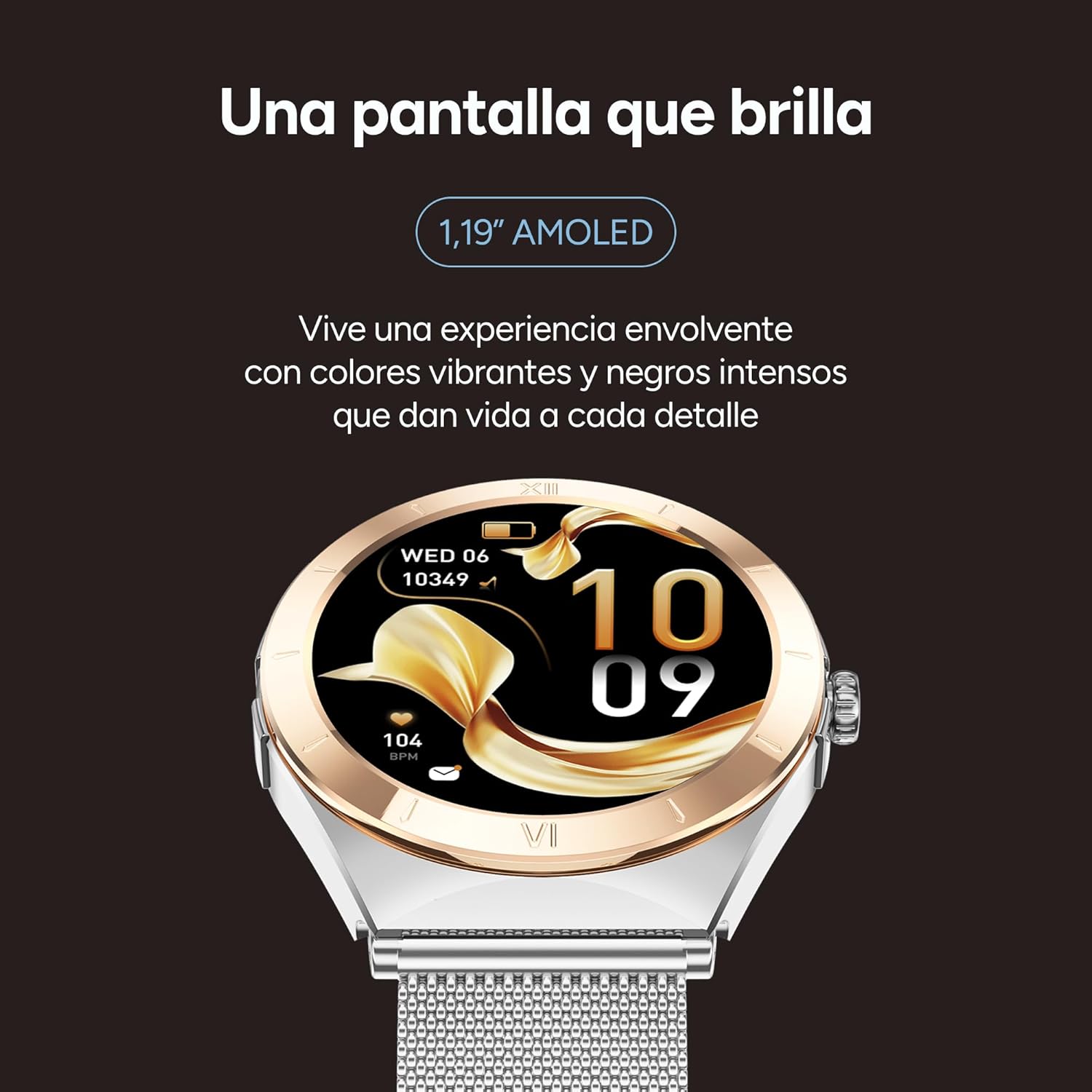
Image: Close-up of the KSIX LYA Smartwatch's 1.19-inch AMOLED display, highlighting its vibrant colors and sharp details.
5.2 ആരോഗ്യ നിരീക്ഷണം
സമഗ്രമായ ആരോഗ്യ ട്രാക്കിംഗ് സവിശേഷതകൾ ഉപയോഗിച്ച് നിങ്ങളുടെ ക്ഷേമം നിരീക്ഷിക്കുക:
- ഹൃദയമിടിപ്പ് നിരീക്ഷണം: Continuous tracking of your heart rate.
- രക്തസമ്മർദ്ദം അളക്കൽ: Provides estimates of your blood pressure levels.
- ഉറക്ക ട്രാക്കിംഗ്: Analyzes sleep patterns, including deep sleep, light sleep, and wake times.
- ആർത്തവചക്രം ട്രാക്കിംഗ്: ആർത്തവചക്രം നിരീക്ഷിക്കാനും പ്രവചിക്കാനും സഹായിക്കുന്നു.
- രക്തത്തിലെ ഓക്സിജൻ (SpO2) നിരീക്ഷണം: രക്തത്തിലെ ഓക്സിജൻ സാച്ചുറേഷൻ അളവ് അളക്കുന്നു.

Image: The KSIX LYA Smartwatch screen showing various health metrics, including daily steps, calories burned, distance covered, heart rate, and blood oxygen levels.
5.3 സ്പോർട്സ് മോഡുകൾ
The smartwatch acts as your personal trainer, offering multiple sport modes to track your activities with detailed metrics. Select your preferred sport mode to record data such as duration, distance, calories burned, and heart rate during exercise.

Image: An infographic illustrating the KSIX LYA Smartwatch's main features, such as its AMOLED display, interchangeable straps, call functionality, health monitoring, music playback, notification alerts, and various sport modes.
5.4 Call Management and Notifications
നിങ്ങളുടെ കൈത്തണ്ടയിൽ നിന്ന് നേരിട്ട് ബന്ധം നിലനിർത്തുക:
- ഹാൻഡ്സ് ഫ്രീ കോളുകൾ: Make, answer, and reject calls without needing to take out your smartphone.
- കോൺടാക്റ്റ് പട്ടിക: Access call history, dial numbers, or manage a personalized contact list.
- ആപ്പ് അറിയിപ്പുകൾ: Receive alerts from your favorite applications (e.g., WhatsApp, Instagram, Facebook, Spotify) directly on your smartwatch.

Image: The KSIX LYA Smartwatch screen showing an incoming call notification with options to accept or decline the call.

Image: The KSIX LYA Smartwatch displaying icons for various social media and messaging applications, indicating its notification capabilities.
5.5 മ്യൂസിക് പ്ലെയർ
Control music playback directly from your smartwatch. Play, pause, skip tracks, and adjust volume for your smartphone's music.
5.6 അധിക പ്രവർത്തനങ്ങൾ
- കാലാവസ്ഥാ പ്രവചനം: തത്സമയ കാലാവസ്ഥാ അപ്ഡേറ്റുകൾ നേടുക.
- ഓർമ്മപ്പെടുത്തലുകളും അലാറങ്ങളും: Set alarms and reminders for important events.
- എൻ്റെ ഫോൺ കണ്ടെത്തുക: നിങ്ങളുടെ പെയർ ചെയ്ത സ്മാർട്ട്ഫോൺ ബ്ലൂടൂത്ത് പരിധിക്കുള്ളിലാണെങ്കിൽ അത് കണ്ടെത്തുക.

Image: The KSIX LYA Smartwatch showcasing additional features such as a music player interface, weather forecast display, reminder settings, and the 'Find My Phone' function.
6. ഇഷ്ടാനുസൃതമാക്കൽ
6.1 Interchangeable Straps
The KSIX LYA Smartwatch comes with two interchangeable 18mm straps: one silicone strap for active use and one metal strap for a more elegant look. To change the strap, locate the quick-release pins on the underside of the watch and gently slide them to detach the current strap. Align the new strap and secure the pins.

Image: A visual comparison of the two interchangeable straps included with the KSIX LYA Smartwatch: a pink silicone strap and a silver metal mesh strap.
6.2 വാച്ച് ഫെയ്സുകൾ
Personalize your smartwatch by choosing from a variety of pre-installed watch faces or download more through the FitCloudPro app. This allows you to match your watch's appearance to your style or mood.

Image: A selection of diverse watch faces available for the KSIX LYA Smartwatch, demonstrating customization options.
7. പരിപാലനം
To ensure the longevity and proper functioning of your KSIX LYA Smartwatch, follow these maintenance guidelines:
- വൃത്തിയാക്കൽ: Regularly wipe the watch screen and straps with a soft, dry cloth. For stubborn dirt, a slightly damp cloth can be used, but ensure the watch is dry before wearing or charging.
- തീവ്രമായ അവസ്ഥകൾ ഒഴിവാക്കുക: Do not expose the smartwatch to extreme temperatures, direct sunlight for prolonged periods, or harsh chemicals.
- ജല പ്രതിരോധം: While the watch may have some water resistance, avoid submerging it in water or exposing it to high-pressure water streams unless explicitly stated otherwise in the specifications.
- ചാർജിംഗ്: നൽകിയിരിക്കുന്ന ചാർജിംഗ് കേബിൾ മാത്രം ഉപയോഗിക്കുക. കേടായ കേബിളുകളോ ചാർജറുകളോ ഉപയോഗിക്കുന്നത് ഒഴിവാക്കുക.
8. പ്രശ്നപരിഹാരം
If you encounter issues with your KSIX LYA Smartwatch, try the following steps:
- ഉപകരണം ഓണാക്കുന്നില്ല: വാച്ച് പൂർണ്ണമായും ചാർജ് ചെയ്തിട്ടുണ്ടെന്ന് ഉറപ്പാക്കുക. കുറഞ്ഞത് 30 മിനിറ്റെങ്കിലും ചാർജറുമായി ബന്ധിപ്പിക്കുക.
- ജോടിയാക്കൽ പ്രശ്നങ്ങൾ: Make sure Bluetooth is enabled on your smartphone and the smartwatch. Restart both devices and try pairing again through the FitCloudPro app.
- കൃത്യമല്ലാത്ത ആരോഗ്യ ഡാറ്റ: വാച്ച് നിങ്ങളുടെ കൈത്തണ്ടയിൽ നന്നായി ധരിച്ചിട്ടുണ്ടെന്ന് ഉറപ്പാക്കുക, അധികം ഇറുകിയതോ അധികം അയഞ്ഞതോ ആകരുത്. വാച്ചിന്റെ പിൻഭാഗത്തുള്ള സെൻസറുകൾ വൃത്തിയാക്കുക.
- ദൃശ്യമാകാത്ത അറിയിപ്പുകൾ: Check notification settings within the FitCloudPro app and your smartphone's system settings to ensure permissions are granted.
- ആപ്പ് മരവിപ്പിക്കൽ/ക്രാഷിംഗ്: Close and restart the FitCloudPro app. If the issue persists, reinstall the app.
For further assistance, refer to the support section or contact KSIX customer service.
9 സ്പെസിഫിക്കേഷനുകൾ
| ഫീച്ചർ | സ്പെസിഫിക്കേഷൻ |
|---|---|
| ബ്രാൻഡ് | KSIX smart your tech |
| മോഡൽ | ബിഎക്സ്എസ്ഡബ്ല്യു29പി |
| ഡിസ്പ്ലേ വലിപ്പം | 1.19 ഇഞ്ച് |
| ഡിസ്പ്ലേ തരം | അമോലെഡ് |
| റെസലൂഷൻ | 320 x 320 |
| ഓപ്പറേറ്റിംഗ് സിസ്റ്റം | FitCloudPro |
| കണക്റ്റിവിറ്റി | ബ്ലൂടൂത്ത് |
| ബാറ്ററി ശേഷി | 230 mAh |
| ശരാശരി ബാറ്ററി ലൈഫ് | 5 ദിവസം |
| ചാർജിംഗ് സമയം | 2.5 മണിക്കൂർ |
| മെറ്റീരിയൽ | സിങ്ക് അലോയ് |
| ഭാരം | 90 ഗ്രാം |
| അനുയോജ്യമായ ഉപകരണങ്ങൾ | സ്മാർട്ട്ഫോൺ |
| പ്രത്യേക സവിശേഷതകൾ | Voice control, alarm clock, touch screen, multi-sport tracker, personalized activity tracking |
10. വാറൻ്റിയും പിന്തുണയും
Your KSIX LYA Smartwatch is covered by a manufacturer's warranty. Please refer to the warranty card included in your package or visit the official KSIX webവിശദമായ വാറന്റി നിബന്ധനകൾക്കും വ്യവസ്ഥകൾക്കും സൈറ്റ്.
For technical support, troubleshooting assistance, or general inquiries, please contact KSIX customer service through their official webസൈറ്റ് അല്ലെങ്കിൽ നിങ്ങളുടെ ഉൽപ്പന്നത്തിനൊപ്പം നൽകിയിരിക്കുന്ന ബന്ധപ്പെടാനുള്ള വിവരങ്ങൾ.
ഓൺലൈൻ ഉറവിടങ്ങൾ: Visit the KSIX Store on Amazon


