ആമുഖം
Thank you for choosing the IRRADIO IR-GT710V Portable Speaker. This manual provides essential information for the safe and efficient operation of your device. Please read it carefully before use and retain it for future reference.
സുരക്ഷാ വിവരങ്ങൾ
- സ്പീക്കറിനെ തീവ്രമായ താപനിലയിലോ, നേരിട്ടുള്ള സൂര്യപ്രകാശത്തിലോ, തുറന്ന തീജ്വാലകളിലോ തുറന്നുകാട്ടരുത്.
- സ്പീക്കറെ ശക്തമായ ആഘാതങ്ങൾക്ക് വിധേയമാക്കുകയോ താഴെയിടുകയോ ചെയ്യുന്നത് ഒഴിവാക്കുക.
- സ്പീക്കർ സ്വയം ഡിസ്അസംബ്ലിംഗ് ചെയ്യുകയോ നന്നാക്കുകയോ പരിഷ്കരിക്കുകയോ ചെയ്യരുത്. ഏതെങ്കിലും അറ്റകുറ്റപ്പണികൾക്ക് യോഗ്യതയുള്ള സേവന ഉദ്യോഗസ്ഥരെ ബന്ധപ്പെടുക.
- മെഡിക്കൽ ഉപകരണങ്ങളിൽ നിന്ന് സ്പീക്കറെ അകറ്റി നിർത്തുക.
- ചാർജർ ബന്ധിപ്പിക്കുന്നതിന് മുമ്പ് ചാർജിംഗ് പോർട്ട് വരണ്ടതാണെന്ന് ഉറപ്പാക്കുക.
- This speaker has an IPX6 water resistance rating, meaning it is protected against high-pressure water jets from any direction. It is not designed for submersion.
പാക്കേജ് ഉള്ളടക്കം
- IRRADIO IR-GT710V Portable Speaker
- ചാർജർ
- ഉപയോക്തൃ മാനുവൽ
ഉൽപ്പന്നം കഴിഞ്ഞുview
Familiarize yourself with the various parts and controls of your IRRADIO IR-GT710V speaker.

ചിത്രം 1: ഫ്രണ്ട് view of the IRRADIO IR-GT710V speaker. The speaker features a black mesh grille covering the front, with the IRRADIO logo illuminated by RGB lights on the left side. A sturdy handle is visible on top.

ചിത്രം 2: മുകളിൽ view of the IRRADIO IR-GT710V speaker. This image highlights the integrated carrying handle and the control panel located on the top surface. The control panel includes buttons for power, Bluetooth pairing, volume control, play/pause, and LED light modes.
നിയന്ത്രണ പാനൽ പ്രവർത്തനങ്ങൾ
- പവർ ബട്ടൺ (⏻): പവർ ഓൺ/ഓഫ് ചെയ്യാൻ അമർത്തിപ്പിടിക്കുക.
- Bluetooth Pairing Button (🔂): ബ്ലൂടൂത്ത് ജോടിയാക്കൽ മോഡിൽ പ്രവേശിക്കാൻ അമർത്തുക.
- ശബ്ദം കുറയ്ക്കുക (−): വോളിയം കുറയ്ക്കുക.
- വോളിയം കൂട്ടുക (+): വോളിയം കൂട്ടുക.
- പ്ലേ/താൽക്കാലിക ബട്ടൺ (▶): ഓഡിയോ പ്ലേബാക്ക് പ്ലേ ചെയ്യുക അല്ലെങ്കിൽ താൽക്കാലികമായി നിർത്തുക.
- LED Light Mode Button (✴): Cycle through different RGB LED light modes.
- ബാസ് ബൂസ്റ്റർ ബട്ടൺ: Activate or deactivate enhanced bass.
തുറമുഖങ്ങളും കണക്ഷനുകളും
ചിത്രം 3: Rear panel of the IRRADIO IR-GT710V speaker. This image shows the various input ports, including a 3.5mm AUX input, a USB port for media playback, and the DC 5V 3A charging port.
- DC 5V 3A Charging Port: For connecting the power adapter to charge the speaker.
- USB പോർട്ട്: ഓഡിയോ പ്ലേ ചെയ്യുന്നതിന് fileഒരു USB ഡ്രൈവിൽ നിന്ന് നേരിട്ട്.
- AUX 3.5mm Input: 3.5mm ഓഡിയോ കേബിൾ വഴി ബാഹ്യ ഓഡിയോ ഉപകരണങ്ങൾ ബന്ധിപ്പിക്കുന്നതിന്.
സജ്ജമാക്കുക
സ്പീക്കറെ കുറ്റപ്പെടുത്തുന്നു
- Connect the provided charger to the DC 5V 3A charging port on the speaker.
- ഒരു പവർ ഔട്ട്ലെറ്റിൽ ചാർജർ പ്ലഗ് ചെയ്യുക.
- ചാർജിംഗ് ഇൻഡിക്കേറ്റർ ലൈറ്റ് പ്രകാശിക്കും.
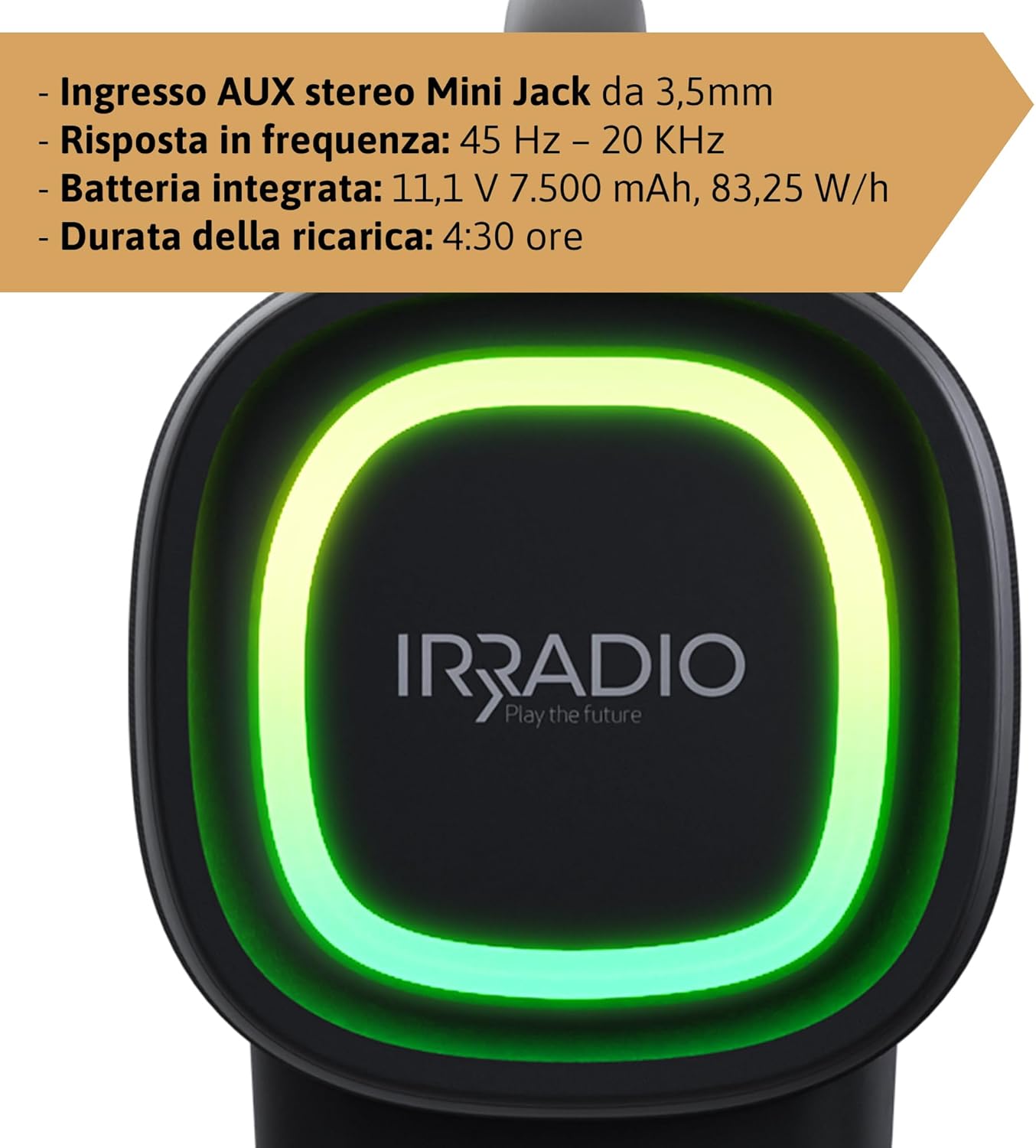
- പൂർണ്ണമായി ചാർജ് ചെയ്യാൻ ഏകദേശം 4.5 മണിക്കൂർ എടുക്കും. ചാർജ് ചെയ്തുകഴിഞ്ഞാൽ ഇൻഡിക്കേറ്റർ ലൈറ്റ് മാറുകയോ ഓഫാകുകയോ ചെയ്യും.
The integrated 7500 mAh battery provides up to 12 hours of continuous playback at 50% volume.
പവർ ഓൺ/ഓഫ്
- പവർ ഓൺ ചെയ്യാൻ, പവർ ബട്ടൺ അമർത്തിപ്പിടിക്കുക (⏻) for a few seconds until you hear an audible prompt or see the indicator lights activate.
- പവർ ഓഫ് ചെയ്യാൻ, പവർ ബട്ടൺ അമർത്തിപ്പിടിക്കുക (⏻) again for a few seconds until the speaker powers down.
പ്രവർത്തന നിർദ്ദേശങ്ങൾ
ബ്ലൂടൂത്ത് ജോടിയാക്കൽ
- Ensure the speaker is powered on and within 10 meters of your Bluetooth device.
- The speaker will automatically enter Bluetooth pairing mode, indicated by a flashing Bluetooth indicator light. If not, press the Bluetooth Pairing button (🔂).
- നിങ്ങളുടെ ഉപകരണത്തിൽ (സ്മാർട്ട്ഫോൺ, ടാബ്ലെറ്റ് മുതലായവ) ബ്ലൂടൂത്ത് പ്രവർത്തനക്ഷമമാക്കി ലഭ്യമായ ഉപകരണങ്ങൾക്കായി തിരയുക.
- Select "IRRADIO IR-GT710V" from the list of devices.
- Once paired, the Bluetooth indicator light will stop flashing and remain solid, and you will hear a confirmation sound.
ട്രൂ വയർലെസ് സ്റ്റീരിയോ (ടിഡബ്ല്യുഎസ്) ജോടിയാക്കൽ
The TWS function allows you to connect two IRRADIO IR-GT710V speakers for a more immersive stereo sound experience.
- Ensure both IR-GT710V speakers are powered on and not connected to any Bluetooth device.
- On one of the speakers (this will be the primary speaker), press and hold the Bluetooth Pairing button (🔂) for a few seconds until you hear a TWS pairing prompt.
- The primary speaker will automatically search for the secondary speaker.
- Once successfully paired, you will hear a confirmation sound, and the Bluetooth indicator lights on both speakers will synchronize.
- Now, connect your Bluetooth device to the primary speaker as described in the "Bluetooth Pairing" section. Both speakers will play audio in stereo.
Audio Playback (USB & AUX)
USB പ്ലേബാക്ക്
- MP3 അല്ലെങ്കിൽ WAV ഓഡിയോ അടങ്ങിയ ഒരു USB ഫ്ലാഷ് ഡ്രൈവ് ഇടുക. fileയുഎസ്ബി പോർട്ടിലേക്ക് എസ്.
- The speaker will automatically detect the USB drive and begin playing audio.
- Use the Play/Pause and Volume buttons on the speaker to control playback.
AUX പ്ലേബാക്ക്
- 3.5mm ഓഡിയോ കേബിളിന്റെ ഒരറ്റം സ്പീക്കറിലെ AUX ഇൻപുട്ട് പോർട്ടുമായി ബന്ധിപ്പിക്കുക.
- കേബിളിന്റെ മറ്റേ അറ്റം നിങ്ങളുടെ ബാഹ്യ ഉപകരണത്തിന്റെ (ഉദാ: MP3 പ്ലെയർ, കമ്പ്യൂട്ടർ) ഓഡിയോ ഔട്ട്പുട്ട് ജാക്കുമായി ബന്ധിപ്പിക്കുക.
- സ്പീക്കർ സ്വയമേവ AUX മോഡിലേക്ക് മാറും.
- പ്രധാനമായും നിങ്ങളുടെ ബാഹ്യ ഉപകരണത്തിൽ നിന്ന് പ്ലേബാക്കും വോളിയവും നിയന്ത്രിക്കുക.
LED ലൈറ്റ് മോഡുകൾ
The IR-GT710V features dynamic RGB LED lighting. Press the LED Light Mode button (✴) to cycle through various lighting effects. The lights can synchronize with the music or display ambient patterns.

ചിത്രം 4: The IRRADIO IR-GT710V speaker shown outdoors, emphasizing its key features. These include True Wireless Stereo functionality, IPX6 water resistance, vibrant RGB LED lighting, and a powerful 100W audio output.
Bass Booster Function
Press the Bass Booster button to enhance the bass output for a deeper, more impactful sound. Press it again to deactivate the function.
മെയിൻ്റനൻസ്
- മൃദുവായതും ഉണങ്ങിയതുമായ തുണി ഉപയോഗിച്ച് സ്പീക്കർ വൃത്തിയാക്കുക. അബ്രസീവ് ക്ലീനറുകളോ ലായകങ്ങളോ ഉപയോഗിക്കരുത്.
- If the speaker gets wet, wipe it dry thoroughly before charging or using it again.
- ദീർഘനേരം ഉപയോഗിക്കാത്തപ്പോൾ സ്പീക്കർ തണുത്തതും വരണ്ടതുമായ സ്ഥലത്ത് സൂക്ഷിക്കുക.
- Charge the battery at least once every three months to maintain its lifespan.
ട്രബിൾഷൂട്ടിംഗ്
| പ്രശ്നം | സാധ്യമായ കാരണം | പരിഹാരം |
|---|---|---|
| സ്പീക്കർ പവർ ഓൺ ചെയ്യുന്നില്ല. | ബാറ്ററി തീർന്നു. | കുറഞ്ഞത് 30 മിനിറ്റെങ്കിലും സ്പീക്കർ ചാർജ് ചെയ്യുക. |
| ബ്ലൂടൂത്ത് വഴി ജോടിയാക്കാൻ കഴിയില്ല. | സ്പീക്കർ ജോടിയാക്കൽ മോഡിലല്ല അല്ലെങ്കിൽ മറ്റൊരു ഉപകരണത്തിലേക്ക് ഇതിനകം കണക്റ്റ് ചെയ്തിരിക്കുന്നു. | Ensure the speaker is in pairing mode (flashing indicator). Disconnect from other devices. Restart both speaker and Bluetooth device. |
| പ്ലേബാക്ക് സമയത്ത് ശബ്ദമില്ല. | Volume is too low or muted. Incorrect input source. | Increase volume on both the speaker and the connected device. Ensure the correct input mode (Bluetooth, USB, AUX) is selected. |
| TWS ജോടിയാക്കൽ പരാജയപ്പെടുന്നു. | Speakers are too far apart or already paired. | Ensure both speakers are close to each other and not connected to any other Bluetooth device. Try resetting both speakers. |
| യുഎസ്ബി പ്ലേബാക്ക് പ്രവർത്തിക്കുന്നില്ല. | പിന്തുണയ്ക്കുന്നില്ല file ഫോർമാറ്റ് ചെയ്യുക അല്ലെങ്കിൽ കേടായ USB ഡ്രൈവ്. | ഉറപ്പാക്കുക files are MP3 or WAV format. Try a different USB drive or reformat the current one. |
സ്പെസിഫിക്കേഷനുകൾ
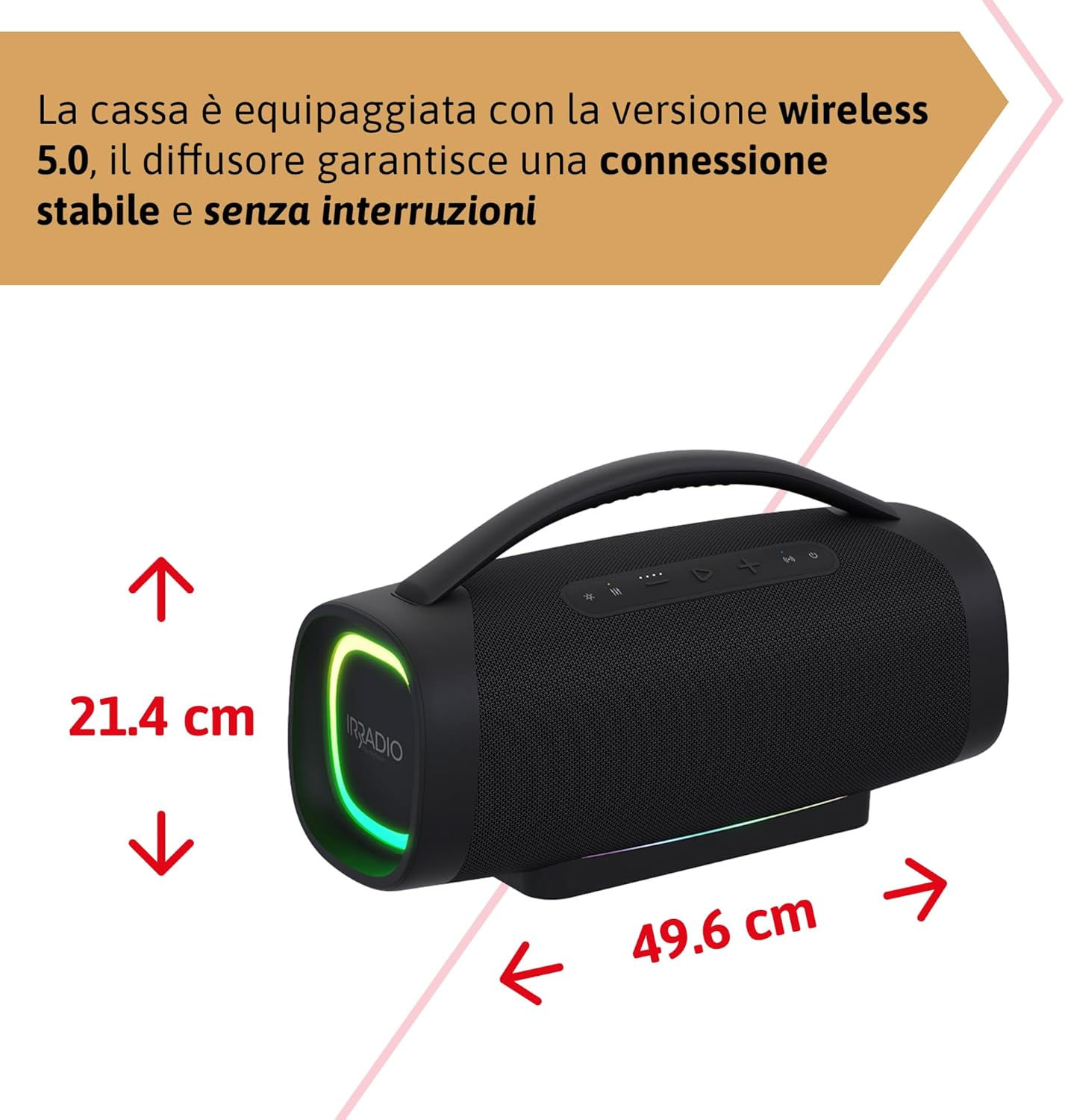
ചിത്രം 5: Dimensions of the IRRADIO IR-GT710V speaker. The speaker measures 49.6 cm in width and 21.4 cm in height.
| ഫീച്ചർ | സ്പെസിഫിക്കേഷൻ |
|---|---|
| ബ്രാൻഡ് | ഇറാഡിയോ |
| മോഡൽ | IR-GT710V |
| സ്പീക്കർ തരം | ബൂംബോക്സ് |
| പവർ ഔട്ട്പുട്ട് | 100W RMS |
| കണക്റ്റിവിറ്റി | Bluetooth 5.0, USB, AUX 3.5mm |
| ബ്ലൂടൂത്ത് ശ്രേണി | 10 മീറ്റർ വരെ (33 അടി) |
| ജല പ്രതിരോധം | IPX6 |
| ബാറ്ററി ശേഷി | 11.1V 7500 mAh (83.25 Wh) |
| പ്ലേബാക്ക് സമയം | 12 മണിക്കൂർ വരെ (50% വോളിയത്തിൽ) |
| ചാർജിംഗ് സമയം | ഏകദേശം 4.5 മണിക്കൂർ |
| ഫ്രീക്വൻസി പ്രതികരണം | 45 ഹെർട്സ് - 20 കിലോ ഹെർട്സ് |
| പിന്തുണയ്ക്കുന്ന ഓഡിയോ ഫോർമാറ്റുകൾ | MP3, WAV |
| ഉൽപ്പന്ന അളവുകൾ (L x W x H) | 49.6 x 21.4 x 21.4 സെ.മീ (19.5 x 8.4 x 8.4 ഇഞ്ച്) |
| മൊത്തം ഭാരം | 6.22 കി.ഗ്രാം (13.7 പൗണ്ട്) |
| ഉൾപ്പെടുത്തിയ ഘടകങ്ങൾ | ചാർജർ |
| പവർ പ്ലഗ് തരം | Type D – 3-pin (India) |
വാറൻ്റിയും പിന്തുണയും
IRRADIO products are designed and manufactured to the highest quality standards. For warranty information, technical support, or service inquiries, please refer to the warranty card included with your product or visit the official IRRADIO webസൈറ്റ്. വാറന്റി ക്ലെയിമുകൾക്കായി നിങ്ങളുടെ വാങ്ങലിന്റെ തെളിവ് സൂക്ഷിക്കുക.


