1. ആമുഖം
This manual provides comprehensive instructions for the setup, operation, and maintenance of your ProtoArc KM310 Wireless Mechanical Keyboard and Mouse combo. This device offers versatile connectivity options, including 2.4G wireless and dual Bluetooth, designed for multi-device use across various operating systems.

Image 1.1: ProtoArc KM310 Wireless Mechanical Keyboard and Mouse Combo.
2. പാക്കേജ് ഉള്ളടക്കം
പാക്കേജിൽ എല്ലാ ഇനങ്ങളും ഉണ്ടെന്ന് ഉറപ്പാക്കുക:
- ProtoArc KM310 Wireless Mechanical Keyboard
- ProtoArc Wireless Mouse
- USB-C ചാർജിംഗ് കേബിൾ
- 2.4G USB Receiver (stored in the mouse)
- ഉപയോക്തൃ മാനുവൽ (ഈ പ്രമാണം)

Image 2.1: ProtoArc KM310 package contents including keyboard, mouse, USB-C cable, and user manual.
3. ഉൽപ്പന്നം കഴിഞ്ഞുview
3.1 കീബോർഡ് ലേഔട്ടും സവിശേഷതകളും
The KM310 keyboard features a full-size 108-key layout with low-profile mechanical red switches for a smooth and quiet typing experience. It includes a numeric keypad and dedicated media keys.
3.2 മൗസ് ഘടകങ്ങൾ
The ergonomic mouse includes standard left/right click buttons, a scroll wheel, a DPI switch, and forward/backward side buttons. The 2.4G USB receiver is stored in a compartment on the underside of the mouse.

ചിത്രം 3.1: എക്സ്പ്ലോഡഡ് view illustrating the internal components and weight distribution of the ProtoArc wireless mouse.
4. സജ്ജീകരണ നിർദ്ദേശങ്ങൾ
4.1 ഉപകരണങ്ങൾ ചാർജ് ചെയ്യുന്നു
Both the keyboard and mouse are equipped with rechargeable batteries. Use the provided USB-C cable to charge them. A full charge typically takes 2-3 hours and provides up to 150 days of standby time.
- Connect the USB-C end of the cable to the charging port on the keyboard/mouse.
- Connect the USB-A end to a power source (e.g., computer USB port, USB wall adapter).
- The charging indicator light will show charging status and turn off when fully charged.

Image 4.1: The keyboard and mouse being charged via USB-C cables.
4.2 Connecting via 2.4G USB Receiver
This method provides a stable wireless connection for your keyboard and mouse.
- Locate the 2.4G USB receiver in the compartment on the underside of the mouse.
- നിങ്ങളുടെ കമ്പ്യൂട്ടറിൽ ലഭ്യമായ USB പോർട്ടിലേക്ക് USB റിസീവർ പ്ലഗ് ചെയ്യുക.
- കീബോർഡും മൗസും അവയുടെ പവർ സ്വിച്ചുകൾ ഉപയോഗിച്ച് ഓണാക്കുക.
- The devices should automatically connect to your computer.
4.3 ബ്ലൂടൂത്ത് വഴി ബന്ധിപ്പിക്കുന്നു
The KM310 supports dual Bluetooth connections, allowing you to pair with up to two Bluetooth-enabled devices.
- കീബോർഡും മൗസും ഓണാക്കുക.
- കീബോർഡിൽ, അമർത്തിപ്പിടിക്കുക BT1 or BT2 key for 3-5 seconds until the indicator light flashes, indicating pairing mode.
- On the mouse, press the channel switch button on the underside to select BT1 or BT2, then press and hold the button for 3-5 seconds until the indicator light flashes.
- On your device (computer, tablet, smartphone), go to Bluetooth settings and search for "ProtoArc KM310 Keyboard" and "ProtoArc KM310 Mouse".
- Select the devices to pair. Once connected, the indicator light will stop flashing.
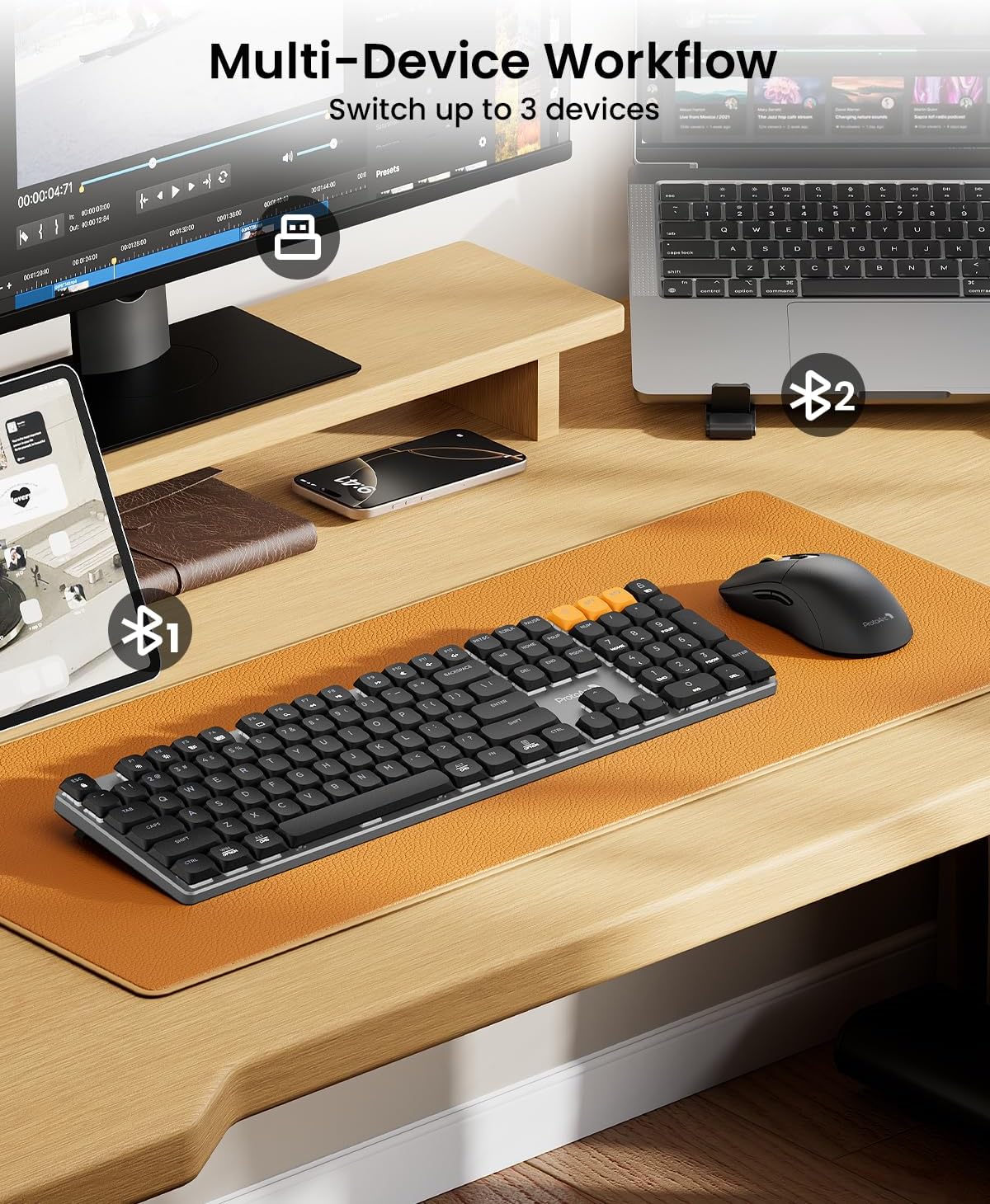
Image 4.2: The KM310 keyboard and mouse connected to a desktop PC via 2.4G, a laptop via Bluetooth 1, and a tablet via Bluetooth 2.
5. പ്രവർത്തന നിർദ്ദേശങ്ങൾ
5.1 ഉപകരണങ്ങൾക്കിടയിൽ മാറൽ
ബന്ധിപ്പിച്ച ഉപകരണങ്ങൾക്കിടയിൽ മാറാൻ:
- കീബോർഡ്: അമർത്തുക 2.4G, BT1, അല്ലെങ്കിൽ BT2 key to instantly switch to the corresponding paired device.
- മൗസ്: Press the channel switch button on the underside of the mouse to cycle between 2.4G, BT1, ഒപ്പം BT2.
5.2 കീബോർഡ് പ്രവർത്തനങ്ങൾ
- ലോ-പ്രോfile Red Switches: Designed for a smooth, linear, and quiet typing experience.
- ക്രമീകരിക്കാവുന്ന ടിൽറ്റ് കാലുകൾ: Extend the tilt legs on the underside of the keyboard to adjust the typing angle for ergonomic comfort (6° and 9° tilt options).
- മീഡിയ കീകൾ: Use the function keys (F1-F12) in combination with the Fn key for media control (e.g., volume, play/pause).
- OS അനുയോജ്യത: The keyboard is compatible with Windows and macOS. Specific key legends may vary slightly for different operating systems.

Image 5.1: Detail of the low-profile mechanical red switches on the ProtoArc keyboard, designed for fluid and responsive typing with low sound.

Image 5.2: The keyboard features adjustable tilt legs, offering 3°, 6°, and 9° angles for personalized comfort.
5.3 മൗസ് പ്രവർത്തനങ്ങൾ
- DPI ക്രമീകരണം: അമർത്തുക ഡിപിഐ button (located behind the scroll wheel) to cycle through 3 DPI levels (800/1200/1600). This adjusts cursor sensitivity.
- എർഗണോമിക് ഡിസൈൻ: The mouse is contoured for a natural grip, reducing hand fatigue during extended use.
- നിശബ്ദ ക്ലിക്കുകൾ: The mouse features quiet click buttons, minimizing noise in shared environments.
- ഫോർവേഡ്/ബാക്ക്വേർഡ് ബട്ടണുകൾ: Use the side buttons for quick navigation in web ബ്രൗസറുകളും file പര്യവേക്ഷകർ.

Image 5.3: The mouse offers 3 adjustable DPI settings (800, 1200, 1600) and features a silent click design.

Image 5.4: The ProtoArc mouse features an ultra-lightweight design (63g) compared to traditional mice (approx. 100g), reducing hand fatigue.
6. പരിപാലനം
6.1 വൃത്തിയാക്കൽ
- Disconnect the keyboard and mouse from power and your devices before cleaning.
- മൃദുവായ, ലിൻ്റ് രഹിത തുണി ഉപയോഗിക്കുകampened with water or a mild cleaning solution to wipe surfaces.
- For keyboard keys, use compressed air to remove dust and debris from between the keycaps.
- Avoid using harsh chemicals, abrasive cleaners, or spraying liquids directly onto the devices.
6.2 സംഭരണം
When not in use for extended periods, store the keyboard and mouse in a cool, dry place away from direct sunlight and extreme temperatures. Ensure they are fully charged before long-term storage to preserve battery health.
7. പ്രശ്നപരിഹാരം
| പ്രശ്നം | പരിഹാരം |
|---|---|
| Keyboard/Mouse not connecting via 2.4G |
|
| Keyboard/Mouse not connecting via Bluetooth |
|
| കാലതാമസം അല്ലെങ്കിൽ ഇടവിട്ടുള്ള കണക്ഷൻ |
|
| Keys or mouse buttons unresponsive |
|
| മൗസ് കഴ്സർ ക്രമരഹിതമാണ് അല്ലെങ്കിൽ ചലിക്കുന്നില്ല. |
|
8 സ്പെസിഫിക്കേഷനുകൾ
| ഫീച്ചർ | വിശദാംശങ്ങൾ |
|---|---|
| മോഡൽ | KM310 |
| കണക്റ്റിവിറ്റി | 2.4G Wireless, Bluetooth (BT1, BT2) |
| കീബോർഡ് തരം | Mechanical, Low-Profile റെഡ് സ്വിച്ചുകൾ |
| കീബോർഡ് ലേഔട്ട് | Full-size 108-key |
| മൗസ് DPI ലെവലുകൾ | 800 / 1200 / 1600 |
| മൗസ് ട്രാക്കിംഗ് | ഒപ്റ്റിക്കൽ |
| ബാറ്ററി തരം | റീചാർജ് ചെയ്യാവുന്ന (USB-C) |
| ചാർജിംഗ് സമയം | ഏകദേശം 2-3 മണിക്കൂർ |
| സ്റ്റാൻഡ്ബൈ സമയം | 150 ദിവസം വരെ |
| അനുയോജ്യത | Windows 7/8/10, Mac OS X 10.12+, Android 4.3+ |
| കീബോർഡ് അളവുകൾ | 43 cm x 16.9 cm x 2.6 cm (16.9 in x 6.7 in x 1.0 in) |
| കീബോർഡ് ഭാരം | 1.06 കി.ഗ്രാം (2.34 പൗണ്ട്) |
| മൗസിൻ്റെ അളവുകൾ | 12.5 cm x 6.4 cm x 3.9 cm (4.9 in x 2.5 in x 1.5 in) |
| മൗസിൻ്റെ ഭാരം | 63 ഗ്രാം (0.14 പൗണ്ട്) |

Image 8.1: Dimensions of the ProtoArc KM310 keyboard and mouse.
9. വാറൻ്റിയും പിന്തുണയും
ProtoArc products are designed for reliability and performance. For information regarding warranty coverage, technical support, or service inquiries, please refer to the warranty card included in your package or visit the official ProtoArc webസൈറ്റ്. വാറൻ്റി ക്ലെയിമുകൾക്കായി നിങ്ങളുടെ വാങ്ങൽ രസീത് സൂക്ഷിക്കുക.


