Antec VX300M ARGB Mini Tower PC Case User Manual
മോഡൽ: 0-761345-10176-9
1. ആമുഖം
Thank you for choosing the Antec VX300M ARGB Mini Tower PC Case. This manual provides essential information for the proper installation, operation, and maintenance of your new PC case. Designed for Micro ATX and ITX motherboards, the VX300M ARGB offers excellent airflow and stunning aesthetics with its pre-installed ARGB fans. Please read this manual thoroughly before beginning your build to ensure optimal performance and longevity of your system.
2. പാക്കേജ് ഉള്ളടക്കം
- Antec VX300M ARGB Mini Tower PC Case
- Pre-installed 120mm ARGB Fans (4x)
- Accessory Box (Screws, standoffs, cable ties, etc.)
- ഉപയോക്തൃ മാനുവൽ (ഈ പ്രമാണം)
3. സവിശേഷതകൾ
- Compact Mini Tower Design: Optimized for Micro ATX and ITX motherboards, saving space without compromising performance.
- മെച്ചപ്പെട്ട വായുപ്രവാഹം: Features a perforated mesh front panel and support for multiple fans to ensure efficient cooling.
- Vibrant ARGB Lighting: Comes with four pre-installed 120mm ARGB fans for customizable lighting effects.
- ടെമ്പർഡ് ഗ്ലാസ് സൈഡ് പാനൽ: Showcases your internal components and ARGB lighting.
- Ample സംഭരണ ഓപ്ഷനുകൾ: Supports multiple 2.5" and 3.5" drives.
- സൗകര്യപ്രദമായ ഫ്രണ്ട് I/O: Easy access to USB ports and audio jacks.
4. സജ്ജീകരണം
Follow these steps to set up your Antec VX300M ARGB PC case and install your components.
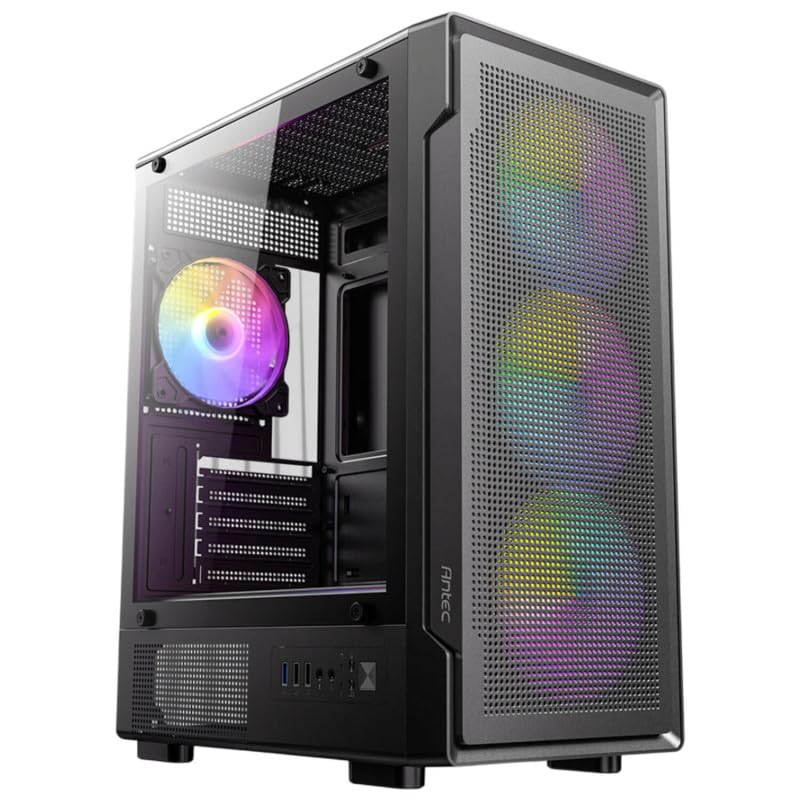
This image displays the Antec VX300M ARGB Mini Tower PC case from a front-left perspective. The case features a black finish, a perforated mesh front panel allowing airflow and showcasing the vibrant ARGB lighting of the pre-installed fans. A tempered glass side panel provides a clear view of the interior, including the rear ARGB fan and internal component mounting areas. The front I/O ports are visible at the bottom front.
4.1 കേസ് തയ്യാറാക്കൽ
- കേസ് ഒരു പരന്നതും സ്ഥിരതയുള്ളതുമായ പ്രതലത്തിൽ വയ്ക്കുക.
- Carefully remove the tempered glass side panel by unscrewing the thumb screws. Set it aside in a safe place.
- Remove the rear side panel (solid metal panel) to access the cable management area.
4.2 മദർബോർഡ് ഇൻസ്റ്റാളേഷൻ
- Install the I/O shield into the motherboard tray opening from the inside of the case.
- Align your Micro ATX or ITX motherboard with the pre-installed standoffs. Additional standoffs may be required depending on your motherboard's form factor; install them as needed.
- Secure the motherboard using the appropriate screws from the accessory box.
4.3 പവർ സപ്ലൈ ഇൻസ്റ്റലേഷൻ
- Position your ATX power supply unit (PSU) in the dedicated PSU shroud area at the bottom rear of the case.
- Secure the PSU to the case using screws from the accessory box, typically from the rear exterior.
4.4 സ്റ്റോറേജ് ഡ്രൈവ് ഇൻസ്റ്റലേഷൻ
- 3.5" എച്ച്ഡിഡികൾ: Locate the drive cage usually beneath the PSU shroud. Slide the HDDs into the trays and secure them with screws.
- 2.5" എസ്എസ്ഡികൾ: Mount SSDs to the designated mounting points on the motherboard tray or drive cage using screws.
4.5 ഗ്രാഫിക്സ് കാർഡും എക്സ്പാൻഷൻ കാർഡുകളും
- കേസിന്റെ പിൻഭാഗത്ത് നിന്ന് ആവശ്യമായ PCIe സ്ലോട്ട് കവറുകൾ നീക്കം ചെയ്യുക.
- മദർബോർഡിന്റെ PCIe സ്ലോട്ടുകളിൽ നിങ്ങളുടെ ഗ്രാഫിക്സ് കാർഡ് അല്ലെങ്കിൽ മറ്റ് എക്സ്പാൻഷൻ കാർഡുകൾ ചേർക്കുക.
- കാർഡുകൾ സ്ക്രൂകൾ ഉപയോഗിച്ച് ഉറപ്പിക്കുക.
4.6 കേബിൾ മാനേജ്മെന്റും കണക്ഷനുകളും
- Connect all necessary power cables from the PSU to your motherboard, CPU, graphics card, and storage drives.
- Connect the front panel I/O cables (USB, audio, power switch, reset switch, HDD LED, Power LED) to their respective headers on the motherboard. Refer to your motherboard manual for exact pinouts.
- Connect the ARGB fan cables to your motherboard's ARGB header (5V 3-pin) or a dedicated ARGB controller. Ensure correct polarity.
- Route cables through the cutouts in the motherboard tray to the rear of the case for a clean build and improved airflow. Use cable ties to secure them.
4.7 അന്തിമ അസംബ്ലി
- എല്ലാ ഘടകങ്ങളും ഇൻസ്റ്റാൾ ചെയ്യുകയും കേബിളുകൾ കൈകാര്യം ചെയ്യുകയും ചെയ്തുകഴിഞ്ഞാൽ, പിൻവശത്തെ പാനൽ വീണ്ടും ഘടിപ്പിക്കുക.
- Carefully reattach the tempered glass side panel and secure it with the thumb screws.
5. പ്രവർത്തിക്കുന്നു
After completing the setup, connect your monitor, keyboard, mouse, and power cable to your PC. Press the power button on the front panel to start your system. The pre-installed ARGB fans will illuminate, and your system should boot up.
5.1 ARGB ലൈറ്റിംഗ് നിയന്ത്രണം
The ARGB lighting of the fans can be controlled via your motherboard's ARGB software (e.g., ASUS Aura Sync, MSI Mystic Light Sync, Gigabyte RGB Fusion, ASRock Polychrome Sync) if connected to a compatible header. Refer to your motherboard's manual for specific instructions on software control.
6. പരിപാലനം
പതിവ് അറ്റകുറ്റപ്പണികൾ മികച്ച പ്രകടനം ഉറപ്പാക്കാൻ സഹായിക്കുകയും നിങ്ങളുടെ പിസി ഘടകങ്ങളുടെ ആയുസ്സ് വർദ്ധിപ്പിക്കുകയും ചെയ്യുന്നു.
6.1 പൊടി വൃത്തിയാക്കൽ
- പുറം: ഒരു മൃദുവായ, ഡി ഉപയോഗിച്ച് ബാഹ്യ പ്രതലങ്ങൾ തുടയ്ക്കുകamp തുണി. ഉരച്ചിലുകൾ ഉള്ള ക്ലീനറുകൾ ഒഴിവാക്കുക.
- പൊടി ഫിൽട്ടറുകൾ: The Antec VX300M ARGB case may include removable dust filters (e.g., top, front, bottom). Periodically remove and clean these filters by rinsing them with water and allowing them to dry completely before reinstallation.
- ഇൻ്റീരിയർ: Use compressed air to blow dust out of the case interior, especially from fans, heatsinks, and ventilation areas. Perform this in a well-ventilated area.
6.2 ഫാൻ മെയിന്റനൻസ്
Ensure that all fans are spinning freely and are not obstructed. If a fan becomes noisy or stops spinning, inspect it for dust buildup or damage. Do not attempt to lubricate sealed fan bearings.
7. പ്രശ്നപരിഹാരം
നിങ്ങളുടെ പിസി ബിൽഡിൽ പ്രശ്നങ്ങൾ നേരിടുകയാണെങ്കിൽ, ഇനിപ്പറയുന്ന പൊതുവായ ട്രബിൾഷൂട്ടിംഗ് ഘട്ടങ്ങൾ പരിഗണിക്കുക:
- ശക്തിയില്ല: Ensure the power supply is switched on, the power cable is securely connected to both the PSU and the wall outlet, and all internal power cables (24-pin ATX, 8-pin CPU, PCIe) are correctly seated.
- Fans Not Spinning / No ARGB: Check fan power connections to the motherboard or fan controller. Verify ARGB connections are secure and connected to the correct 5V 3-pin header (not 12V 4-pin RGB). Ensure ARGB software is configured correctly.
- ഡിസ്പ്ലേ ഇല്ല: Confirm the monitor cable is connected to the graphics card (not the motherboard's integrated graphics port, unless using integrated graphics). Reseat the graphics card and RAM modules.
- സിസ്റ്റം അസ്ഥിരത: Check all component connections. Ensure adequate cooling and airflow within the case.
- Front Panel I/O Issues: Double-check the front panel header connections on the motherboard against your motherboard manual.
For more complex issues, consult your individual component manuals (motherboard, GPU, PSU) or seek assistance from a qualified technician.
8 സ്പെസിഫിക്കേഷനുകൾ
| ഫീച്ചർ | സ്പെസിഫിക്കേഷൻ |
|---|---|
| മോഡലിൻ്റെ പേര് | VX300M ARGB |
| കേസ് തരം | മിനി-ടവർ |
| മദർബോർഡ് അനുയോജ്യത | മൈക്രോ എടിഎക്സ്, മിനി ഐടിഎക്സ് |
| മുൻകൂട്ടി ഇൻസ്റ്റാൾ ചെയ്ത ഫാനുകൾ | 4x 120mm ARGB ഫാനുകൾ |
| തണുപ്പിക്കൽ രീതി | വായു |
| നിറം | കറുപ്പ് |
| അളവുകൾ (L x W x H) | 48 x 24.5 x 41.5 സെ.മീ |
| ഭാരം | 11 കി.ഗ്രാം |
| ശുപാർശ ചെയ്യുന്ന ഉപയോഗം | Gaming PC and General Computing |
9. വാറൻ്റിയും പിന്തുണയും
Antec products are manufactured to the highest quality standards. For information regarding warranty coverage and terms, please refer to the warranty card included with your product or visit the official Antec website. If you require technical assistance or have questions not covered in this manual, please contact Antec customer support through their official channels.
ആന്റക് ഒഫീഷ്യൽ Webസൈറ്റ്: www.antec.com


