1. ആമുഖം
The GEEKVAPE SOUL 2 Pod Kit is an advanced vaping device designed for both Mouth-to-Lung (MTL) and Restricted Direct-Lung (RDL) vaping styles. It features a powerful built-in battery, adjustable output, and an innovative airflow system for a customizable experience. This manual provides detailed instructions for safe and effective use of your device.
പ്രധാനപ്പെട്ടത്: This product is a VAPE starter set. E-liquid is not included and must be purchased separately. This device is nicotine-free.
2. പാക്കേജ് ഉള്ളടക്കം
പാക്കേജിൽ ഇനിപ്പറയുന്ന ഇനങ്ങൾ ഉണ്ടോ എന്ന് പരിശോധിക്കുക:
- GEEKVAPE SOUL 2 Pod Kit Main Unit x1
- GEEKVAPE SOUL Pod (0.6Ω) x1
- GEEKVAPE SOUL Pod (1.0Ω) x1
- യുഎസ്ബി ടൈപ്പ്-സി കേബിൾ x1
- ഉപയോക്തൃ മാനുവൽ x1
- Warning Card x1
- FlavorKitchen Original Mini Pouch x1

Image: GEEKVAPE SOUL 2 Pod Kit in black, shown with a FlavorKitchen pouch and other color variants of the device.
3. ഉൽപ്പന്നം കഴിഞ്ഞുview കൂടാതെ സ്പെസിഫിക്കേഷനുകളും
3.1 പ്രധാന സവിശേഷതകൾ
- വലിയ ശേഷിയുള്ള ബാറ്ററി: Integrated 2100mAh battery for extended use.
- ക്രമീകരിക്കാവുന്ന ഔട്ട്പുട്ട്: Max output of 35W, allowing for power customization.
- 0.99 ഇഞ്ച് ഡിസ്പ്ലേ: Clear display for essential vaping information.
- Slider Airflow Adjustment: Precise control over airflow for tailored draw.
- New BOOST PODs: Enhanced flavor and vapor production with improved durability.
- കാട്രിഡ്ജ് അനുയോജ്യത: Backward compatible with previous GEEKVAPE Soul cartridges.
- ഫാസ്റ്റ് ചാർജിംഗ്: Approximately 40 minutes for a full charge via USB Type-C.
- Dual Activation: Supports both auto-draw and button-activated vaping.

Image: GEEKVAPE SOUL 2 device highlighting its 2100mAh battery, long-life cartridge, and cartridge compatibility.

Image: GEEKVAPE SOUL 2 device showcasing its tobacco capsule compatibility, 2100mAh battery, 35W output, and second-generation Boost Pod.
3.2 സാങ്കേതിക സവിശേഷതകൾ
| പരാമീറ്റർ | മൂല്യം |
|---|---|
| ഉൽപ്പന്നത്തിൻ്റെ പേര് | GEEKVAPE SOUL 2 |
| അളവുകൾ | 108.49mm × 33.67mm × 23.50mm |
| ബാറ്ററി ശേഷി | 2100mAh (ബിൽറ്റ്-ഇൻ) |
| പരമാവധി ഔട്ട്പുട്ട് | 35W |
| ഡിസ്പ്ലേ സ്ക്രീൻ | 0.99 ഇഞ്ച് |
| എയർഫ്ലോ നിയന്ത്രണം | Stepless Slider Adjustment |
| Compatible Resistance | 0.4Ω (Sold Separately) / 0.6Ω / 1.0Ω |
| ചാർജിംഗ് പോർട്ട് | USB Type-C (5V/2A) |
| ചാർജിംഗ് സമയം | ഏകദേശം 40 മിനിറ്റ് |
| സജീവമാക്കൽ രീതി | Auto-draw & Button-draw |
| Compatible Styles | MTL / RDL |
4. ആരംഭിക്കുന്നു
4.1 പ്രാരംഭ ചാർജിംഗ്
Before first use, fully charge your GEEKVAPE SOUL 2 device. Connect the provided USB Type-C cable to the charging port on the device and plug the other end into a suitable USB power source (e.g., wall adapter, computer USB port). The display will indicate charging status. A full charge takes approximately 40 minutes.

Image: Illustration showing the internal 2100mAh battery of the GEEKVAPE SOUL 2 device, emphasizing its large capacity and fast charging capability.
4.2 Filling the Pod
- ഉപകരണത്തിൽ നിന്ന് പോഡ് നീക്കം ചെയ്യുക.
- Locate the silicone stopper on the side of the pod.
- സ്റ്റോപ്പർ ശ്രദ്ധാപൂർവ്വം തുറന്ന് നിങ്ങളുടെ ഇ-ലിക്വിഡ് കുപ്പിയുടെ നോസൽ ഫില്ലിംഗ് പോർട്ടിലേക്ക് തിരുകുക.
- Fill the pod with your desired e-liquid, ensuring not to overfill.
- സിലിക്കൺ സ്റ്റോപ്പർ സുരക്ഷിതമായി അടയ്ക്കുക.
- പ്രധാനപ്പെട്ടത്: If it's a new pod, let it stand for 5-10 minutes after filling to allow the coil to saturate with e-liquid. This prevents dry hits and extends coil life.
4.3 Installing the Pod
Align the filled pod with the pod slot on the device and push it firmly until it clicks into place. The magnetic connection will secure the pod.
5. ഓപ്പറേഷൻ
5.1 പവർ ഓൺ/ഓഫ്
ഉപകരണം തിരിക്കാൻ ON or ഓഫ്, rapidly press the fire button 5 times within 2 seconds.
5.2 വാപ്പിംഗ്
The GEEKVAPE SOUL 2 supports two vaping methods:
- Auto-Draw: Simply inhale from the mouthpiece to activate the device and produce vapor.
- Button-Activated: Press and hold the fire button while inhaling from the mouthpiece.

Image: A hand holding the GEEKVAPE SOUL 2 device, showing its display screen with wattage and resistance information.
5.3 വാട്ട് ക്രമീകരിക്കൽtagഇ Outട്ട്പുട്ട്
The device allows for wattage adjustment up to 35W. Use the adjustment buttons (usually located near the display) to increase or decrease the wattage to your preferred level. Refer to the recommended wattage range for your installed pod (e.g., 0.6Ω pod, 1.0Ω pod) for optimal performance and coil longevity.
കുറിപ്പ്: To set output above 31W, a separately sold 0.4Ω pod is required.

Image: GEEKVAPE SOUL 2 device illustrating its maximum 35W output adjustment capability.
5.4 വായുപ്രവാഹം ക്രമീകരിക്കൽ
The GEEKVAPE SOUL 2 features a slider-type airflow adjustment. Locate the airflow slider on the device and move it to increase or decrease the airflow. Adjusting the airflow will change the tightness of your draw and the amount of vapor produced, allowing you to fine-tune your vaping experience from a tight MTL draw to a looser RDL draw.

Image: Diagrams showing the patented leak-proof design and the adjustable airflow control of the GEEKVAPE SOUL 2 pod.
6. പരിപാലനം
6.1 Pod Replacement
The pods are consumable parts and need to be replaced periodically. You will notice a decrease in flavor, vapor production, or a burnt taste when the coil needs replacement. To replace a pod:
- Remove the old pod from the device.
- Dispose of the old pod responsibly.
- Fill a new GEEKVAPE SOUL Pod (0.6Ω or 1.0Ω) with e-liquid as described in Section 4.2.
- Install the new pod into the device.
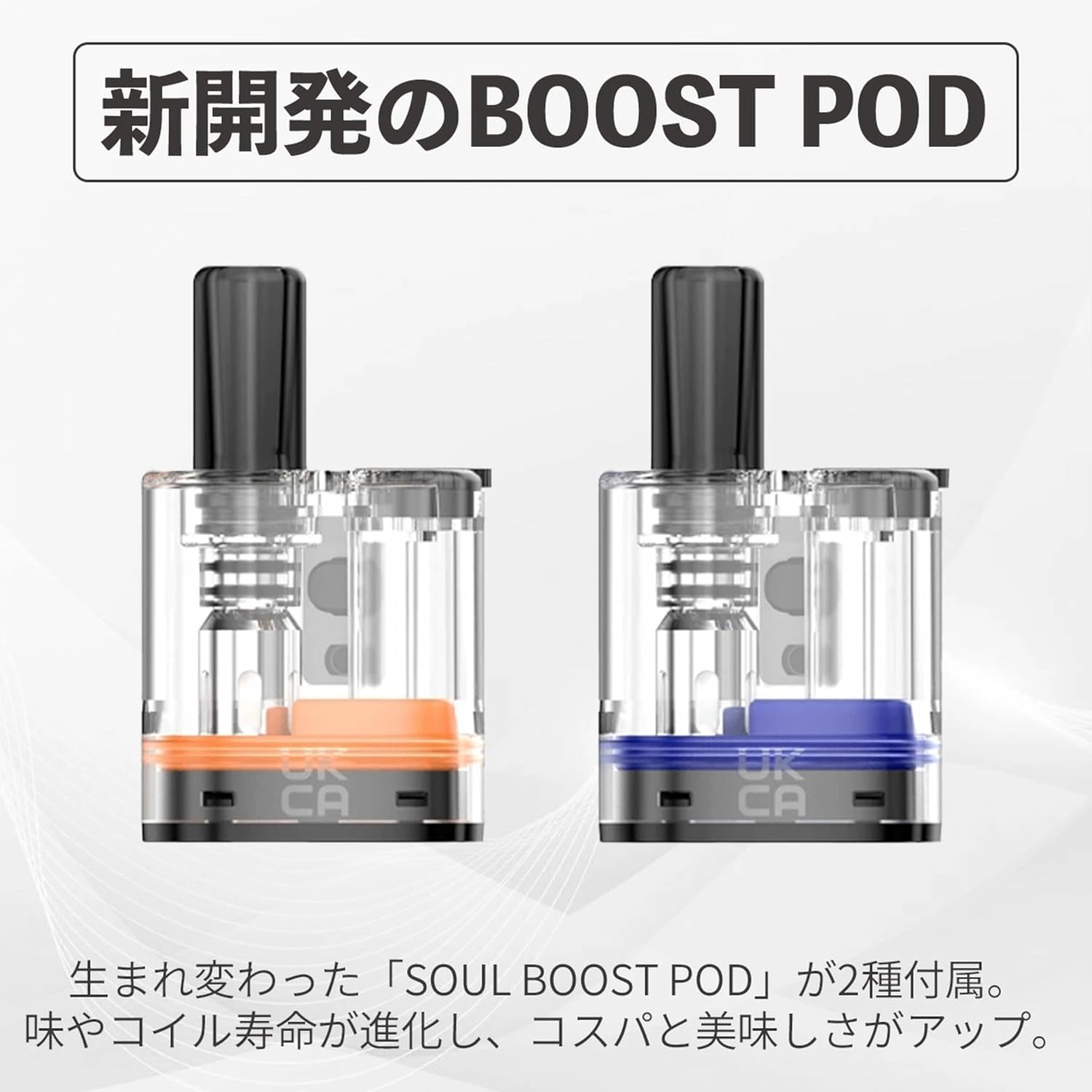
Image: Two newly developed GEEKVAPE SOUL BOOST PODs, highlighting their improved design for flavor and coil life.
6.2 ഉപകരണം വൃത്തിയാക്കുന്നു
Regularly clean the device, especially the pod connection area, to ensure optimal performance and prevent e-liquid residue buildup. Use a dry cloth or cotton swab to gently wipe away any condensation or e-liquid spills.
7. പ്രശ്നപരിഹാരം
| പ്രശ്നം | സാധ്യമായ കാരണം | പരിഹാരം |
|---|---|---|
| നീരാവി ഉത്പാദനമില്ല | Battery low; Pod not properly installed; No e-liquid; Device off. | Charge device; Reinstall pod; Refill pod; Turn device on (5 clicks). |
| കരിഞ്ഞ രുചി | Coil dry/burnt; E-liquid level too low; High wattagഇ ക്രമീകരണം. | Replace pod; Refill pod; Lower wattage. |
| ചോർന്നൊലിക്കുന്നു | Overfilled pod; Worn-out pod; Condensation. | Do not overfill; Replace pod; Clean condensation regularly. |
| ഉപകരണം ചാർജ് ചെയ്യുന്നില്ല | Faulty cable/charger; Dirty charging port. | Try different cable/charger; Clean charging port. |
8. സുരക്ഷാ മുൻകരുതലുകൾ
- കുട്ടികൾക്കും വളർത്തുമൃഗങ്ങൾക്കും ലഭ്യമല്ലാത്തവിധം ഉപകരണം സൂക്ഷിക്കുക.
- ഉപകരണത്തെ തീവ്രമായ താപനിലയിലോ, നേരിട്ടുള്ള സൂര്യപ്രകാശത്തിലോ, വെള്ളത്തിലോ തുറന്നുകാട്ടരുത്.
- ചാർജ് ചെയ്യുന്നതിന് നൽകിയിരിക്കുന്ന യുഎസ്ബി ടൈപ്പ്-സി കേബിൾ മാത്രം ഉപയോഗിക്കുക.
- കേടായ ബാറ്ററികളോ ചാർജറുകളോ ഉപയോഗിക്കരുത്.
- Avoid dropping or subjecting the device to heavy impact.
- If the device malfunctions or emits unusual odors, discontinue use immediately.
- പ്രാദേശിക നിയന്ത്രണങ്ങൾക്കനുസൃതമായി ഇലക്ട്രോണിക് മാലിന്യങ്ങൾ ഉത്തരവാദിത്തത്തോടെ സംസ്കരിക്കുക.
9. ഔദ്യോഗിക ഉൽപ്പന്ന വീഡിയോ
Video: An official promotional video for the GEEKVAPE SOUL 2, showcasing its design, features, and user experience in various settings.
10. വാറൻ്റിയും പിന്തുണയും
For warranty information and customer support, please refer to the warranty card included in your package or contact GEEKVAPE customer service directly through their official webസൈറ്റ്. വാറന്റി ക്ലെയിമുകൾക്കായി നിങ്ങളുടെ വാങ്ങലിന്റെ തെളിവ് സൂക്ഷിക്കുക.


