1. ആമുഖം
This manual provides comprehensive instructions for the setup, operation, maintenance, and troubleshooting of your HUAYU K-MS1859 Universal Smart Air Conditioner Remote Control. Please read this manual thoroughly before using the remote control to ensure proper function and to extend the product's lifespan. Keep this manual for future reference.
2 സുരക്ഷാ വിവരങ്ങൾ
- നേരിട്ടുള്ള സൂര്യപ്രകാശം, ഉയർന്ന താപനില, അല്ലെങ്കിൽ ഉയർന്ന ഈർപ്പം എന്നിവയ്ക്ക് റിമോട്ട് കൺട്രോൾ വിധേയമാക്കരുത്.
- റിമോട്ട് കൺട്രോൾ താഴെയിടുകയോ ശക്തമായ ആഘാതങ്ങൾക്ക് വിധേയമാക്കുകയോ ചെയ്യുന്നത് ഒഴിവാക്കുക.
- പഴയതും പുതിയതുമായ ബാറ്ററികളോ വ്യത്യസ്ത തരം ബാറ്ററികളോ മിക്സ് ചെയ്യരുത്.
- ചോർച്ച തടയാൻ റിമോട്ട് കൺട്രോൾ ദീർഘനേരം ഉപയോഗിക്കുന്നില്ലെങ്കിൽ ബാറ്ററികൾ നീക്കം ചെയ്യുക.
- ബാറ്ററികൾ കുട്ടികൾക്ക് ലഭ്യമാകാതെ സൂക്ഷിക്കുക.
- റിമോട്ട് കൺട്രോൾ ഡിസ്അസംബ്ലിംഗ് ചെയ്യാനോ പരിഷ്ക്കരിക്കാനോ ശ്രമിക്കരുത്.
3. ഉൽപ്പന്നം കഴിഞ്ഞുview
The HUAYU K-MS1859 is a universal smart remote control designed for various MITSUBISHI air conditioner models. It features a clear LCD display and intuitive buttons for easy operation.
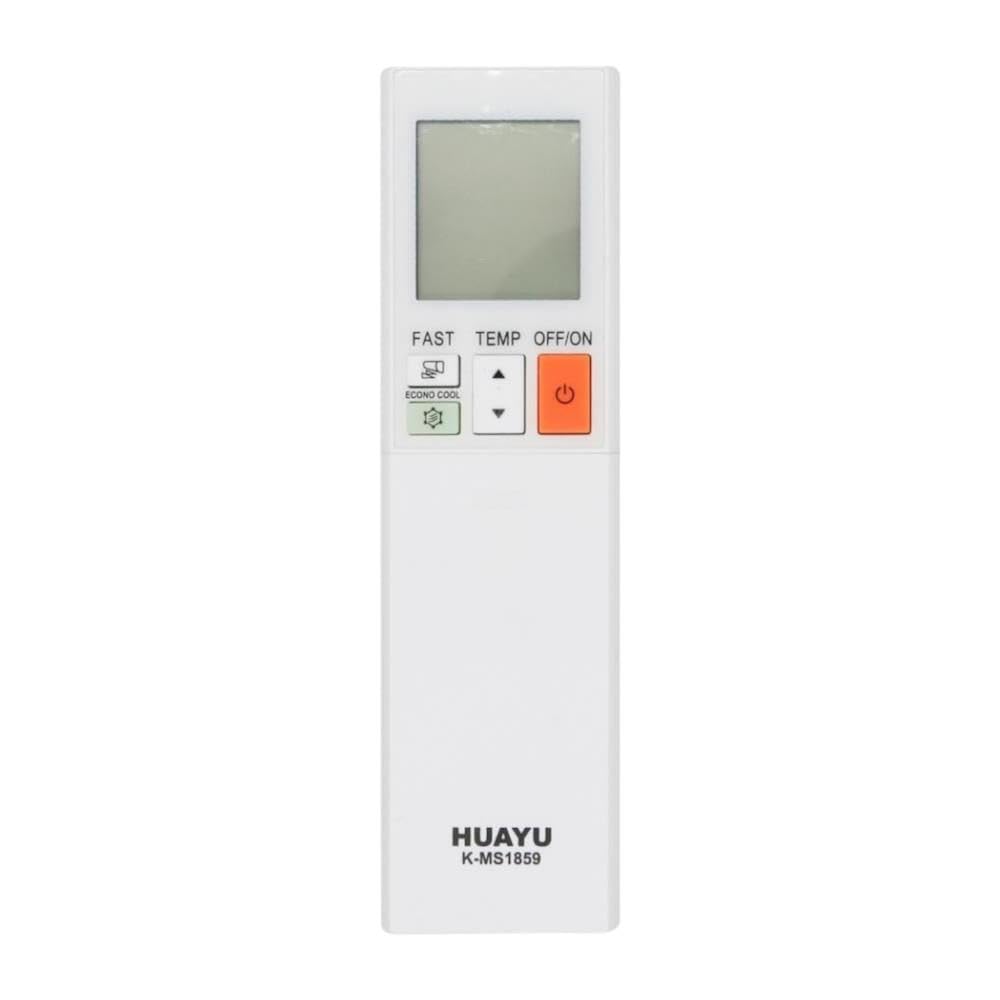
ചിത്രം 3.1: മുൻവശം, വശം, പിൻവശം views of the HUAYU K-MS1859 Universal Smart Air Conditioner Remote Control. The front shows the LCD screen, power button, temperature controls, and special function buttons like FAST and ECONO COOL. The side view സ്ലിം പ്രോ കാണിക്കുന്നുfile, പിൻഭാഗം view shows the battery compartment and a wall-mount slot.
3.1. ബട്ടൺ പ്രവർത്തനങ്ങൾ
- OFF/ON (Power Button): എയർകണ്ടീഷണർ ഓൺ അല്ലെങ്കിൽ ഓഫ് ചെയ്യുക.
- TEMP ▲ / ▼ (Temperature Control): ആവശ്യമുള്ള താപനില മുകളിലേക്കോ താഴേക്കോ ക്രമീകരിക്കുന്നു.
- വേഗം: Activates a rapid cooling or heating function (specific function may vary by AC model).
- ECONO COOL: Engages an energy-saving cooling mode (specific function may vary by AC model).
- Other buttons (not explicitly visible but common): Mode selection (Cool, Heat, Fan, Dry, Auto), Fan Speed, Swing/Vane control, Timer functions.
4. സജ്ജീകരണം
4.1. ബാറ്ററി ഇൻസ്റ്റാളേഷൻ
- വിദൂര നിയന്ത്രണത്തിന്റെ പിൻഭാഗത്ത് ബാറ്ററി കമ്പാർട്ട്മെന്റ് കവർ തുറക്കുക.
- കമ്പാർട്ടുമെന്റിനുള്ളിൽ സൂചിപ്പിച്ചിരിക്കുന്നതുപോലെ ശരിയായ പോളാരിറ്റി (+ ഉം - ഉം) ഉറപ്പാക്കിക്കൊണ്ട് രണ്ട് AAA ബാറ്ററികൾ (ഉൾപ്പെടുത്തിയിട്ടില്ല) ഇടുക.
- ബാറ്ററി കമ്പാർട്ട്മെൻ്റ് കവർ സുരക്ഷിതമായി അടയ്ക്കുക.
4.2. Programming the Remote Control (Auto Search)
This universal remote control typically requires programming to match your specific air conditioner model. Follow these general steps for auto-search programming:
- നിങ്ങളുടെ എയർ കണ്ടീഷണർ ഓണാക്കിയിട്ടുണ്ടെന്ന് ഉറപ്പാക്കുക.
- Point the remote control towards the air conditioner's receiver.
- Press and hold the "SET" button (or a similar button, if available, otherwise proceed to step 4) for approximately 3-5 seconds until a code starts flashing on the remote's LCD display.
- If no "SET" button, press and hold the "POWER" button for 5 seconds, then release. The remote will begin cycling through codes.
- The remote will automatically search for compatible codes. Observe your air conditioner. When the air conditioner responds (e.g., turns on/off, beeps, changes mode), immediately press any button (e.g., "OK" or "POWER") to confirm the code.
- Test all functions (Power, Temperature, Mode, Fan Speed) to ensure proper operation. If some functions do not work, repeat the auto-search process to find a more compatible code.
Note: Specific programming steps may vary slightly. Refer to the original air conditioner manual for its remote control code if manual code entry is an option on this universal remote.
5. പ്രവർത്തന നിർദ്ദേശങ്ങൾ
Once the remote control is programmed, you can operate your air conditioner using the following functions:
- പവർ ഓൺ/ഓഫ്: അമർത്തുക ഓഫ്/ഓൺ എയർ കണ്ടീഷണർ ഓണാക്കാനോ ഓഫാക്കാനോ ഉള്ള ബട്ടൺ.
- താപനില ക്രമീകരണം: ഉപയോഗിക്കുക TEMP ▲ ഒപ്പം ▼ buttons to set your desired room temperature.
- മോഡ് തിരഞ്ഞെടുക്കൽ: (Assumed button, not visible in image) Press the "MODE" button repeatedly to cycle through available modes: Cool, Heat, Fan, Dry, Auto.
- ഫാൻ വേഗത: (Assumed button, not visible in image) Press the "FAN" button to adjust the fan speed (e.g., Low, Medium, High, Auto).
- FAST Function: അമർത്തുക വേഗത്തിൽ button for quick cooling or heating.
- ECONO COOL Function: അമർത്തുക ഇക്കോനോ കൂൾ button to activate energy-saving cooling.
- Swing/Vane Control: (Assumed button, not visible in image) Use the "SWING" button to adjust the airflow direction.
- ടൈമർ പ്രവർത്തനങ്ങൾ: (Assumed button, not visible in image) If available, use the "TIMER" button to set auto-on or auto-off times.
Ensure the remote control is pointed directly at the air conditioner's receiver for optimal signal transmission.
6. പരിപാലനം
6.1. വൃത്തിയാക്കൽ
Wipe the remote control with a soft, dry cloth. Do not use liquid cleaners, abrasive cleaners, or chemical solvents, as these may damage the surface or internal components.
6.2. ബാറ്ററി മാറ്റിസ്ഥാപിക്കൽ
Replace batteries when the remote control's display becomes dim or its range decreases. Follow the battery installation steps in Section 4.1. Always replace both batteries at the same time with new ones of the same type (AAA).
7. പ്രശ്നപരിഹാരം
| പ്രശ്നം | സാധ്യമായ കാരണം | പരിഹാരം |
|---|---|---|
| റിമോട്ട് കൺട്രോൾ പ്രവർത്തിക്കുന്നില്ല. |
|
|
| Air conditioner does not respond to all commands. |
|
|
| LCD ഡിസ്പ്ലേ മങ്ങിയതോ ശൂന്യമോ ആണ്. |
|
|
8 സ്പെസിഫിക്കേഷനുകൾ
| ഫീച്ചർ | വിശദാംശങ്ങൾ |
|---|---|
| ബ്രാൻഡ് | ഹുവായു |
| മോഡൽ | K-MS1859 |
| അനുയോജ്യത | Universal for MITSUBISHI Air Conditioners |
| പവർ ഉറവിടം | 2 x AAA ബാറ്ററികൾ (ഉൾപ്പെടുത്തിയിട്ടില്ല) |
| മെറ്റീരിയൽ | എബിഎസ് പ്ലാസ്റ്റിക് |
| ഭാഗം നമ്പർ | 06931956807884 |
| ASIN | B0F4YZ41NT |
9. വാറണ്ടിയും പിന്തുണയും
9.1. വാറൻ്റി വിവരങ്ങൾ
This product is covered by a standard manufacturer's warranty against defects in materials and workmanship. The warranty period typically begins from the date of purchase. Please retain your proof of purchase for warranty claims. For specific warranty terms and conditions, refer to the documentation provided with your purchase or contact the retailer.
9.2. ഉപഭോക്തൃ പിന്തുണ
If you encounter any issues or have questions regarding your HUAYU K-MS1859 Universal Smart Air Conditioner Remote Control that are not addressed in this manual, please contact your retailer or the manufacturer's customer support. Provide your product model number (K-MS1859) and ASIN (B0F4YZ41NT) when seeking assistance.


