1. ആമുഖം
Thank you for choosing the CAMECHO Qualcomm 8-Core Car Stereo. This manual provides detailed instructions for installation, operation, and maintenance of your new head unit. Please read this manual thoroughly before use to ensure proper functionality and safety.
2 സുരക്ഷാ വിവരങ്ങൾ
- Always ensure the vehicle is turned off and the battery is disconnected before performing any installation or maintenance.
- Professional installation is recommended for optimal performance and to avoid damage to your vehicle or the unit.
- ഡ്രൈവിംഗിൽ നിന്ന് ശ്രദ്ധ തിരിക്കുന്ന രീതിയിൽ യൂണിറ്റ് പ്രവർത്തിപ്പിക്കരുത്. റോഡ് സുരക്ഷയ്ക്ക് എപ്പോഴും മുൻഗണന നൽകുക.
- യൂണിറ്റ് വെള്ളം, ഈർപ്പം, കടുത്ത താപനില എന്നിവയിൽ നിന്ന് അകറ്റി നിർത്തുക.
3. ബോക്സിൽ എന്താണുള്ളത്?
ഇൻസ്റ്റാളേഷൻ ആരംഭിക്കുന്നതിന് മുമ്പ് എല്ലാ ഘടകങ്ങളും നിലവിലുണ്ടെന്ന് ഉറപ്പാക്കുക:
- 1 x Android Head Unit
- 1 x AHD ബാക്കപ്പ് ക്യാമറ
- 1 x ബാഹ്യ മൈക്രോഫോൺ
- 1 x ജിപിഎസ് ആന്റിന
- 1 x പവർ കേബിൾ
- 1 x RCA കേബിൾ
- 2 x USB കേബിൾ
- 1 x പിൻ ക്യാമറ ഇൻപുട്ട് കേബിൾ
- 1 x ഇൻസ്റ്റാളേഷൻ ഉപകരണം
- 1 x ഇൻസ്ട്രക്ഷൻ മാനുവൽ
4. ഇൻസ്റ്റാളേഷൻ ഗൈഡ്
4.1 വാഹന അനുയോജ്യത
This head unit is compatible with 2007-2011 Honda CRV models (Low-End Version, without Canbus). It is not suitable for original cars with a large navigation screen.

4.2 Removing the Factory Radio
Carefully remove the existing factory radio unit from your Honda CRV dashboard. Use appropriate trim removal tools to avoid damaging the dashboard. The process typically involves prying off trim panels, unscrewing the radio, and disconnecting wiring harnesses.
Video: This video demonstrates the process of removing a factory car stereo, which can be used as a general guide for similar installations. Note that the vehicle shown in the video is a Ford Transit, not a Honda CRV, but the general principles of panel removal and wiring disconnection are similar.
4.3 വയറിംഗ് കണക്ഷനുകൾ
Connect the provided wiring harnesses to the new Android head unit and the vehicle's existing wiring. Ensure all connections are secure. The main power cable, RCA cables, USB cables, and GPS antenna should be connected as per the included wiring diagram.

4.4 ബാക്കപ്പ് ക്യാമറ ഇൻസ്റ്റാളേഷൻ
The AHD backup camera provides a clear image for reversing. Connect the camera to the rear camera input cable on the head unit. Ensure the camera is mounted securely at the rear of the vehicle and wired correctly to the reverse light power source.
- Connect the red wire of the camera to the positive pole of the car's reversing light.
- Connect the black wire of the camera to the negative pole of the car's reversing light.
- The reversing trigger is controlled by the stereo, so no additional connection is needed for the trigger wire.
- After installation, set the camera resolution via: Car Settings > Factory settings (Password: 8888) > Protocol parameter settings > Reversing settings > Reverse video resolution (NTSC/PAL or AHD25), then restart your car.

5. സജ്ജീകരണവും കോൺഫിഗറേഷനും
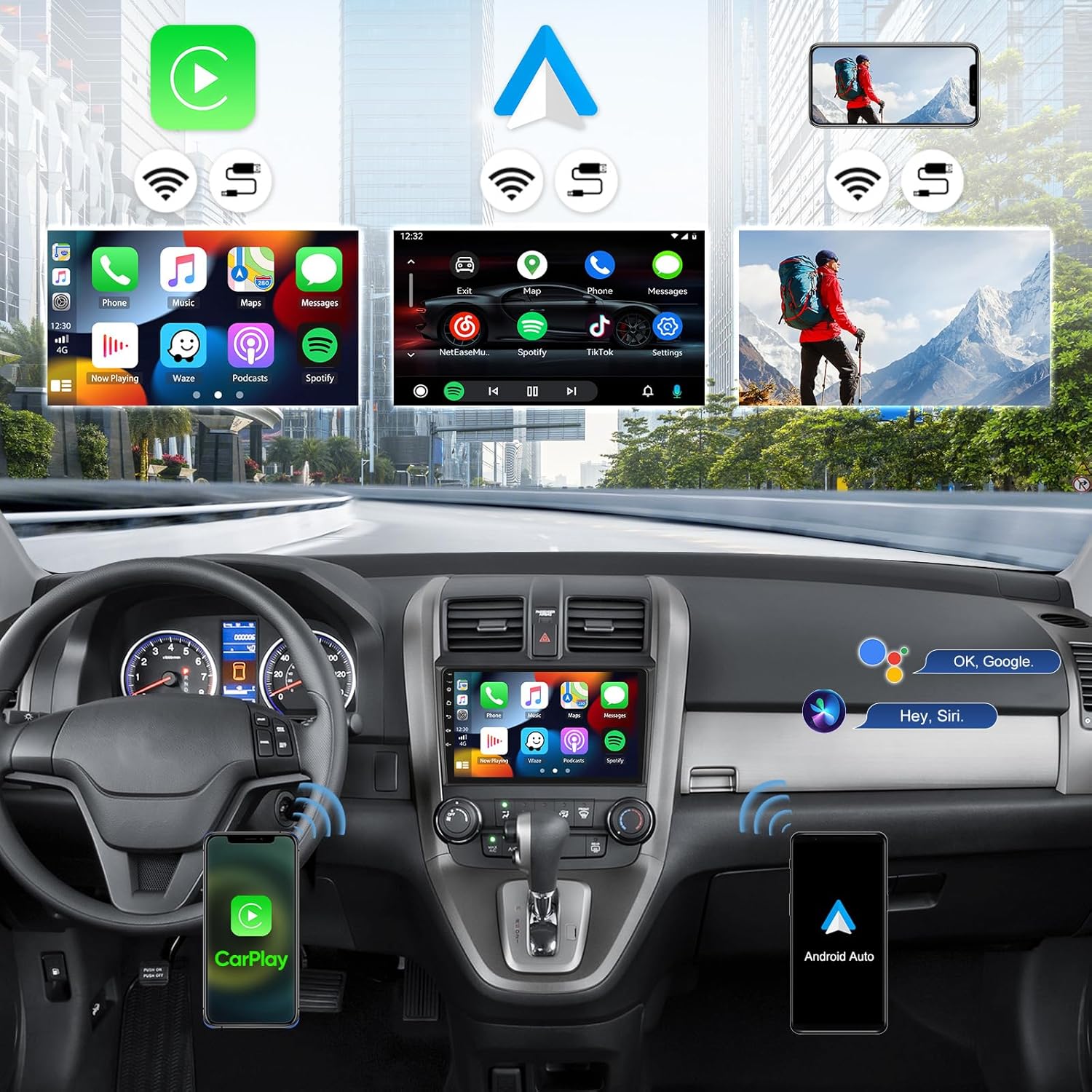
5.1 വയർലെസ് ആപ്പിൾ കാർപ്ലേയും ആൻഡ്രോയിഡ് ഓട്ടോയും
Connect your smartphone wirelessly for seamless integration:
- For Apple CarPlay: Enable Bluetooth on your iPhone and pair with the car radio. Open the "ZLINK" app on the head unit. If connection fails, connect your phone to the head unit's hotspot and try the "ZLINK" app again. Keep Bluetooth and hotspot connected.
- ആൻഡ്രോയിഡ് ഓട്ടോയ്ക്ക്: Ensure the "Android Auto" app is installed on your phone. Enable Bluetooth on your Android phone and pair with the car radio. Open the "ZLINK" app on the head unit.

5.2 ജിപിഎസ് നാവിഗേഷൻ & വൈ-ഫൈ കണക്ഷൻ
The unit features built-in GPS for both online and offline navigation. Connect to Wi-Fi or a mobile hotspot to download maps and other applications.
- To use online navigation, connect the head unit to your phone's mobile hotspot.
- Download various third-party free apps from the Google Play Store for enhanced functionality.

5.3 Bluetooth 5.1 & FM RDS Radio
Pair your phone via Bluetooth for hands-free calling and wireless audio streaming. Tune into FM/RDS radio for live broadcasts.
- Go to the Bluetooth menu on the head unit to pair your device.
- Access the FM/RDS radio application to scan for stations and save presets.

5.4 സ്റ്റിയറിംഗ് വീൽ നിയന്ത്രണം (SWC)
The unit supports factory steering wheel control functions. After connecting the power cable, you may need to program the SWC buttons:
- നാവിഗേറ്റ് ചെയ്യുക Car Settings > Steering Learn.
- നിങ്ങളുടെ സ്റ്റിയറിംഗ് വീൽ ബട്ടണുകൾക്ക് ഫംഗ്ഷനുകൾ നൽകുന്നതിന് ഓൺ-സ്ക്രീൻ നിർദ്ദേശങ്ങൾ പാലിക്കുക.
- If programming fails, ensure all wiring is correct and try again.

6. പ്രവർത്തന നിർദ്ദേശങ്ങൾ
6.1 ടച്ച് സ്ക്രീൻ ഇന്റർഫേസ്
The 9-inch IPS touch screen offers a responsive and intuitive user experience. Navigate through menus and applications by tapping, swiping, and pinching.

6.2 DSP Hi-Res Audio
Customize your audio experience with the built-in DSP (Digital Signal Processor) and Hi-Res audio support. Access the DSP equalizer settings to fine-tune sound output.

6.3 മിറർ ലിങ്ക് ഫംഗ്ഷൻ
Cast your smartphone's screen directly to the car radio touchscreen for convenient viewing of apps and content.

7. പരിപാലനം
- മൃദുവായതും ഉണങ്ങിയതുമായ തുണി ഉപയോഗിച്ച് സ്ക്രീൻ വൃത്തിയായി സൂക്ഷിക്കുക. ഉരച്ചിലുകൾ ഉള്ള ക്ലീനറുകൾ ഒഴിവാക്കുക.
- Ensure proper ventilation around the unit to prevent overheating. The unit features a fan cooling system for long-lasting heat dissipation.
- Regularly check wiring connections for any signs of wear or looseness.

8. പ്രശ്നപരിഹാരം
- ശക്തിയില്ല: Check all power connections and ensure the vehicle's ignition is on. Verify fuses are intact.
- ശബ്ദമില്ല: Check speaker connections and volume settings. Ensure the correct audio source is selected.
- സ്റ്റിയറിംഗ് വീൽ നിയന്ത്രണങ്ങൾ പ്രവർത്തിക്കുന്നില്ല: Re-check wiring for KEY1/KEY2 connections. Perform the "Steering Learn" process in Car Settings. Note that some vehicles may require a CANBUS decoder for full functionality, though this unit is designed for models without a factory CANBUS.
- ജിപിഎസ് സിഗ്നൽ പ്രശ്നങ്ങൾ: ജിപിഎസ് ആന്റിന ശരിയായി ഇൻസ്റ്റാൾ ചെയ്തിട്ടുണ്ടെന്നും വ്യക്തമായ ഒരു ലൈൻ ഉണ്ടെന്നും ഉറപ്പാക്കുക. view ആകാശത്തിൻ്റെ.
- Wireless CarPlay/Android Auto Connection Issues: Ensure Bluetooth and Wi-Fi are enabled on both the phone and the head unit. Try restarting both devices.
9 സ്പെസിഫിക്കേഷനുകൾ
| ഫീച്ചർ | വിവരണം |
|---|---|
| പ്രോസസ്സർ | Qualcomm Snapdragon 8-Core CPU |
| ഓപ്പറേറ്റിംഗ് സിസ്റ്റം | ആൻഡ്രോയിഡ് 15 |
| റാം | 4 ജിബി |
| ROM | 64 ജിബി |
| പ്രദർശിപ്പിക്കുക | 9-inch IPS Touch Screen (1280*720 resolution) |
| കണക്റ്റിവിറ്റി | Wireless Apple CarPlay, Android Auto, Bluetooth 5.1, Wi-Fi, GPS |
| ഓഡിയോ | Hi-Res DSP, MOSFET 4*50W Power Output |
| ക്യാമറ പിന്തുണ | AHD Backup Camera (included) |
| റേഡിയോ | FM/RDS Radio with 10-station presets |
| അളവുകൾ | 9.7"L x 1.4"W x 6"H |
| ഇനത്തിൻ്റെ ഭാരം | 3.19 പൗണ്ട് |
10. വാറൻ്റി
This product comes with a 1-Year Warranty. Please refer to the warranty card included in your package for detailed terms and conditions.
11. പിന്തുണ
For technical assistance, troubleshooting, or any inquiries, please contact CAMECHO customer support at: CAMECHOVIP@126.com


