ആമുഖം
കറുപ്പ് തിരഞ്ഞെടുത്തതിന് നന്ദിview W50PRO Smartwatch. This manual provides essential information for setting up, operating, and maintaining your device. Please read it carefully to ensure optimal performance and a safe user experience. Keep this manual for future reference.
പാക്കേജ് ഉള്ളടക്കം
നിങ്ങളുടെ പാക്കേജിൽ എല്ലാ ഇനങ്ങളും ഉണ്ടെന്ന് ഉറപ്പാക്കുക:
- കറുപ്പ്view W50PRO Smartwatch
- സിലിക്കൺ സ്ട്രാപ്പ്
- Replacement Nylon Braided Strap
- മാഗ്നെറ്റിക് ചാർജിംഗ് കേബിൾ
- ഉപയോക്തൃ മാനുവൽ (ഈ പ്രമാണം)

Image: Package contents and product dimensions.
ഉൽപ്പന്നം കഴിഞ്ഞുview
ബ്ലാക്ക്view W50PRO Smartwatch features a 1.45-inch HD touchscreen display, function buttons, a powerful flashlight, and a comfortable silicone strap. Its robust design is suitable for various activities.

ചിത്രം: കറുപ്പ്view W50PRO Smartwatch with its key features labeled.
സജ്ജമാക്കുക
1 ഉപകരണം ചാർജ് ചെയ്യുന്നു
Before first use, fully charge your smartwatch. Connect the magnetic charging cable to the charging points on the back of the watch and plug the USB end into a power adapter (not included) or a computer's USB port. The watch will display a charging indicator.
- ഒരു പൂർണ്ണ ചാർജ് സാധാരണയായി ഏകദേശം 3 മണിക്കൂർ എടുക്കും.
- The 960mAh battery provides up to 30 days of typical use and 100 days of standby time.

Image: Battery capacity and charging information.
2. ആപ്പ് ഇൻസ്റ്റാളേഷൻ
ഡൗൺലോഡ് ചെയ്ത് ഇൻസ്റ്റാൾ ചെയ്യുക "Da Fit" വസ്തുതകൾ application on your smartphone. You can find it in the App Store (iOS) or Google Play Store (Android).
3. Device Pairing and Bluetooth Calls
To connect your smartwatch and enable Bluetooth calling:
- Download the Da Fit app from your phone's app store.
- നിങ്ങളുടെ സ്മാർട്ട്ഫോണിൽ ബ്ലൂടൂത്ത് പ്രവർത്തനക്ഷമമാക്കുക.
- Open the Da Fit app and add your device.
- Confirm the pairing request on your phone and watch.
- Grant necessary notification permissions within the Da Fit app for calls and messages.
- ജോടിയാക്കിയാൽ, നിങ്ങളുടെ വാച്ചിൽ നിന്ന് നേരിട്ട് കോളുകൾ വിളിക്കാനും സ്വീകരിക്കാനും കഴിയും.

Image: Connection and calling setup guide.
പ്രവർത്തന നിർദ്ദേശങ്ങൾ
1. അടിസ്ഥാന നാവിഗേഷൻ
- ടച്ച് സ്ക്രീൻ: മെനുകൾ നാവിഗേറ്റ് ചെയ്യാനും സവിശേഷതകൾ ആക്സസ് ചെയ്യാനും ഇടത്തേക്ക്/വലത്തേക്ക്, മുകളിലേക്കും താഴേക്കും സ്വൈപ്പ് ചെയ്യുക. തിരഞ്ഞെടുക്കാൻ ടാപ്പ് ചെയ്യുക.
- ഫംഗ്ഷൻ ബട്ടണുകൾ: Use the physical buttons on the side of the watch for quick access to specific functions or to return to the home screen.
2. Flashlight and Compass
The W50PRO includes a built-in flashlight and compass for outdoor activities.
- ഫ്ലാഷ്ലൈറ്റ്: Activate the flashlight feature from the watch's menu. It offers fixed and intermittent modes for various situations.
- കോമ്പസ്: Access the compass feature from the watch's menu for accurate directional guidance.
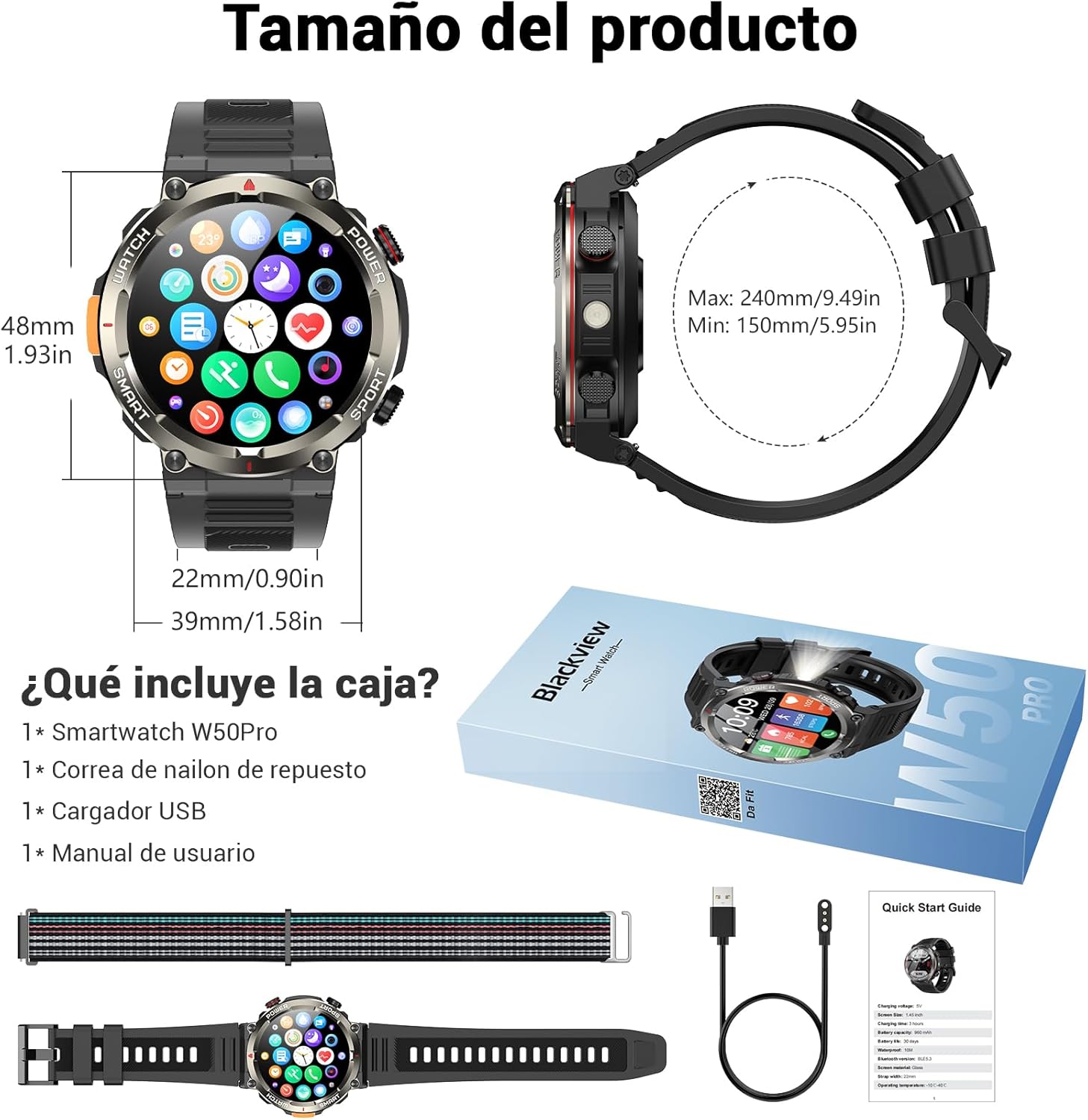
Image: Compass feature for outdoor navigation.

Image: Powerful LED flashlight in action.
3. ബ്ലൂടൂത്ത് കോളിംഗും അറിയിപ്പുകളും
Once paired with your smartphone, the W50PRO allows you to manage calls and notifications directly from your wrist.
- കോളുകൾ ചെയ്യുക/സ്വീകരിക്കുക: Use the integrated speaker and microphone to make or answer calls.
- അറിയിപ്പുകൾ: Receive real-time alerts for text messages, emails, and social media apps.
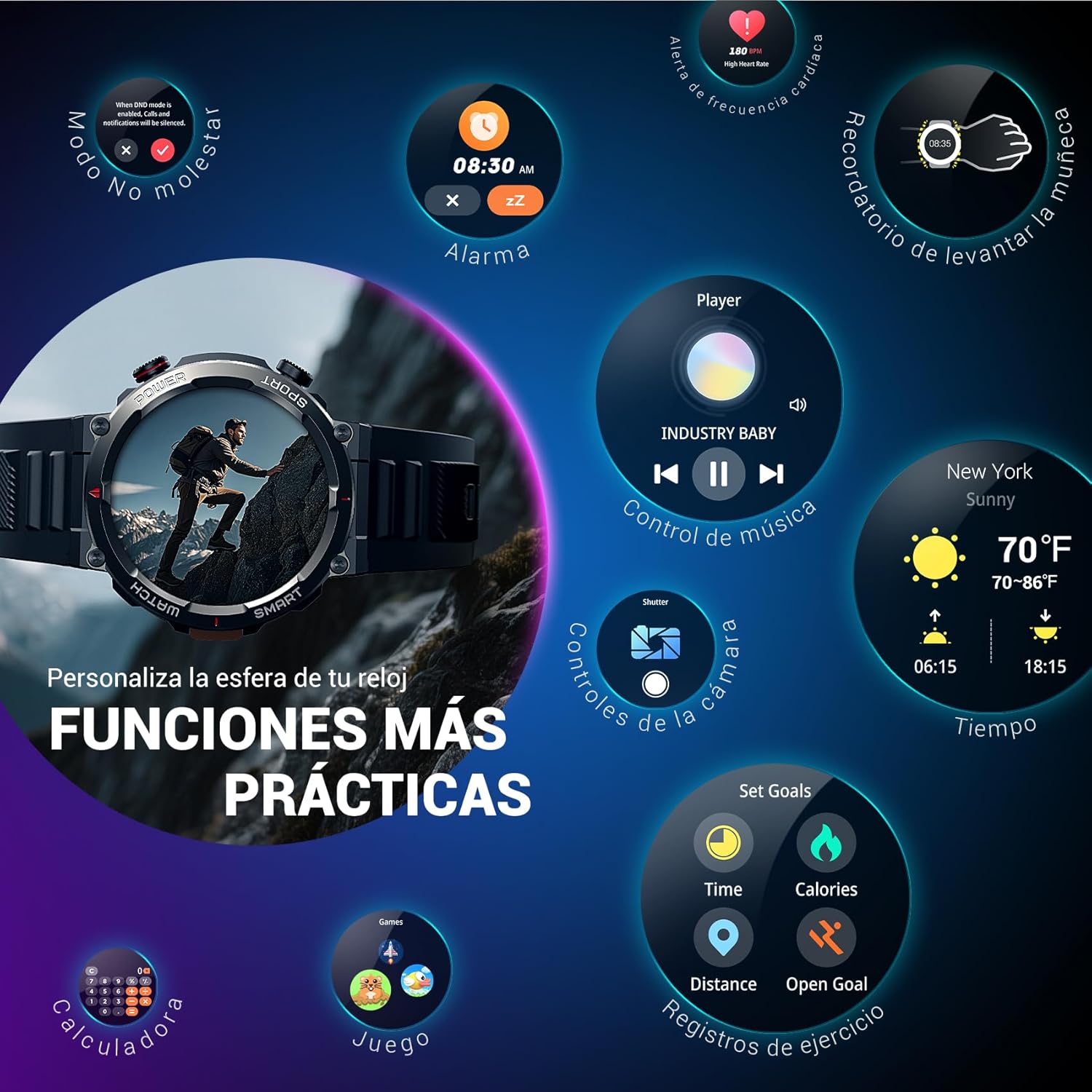
Image: Bluetooth calling and notification features.
4. ആരോഗ്യ നിരീക്ഷണം
The smartwatch is equipped with high-precision sensors to monitor various health indicators:
- ഹൃദയമിടിപ്പ്: Real-time heart rate monitoring.
- രക്ത ഓക്സിജൻ (SpO2): നിങ്ങളുടെ രക്തത്തിലെ ഓക്സിജന്റെ അളവ് നിരീക്ഷിക്കുക.
- സ്ലീപ്പ് മോണിറ്റർ: Tracks sleep quality and patterns.
- സമ്മർദ്ദ നിലകൾ: നിങ്ങളുടെ സമ്മർദ്ദ നിലകളെക്കുറിച്ചുള്ള ഉൾക്കാഴ്ചകൾ നൽകുന്നു.
All health data synchronizes with the Da Fit app for detailed analysis and trend tracking.

Image: Real-time health monitoring features.
5. സ്പോർട്സ് മോഡുകൾ
The W50PRO offers over 100 integrated sports modes, including running, cycling, climbing, rope skipping, football, and basketball. It accurately records exercise time, distance, steps, calorie consumption, and heart rate changes, providing clear and intuitive performance data. Detailed data can be viewDa Fit ആപ്പിൽ ed.

ചിത്രം: കഴിഞ്ഞുview of 100+ sports modes.
6. വാച്ച് ഫെയ്സുകൾ ഇഷ്ടാനുസൃതമാക്കൽ
The Da Fit app provides a wide selection of watch faces to suit various styles. You can also upload personal photos as wallpaper and adjust text color and widget layout to create a unique watch interface.

Image: Customizable watch faces.
7. മറ്റ് പ്രായോഗിക പ്രവർത്തനങ്ങൾ
ബ്ലാക്ക്view W50PRO includes additional features for daily convenience:
- കാലാവസ്ഥാ പ്രവചനം
- സംഗീത നിയന്ത്രണം
- ക്യാമറ റിമോട്ട് കൺട്രോൾ
- അലാറങ്ങൾ
- ഉദാസീനമായ ഓർമ്മപ്പെടുത്തൽ
- ഡ്രിങ്ക് വാട്ടർ റിമൈൻഡർ
- സ്റ്റോപ്പ് വാച്ച്
- കൗണ്ട്ഡൗൺ ടൈമർ
- ഫോൺ കണ്ടെത്തുക
- കാൽക്കുലേറ്റർ
- ഗെയിമുകൾ
- തെളിച്ചം ക്രമീകരിക്കൽ

Image: Multiple smart functions available on the smartwatch.
മെയിൻ്റനൻസ്
1. വൃത്തിയാക്കൽ
Regularly clean your smartwatch and strap to prevent skin irritation and maintain device functionality. Use a soft, damp സ്ക്രീൻ തുടയ്ക്കാൻ തുണിയും സി.asing. For the strap, follow the manufacturer's cleaning recommendations based on the material (silicone or nylon).
2. ജല പ്രതിരോധം
ബ്ലാക്ക്view W50PRO Smartwatch features an IP68 water resistance rating. This means it is protected against dust ingress and can withstand immersion in water up to 1.5 meters for up to 30 minutes. It is suitable for daily use, such as hand washing or light rain. Avoid using it in hot water, saunas, or during diving, as steam and high pressure can compromise the seals.

Image: Durability features including IP68 water resistance.
3. ബാറ്ററി പരിചരണം
ബാറ്ററി ആയുസ്സ് വർദ്ധിപ്പിക്കാൻ:
- തീവ്രമായ താപനില ഒഴിവാക്കുക.
- ബാറ്ററി ഇടയ്ക്കിടെ പൂർണ്ണമായും തീർന്നുപോകാൻ അനുവദിക്കരുത്.
- Charge the device using the provided magnetic charging cable.
ട്രബിൾഷൂട്ടിംഗ്
നിങ്ങളുടെ കറുപ്പിൽ പ്രശ്നങ്ങൾ നേരിടുകയാണെങ്കിൽview W50PRO Smartwatch, try the following:
- ഉപകരണം ഓണാക്കുന്നില്ല: വാച്ച് പൂർണ്ണമായും ചാർജ് ചെയ്തിട്ടുണ്ടെന്ന് ഉറപ്പാക്കുക.
- ഫോണുമായി ജോടിയാക്കാൻ കഴിയില്ല: Check if Bluetooth is enabled on both devices. Restart both the watch and phone. Ensure the Da Fit app has necessary permissions.
- കൃത്യമല്ലാത്ത ആരോഗ്യ ഡാറ്റ: Ensure the watch is worn snugly on your wrist. Clean the sensors regularly.
- അറിയിപ്പുകൾ ലഭിച്ചിട്ടില്ല: Verify that notification permissions are granted in the Da Fit app and your phone's settings. Ensure the app is running in the background.
- ഹ്രസ്വ ബാറ്ററി ലൈഫ്: Reduce screen brightness, disable unnecessary features, and limit frequent heart rate monitoring.
For persistent issues, refer to the Da Fit app's help section or contact customer support.
സ്പെസിഫിക്കേഷനുകൾ
| ഫീച്ചർ | സ്പെസിഫിക്കേഷൻ |
|---|---|
| ബ്രാൻഡ് | കറുപ്പ്view |
| മോഡൽ | W50PRO |
| ഡിസ്പ്ലേ വലിപ്പം | 1.45 ഇഞ്ച് |
| ഡിസ്പ്ലേ തരം | എൽസിഡി |
| റെസലൂഷൻ | 360 x 360 പിക്സലുകൾ |
| ബാറ്ററി ശേഷി | 960 mAh |
| സാധാരണ ബാറ്ററി ലൈഫ് | 30 ദിവസം വരെ |
| സ്റ്റാൻഡ്ബൈ സമയം | 100 ദിവസം വരെ |
| ചാർജിംഗ് സമയം | ഏകദേശം 3 മണിക്കൂർ |
| കണക്റ്റിവിറ്റി | ബ്ലൂടൂത്ത് |
| ഹ്യൂമൻ ഇന്റർഫേസ് ഇൻപുട്ട് | Buttons, Microphone |
| ജല പ്രതിരോധം | IP68 |
| അനുയോജ്യമായ ഫോൺ മോഡലുകൾ | iOS, Android |
| ഉൽപ്പന്ന അളവുകൾ | 8.8 x 2.2 x 18.1 സെ.മീ |
| ഉൽപ്പന്ന ഭാരം | 136 ഗ്രാം |
വാറൻ്റിയും പിന്തുണയും
For warranty information and technical support, please refer to the documentation included with your purchase or visit the official Blackview webസൈറ്റ്. വാറന്റി ക്ലെയിമുകൾക്കായി നിങ്ങളുടെ വാങ്ങലിന്റെ തെളിവ് സൂക്ഷിക്കുക.


