1. ആമുഖം
The GMKtec EVO-X2 is a high-performance mini PC designed for demanding tasks, including AI computing, 4K video editing, 3D modeling, and VR content creation. It features the latest AMD Ryzen AI Max+ 395 processor, integrated Radeon 8060S graphics, and advanced connectivity options, all within a compact and space-saving design.
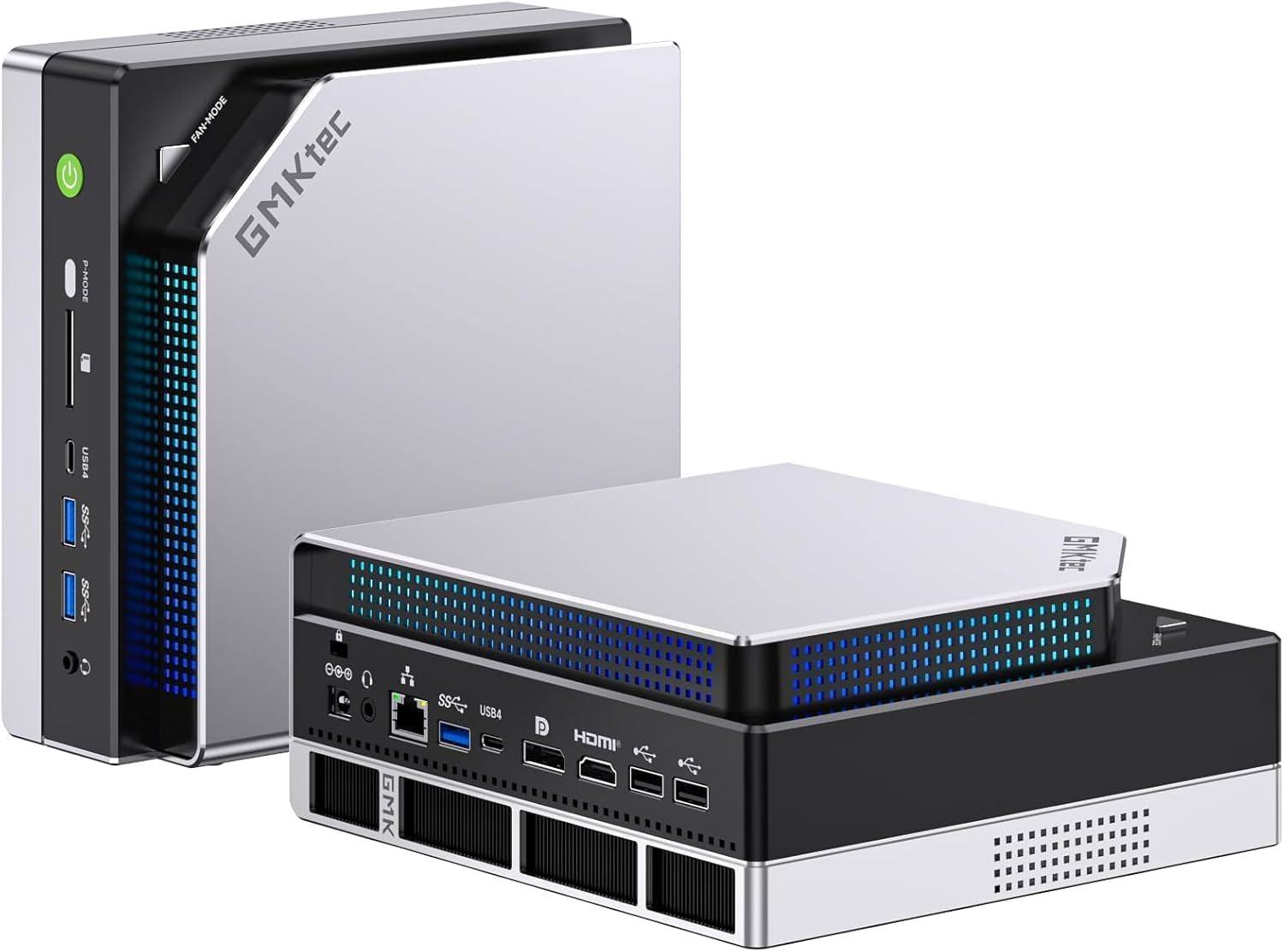
Figure 1: The GMKtec EVO-X2 Mini PC, showcasing its compact form factor and sleek design.
This manual provides essential information to help you set up, operate, and maintain your EVO-X2 Mini PC, ensuring optimal performance and longevity.
2. സജ്ജീകരണ ഗൈഡ്
2.1 പാക്കേജ് ഉള്ളടക്കം
ആരംഭിക്കുന്നതിന് മുമ്പ്, പാക്കേജിൽ എല്ലാ ഇനങ്ങളും ഉണ്ടെന്ന് ഉറപ്പാക്കുക:
- EVO-X2 Mini PC Unit
- പവർ അഡാപ്റ്റർ
- HDMI കേബിൾ
- ഉപയോക്തൃ മാനുവൽ (ഈ പ്രമാണം)
2.2 പെരിഫറലുകൾ ബന്ധിപ്പിക്കുന്നു
Follow these steps to connect your display, keyboard, and mouse:
- Connect your monitor(s) to the HDMI 2.1, DP 1.4, or USB4 ports. The device supports up to four simultaneous displays.
- Connect your keyboard and mouse to the available USB 3.2 or USB2.0 ports.
- For wired network access, connect an Ethernet cable to the 2.5Gbps LAN port.
- Connect the power adapter to the DC IN port on the Mini PC, then plug it into a power outlet.

ചിത്രം 2: ഓവർview of the Mini PC's front and rear ports, including USB, HDMI, DisplayPort, and LAN connections.
2.3 പ്രാരംഭ പവർ ഓൺ
Press the power button located on the front of the Mini PC. The system will boot up, and you will be guided through the initial Windows 11 Pro setup process.
3. പ്രവർത്തന നിർദ്ദേശങ്ങൾ
3.1 Processor and AI Performance
The EVO-X2 is equipped with the AMD Ryzen AI Max+ 395 processor, featuring 16 cores and 32 threads, with a boost clock up to 5.1GHz. Its integrated XDNA 2 NPU delivers up to 126 TOPS of AI computing power, making it ideal for local LLM processing, image generation, and deep learning applications.

ചിത്രം 3: വിശദമായി view of the AMD Ryzen AI Max+ 395 processor, highlighting its core count, clock speed, and cache.
Figure 4: The innovative XDNA 2 architecture, enabling high-performance AI processing for various applications.
3.2 Graphics Performance
The integrated Radeon 8060S graphics, based on RDNA 3.5 architecture with 40 CUs, provides professional-grade graphics performance. This allows for smooth 4K video editing, 3D rendering, and VR content creation.
3.3 മെമ്മറിയും സംഭരണവും
The EVO-X2 comes with 64GB of LPDDR5X-8000MHz memory, offering ultra-fast access speeds and superior responsiveness. For storage, it includes a 1TB NVMe SSD and supports expansion up to 8TB via two M.2 PCIe 4.0 NVMe slots, making it suitable for data science, AI development, and large storage needs.

Figure 5: Visual representation of the LPDDR5X 8000MHz memory, highlighting its high-speed capabilities.
3.4 ഡിസ്പ്ലേ ഔട്ട്പുട്ട്
With HDMI 2.1, DP 1.4, and two USB4 ports, the Mini PC supports up to 8K/60Hz or 4K/240Hz output. It can simultaneously drive up to four displays, catering to the needs of business professionals and creators requiring multi-monitor setups.
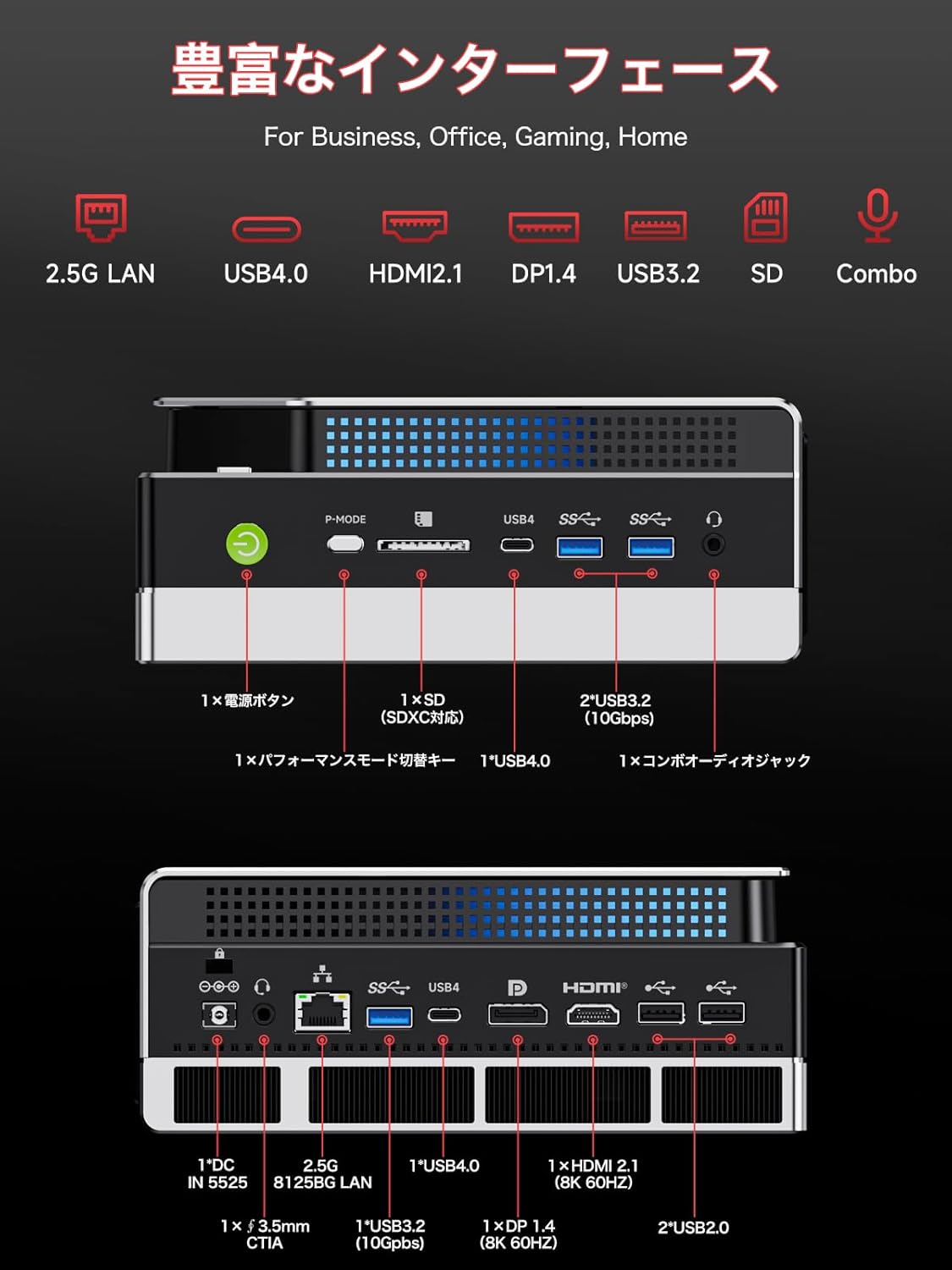
Figure 6: The Mini PC connected to four displays, demonstrating its multi-screen output capability for enhanced productivity.
3.5 കണക്റ്റിവിറ്റി
The EVO-X2 features the latest Wi-Fi 7 (RZ717 (MT7925)) with 320MHz channel width and speeds up to 2.9Gbps, along with a 2.5Gbps wired LAN port. This ensures a high-speed network environment, ideal for remote work and cloud AI tasks.

Figure 7: Illustrating the high-speed 2.5GBE Ethernet and USB4.0 connectivity options for rapid data transfer.
3.6 Intelligent Cooling and Performance Modes
The device incorporates an intelligent cooling system with 13 fan lighting effects and a physical switch for performance mode selection. This balances quiet operation with stable cooling during high-load tasks, supporting up to 140W TDP for gaming and development.

Figure 8: Diagram of the Mini PC's advanced triple fan cooling system, designed for efficient heat dissipation.
4. പരിപാലനം
നിങ്ങളുടെ മിനി പിസിയുടെ ദീർഘായുസ്സും മികച്ച പ്രകടനവും ഉറപ്പാക്കാൻ പതിവ് അറ്റകുറ്റപ്പണികൾ സഹായിക്കുന്നു.
4.1 വൃത്തിയാക്കൽ
- പുറം: Use a soft, dry cloth to wipe the exterior of the Mini PC. Avoid abrasive cleaners or solvents.
- വെന്റുകൾ: Periodically use compressed air to clear dust from the ventilation openings to ensure proper airflow and cooling.
4.2 സോഫ്റ്റ്വെയർ അപ്ഡേറ്റുകൾ
Keep your operating system (Windows 11 Pro) and drivers updated to the latest versions. This improves security, stability, and performance. Check for updates regularly through Windows Update and the GMKtec official webഡ്രൈവർ അപ്ഡേറ്റുകൾക്കായുള്ള സൈറ്റ്.
4.3 സ്റ്റോറേജ് മാനേജ്മെൻ്റ്
അനാവശ്യമായവ നീക്കം ചെയ്തുകൊണ്ട് നിങ്ങളുടെ സംഭരണം പതിവായി കൈകാര്യം ചെയ്യുക. files, emptying the recycle bin, and uninstalling unused programs. This helps maintain system speed and frees up valuable disk space.
5. പ്രശ്നപരിഹാരം
This section addresses common issues you might encounter with your GMKtec EVO-X2 Mini PC.
5.1 ഡിസ്പ്ലേ ഔട്ട്പുട്ട് ഇല്ല
- കേബിളുകൾ പരിശോധിക്കുക: Ensure all display cables (HDMI, DP, USB4) are securely connected to both the Mini PC and the monitor.
- ശക്തി: Verify the Mini PC is powered on and the power adapter is properly connected.
- ഇൻപുട്ട് നിരീക്ഷിക്കുക: നിങ്ങളുടെ മോണിറ്റർ ശരിയായ ഇൻപുട്ട് ഉറവിടത്തിലേക്ക് സജ്ജീകരിച്ചിട്ടുണ്ടെന്ന് ഉറപ്പാക്കുക.
- മറ്റൊരു പോർട്ട്/കേബിൾ പരീക്ഷിച്ചുനോക്കൂ: Test with a different display port on the Mini PC or a different cable if available.
5.2 ഇന്റർനെറ്റ് കണക്ഷൻ ഇല്ല
- വയർഡ് കണക്ഷൻ: Check if the Ethernet cable is securely plugged into the LAN port and your router. Verify router status.
- വയർലെസ് കണക്ഷൻ: Ensure Wi-Fi is enabled in Windows settings. Check if the correct Wi-Fi network is selected and the password is entered correctly. Restart your router/modem.
- ഡ്രൈവർ പ്രശ്നങ്ങൾ: Ensure network drivers are installed and up to date.
5.3 System Slowdown or Unresponsiveness
- അപ്ലിക്കേഷനുകൾ അടയ്ക്കുക: പശ്ചാത്തലത്തിൽ പ്രവർത്തിക്കുന്ന അനാവശ്യ ആപ്ലിക്കേഷനുകൾ അടയ്ക്കുക.
- Check Task Manager: Use Task Manager (Ctrl+Shift+Esc) to identify processes consuming high CPU, memory, or disk resources.
- ഡിസ്ക് സ്പേസ്: നിങ്ങളുടെ SSD-യിൽ മതിയായ ഇടമുണ്ടെന്ന് ഉറപ്പാക്കുക.
- അമിത ചൂടാക്കൽ: Check if the Mini PC feels unusually hot. Ensure vents are clear and the cooling fan is operating.
- മാൽവെയർ സ്കാൻ: Run a full system scan using antivirus software.
5.4 പെരിഫറൽ കണ്ടെത്തിയില്ല
- വീണ്ടും ബന്ധിപ്പിക്കുക: Disconnect and reconnect the peripheral.
- Try Another Port: Test the peripheral in a different USB port.
- ഡ്രൈവർ ഇൻസ്റ്റാളേഷൻ: Install the necessary drivers for the peripheral if required.
- മറ്റൊരു ഉപകരണത്തിൽ പരീക്ഷിക്കുക: If possible, test the peripheral on another computer to rule out a device malfunction.
6 സ്പെസിഫിക്കേഷനുകൾ
Detailed technical specifications for the GMKtec EVO-X2 Mini PC.

Figure 9: Comprehensive diagram detailing the internal components and features of the GMKtec EVO-X2.
| ഫീച്ചർ | സ്പെസിഫിക്കേഷൻ |
|---|---|
| ബ്രാൻഡ് | ജിഎംകെടെക് |
| മോഡലിൻ്റെ പേര് | GMKTEC EVO-X2-JP |
| ഓപ്പറേറ്റിംഗ് സിസ്റ്റം | വിൻഡോസ് 11 പ്രോ |
| സിപിയു ബ്രാൻഡ് | എഎംഡി |
| സിപിയു തരം | AMD A Series (Ryzen AI Max+ 395) |
| സിപിയു വേഗത | 5.1 GHz (Max Boost) |
| ഗ്രാഫിക്സ് കോപ്രൊസസർ | Radeon 8060S (Integrated) |
| മെമ്മറി തരം | LPDDR5X |
| ഇൻസ്റ്റാൾ ചെയ്ത RAM വലുപ്പം | 64 GB (LPDDR5X-8000MHz) |
| പരമാവധി മെമ്മറി ശേഷി | 128 ജിബി |
| ഹാർഡ് ഡിസ്ക് തരം | എസ്എസ്ഡി |
| ഹാർഡ് ഡിസ്ക് ശേഷി | 1 TB (Expandable up to 8TB via 2x M.2 PCIe 4.0 NVMe slots) |
| റെസലൂഷൻ | 7680 x 4320 (8K) |
| HDMI പോർട്ടുകൾ | 1 (HDMI 2.1) |
| ഡിസ്പ്ലേ പോർട്ട് | 1 (DP 1.4) |
| USB4 പോർട്ടുകൾ | 2 |
| USB 3.0 പോർട്ടുകൾ | 2 |
| USB 2.0 പോർട്ടുകൾ | 2 |
| ലാൻ | 2.5Gbps ഇതർനെറ്റ് |
| വയർലെസ് കണക്റ്റിവിറ്റി | Wi-Fi 7 (RZ717 (MT7925)), Bluetooth 5.4 |
| ഉൽപ്പന്ന അളവുകൾ | 38.4 x 25.2 x 9.3 സെ.മീ |
| ഇനത്തിൻ്റെ ഭാരം | 3.3 കി.ഗ്രാം |
7. വാറൻ്റിയും പിന്തുണയും
GMKtec provides comprehensive support for your EVO-X2 Mini PC.
7.1 നിർമ്മാതാവിന്റെ വാറന്റി
Your GMKtec EVO-X2 Mini PC comes with a 1 വർഷത്തെ നിർമ്മാതാവിന്റെ വാറന്റി വാങ്ങിയ തീയതി മുതൽ. സാധാരണ ഉപയോഗത്തിലുള്ള മെറ്റീരിയലുകളിലെയും ജോലികളിലെയും വൈകല്യങ്ങൾ ഈ വാറന്റി ഉൾക്കൊള്ളുന്നു. വാറന്റി ക്ലെയിമുകൾക്കായി നിങ്ങളുടെ വാങ്ങിയതിന്റെ തെളിവ് സൂക്ഷിക്കുക.
7.2 ഉപഭോക്തൃ പിന്തുണ
For any technical assistance, troubleshooting, or warranty inquiries, please contact GMKtec customer support. We offer 24-മണിക്കൂർ ഉപഭോക്തൃ പിന്തുണ to ensure your issues are resolved promptly.
Please visit the official GMKtec website for contact information and additional support resources.


