ആമുഖം
This manual provides detailed instructions for the SGIN Android Tablet SGIN-T12. It covers setup, operation, maintenance, and troubleshooting to ensure optimal use of your device. The SGIN-T12 features a 10.51-inch Full HD IPS display, an Octa-Core processor, 6GB RAM, 128GB internal storage, and runs on Android 13. It supports 5G WiFi, Bluetooth 5.0, and GPS functionality.
1. സജ്ജീകരണം
1.1 പാക്കേജ് ഉള്ളടക്കം
പാക്കേജിൽ എല്ലാ ഇനങ്ങളും ഉണ്ടെന്ന് ഉറപ്പാക്കുക:
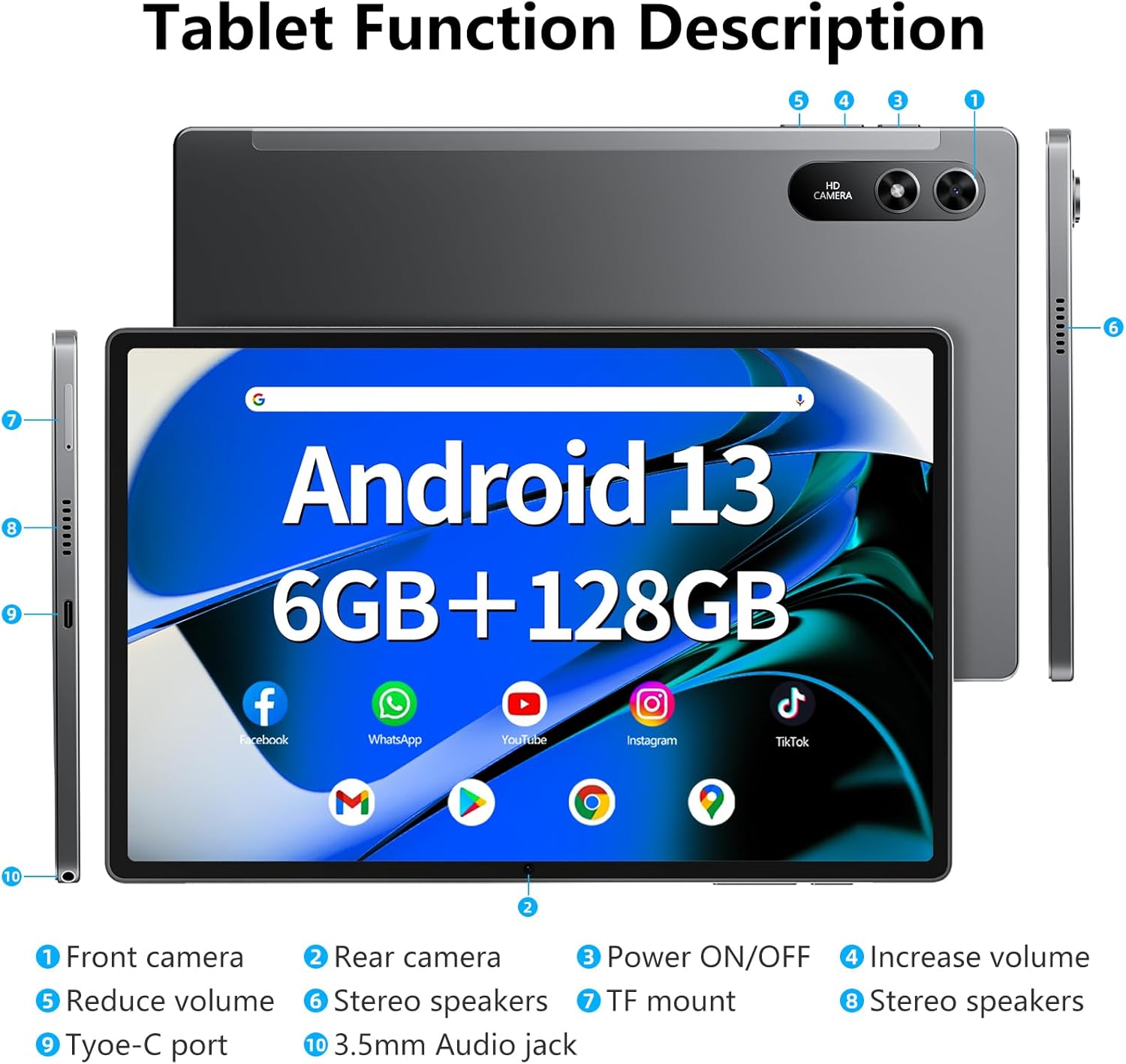
Image: The SGIN-T12 tablet, power adapter, USB-C charging cable, SIM ejector tool, and user manual.
- SGIN Android Tablet SGIN-T12
- പവർ അഡാപ്റ്റർ
- USB-C ചാർജിംഗ് കേബിൾ
- സിം എജക്ടർ ഉപകരണം
- ഉപയോക്തൃ മാനുവൽ
1.2 ഉപകരണ ലേayട്ട്
Familiarize yourself with the physical components and ports of your tablet.

Image: Labeled diagram of the SGIN-T12 tablet indicating the location of the front camera, rear camera, power ON/OFF button, volume increase/decrease buttons, stereo speakers, TF card slot, Type-C charging port, and 3.5mm audio jack.
- മുൻ ക്യാമറ
- പിൻ ക്യാമറ
- പവർ ഓൺ/ഓഫ് ബട്ടൺ
- വോളിയം കൂട്ടുക ബട്ടൺ
- വോളിയം കുറയ്ക്കുക ബട്ടൺ
- സ്റ്റീരിയോ സ്പീക്കറുകൾ
- TF mount (MicroSD card slot)
- സ്റ്റീരിയോ സ്പീക്കറുകൾ
- ടൈപ്പ്-സി പോർട്ട്
- 3.5എംഎം ഓഡിയോ ജാക്ക്
1.3 പ്രാരംഭ ചാർജിംഗ്
Before first use, fully charge the tablet. Connect the USB-C charging cable to the tablet's Type-C port and the power adapter to a wall outlet. The charging indicator will show the charging status.
1.4 പവർ ഓൺ/ഓഫ്
- പവർ ഓണാക്കാൻ: Press and hold the Power ON/OFF button until the SGIN logo appears.
- പവർ ഓഫ് ചെയ്യാൻ: Press and hold the Power ON/OFF button until the power options appear on the screen. Select "Power off" and confirm.
- പുനരാരംഭിക്കാൻ: From the power options, select "Restart."
1.5 പ്രാരംഭ സജ്ജീകരണ വിസാർഡ്
ആദ്യമായി പവർ-ഓൺ ചെയ്യുമ്പോൾ, ടാബ്ലെറ്റ് പ്രാരംഭ സജ്ജീകരണ പ്രക്രിയയിലൂടെ നിങ്ങളെ നയിക്കും:
- നിങ്ങൾ ഇഷ്ടപ്പെടുന്ന ഭാഷ തിരഞ്ഞെടുക്കുക.
- ഒരു Wi-Fi നെറ്റ്വർക്കിലേക്ക് കണക്റ്റുചെയ്യുക.
- Review നിബന്ധനകളും വ്യവസ്ഥകളും അംഗീകരിക്കുക.
- Sign in with your Google account or create a new one. This is necessary for accessing the Google Play Store and other Google services.
- സ്ക്രീൻ ലോക്ക് (പിൻ, പാറ്റേൺ അല്ലെങ്കിൽ പാസ്വേഡ്) സജ്ജീകരിക്കുക.
- Configure other settings as prompted.
2. പ്രവർത്തന നിർദ്ദേശങ്ങൾ
2.1 അടിസ്ഥാന നാവിഗേഷൻ
- ടാപ്പ് ചെയ്യുക: ഒരു ഇനം തിരഞ്ഞെടുക്കാനോ ഒരു ആപ്ലിക്കേഷൻ തുറക്കാനോ സ്ക്രീനിൽ ഒരിക്കൽ സ്പർശിക്കുക.
- ടാപ്പുചെയ്ത് പിടിക്കുക: Touch and hold an item to access contextual menus or move icons.
- സ്വൈപ്പ്: പേജുകളിലൂടെയോ ലിസ്റ്റുകളിലൂടെയോ സ്ക്രോൾ ചെയ്യാൻ സ്ക്രീനിലുടനീളം നിങ്ങളുടെ വിരൽ വലിച്ചിടുക.
- പിഞ്ച്: ചിത്രങ്ങൾ സൂം ഇൻ ചെയ്യാനോ ഔട്ട് ചെയ്യാനോ രണ്ട് വിരലുകൾ ഉപയോഗിക്കുക, web പേജുകൾ.
2.2 വൈഫൈ കണക്ഷൻ
ഒരു വയർലെസ് നെറ്റ്വർക്കിലേക്ക് കണക്റ്റുചെയ്യാൻ:
- പോകുക ക്രമീകരണങ്ങൾ > നെറ്റ്വർക്കും ഇൻ്റർനെറ്റും > വൈഫൈ.
- വൈഫൈ ടോഗിൾ ചെയ്യുക On.
- ലിസ്റ്റിൽ നിന്ന് നിങ്ങൾക്ക് ആവശ്യമുള്ള നെറ്റ്വർക്ക് തിരഞ്ഞെടുക്കുക.
- ആവശ്യപ്പെടുകയാണെങ്കിൽ പാസ്വേഡ് നൽകി ടാപ്പ് ചെയ്യുക ബന്ധിപ്പിക്കുക.
2.3 ബ്ലൂടൂത്ത് ജോടിയാക്കൽ
ഒരു ബ്ലൂടൂത്ത് ഉപകരണവുമായി (ഉദാ. ഹെഡ്ഫോണുകൾ, കീബോർഡ്) ജോടിയാക്കാൻ:
- പോകുക ക്രമീകരണങ്ങൾ > ബന്ധിപ്പിച്ച ഉപകരണങ്ങൾ > ബ്ലൂടൂത്ത്.
- ബ്ലൂടൂത്ത് ടോഗിൾ ചെയ്യുക On.
- നിങ്ങളുടെ ബ്ലൂടൂത്ത് ഉപകരണം ജോടിയാക്കൽ മോഡിലാണെന്ന് ഉറപ്പാക്കുക.
- Select the device from the "Available devices" list and follow any on-screen prompts to complete pairing.
2.4 ക്യാമറ പ്രവർത്തനം
ടാബ്ലെറ്റിൽ 5MP മുൻ ക്യാമറയും 13MP പിൻ ക്യാമറയും ഉണ്ട്.

Image: The SGIN-T12 tablet showcasing its front camera for video calls and rear camera for capturing images.
- തുറക്കുക ക്യാമറ അപേക്ഷ.
- Tap the camera switch icon to alternate between the front and rear cameras.
- ഒരു ഫോട്ടോ എടുക്കാൻ ഷട്ടർ ബട്ടൺ ടാപ്പ് ചെയ്യുക അല്ലെങ്കിൽ വീഡിയോ റെക്കോർഡിംഗ് ആരംഭിക്കുക/നിർത്തുക.
- Access various camera modes and settings within the app.
2.5 സ്റ്റോറേജ് മാനേജ്മെൻ്റ്
The tablet comes with 128GB of internal storage and supports expansion up to 256GB via a TF (MicroSD) card.
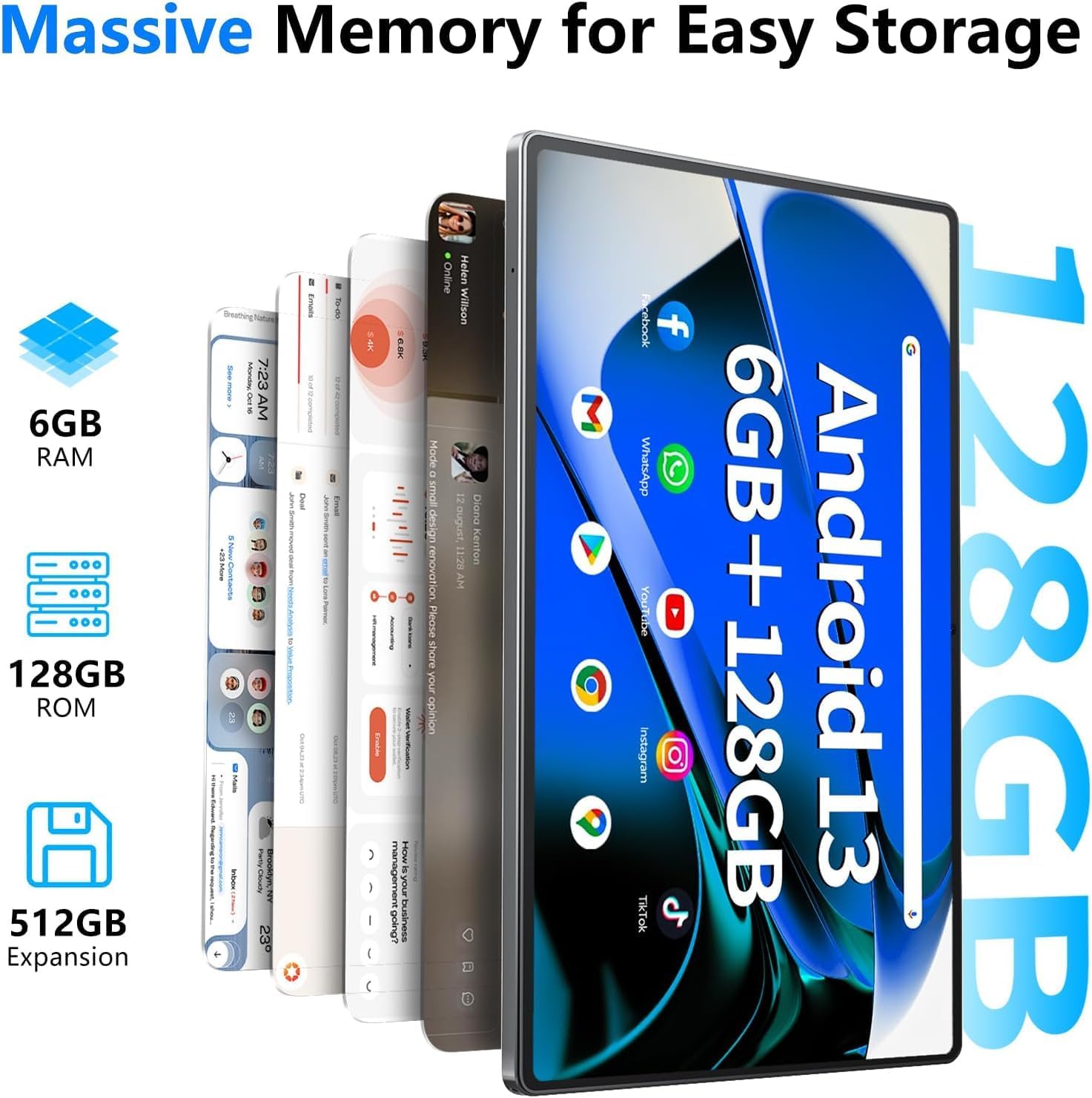
Image: Visual representation of the tablet's memory specifications, highlighting 6GB RAM, 128GB ROM, and support for up to 512GB external storage expansion.
- ഒരു TF കാർഡ് ചേർക്കുന്നു: Use the provided SIM ejector tool to open the TF card slot. Insert the MicroSD card with the gold contacts facing down, then close the tray.
- സംഭരണം കൈകാര്യം ചെയ്യൽ: പോകുക ക്രമീകരണങ്ങൾ > സംഭരണം വരെ view സംഭരണ ഉപയോഗവും മാനേജ്മെന്റും files.
2.6 ഓഡിയോ ക്രമീകരണങ്ങൾ
The tablet features dual stereo speakers and a 3.5mm audio jack.

Image: The SGIN-T12 tablet illustrating its four-speaker stereo system for an immersive audio experience.
- വോളിയം നിയന്ത്രണം: Use the physical volume buttons on the side of the tablet or adjust volume in ക്രമീകരണങ്ങൾ > ശബ്ദവും വൈബ്രേഷനും.
- ഹെഡ്ഫോൺ ജാക്ക്: സ്വകാര്യ ശ്രവണത്തിനായി സ്റ്റാൻഡേർഡ് 3.5mm ഹെഡ്ഫോണുകൾ ബന്ധിപ്പിക്കുക.
2.7 ജിപിഎസ് പ്രവർത്തനം
The tablet includes GPS for navigation and location-based services.
- ഉറപ്പാക്കുക സ്ഥാനം services are enabled in ക്രമീകരണങ്ങൾ > സ്ഥാനം.
- Use pre-installed mapping applications or download others from the Google Play Store for navigation.
3. പരിപാലനം
3.1 ബാറ്ററി കെയർ

Image: The SGIN-T12 tablet highlighting its 6200mAh battery, designed for extended use.
- ബാറ്ററി ഇടയ്ക്കിടെ പൂർണ്ണമായും ഡിസ്ചാർജ് ചെയ്യുന്നത് ഒഴിവാക്കുക.
- ടാബ്ലെറ്റ് കടുത്ത താപനിലയിൽ തുറന്നുകാട്ടരുത്.
- നൽകിയിരിക്കുന്ന ചാർജറോ സാക്ഷ്യപ്പെടുത്തിയ അനുയോജ്യമായ ചാർജറോ മാത്രം ഉപയോഗിക്കുക.
- ടാബ്ലെറ്റ് കൂടുതൽ നേരം ഉപയോഗിക്കാൻ പറ്റുന്നില്ലെങ്കിൽ, സൂക്ഷിക്കുന്നതിന് മുമ്പ് ഏകദേശം 50% ചാർജ് ചെയ്യുക.
3.2 ഉപകരണം വൃത്തിയാക്കുന്നു
- സ്ക്രീനും ബോഡിയും വൃത്തിയാക്കാൻ മൃദുവായ, ലിന്റ് രഹിത തുണി ഉപയോഗിക്കുക.
- കഠിനമായ പാടുകൾക്ക്, ചെറുതായി dampഇലക്ട്രോണിക് ഉപകരണങ്ങൾക്കായി രൂപകൽപ്പന ചെയ്ത വെള്ളമുള്ള തുണി അല്ലെങ്കിൽ സ്ക്രീൻ ക്ലീനർ.
- കഠിനമായ രാസവസ്തുക്കൾ, ഉരച്ചിലുകൾ ഉള്ള വസ്തുക്കൾ, അല്ലെങ്കിൽ അമിതമായ ഈർപ്പം എന്നിവ ഉപയോഗിക്കുന്നത് ഒഴിവാക്കുക.
3.3 സോഫ്റ്റ്വെയർ അപ്ഡേറ്റുകൾ
മികച്ച പ്രകടനവും സുരക്ഷയും ഉറപ്പാക്കാൻ സോഫ്റ്റ്വെയർ അപ്ഡേറ്റുകൾ പതിവായി പരിശോധിച്ച് ഇൻസ്റ്റാൾ ചെയ്യുക.
- പോകുക ക്രമീകരണങ്ങൾ > സിസ്റ്റം > സിസ്റ്റം അപ്ഡേറ്റ്.
- ലഭ്യമായ ഏതെങ്കിലും അപ്ഡേറ്റുകൾ പരിശോധിച്ച് ഇൻസ്റ്റാൾ ചെയ്യുന്നതിന് ഓൺ-സ്ക്രീൻ നിർദ്ദേശങ്ങൾ പാലിക്കുക.
4. പ്രശ്നപരിഹാരം
| പ്രശ്നം | പരിഹാരം |
|---|---|
| ടാബ്ലെറ്റ് ഓണാക്കുന്നില്ല. | ബാറ്ററി ചാർജ്ജ് ചെയ്തിട്ടുണ്ടെന്ന് ഉറപ്പാക്കുക. ടാബ്ലെറ്റ് ചാർജറുമായി ബന്ധിപ്പിച്ച് വീണ്ടും പവർ ഓൺ ചെയ്യാൻ ശ്രമിക്കുന്നതിന് മുമ്പ് കുറച്ച് മിനിറ്റ് കാത്തിരിക്കുക. |
| സ്ക്രീൻ പ്രതികരിക്കുന്നില്ല. | Perform a forced restart by pressing and holding the Power ON/OFF button for approximately 10-15 seconds until the device restarts. |
| വൈഫൈ കണക്ഷൻ പ്രശ്നങ്ങൾ. | Restart your Wi-Fi router. On the tablet, toggle Wi-Fi off and then on again. Forget the network and reconnect. |
| Applications are crashing or freezing. | Close and reopen the application. Clear the app's cache in ക്രമീകരണങ്ങൾ > ആപ്പുകൾ > [ആപ്പ് നാമം] > സംഭരണവും കാഷെയും. പ്രശ്നം നിലനിൽക്കുകയാണെങ്കിൽ, ആപ്പ് അൺഇൻസ്റ്റാൾ ചെയ്ത് വീണ്ടും ഇൻസ്റ്റാൾ ചെയ്യുക. |
| മന്ദഗതിയിലുള്ള പ്രകടനം. | ഉപയോഗിക്കാത്ത ആപ്ലിക്കേഷനുകൾ അടയ്ക്കുക. കാഷെ മായ്ക്കുക, താൽക്കാലികമായി ഉപയോഗിക്കുക. files. Consider performing a factory reset if performance issues are severe and persistent (back up data first). |
| "Reboot errors" or "Failed to load" messages. | Attempt multiple restarts. If the issue persists, a factory reset may be required. Warning: A factory reset will erase all data on the device. Back up important fileതുടരുന്നതിന് മുമ്പ്. If the problem continues after a factory reset, contact customer support. |
5 സ്പെസിഫിക്കേഷനുകൾ
| ഫീച്ചർ | വിശദാംശങ്ങൾ |
|---|---|
| മോഡൽ | SGIN-T12 |
| ഓപ്പറേറ്റിംഗ് സിസ്റ്റം | ആൻഡ്രോയിഡ് 13 |
| സ്ക്രീൻ വലിപ്പം | 10.51 ഇഞ്ച് |
| സ്ക്രീൻ റെസല്യൂഷൻ | 1920 x 1200 പിക്സലുകൾ (FHD IPS) |
| പ്രോസസ്സർ | Octa-Core (2 GHz ARM_Cortex_A5) |
| റാം | 6 ജിബി ഡിഡിആർ4 എസ്ഡിആർഎഎം |
| ആന്തരിക സംഭരണം | 128 ജിബി |
| വികസിപ്പിക്കാവുന്ന സംഭരണം | Supports up to 256GB TF card (MicroSD) |
| മുൻ ക്യാമറ | 5 എം.പി |
| പിൻ ക്യാമറ | 13 എം.പി |
| ബാറ്ററി ശേഷി | 6200 mAh ലിഥിയം അയോൺ |
| ശരാശരി ബാറ്ററി ലൈഫ് | 6 മണിക്കൂർ വരെ |
| വയർലെസ് കണക്റ്റിവിറ്റി | 5G Wi-Fi (802.11bgn), Bluetooth 5.0 |
| നാവിഗേഷൻ | ജിപിഎസ് |
| തുറമുഖങ്ങൾ | Type-C, 3.5mm Audio Jack, TF Card Slot |
| അളവുകൾ (LxWxH) | 10.51 x 6.36 x 0.3 ഇഞ്ച് |
| ഇനത്തിൻ്റെ ഭാരം | 2.2 പൗണ്ട് |
6. വാറൻ്റിയും പിന്തുണയും
6.1 ഉൽപ്പന്ന വാറന്റി
The SGIN Android Tablet SGIN-T12 comes with a 1 വർഷത്തെ പരിമിത വാറൻ്റി വാങ്ങിയ തീയതി മുതൽ. സാധാരണ ഉപയോഗത്തിലുള്ള നിർമ്മാണ വൈകല്യങ്ങളും പ്രവർത്തനക്ഷമതയും ഈ വാറന്റി ഉൾക്കൊള്ളുന്നു. ദുരുപയോഗം, അപകടങ്ങൾ, അനധികൃത പരിഷ്കാരങ്ങൾ അല്ലെങ്കിൽ പ്രകൃതി ദുരന്തങ്ങൾ എന്നിവ മൂലമുണ്ടാകുന്ന നാശനഷ്ടങ്ങൾക്ക് ഇത് പരിരക്ഷ നൽകുന്നില്ല.
വാറൻ്റി ക്ലെയിമുകൾക്കായി നിങ്ങളുടെ വാങ്ങിയതിൻ്റെ തെളിവ് സൂക്ഷിക്കുക.
6.2 ഉപഭോക്തൃ പിന്തുണ
For technical assistance, troubleshooting not covered in this manual, or warranty inquiries, please contact SGIN customer support. Refer to the contact information provided on the SGIN official webസൈറ്റ് അല്ലെങ്കിൽ നിങ്ങളുടെ വാങ്ങൽ ഡോക്യുമെന്റേഷൻ.
നിങ്ങൾക്ക് സന്ദർശിക്കാവുന്നതും SGIN Store on Amazon കൂടുതൽ ഉൽപ്പന്ന വിവരങ്ങൾക്കും ഉറവിടങ്ങൾക്കും.


