ആമുഖം
The Garnen Sprinkler Timer is designed to simplify your garden watering routine with its user-friendly interface and versatile programming options. This digital water timer allows for precise control over watering schedules, helping you conserve water and maintain healthy plants. It features automatic, manual, and rain delay modes, an IP55 waterproof rating, and a robust build for outdoor durability.

ചിത്രം: മുൻഭാഗം view of the Garnen Sprinkler Timer, highlighting its clear LCD screen and control dial.
പാക്കേജ് ഉള്ളടക്കം
- 1 x Garnen Sprinkler Timer (Model: GAN09517NF)
- 1 x ഉപയോക്തൃ മാനുവൽ
- 2 x AA Batteries (may be included or required separately)
- 1 x Hose Quick Connector
സജ്ജീകരണവും ഇൻസ്റ്റാളേഷനും
- ബാറ്ററികൾ ഇൻസ്റ്റാൾ ചെയ്യുക: Open the sealed battery compartment. Insert two (2) AA alkaline batteries, ensuring correct polarity. Close the compartment securely to maintain the IP55 waterproof rating.
- Attach Filter Sieve: Ensure the metallic filter sieve is properly seated in the coupling nut. This prevents sediment from entering the timer.
- ഫ്യൂസെറ്റിലേക്ക് കണക്റ്റുചെയ്യുക: Screw the coupling nut of the timer onto any standard outdoor water tap (NH¾" external thread). Hand-tighten firmly to prevent leaks. If your faucet has a different thread size, an adapter may be required.
- ഹോസ് അറ്റാച്ചുചെയ്യുക: Connect your garden hose to the outlet of the timer (NH¾" external thread). The included hose quick connector can be used for easy attachment and detachment of your hose.

Image: Step-by-step visual guide for installing the sprinkler timer, including battery insertion, filter sieve connection, and attachment to a water tap.
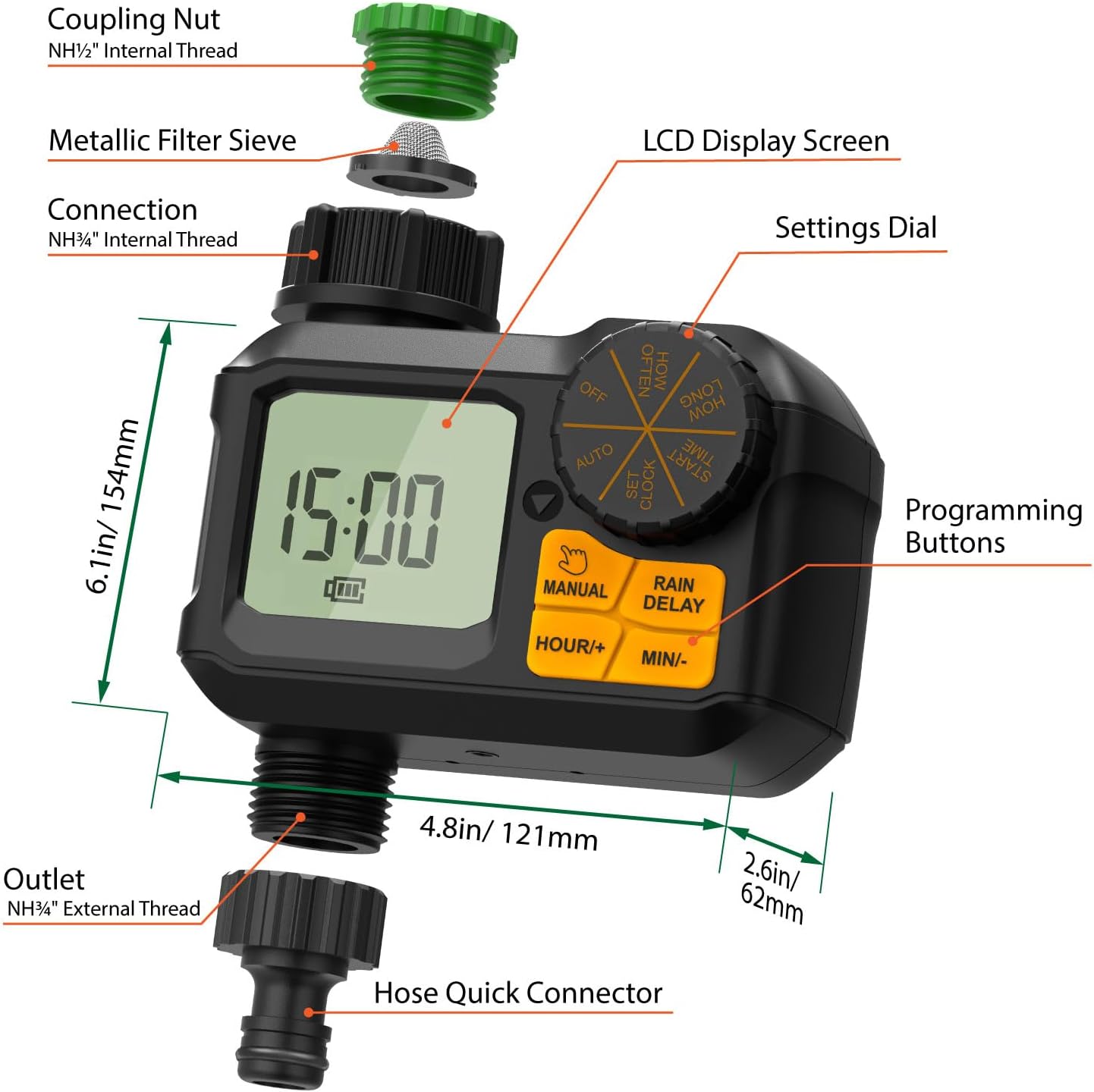
Image: Detailed diagram showing the components of the Garnen Sprinkler Timer, including the coupling nut, metallic filter sieve, LCD display screen, settings dial, programming buttons, outlet, and hose quick connector, along with overall dimensions.
പ്രവർത്തന നിർദ്ദേശങ്ങൾ
The timer features a central dial and dedicated buttons for easy programming.
ക്ലോക്ക് ക്രമീകരിക്കുന്നു
- ഡയൽ ഇതിലേക്ക് തിരിക്കുക ക്ലോക്ക് സജ്ജമാക്കുക.
- ഉപയോഗിക്കുക HOUR/+ ഒപ്പം MIN/- നിലവിലെ സമയം സജ്ജമാക്കുന്നതിനുള്ള ബട്ടണുകൾ.
- അമർത്തുക മാനുവൽ button to confirm and move to the next setting, or turn the dial to another function.
Automatic Watering (Program Mode)
This mode allows you to set a recurring watering schedule.
- ഡയൽ ഇതിലേക്ക് തിരിക്കുക സമയം ആരംഭിക്കുക. ഉപയോഗിക്കുക HOUR/+ ഒപ്പം MIN/- നനയ്ക്കുന്നതിന് ആവശ്യമുള്ള ആരംഭ സമയം സജ്ജമാക്കാൻ.
- ഡയൽ ഇതിലേക്ക് തിരിക്കുക എത്രകാലം. ഉപയോഗിക്കുക HOUR/+ ഒപ്പം MIN/- to set the watering duration (1 to 300 minutes).
- ഡയൽ ഇതിലേക്ക് തിരിക്കുക എത്ര ഇട്ടവിട്ട്. ഉപയോഗിക്കുക HOUR/+ ഒപ്പം MIN/- to set the watering frequency (from 1 minute to 7 days).
- ഡയൽ ഇതിലേക്ക് തിരിക്കുക ഓട്ടോ to activate the programmed schedule. The timer will now water automatically according to your settings.
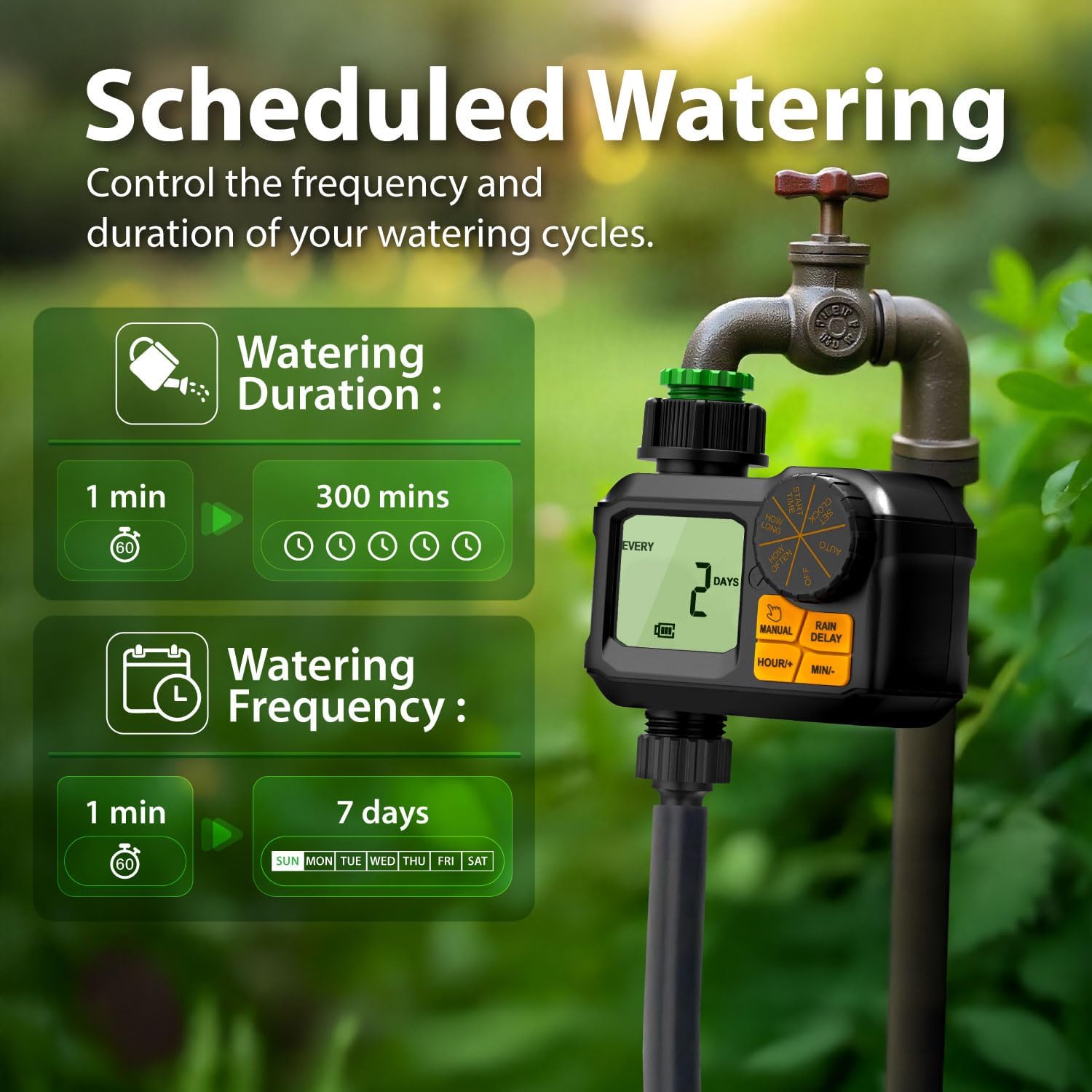
Image: Visual representation of setting watering duration (1-300 mins) and frequency (1 min-7 days) on the timer.
മാനുവൽ നനവ്
Use this mode for immediate, unscheduled watering without affecting your programmed schedule.
- ഡയൽ സജ്ജമാക്കിയിട്ടുണ്ടെന്ന് ഉറപ്പാക്കുക ഓട്ടോ or ഓഫ്.
- അമർത്തുക മാനുവൽ button once. The display will show "MANUAL RUN".
- ഉപയോഗിക്കുക HOUR/+ ഒപ്പം MIN/- ആവശ്യമുള്ള മാനുവൽ നനവ് ദൈർഘ്യം (1 മുതൽ 300 മിനിറ്റ് വരെ) സജ്ജമാക്കാൻ ബട്ടണുകൾ.
- The timer will begin watering immediately for the set duration. To stop manual watering, press the മാനുവൽ വീണ്ടും ബട്ടൺ.

Image: Demonstrates the manual watering feature, showing the timer set for a specific duration, with examples of its use for garden watering, drip irrigation, and pool filling.
മഴ കാലതാമസം പ്രവർത്തനം
Pause your watering schedule for a set period during rainy weather to conserve water.
- ഡയൽ സജ്ജമാക്കിയിട്ടുണ്ടെന്ന് ഉറപ്പാക്കുക ഓട്ടോ.
- അമർത്തുക മഴ കാലതാമസം button. The display will show "DELAY".
- ഉപയോഗിക്കുക HOUR/+ ഒപ്പം MIN/- buttons to set the delay duration (1 to 7 days).
- The programmed schedule will automatically resume after the delay period ends. To cancel the rain delay, press the മഴ കാലതാമസം വീണ്ടും ബട്ടൺ.

Image: Illustrates the rain delay feature, showing the timer displaying "DELAY" and the option to set a delay from 1 to 7 days, with a background of a rainy garden.
Turning Off the Timer
To stop all watering and programming, turn the dial to ഓഫ്.
മെയിൻ്റനൻസ്
- വൃത്തിയാക്കൽ: Periodically check and clean the metallic filter sieve to prevent blockages and ensure optimal water flow.
- ബാറ്ററി മാറ്റിസ്ഥാപിക്കൽ: Replace batteries when the low battery indicator appears on the LCD screen. Always use fresh AA alkaline batteries.
- ശൈത്യകാല സംഭരണം: Before the first frost, disconnect the timer from the faucet and drain any remaining water. Store the timer indoors in a dry, frost-free location to prevent damage. Remove batteries if storing for extended periods.

Image: Highlights the built-in mesh filter, explaining its function in preventing debris from entering the irrigation system for constant water flow.
ട്രബിൾഷൂട്ടിംഗ്
| പ്രശ്നം | സാധ്യമായ കാരണം | പരിഹാരം |
|---|---|---|
| ടൈമർ ഓണാക്കുന്നില്ല/എൽസിഡി ശൂന്യമാണ് | ഡെഡ് അല്ലെങ്കിൽ തെറ്റായി ഇൻസ്റ്റാൾ ചെയ്ത ബാറ്ററികൾ. | Replace batteries with fresh AA alkaline batteries. Ensure correct polarity. |
| Water not flowing or low pressure | Clogged filter sieve; low water pressure from faucet; hose kinked. | Clean the metallic filter sieve. Check faucet water pressure. Straighten any kinks in the hose. |
| കണക്ഷനുകളിൽ നിന്നുള്ള ചോർച്ചകൾ | Loose connections; missing or damaged O-rings/washers. | Ensure all connections are hand-tightened. Check for and replace any missing or damaged O-rings/washers. |
| Manual mode not activating correctly | Buttons not pressed firmly enough; dial not in AUTO or OFF position. | Press buttons firmly. Ensure dial is in AUTO or OFF before pressing MANUAL. |
| പ്രോഗ്രാം ചെയ്ത ഷെഡ്യൂൾ പ്രവർത്തിക്കുന്നില്ല. | Dial not set to AUTO; rain delay active; low battery. | Turn dial to AUTO. Check if rain delay is active and cancel if needed. Replace batteries. |
സ്പെസിഫിക്കേഷനുകൾ
- മോഡൽ: GAN09517NF
- ബ്രാൻഡ്: Garnen (by Fosmon)
- അളവുകൾ: 6.1"D x 4.8"W x 2.6"H
- ഭാരം: 14 ഔൺസ്
- നനയ്ക്കൽ കാലയളവ്: 1 മുതൽ 300 മിനിറ്റ് വരെ
- നനയ്ക്കൽ ആവൃത്തി: 1 മിനിറ്റ് മുതൽ 7 ദിവസം വരെ
- ജല സമ്മർദ്ദ ശ്രേണി: 7.25 മുതൽ 116 വരെ PSI
- വാട്ടർപ്രൂഫ് റേറ്റിംഗ്: IP55
- ഊർജ്ജ സ്രോതസ്സ്: 2 x AA ബാറ്ററികൾ
- നിറം: കറുപ്പ്

Image: Displays the Garnen Sprinkler Timer connected to a faucet, emphasizing its maximum water pressure capability of 116 PSI and its robust, leak-proof design.
വാറൻ്റിയും പിന്തുണയും
Garnen is a brand of Fosmon, Inc. Fosmon has served millions of customers for more than 10 years, and every product comes with a limited lifetime warranty. If you're not completely satisfied, our dedicated USA-based customer support team is ready to assist 24/7.
പിന്തുണയ്ക്കായി, ദയവായി സന്ദർശിക്കുക www.fosmon.com/support അല്ലെങ്കിൽ അവരുടെ ഉപഭോക്തൃ സേവനവുമായി നേരിട്ട് ബന്ധപ്പെടുക.


