1. ആമുഖം
Thank you for choosing the Baseus Bass BP1 Pro Noise Cancelling Wireless Earbuds. These earbuds are designed to provide a superior audio experience with advanced features such as real-time adaptive noise cancelling, adaptive active EQ, and lossless Hi-Res sound. This manual will guide you through the setup, operation, and maintenance of your new earbuds to ensure optimal performance and longevity.
2. ബോക്സിൽ എന്താണുള്ളത്?
നിങ്ങളുടെ പാക്കേജിൽ എല്ലാ ഇനങ്ങളും ഉണ്ടെന്ന് ദയവായി പരിശോധിക്കുക:
- Baseus Bass BP1 Pro Noise Cancelling Wireless Earbuds
- XS/S/M/L/XL Ear Tips
- USB-C ചാർജിംഗ് കേബിൾ
- ഉപയോക്തൃ മാനുവൽ

3. സജ്ജീകരണം
3.1. ഇയർബഡുകളും കേസും ചാർജ് ചെയ്യുന്നു
Before first use, fully charge the earbuds and charging case. Connect the provided USB-C cable to the charging port on the case and a power source. The indicator light on the case will show charging status.

3.2. ഇയർ ടിപ്പ് സെലക്ഷൻ
Selecting the correct ear tip size is crucial for optimal sound quality and noise cancellation. Experiment with the included XS, S, M, L, and XL ear tips to find the best fit for your ears. A snug fit ensures proper seal and comfort.
3.3. ബ്ലൂടൂത്ത് ജോടിയാക്കൽ
നിങ്ങളുടെ ഇയർബഡുകൾ ഒരു ഉപകരണവുമായി ജോടിയാക്കാൻ:
- ചാർജിംഗ് കേസ് തുറക്കുക. ഇയർബഡുകൾ സ്വയമേവ ജോടിയാക്കൽ മോഡിലേക്ക് പ്രവേശിക്കും.
- നിങ്ങളുടെ ഉപകരണത്തിൽ (സ്മാർട്ട്ഫോൺ, ടാബ്ലെറ്റ് മുതലായവ), ബ്ലൂടൂത്ത് പ്രവർത്തനക്ഷമമാക്കുക.
- ഇതിനായി തിരയുക "Baseus Bass BP1 Pro" in the list of available devices and select it to connect.
- കണക്റ്റുചെയ്തുകഴിഞ്ഞാൽ, ഒരു വോയ്സ് പ്രോംപ്റ്റ് വിജയകരമായ ജോടിയാക്കൽ സ്ഥിരീകരിക്കും.

4. ഇയർബഡുകൾ പ്രവർത്തിപ്പിക്കൽ
4.1. Intuitive Touch Controls
The Baseus Bass BP1 Pro earbuds feature intuitive touch controls for easy management of music playback, calls, and noise cancellation modes.
| ആക്ഷൻ | നിയന്ത്രണം |
|---|---|
| പ്ലേ/താൽക്കാലികമായി നിർത്തുക | Tap L or R earbud 2 times |
| വോയ്സ് അസിസ്റ്റൻ്റ് സജീവമാക്കുക | Tap L or R earbud 3 times |
| ഉത്തരം / കോൾ അവസാനിപ്പിക്കുക | Tap L or R earbud 2 times |
| കോൾ നിരസിക്കുക | Tap L or R earbud 3 times |
| Switch Noise Reduction Modes (Noise Reduction, Transparency, Normal) | Press and hold L or R earbud for 2 seconds |

4.2. Real-Time Adaptive Noise Cancelling (ANC)
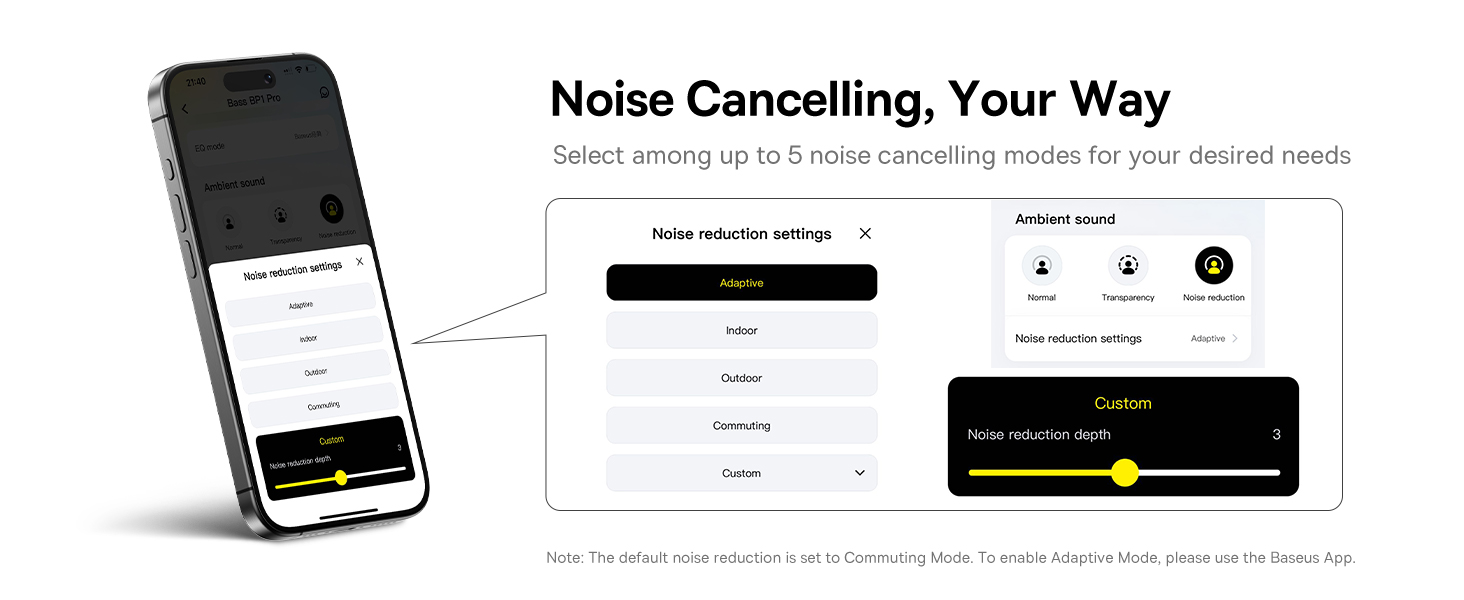
The earbuds feature real-time adaptive noise cancelling, reacting instantly with up to 4 noise sensors to reduce wideband noise by up to -50dB. You can select from 5 ANC modes via the Baseus App for a personalized quiet experience.


4.3. Adaptive Balanced Audio (Active EQ)
Experience deep bass and crisp highs with the exclusive volume-adaptive Active EQ technology. Choose between 'SuperBass' for powerful beats or 'SuperBalance' for detailed clarity, tailored to your listening style.

4.4. Lossless Hi-Res Sound (LDAC)
Certified Hi-Res and equipped with LDAC codec, these earbuds transmit 3x the audio details for stunning, lossless Hi-Fi sound, allowing you to hear every note and nuance as intended by the artist.

4.5. 6-Mic AI Clear Calls
Stay heard loud and clear with 6 microphones and AI-powered noise reduction. The earbuds block out background noise for seamless, natural conversations wherever you are.

4.6. സ്മാർട്ട് ആപ്പ് നിയന്ത്രണം
Take full control of your listening experience with the dedicated Baseus app. Customize EQ settings, enhance bass, and manage noise reduction modes for a truly personalized audio experience.

4.7. Instant Multipoint Connection
Baseus Smart-Connect (BSC) technology allows for effortless switching between two connected devices, providing a seamless and low-latency experience.

5. പരിപാലനം
5.1. IP55 ജല പ്രതിരോധം
The Bass BP1 Pro earbuds are IP55 rated, making them resistant to dust, water, sweat, and splashes. This makes them suitable for workouts and daily adventures. However, they are not designed for submersion in water.

5.2 വൃത്തിയാക്കലും സംഭരണവും
Regularly clean your earbuds and charging case with a soft, dry, lint-free cloth. Avoid using abrasive materials or harsh chemicals. Store the earbuds in their charging case when not in use to protect them and maintain battery life.
6. പ്രശ്നപരിഹാരം
If you encounter issues with your Baseus Bass BP1 Pro earbuds, please refer to the following common solutions:
- ശബ്ദമില്ല: ഇയർബഡുകൾ ചാർജ് ചെയ്തിട്ടുണ്ടെന്നും ശരിയായി ജോടിയാക്കിയിട്ടുണ്ടെന്നും ഇയർബഡുകളിലും നിങ്ങളുടെ ഉപകരണത്തിലും വോളിയം വർദ്ധിച്ചിട്ടുണ്ടെന്നും ഉറപ്പാക്കുക.
- ജോടിയാക്കൽ പ്രശ്നങ്ങൾ: നിങ്ങളുടെ ഉപകരണത്തിൽ ബ്ലൂടൂത്ത് പ്രവർത്തനക്ഷമമാക്കിയിട്ടുണ്ടെന്നും ഇയർബഡുകൾ ജോടിയാക്കൽ മോഡിലാണെന്നും ഉറപ്പാക്കുക. നിങ്ങളുടെ ഫോണിലെ ഉപകരണം മറന്ന് വീണ്ടും ജോടിയാക്കാൻ ശ്രമിക്കുക.
- മോശം ശബ്ദ നിലവാരം: Check ear tip fit. Ensure earbuds are clean and free of debris. Try disabling or changing ANC modes.
- ഇയർബഡുകൾ ചാർജ് ചെയ്യുന്നില്ല: Verify the USB-C cable is securely connected to both the case and power source. Clean charging contacts on earbuds and case.
- മൈക്രോഫോൺ പ്രശ്നങ്ങൾ: Ensure earbuds are properly positioned. Check for any obstructions on the microphone ports.
For further assistance, please contact Baseus customer support.
7 സ്പെസിഫിക്കേഷനുകൾ
Detailed technical specifications for the Baseus Bass BP1 Pro:
| ഫീച്ചർ | വിശദാംശങ്ങൾ |
|---|---|
| മോഡലിൻ്റെ പേര് | ബേസിയസ് ബാസ് ബിപി1 പ്രോ |
| കണക്റ്റിവിറ്റി ടെക്നോളജി | വയർലെസ്, ബ്ലൂടൂത്ത് 6.0 |
| ജല പ്രതിരോധ നില | IP55 വാട്ടർ റെസിസ്റ്റൻ്റ് |
| നിയന്ത്രണ രീതി | സ്പർശിക്കുക |
| ഓഡിയോ ഡ്രൈവർ തരം | ഡൈനാമിക് ഡ്രൈവർ |
| ഇനത്തിൻ്റെ ഭാരം | 4.2 ഔൺസ് |
| നിറം | ചന്ദ്രൻ വെള്ള |
| ചെവി പ്ലേസ്മെൻ്റ് | ചെവിയിൽ |
| ശബ്ദ നിയന്ത്രണം | അഡാപ്റ്റീവ് നോയ്സ് റദ്ദാക്കൽ |
| യു.പി.സി | 810196180550 |
8. ഔദ്യോഗിക ഉൽപ്പന്ന വീഡിയോ
Watch the official product video for a visual guide to the Baseus Bass BP1 Pro features and usage.
9. വാറൻ്റിയും പിന്തുണയും
Baseus products are designed with quality and reliability in mind. For information regarding product warranty, returns, or technical support, please visit the official Baseus webസൈറ്റിൽ ബന്ധപ്പെടുക അല്ലെങ്കിൽ അവരുടെ ഉപഭോക്തൃ സേവനവുമായി നേരിട്ട് ബന്ധപ്പെടുക. വാറന്റി ക്ലെയിമുകൾക്കായി നിങ്ങളുടെ വാങ്ങൽ രസീത് സൂക്ഷിക്കുക.
ഔദ്യോഗിക ബേസിയസ് സ്റ്റോർ: ബേസിയസ് ആമസോൺ സ്റ്റോർ


