ആമുഖം
The eufy PoE NVR Security Camera System S4 provides comprehensive surveillance for your property. This system includes a Network Video Recorder (NVR) with a pre-installed 2TB HDD, two 4K Bullet-PTZ Cams, and two 4K Bullet Cams. Designed for 24/7 recording, the system offers advanced features such as AI Auto Framing & Tracking, Smart Video Search, and Color Night Vision. This manual will guide you through the setup, operation, and maintenance of your security system.
ബോക്സിൽ എന്താണുള്ളത്
- 1 x Network Video Recorder S4
- 2 x PoE Cam S4 (Bullet-PTZ)
- 2 x PoE Cam E40 (Bullet Cam)
- 4 x 59 അടി/18 മീറ്റർ ഇതർനെറ്റ് കേബിൾ
- 1 x 3.3 അടി/1 മീറ്റർ ഇതർനെറ്റ് കേബിൾ
- 1 x HDMI കേബിൾ
- 1 x പവർ അഡാപ്റ്റർ
- 1 x യുഎസ്ബി മൗസ്
- 4 x Waterproof Cover Pack
- 2 x മൗണ്ടിംഗ് ബ്രാക്കറ്റ്
- 4 x സ്ക്രീൻ പായ്ക്ക്
- 1 x ദ്രുത ആരംഭ ഗൈഡ്
സജ്ജമാക്കുക
1. Prepare the NVR
Place the NVR near a power outlet, your router, and a monitor/TV for easy setup. Ensure the NVR's side vents are at least 3.9 inches (10 cm) away from any obstacles to allow for proper ventilation. Place the NVR on a stable, flat surface and avoid covering any vent holes.

Image: eufy NVR connected to a monitor, router, and power outlet.
2. NVR ബന്ധിപ്പിക്കുക
Connect the NVR to your router using an Ethernet cable. Connect the included USB mouse and an HDMI cable to your monitor or TV. Finally, connect the NVR to power using the provided power adapter.
Video: Step-by-step guide on how to set up and install the eufy Network Video Recorder S4, including connecting to a router, monitor, and power.
3. Set Up NVR Access
Follow the on-screen instructions on your monitor/TV to complete the basic settings, time zone, equipment information, network settings, local account creation, and password protection. Download the eufy app from the App Store or Google Play and follow the in-app instructions to add the NVR to your device list by scanning the QR code on the NVR.
4. Install the Cameras
Choose optimal locations for your PoE Cams, ensuring they are 7-10 ft (2-3 m) above the ground for optimal coverage. The Bullet-PTZ Cams offer 360° pan and 70° tilt for flexible positioning. Mount the cameras securely using the provided mounting brackets and screws. Connect each camera to the NVR using the included Ethernet cables. The PoE (Power over Ethernet) technology allows a single cable to provide both power and video transmission.
Video: Instructions on how to set up and install the eufy PoE Cam S4, covering mounting and cable connections.
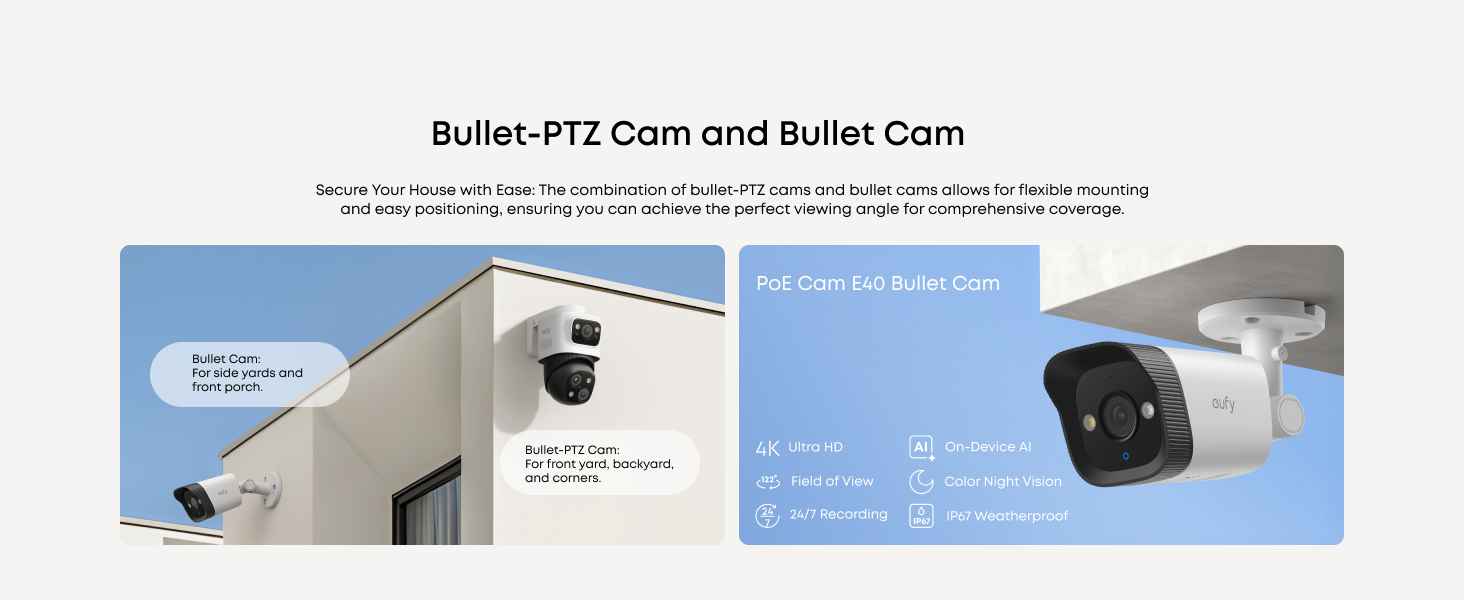
ചിത്രം: ഉദാamples of Bullet-PTZ Cam and Bullet Cam installation for versatile coverage.
5. Test the Camera Connection
After connecting all cameras, check the live view on your monitor/TV or through the eufy app on your phone to ensure all cameras are successfully connected and displaying video feeds.
പ്രവർത്തന നിർദ്ദേശങ്ങൾ
1. 24/7 Continuous Recording
The NVR system provides continuous 24/7 recording to the pre-installed 2TB HDD. This ensures no critical moments are missed. The storage is expandable up to 16TB for extended recording capacity.

Image: eufy NVR illustrating 24/7 recording capability.
2. AI Auto Framing & Tracking
The Bullet-PTZ cameras feature AI Auto Framing and Group Tracking. When motion is detected, the PTZ camera can automatically lock onto and track subjects, keeping them in sharp, centered close-ups from up to 164 ft away. Auto-zoom adjusts to keep moving subjects framed until they exit the view.

Image: eufy app interface demonstrating AI auto-framing and tracking of a person in a backyard.
3. Smart Video Search
Instead of manually scrolling through hours of footage, use the Smart Video Search feature to quickly locate specific events by searching with keywords. This local AI agent processes data instantly for efficient threat identification.

Image: Smart Video Search interface showing keyword search for specific video clips.
4. കളർ നൈറ്റ് വിഷൻ
The cameras are equipped with AI-ISP technology for vivid Color Night Vision, utilizing spotlights when needed. Multiple night vision modes are available, including Starlight Color Night Vision, Infrared Night Vision, and Spotlight Color Night Vision, to ensure clear visuals in various low-light conditions.

Image: Comparison of different color night vision modes offered by eufy cameras.
5. ടു-വേ ടോക്ക്
Utilize the two-way talk feature for clear, distraction-free communication through the cameras. AI noise reduction filters out background noise for enhanced audio quality.

Image: Illustration of two-way talk feature with AI noise reduction.
മെയിൻ്റനൻസ്
1. ഹാർഡ് ഡ്രൈവ് മാനേജ്മെന്റ്
The NVR comes with a pre-installed 2TB HDD. If you need to replace or upgrade the hard drive (up to 16TB supported), ensure all critical information is backed up before proceeding. Disconnect all cables and power off the NVR. Use a Phillips head screwdriver to remove the screws securing the outer case. Carefully lift the lid and disconnect the SATA cables from the hard drive. Unscrew the hard drive from the NVR chassis, holding it to prevent falling. Install the new hard drive by reversing these steps, ensuring it is securely mounted and connected. Format the new hard drive via the NVR's GUI or the eufy app to prepare it for use.
Video: Quick tip on how to replace the hard drive in your eufy NVR S4, including preparation, removal, and installation steps.
2. Weatherproofing
The cameras are IP65 weatherproof, designed to withstand various weather conditions. Ensure all cable connections, especially those exposed outdoors, are properly sealed with the provided waterproof covers to prevent water intrusion.

Image: eufy camera demonstrating IP65 weatherproofing in rainy conditions.
ട്രബിൾഷൂട്ടിംഗ്
If you encounter any issues with your eufy PoE NVR Security Camera System S4, please ensure all cables are securely connected and that your eufy app is updated to the latest version (iOS V5.0.70/Android V5.0.71 or above). For specific problems, refer to the Quick Start Guide or contact customer support.
സ്പെസിഫിക്കേഷനുകൾ
| ബ്രാൻഡ് | eufy സെക്യൂരിറ്റി |
| കണക്റ്റിവിറ്റി ടെക്നോളജി | വയേർഡ് (PoE) |
| വീഡിയോ ക്യാപ്ചർ റെസല്യൂഷൻ | 4K |
| ചാനലുകളുടെ എണ്ണം | 8 (16 വരെ വികസിപ്പിക്കാം) |
| മെമ്മറി സ്റ്റോറേജ് കപ്പാസിറ്റി | 2 TB HDD (upgradeable to 16TB) |
| പവർ ഉറവിടം | കോർഡഡ് ഇലക്ട്രിക് |
| ഇനത്തിൻ്റെ അളവുകൾ L x W x H | 6.46 x 5.79 x 3.62 ഇഞ്ച് |
| ഓപ്പറേറ്റിംഗ് സിസ്റ്റം | App (Android, iOS), Web (Windows, macOS) |
| ഉൽപ്പന്നത്തിനുള്ള ശുപാർശിത ഉപയോഗങ്ങൾ | ഔട്ട്ഡോർ |
| ലോ ലൈറ്റ് ടെക്നോളജി | Streetlight Vision, Spotlight Vision, Infrared Vision |
| നൈറ്റ് വിഷൻ റേഞ്ച് | 65 അടി |
| റെക്കോർഡിംഗ് മോഡ് | 24/7 Recording, Motion Recording, Schedule Recording |
| Viewing ആംഗിൾ | 122 ഡിഗ്രി |
| ഇനത്തിൻ്റെ ഭാരം | 18.81 പൗണ്ട് |
വാറൻ്റിയും പിന്തുണയും
Your eufy PoE NVR Security Camera System S4 is covered by a 3-year after-sales support. For any questions or assistance, please contact our expert support team, available 24/7, at support@eufy.com.


