1. ഉൽപ്പന്നം കഴിഞ്ഞുview
The Zmodo 4-Camera Security System provides comprehensive surveillance for both indoor and outdoor environments. This system includes two Zmodo Mini Pro Indoor WiFi Cameras and two Zmodo Wireless Battery-Powered Outdoor/Indoor Cameras. Designed for ease of use and reliable performance, it offers advanced features to monitor your property effectively.
Key features include 1080P HD video resolution, color night vision, wide-angle viewing, two-way audio communication, AI-powered motion detection, compatibility with Alexa, and flexible storage options via cloud service or local microSD card.

Figure 1: Zmodo 4-Camera Security System components.
2. ബോക്സിൽ എന്താണുള്ളത്?
- Camera Body with micro USB cable (for Mini Pro Indoor Cameras)
- Mounting bracket with hardware
- ദ്രുത ആരംഭ ഗൈഡ്
ഇൻസ്റ്റാളേഷനുമായി മുന്നോട്ടുപോകുന്നതിനുമുമ്പ് എല്ലാ ഘടകങ്ങളും ഉണ്ടെന്ന് ഉറപ്പാക്കുക.
3. സജ്ജീകരണ ഗൈഡ്
3.1 അപ്ലിക്കേഷൻ ഇൻസ്റ്റാളേഷൻ
- Download the "Smartz Eaze" app from your device's app store (iOS or Android).
- ഒരു പുതിയ അക്കൗണ്ട് സൃഷ്ടിക്കുക അല്ലെങ്കിൽ നിങ്ങൾക്ക് ഇതിനകം ഒന്ന് ഉണ്ടെങ്കിൽ ലോഗിൻ ചെയ്യുക.
3.2 ക്യാമറ പ്ലെയ്സ്മെന്റും മൗണ്ടിംഗും
The Zmodo cameras offer flexible placement options for optimal coverage.
- Zmodo Mini Pro Indoor WiFi Cameras: These cameras can be placed on any flat surface, such as a shelf, table, or desk. They can also be wall-mounted using the provided bracket and hardware.
- Zmodo Wireless Battery-Powered Outdoor/Indoor Cameras: These cameras are wire-free, allowing for installation anywhere without the need for a power outlet. They are IP65 weatherproof and can be mounted on a wall or placed on a shelf using the included bracket.

ചിത്രം 2: ഉദാamples of flexible camera placement indoors and outdoors.
3.3 പ്രാരംഭ ജോടിയാക്കൽ
- Power on your camera(s). For battery cameras, ensure they are charged.
- Open the "Smartz Eaze" app and follow the on-screen instructions to add a new device.
- Connect the camera to your home Wi-Fi network as prompted by the app.
- Once connected, you can customize camera settings such as name, motion detection zones, and alert preferences.
4. പ്രവർത്തന നിർദ്ദേശങ്ങൾ
4.1 തത്സമയം View ഒപ്പം റെക്കോർഡിംഗ്
Access real-time video streams from your cameras through the "Smartz Eaze" app. The system supports 1080P HD resolution and a 130-degree wide-angle view. നിങ്ങൾക്ക് കഴിയും view up to four cameras simultaneously.

Figure 3: 1080P HD and 130-degree wide-angle view.

ചിത്രം 4: ഒരേസമയം viewing of multiple cameras on a smartphone.
4.2 മോഷൻ ഡിറ്റക്ഷനും അലേർട്ടുകളും
The cameras are equipped with motion detection capabilities. When motion is detected, you will receive instant push notifications with image previewനിങ്ങളുടെ സ്മാർട്ട്ഫോണിൽ.
- ഇഷ്ടാനുസൃതമാക്കാവുന്ന ഡിറ്റക്ഷൻ സോണുകൾ: ക്യാമറയ്ക്കുള്ളിലെ നിർദ്ദിഷ്ട മേഖലകൾ നിർവചിക്കുക view ചലന കണ്ടെത്തൽ സജീവമായിരിക്കേണ്ടയിടത്ത്.
- AI Detection (Cloud Plan Required): With a cloud plan, the system can differentiate between people, pets, vehicles, and packages, reducing false alerts.

Figure 5: Motion detection alert on a smartphone.

Figure 6: AI-powered person detection alert.
4.3 ടു-വേ ഓഡിയോ
Each camera features a built-in microphone and speaker, enabling two-way audio communication. This allows you to hear what is happening around the camera and speak through the camera from your smartphone.
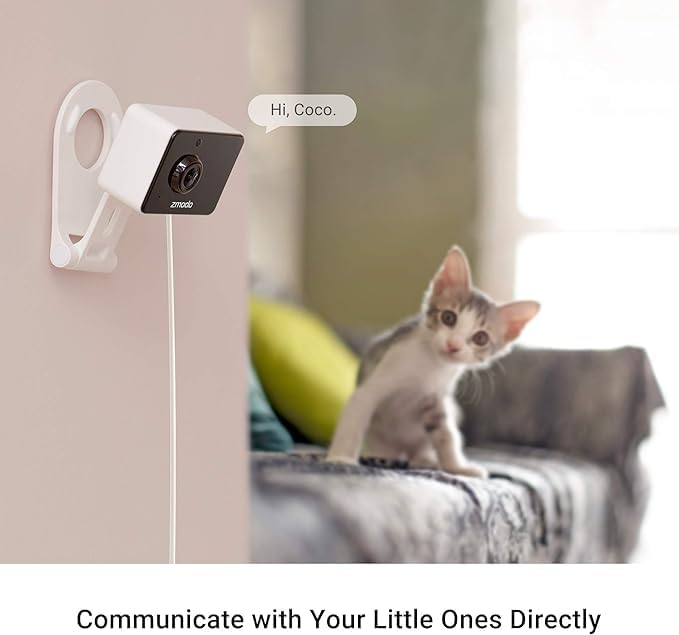
Figure 7: Two-way audio communication example.
4.4 നൈറ്റ് വിഷൻ
The cameras provide clear visibility in low-light conditions. Both color night vision and infrared night vision modes are available to ensure monitoring around the clock.

Figure 8: Color night vision in an outdoor setting.
4.5 സംഭരണ ഓപ്ഷനുകൾ
Your video footage can be stored using two methods:
- ക്ലൗഡ് സംഭരണം: Securely store recordings in the cloud (subscription required).
- Local MicroSD Card Storage: Insert a microSD card (up to 128GB, not included) into the camera for local recording.

ചിത്രം 9: ക്ലൗഡ്, ലോക്കൽ സ്റ്റോറേജ് ഓപ്ഷനുകൾ.
4.6 അലക്സാ അനുയോജ്യത
Integrate your Zmodo cameras with Amazon Alexa for convenient voice control. Follow the instructions in the Smartz Eaze app to link your Zmodo account with Alexa.
5. പരിപാലനം
5.1 വൃത്തിയാക്കൽ
- Gently wipe the camera lens with a soft, dry microfiber cloth to remove dust or smudges.
- Clean the camera body with a slightly damp cloth if necessary. Avoid using harsh chemicals or abrasive cleaners.
5.2 Battery Charging (Wireless Outdoor/Indoor Cameras)
The wireless outdoor cameras are powered by rechargeable 5000mAh batteries. When the battery level is low, you will receive a notification via the Smartz Eaze app. Recharge the camera using the provided micro USB cable and a standard USB power adapter (not included).
5.3 സോഫ്റ്റ്വെയർ അപ്ഡേറ്റുകൾ
Periodically check the Smartz Eaze app for available firmware updates. Keeping your camera's software up-to-date ensures optimal performance, security, and access to new features.
6. പ്രശ്നപരിഹാരം
- ക്യാമറ ഓണാക്കുന്നില്ല:
For Mini Pro cameras, ensure the USB cable is securely connected to a power source. For battery cameras, check the battery level and recharge if necessary.
- Wi-Fi-ലേക്ക് കണക്റ്റുചെയ്യാൻ കഴിയില്ല:
Ensure your Wi-Fi network is 2.4GHz (5GHz is not supported by all models). Verify your Wi-Fi password. Move the camera closer to your router to improve signal strength. Restart your router and the camera.
- Motion Detection Not Triggering/Too Many False Alarms:
Adjust the motion detection sensitivity in the app. Configure detection zones to focus on specific areas and exclude irrelevant movements (e.g., tree branches). Ensure AI detection is enabled if you have a cloud plan and wish to filter alerts.
- മോശം വീഡിയോ നിലവാരം:
Check your Wi-Fi signal strength. Ensure the camera lens is clean and free from obstructions. Verify your internet bandwidth is sufficient for streaming.
- ടു-വേ ഓഡിയോ പ്രവർത്തിക്കുന്നില്ല:
Ensure the microphone and speaker on the camera are not blocked. Check the audio settings within the Smartz Eaze app on your smartphone.
7 സ്പെസിഫിക്കേഷനുകൾ
| ഫീച്ചർ | വിശദാംശങ്ങൾ |
|---|---|
| മോഡലിൻ്റെ പേര് | ZG013C-4 |
| ഇൻഡോർ/ഔട്ട്ഡോർ ഉപയോഗം | ഇൻഡോർ, ഔട്ട്ഡോർ |
| വീഡിയോ ക്യാപ്ചർ റെസല്യൂഷൻ | 1080p |
| Viewing ആംഗിൾ | 130 ഡിഗ്രി |
| പവർ ഉറവിടം | Battery Powered (for Outdoor/Indoor Cams) |
| കണക്റ്റിവിറ്റി ടെക്നോളജി | വയർലെസ് (വൈ-ഫൈ, ബ്ലൂടൂത്ത്) |
| കണക്റ്റിവിറ്റി പ്രോട്ടോക്കോൾ | ബ്ലൂടൂത്ത്, വൈഫൈ |
| പ്രത്യേക സവിശേഷതകൾ | 2-Way Audio, Local Recording, Motion Sensor, Night Vision, Weather Proof |
| കൺട്രോളർ തരം | Amazon Alexa, Google Assistant, SmartThings |
| ജല പ്രതിരോധ നില | Waterproof (for Outdoor/Indoor Cams) |
| ഇനത്തിന്റെ അളവുകൾ (L x W x H) | 3.12 x 2.67 x 3.46 ഇഞ്ച് |
| യു.പി.സി | 889490022828 |
8. വാറൻ്റിയും പിന്തുണയും
Zmodo products are designed for reliability and performance. For specific warranty details, please refer to the warranty card included with your product or visit the official Zmodo webസൈറ്റ്.
For technical assistance, troubleshooting, or further inquiries, please contact Zmodo Customer Support. You can find contact information on the Zmodo website or through the Smartz Eaze app.
Visit the official Zmodo Store for more information and products: Zmodo Store


