1. ആമുഖം
The SHANLING M6 Ultra is a high-resolution digital audio player designed for exceptional sound quality and versatile functionality. Featuring an open Android 10 system, a vibrant 5-inch HD touch screen, and advanced audio components, it provides a premium portable music experience.

Figure 1: SHANLING M6 Ultra Digital Audio Player, showcasing its front display and rear panel with Hi-Res Audio logos.
2. സജ്ജീകരണ ഗൈഡ്
2.1 പ്രാരംഭ ചാർജിംഗ്
Before first use, fully charge the M6 Ultra using the provided USB-C cable and a compatible 18W fast charger. The device is equipped with a 5650mAh battery.
2.2 പവർ ഓൺ/ഓഫ്
- To power on: Press and hold the power button located on the side until the screen illuminates.
- To power off: Press and hold the power button, then select "Power off" from the on-screen options.
- To sleep/wake: Briefly press the power button.
2.3 ഒരു മൈക്രോ എസ്ഡി കാർഡ് ചേർക്കൽ
The M6 Ultra supports up to 2TB MicroSD cards for expanded storage. Locate the MicroSD card slot on the side of the device. Gently insert the card until it clicks into place. To remove, press the card inward until it springs out.

Figure 2: The bottom of the M6 Ultra, highlighting the USB-C port for charging and data transfer, and the MicroSD card slot for expandable storage.
2.4 ഹെഡ്ഫോണുകൾ ബന്ധിപ്പിക്കുന്നു
The device features both 3.5mm single-ended and 4.4mm balanced headphone outputs. Connect your headphones to the appropriate port on the top of the device.

Figure 3: The top of the M6 Ultra, displaying the 3.5mm single-ended and 4.4mm balanced audio output jacks.
2.5 വൈ-ഫൈ, ബ്ലൂടൂത്ത് കണക്റ്റിവിറ്റി
- വൈഫൈ: Navigate to Settings > Network & Internet > Wi-Fi to connect to a 2.4G or 5G network.
- ബ്ലൂടൂത്ത്: Go to Settings > Connected devices > Bluetooth to pair with Bluetooth headphones or speakers. The M6 Ultra supports Bluetooth 5.0 with LDAC, LHDC, aptX HD, aptX, and SBC codecs for transmission, and LDAC, SBC for reception.

Figure 4: The M6 Ultra display showing Bluetooth 5.0 and 2.4G/5G Wi-Fi capabilities, indicating its wireless connectivity options.
3. പ്രവർത്തന നിർദ്ദേശങ്ങൾ
3.1 മ്യൂസിക് പ്ലേബാക്ക്
Use the pre-installed music player app or download your preferred streaming apps from the Google Play Store. The 5-inch 1920*1080 LCD screen provides a clear interface for browsing and controlling your music.

Figure 5: The M6 Ultra's 5-inch high-definition LCD screen displaying music playback, highlighting its "Floating Screen Design" and touch display capabilities.
3.2 Android 10 System and AGLO
The M6 Ultra runs on an open Android 10 system, allowing installation of various applications. SHANLING's AGLO (Android Global Lossless Output) technology ensures that all audio is processed at its full quality, bypassing Android's native sampലെ നിരക്ക് പരിവർത്തനം.
3.3 Audio Settings (Gain & Digital Filters)
Access audio settings through the device's menu to adjust gain levels (High, Medium, Low) and select from 7 different digital filters to customize your listening experience.
3.4 Advanced Connectivity (DLNA, Airplay, NAS)
The M6 Ultra supports DLNA, Airplay, and NAS functions, enabling seamless streaming and access to media across your network.
3.5 USB DAC മോഡ്
Connect the M6 Ultra to a computer via the USB-C port to use it as an external DAC (Digital-to-Analog Converter), enhancing your computer's audio output quality.
4. പരിപാലനം
4.1 ഉപകരണം വൃത്തിയാക്കുന്നു
Wipe the device with a soft, dry cloth. Avoid using harsh chemicals or abrasive materials that could damage the screen or finish.
4.2 ബാറ്ററി കെയർ
- ബാറ്ററി ലൈഫ് വർദ്ധിപ്പിക്കാൻ, ഉപകരണം ഇടയ്ക്കിടെ പൂർണ്ണമായും ഡിസ്ചാർജ് ചെയ്യുന്നത് ഒഴിവാക്കുക.
- When using the device as a desktop player, consider utilizing the "Desktop Mode" feature (if available in software updates) to bypass battery charging and run directly from external power, preserving battery health.
- The device supports 18W fast charging.
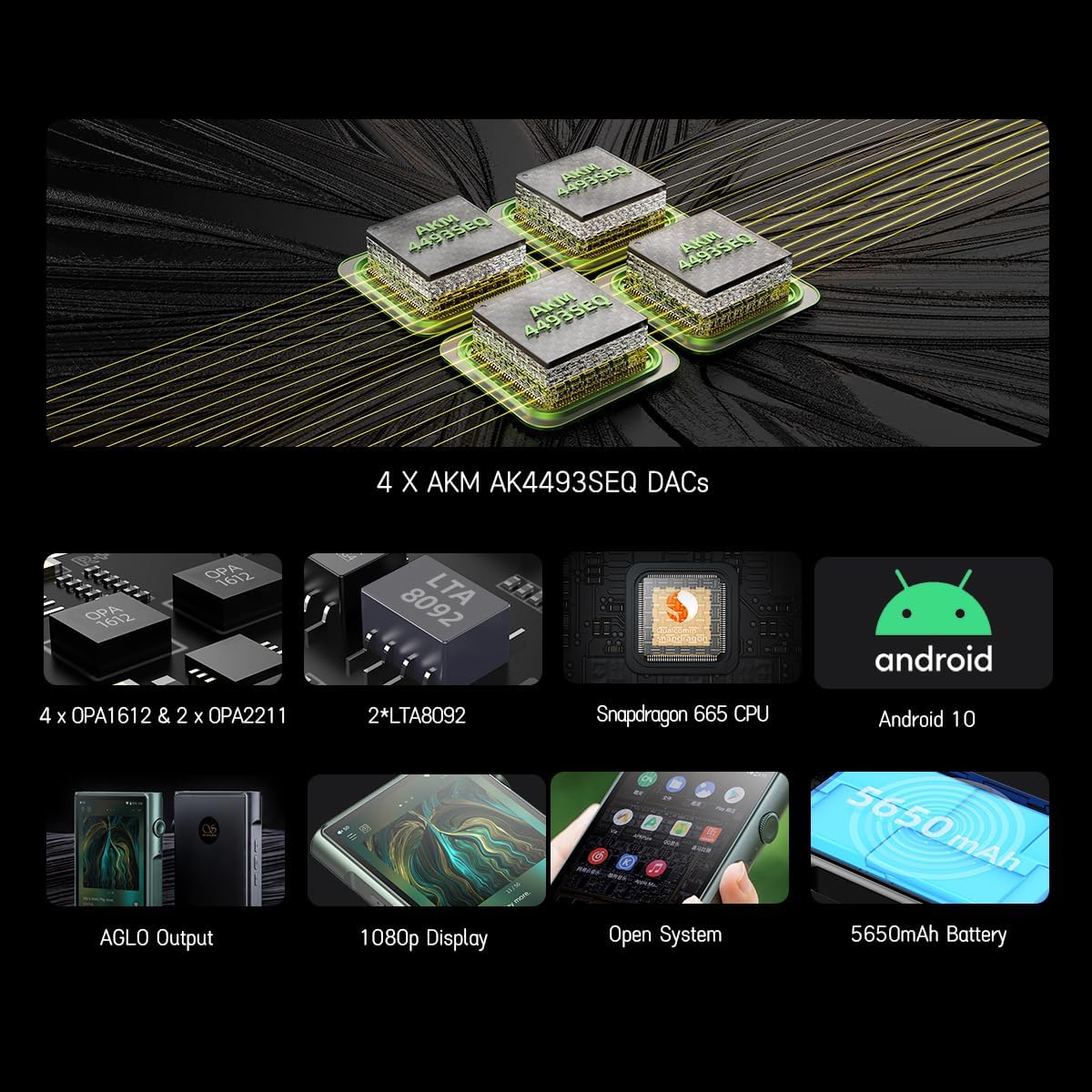
Figure 6: Visual representation of the M6 Ultra's battery capacity (5650mAh) and estimated playback times for 3.5mm single-ended, 4.4mm balanced, and Bluetooth transmission, along with output power ratings.
4.3 സോഫ്റ്റ്വെയർ അപ്ഡേറ്റുകൾ
Regularly check for and install software updates to ensure optimal performance and access to new features. Updates can typically be found in the device's settings menu under "About device" or "System updates."
5. പ്രശ്നപരിഹാരം
- ഉപകരണം ഓണാക്കുന്നില്ല: Ensure the device is fully charged. If the issue persists, try holding the power button for 10-15 seconds for a forced restart.
- ശബ്ദ ഔട്ട്പുട്ട് ഇല്ല: Check headphone connections, volume levels, and ensure the correct output (3.5mm or 4.4mm) is selected if applicable in software. Verify that the audio file കേടായിട്ടില്ല.
- വൈഫൈ/ബ്ലൂടൂത്ത് കണക്റ്റിവിറ്റി പ്രശ്നങ്ങൾ: Restart the device and your router/Bluetooth accessory. Forget and re-pair Bluetooth devices.
- Device freezing or unresponsive: Perform a forced restart by holding the power button for 10-15 seconds. If frequent, consider a factory reset (backup data first).
- മോശം ശബ്ദ നിലവാരം: Ensure you are using high-quality audio files and appropriate headphones. Experiment with different digital filters and gain settings.
6 സ്പെസിഫിക്കേഷനുകൾ
| ഫീച്ചർ | വിശദാംശങ്ങൾ |
|---|---|
| വലിപ്പം | 127mm x 77mm x 18mm |
| ഭാരം | 263 ഗ്രാം |
| സ്ക്രീൻ | 5-inch 1920x1080 LCD (441PPI) |
| സിസ്റ്റം | Open Android 10 |
| പ്രോസസ്സർ | Octa-core Snapdragon 665 |
| റാം/റോം | 4 ജിബി റാം, 64 ജിബി റോം |
| വികസിപ്പിക്കാവുന്ന സംഭരണം | Up to 2TB MicroSD card |
| DAC ചിപ്പ് | 4x AK4493SEQ |
| പിന്തുണയ്ക്കുന്ന ഓഡിയോ ഫോർമാറ്റുകൾ | DSD (.iso, .dsf, .dff), ISO, DXD, APE, FLAC, WAV, AIFF, ALFF, DTS, MP3, MP4, WMA, AAC, OGG, ALAC, MP2, M4A, AC3, M3U, M3U8, OPUS |
| Max Supported Specs | 768 kHz/32 bit, DSD 512, 16X MQA |
| നഷ്ടപരിഹാരം നേടുക | ഉയർന്നത്, ഇടത്തരം, താഴ്ന്നത് |
| ഡിജിറ്റൽ ഫിൽട്ടറുകൾ | 7 different methods |
| ബ്ലൂടൂത്ത് പതിപ്പ് | 5.0 |
| Bluetooth TX Codecs | LDAC, LHDC, aptX HD, aptX, SBC |
| Bluetooth RX Codecs | എൽഡിഎസി, എസ്ബിസി |
| വൈഫൈ സ്റ്റാൻഡേർഡ് | 2.4G/5G (Qualcomm WCN 3980, MIMO) |
| ബാറ്ററി ശേഷി | 5650mAh (ലിഥിയം അയോൺ) |
| ബാറ്ററി ലൈഫ് (ഏകദേശം) | 3.5mm SE: 13.5 hours, 4.4mm BAL: 9 hours, Bluetooth TX: 58.8 hours |
| ചാർജിംഗ് | 18W ഫാസ്റ്റ് ചാർജിംഗ് |
| സിംഗിൾ ഔട്ട്പുട്ട് പവർ | Low: 16mW@32Ω, Mid: 92mW@32Ω, High: 240mW@32Ω |
| Balanced Output Power | Low: 61mW@32Ω, Mid: 360mW@32Ω, High: 720mW@32Ω |
| THD+N | 0.0005% (Both SE & BAL) |
| ഡൈനാമിക് റേഞ്ച് | 122dB (SE), 125dB (BAL) |
| സിഗ്നൽ ടു നോയ്സ് റേഷ്യോ | 122dB (SE), 125dB (BAL) |
| ഔട്ട്പുട്ട് ഇംപെഡൻസ് | Less than 1Ω (Both SE & BAL) |
ചിത്രം 7: ഒരു ആന്തരിക view of the M6 Ultra's key components, including the 4x AK4493SEQ DACs, OPA1612 and OPA2211 op-amps, Snapdragon 665 CPU, and 5650mAh battery, illustrating its advanced audio architecture.
7. വാറൻ്റിയും പിന്തുണയും
The SHANLING M6 Ultra comes with a 1-year maintenance service. In case of any quality problems with the product, replacements will be provided unconditionally within this period.
For technical consultation or after-sales service, please contact SHANLING customer support. Support is available 24 hours a day.
For further assistance, please refer to the official SHANLING webസൈറ്റ് അല്ലെങ്കിൽ നിങ്ങളുടെ പ്രാദേശിക വിതരണക്കാരനെ ബന്ധപ്പെടുക.
8. ഉൽപ്പന്ന വീഡിയോകൾ
No official seller videos directly featuring the SHANLING M6 Ultra were found in the provided data. Videos for related products or different models are available but not included here to maintain relevance to the M6 Ultra.


