ആമുഖം
The Maxcom Smartwatch FW64 Oxygen 2 is a sophisticated wearable device designed to enhance your daily life with advanced features for wellness and style. It boasts a vibrant AMOLED display, comprehensive sleep analysis, and robust activity tracking capabilities. This manual provides detailed instructions to help you set up, operate, maintain, and troubleshoot your smartwatch effectively.
പാക്കേജ് ഉള്ളടക്കം
ആരംഭിക്കുന്നതിന് മുമ്പ്, പാക്കേജിൽ എല്ലാ ഇനങ്ങളും ഉണ്ടെന്ന് ഉറപ്പാക്കുക:
- Maxcom Smartwatch FW64 Oxygen 2
- ചാർജിംഗ് കേബിൾ
- ഉപയോക്തൃ മാനുവൽ (ഈ പ്രമാണം)
സജ്ജമാക്കുക
1. പ്രാരംഭ ചാർജിംഗ്
Before first use, fully charge your smartwatch. Connect the charging cable to the charging port on the back of the watch and plug the other end into a USB power adapter (not included). The watch display will indicate charging status. A full charge typically takes approximately 2 hours.
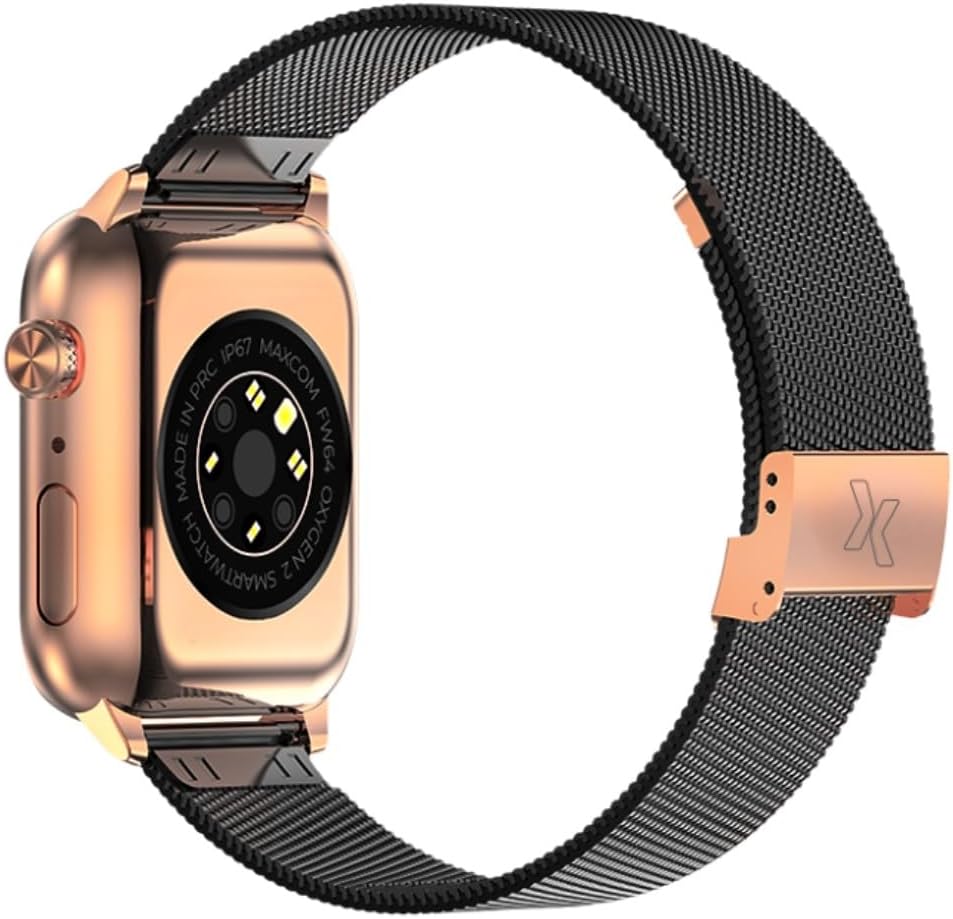
ചിത്രം: പിൻഭാഗം view of the smartwatch, highlighting the charging contacts and various sensors. This area is where the charging cable connects.
2. പവർ ഓൺ/ഓഫ്
- പവർ ഓണാക്കാൻ: Press and hold the side button for a few seconds until the Maxcom logo appears.
- പവർ ഓഫ് ചെയ്യാൻ: സൈഡ് ബട്ടൺ അമർത്തിപ്പിടിക്കുക, തുടർന്ന് സ്ക്രീനിൽ "പവർ ഓഫ്" തിരഞ്ഞെടുക്കുക.

ചിത്രം: സൈഡ് പ്രോfile of the smartwatch, illustrating the location of the physical button (crown) used for power and navigation.
3. ആപ്പ് ഇൻസ്റ്റാളേഷനും ജോടിയാക്കലും
- Download the official Maxcom smartwatch application from your smartphone's app store (iOS App Store or Google Play Store).
- നിങ്ങളുടെ സ്മാർട്ട്ഫോണിൽ ബ്ലൂടൂത്ത് പ്രവർത്തനക്ഷമമാക്കുക.
- Open the Maxcom app and follow the on-screen instructions to create an account or log in.
- ആപ്പിനുള്ളിൽ "ഉപകരണം ചേർക്കുക" അല്ലെങ്കിൽ "പുതിയ ഉപകരണം ജോടിയാക്കുക" തിരഞ്ഞെടുക്കുക.
- The app will search for available devices. Select "FW64 Oxygen 2" from the list.
- നിങ്ങളുടെ സ്മാർട്ട്ഫോണിലും സ്മാർട്ട് വാച്ചിലും പെയറിംഗ് അഭ്യർത്ഥന സ്ഥിരീകരിക്കുക.
പ്രവർത്തന നിർദ്ദേശങ്ങൾ
1. ഇന്റർഫേസ് നാവിഗേറ്റ് ചെയ്യുന്നു
- ടച്ച് സ്ക്രീൻ: Swipe left, right, up, or down to navigate through menus and widgets. Tap to select an item.
- സൈഡ് ബട്ടൺ: Press once to return to the home screen or wake the display. Press and hold for power options or to access a quick menu.
2. Watch Faces and Always-on Display
The FW64 Oxygen 2 features a vibrant AMOLED display. You can customize your watch face:
- വാച്ച് മുഖങ്ങൾ മാറ്റുന്നു: Long-press on the current watch face, then swipe left or right to browse pre-installed options. More designs are available in the Maxcom app.
- ഇഷ്ടാനുസൃത വാച്ച് മുഖങ്ങൾ: Use the Maxcom app to create personalized watch faces.
- എപ്പോഴും പ്രദർശിപ്പിക്കുന്ന (AOD): Enable AOD in the watch settings to keep the time visible without activating the full screen. Note that AOD may consume more battery.

ചിത്രം: മുൻഭാഗം view of the smartwatch display, showcasing a watch face with activity metrics like steps, kilometers, calories, and the current time.
3. പ്രവർത്തന ട്രാക്കിംഗ്
The smartwatch tracks various activities:
- ഘട്ടങ്ങൾ: Automatically counts your daily steps.
- ദൂരം: Estimates distance covered based on steps.
- കലോറികൾ: Calculates calories burned during activity.
- ഹൃദയമിടിപ്പ്: Monitors your heart rate throughout the day. Access real-time heart rate data from the watch or app.
- സ്പോർട്സ് മോഡുകൾ: Select a specific sport mode (e.g., walking, running) from the watch menu to get more accurate tracking for duration, heart rate, and distance during your workout.
4. Sleep Analysis
Wear your smartwatch to bed for automatic sleep tracking. The FW64 Oxygen 2 monitors your sleep patterns, detecting deep sleep, light sleep, REM stages, and awakenings. View detailed sleep reports in the Maxcom app to understand and improve your sleep quality.
5. അറിയിപ്പുകൾ
Once paired with your smartphone, the smartwatch can display notifications for calls, messages, and app alerts. Ensure notification permissions are granted in both your phone's settings and the Maxcom app.
മെയിൻ്റനൻസ്
1. വൃത്തിയാക്കൽ
- മൃദുവായ, ലിന്റ് രഹിത തുണി ഉപയോഗിച്ച് വാച്ച് സ്ക്രീനും ബോഡിയും തുടയ്ക്കുക.
- കഠിനമായ അഴുക്കിന്, ചെറുതായി dampതുണിയിൽ വെള്ളം ഒഴിക്കുക. കഠിനമായ രാസവസ്തുക്കളോ ഉരച്ചിലുകളോ ഉള്ള വസ്തുക്കൾ ഉപയോഗിക്കുന്നത് ഒഴിവാക്കുക.
- ശരിയായ ചാർജിംഗ് ഉറപ്പാക്കാൻ ചാർജിംഗ് കോൺടാക്റ്റുകൾ പതിവായി വൃത്തിയാക്കുക.
2. ജല പ്രതിരോധം (IP67)
The Maxcom FW64 Oxygen 2 is rated IP67, meaning it is protected from dust and can withstand immersion in water up to 1 meter for up to 30 minutes. It is suitable for daily use and light splashes, but it is അല്ല recommended for swimming, showering, or diving. Prolonged exposure to water or use in hot water may damage the device.
3. ബാറ്ററി പരിചരണം
- ഉപകരണം പതിവായി ചാർജ് ചെയ്യുക, പൂർണ്ണമായ ഡിസ്ചാർജ് ഒഴിവാക്കുക.
- Do not expose the smartwatch to extreme temperatures.
- നൽകിയിരിക്കുന്ന ചാർജിംഗ് കേബിൾ മാത്രം ഉപയോഗിക്കുക.
ട്രബിൾഷൂട്ടിംഗ്
- വാച്ച് ഓണാകുന്നില്ല: വാച്ച് പൂർണ്ണമായും ചാർജ് ചെയ്തിട്ടുണ്ടെന്ന് ഉറപ്പാക്കുക. കുറഞ്ഞത് 30 മിനിറ്റെങ്കിലും ചാർജറുമായി ബന്ധിപ്പിക്കുക.
- ഫോണുമായി ജോടിയാക്കാൻ കഴിയില്ല:
- നിങ്ങളുടെ ഫോണിലും വാച്ചിലും ബ്ലൂടൂത്ത് പ്രവർത്തനക്ഷമമാക്കിയിട്ടുണ്ടെന്ന് ഉറപ്പാക്കുക.
- വാച്ച് നിങ്ങളുടെ ഫോണിന്റെ ബ്ലൂടൂത്ത് പരിധിക്കുള്ളിലാണെന്ന് ഉറപ്പാക്കുക.
- നിങ്ങളുടെ ഫോണും സ്മാർട്ട് വാച്ചും പുനരാരംഭിക്കുക.
- Try unpairing and re-pairing the device through the Maxcom app.
- കൃത്യമല്ലാത്ത പ്രവർത്തന ഡാറ്റ:
- വാച്ച് നിങ്ങളുടെ കൈത്തണ്ടയിൽ നന്നായി ധരിച്ചിട്ടുണ്ടെന്ന് ഉറപ്പാക്കുക, ഏകദേശം ഒരു വിരലിന്റെ വീതി നിങ്ങളുടെ കൈത്തണ്ട എല്ലിന് മുകളിലായി.
- വാച്ചിന്റെ പിൻഭാഗത്തുള്ള സെൻസറുകൾ വൃത്തിയാക്കുക.
- Update the Maxcom app and watch firmware to the latest versions.
- ഹ്രസ്വ ബാറ്ററി ലൈഫ്:
- Disable features like Always-on Display if not essential.
- സ്ക്രീൻ തെളിച്ചം കുറയ്ക്കുക.
- ആപ്പ് അറിയിപ്പുകളുടെ എണ്ണം പരിമിതപ്പെടുത്തുക.
- വാച്ച് ഫേംവെയർ കാലികമാണെന്ന് ഉറപ്പാക്കുക.
- പ്രതികരിക്കാത്തത് കാണുക: Try a force restart by pressing and holding the side button for approximately 10-15 seconds until the device restarts.
സ്പെസിഫിക്കേഷനുകൾ
| ബ്രാൻഡ് | മാക്സ്കോം |
| മോഡൽ നമ്പർ | 2069775 (FW64 Oxygen 2) |
| നിറം | സ്വർണ്ണം |
| ഡിസ്പ്ലേ തരം | അമോലെഡ് |
| ജല പ്രതിരോധം | IP67 |
| ഉൽപ്പന്ന അളവുകൾ | 10 x 7 x 10 സെ.മീ |
| ഉൽപ്പന്ന ഭാരം | 180 ഗ്രാം |
| പ്രത്യേക സവിശേഷതകൾ | AMOLED Display, Unique Watch Faces, Sleep Analysis, Activity Tracking (Steps, Heart Rate, Calories, Distance) |
വാറൻ്റിയും പിന്തുണയും
Warranty information for the Maxcom Smartwatch FW64 Oxygen 2 is typically provided with your purchase documentation or can be found on the official Maxcom website. For technical support, troubleshooting assistance beyond this manual, or warranty claims, please contact Maxcom customer service or visit their official support portal.
വാറന്റി ആവശ്യങ്ങൾക്കായി നിങ്ങളുടെ വാങ്ങിയതിന്റെ തെളിവ് സൂക്ഷിക്കുക.


