1. ആമുഖം
This manual provides detailed instructions for the safe and efficient use of your OLIGHT IMINI 2 EDC Rechargeable Keychain Flashlight and OLIGHT Sphere C Smart Night Light. Please read this manual thoroughly before operation and retain it for future reference.

ചിത്രം 1.1: The OLIGHT IMINI 2 Keychain Flashlight (top) and Sphere C Smart Night Light (bottom). The IMINI 2 is a compact red flashlight with a USB-A charging end. The Sphere C is a spherical light with a translucent top and a white base, featuring a blue band and the OLIGHT logo, emitting colorful light.
2. ഉൽപ്പന്നം കഴിഞ്ഞുview
2.1 OLIGHT IMINI 2 EDC Rechargeable Keychain Flashlight
The IMINI 2 is a compact and portable LED flashlight designed for everyday carry. It features a simple, instant activation mechanism and an integrated USB-A charging plug.
- ഔട്ട്പുട്ട്: 50 lumens, providing a wide and balanced beam.
- സജീവമാക്കൽ: Instant on/off by detaching/attaching the body from the magnetic cap.
- ചാർജിംഗ്: Integrated USB-A plug for direct charging.
- പോർട്ടബിലിറ്റി: Super mini size for easy carrying.
- ഹാൻഡ്സ് ഫ്രീ ഉപയോഗം: Magnetic base allows attachment to metal surfaces.
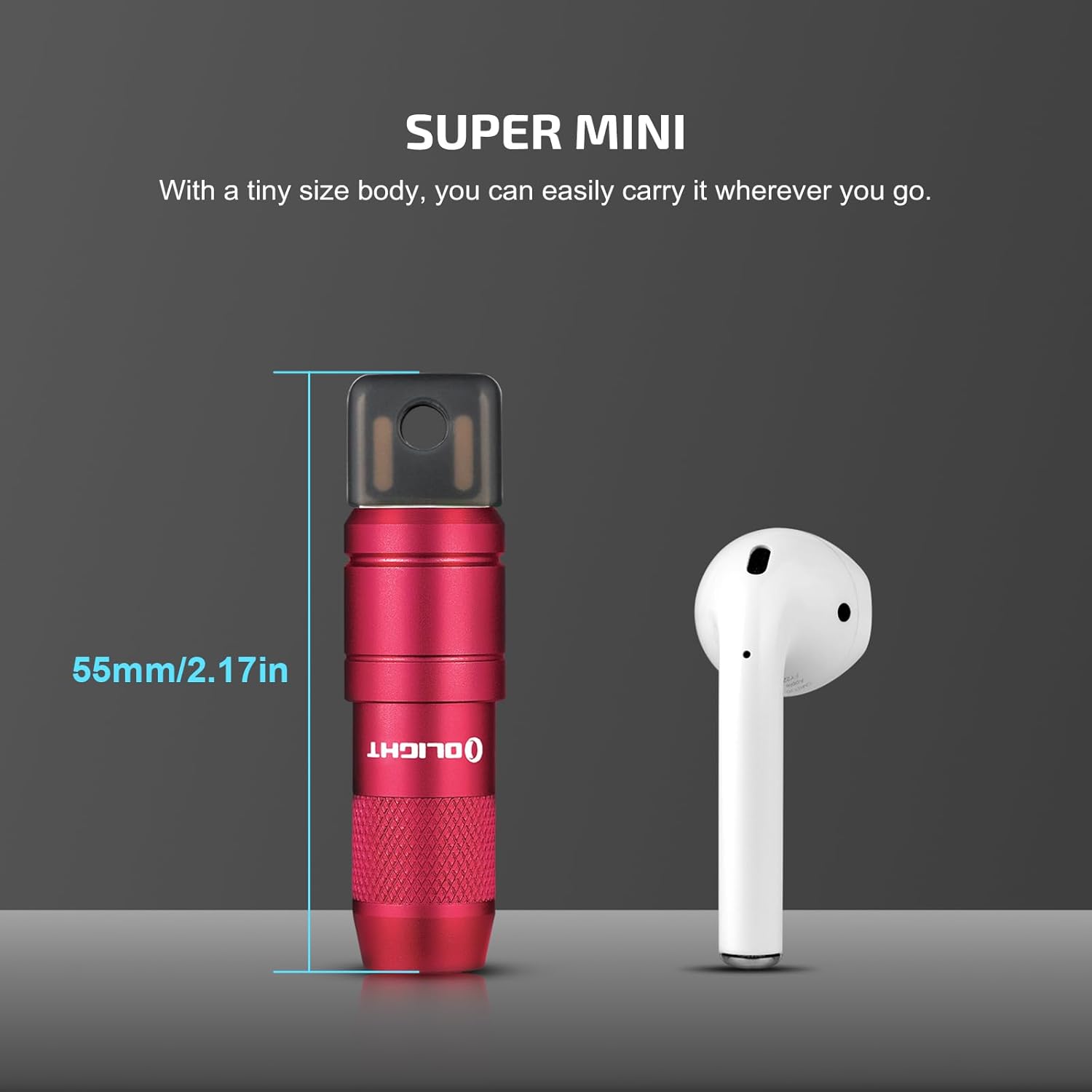
ചിത്രം 2.1: The OLIGHT IMINI 2 flashlight shown next to a wireless earbud for size comparison, illustrating its compact 55mm (2.17in) length.

ചിത്രം 2.2: The OLIGHT IMINI 2 flashlight attached magnetically to a metal surface, demonstrating its hands-free capability.
2.2 OLIGHT Sphere C Smart Night Light
The Sphere C is a versatile smart night light offering ambient lighting with app control and a magnetic base for flexible placement.
- ലൈറ്റിംഗ് മോഡുകൾ: Over 20 lighting modes with brightness adjustment.
- നിയന്ത്രണം: App control for various functions including dimming, music rhythm, and countdown timer.
- ചാർജിംഗ്: Universal USB-C rechargeable.
- ബാറ്ററി ലൈഫ്: Up to 40 hours of continuous use at low brightness.
- സ്ഥിരത: Upgraded magnetic adhesion at the bottom for secure placement.
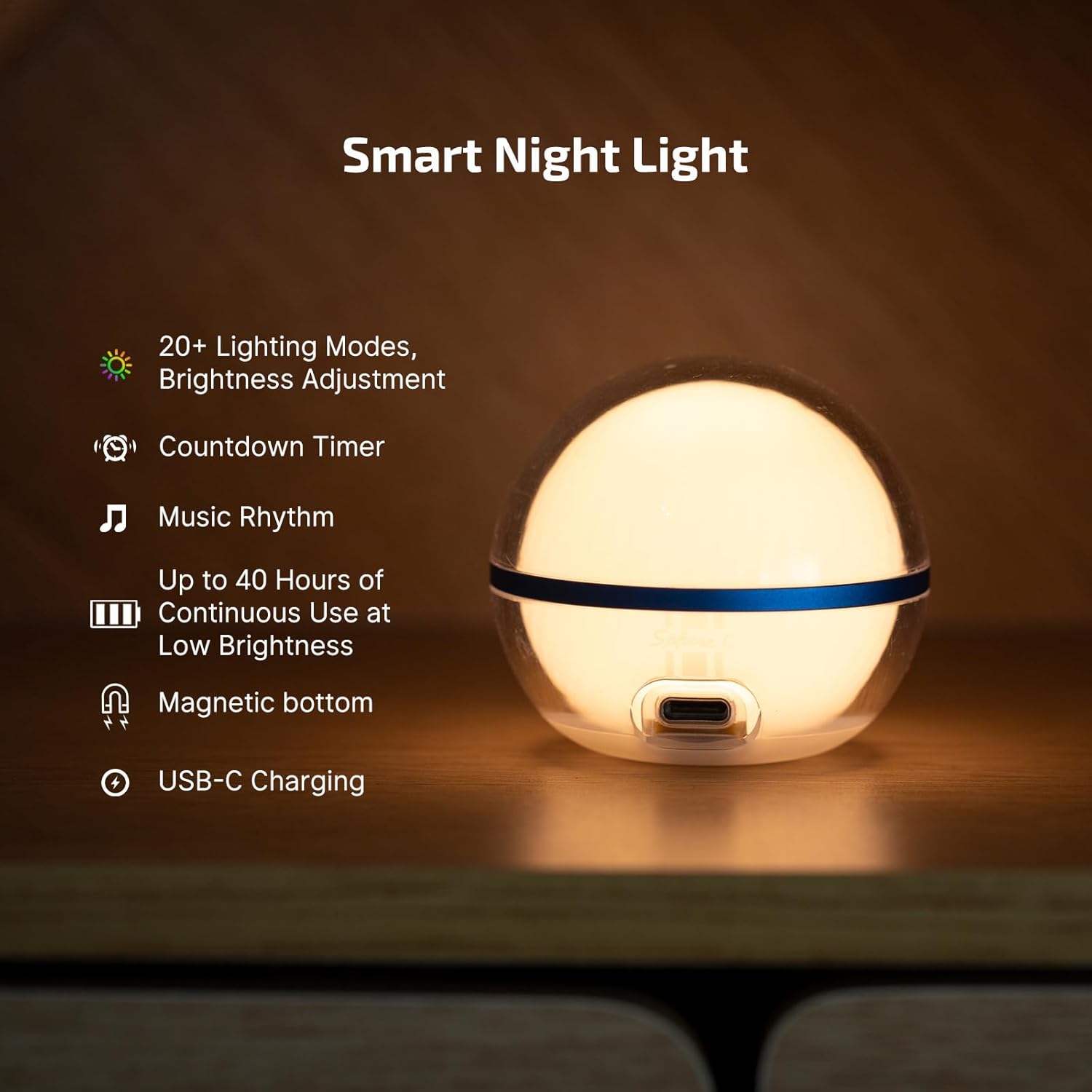
ചിത്രം 2.3: An illustration highlighting the key features of the OLIGHT Sphere C Smart Night Light, including 20+ lighting modes, brightness adjustment, countdown timer, music rhythm, up to 40 hours of continuous use, magnetic bottom, and USB-C charging.
3. സജ്ജീകരണം
3.1 OLIGHT IMINI 2
The IMINI 2 requires minimal setup. Ensure it is charged before first use.
- പ്രാരംഭ ചാർജ്: Refer to Section 5.1 for charging instructions.
- അറ്റാച്ച്മെൻ്റ്: Attach the flashlight body to the magnetic cap.
3.2 OLIGHT Sphere C
To fully utilize the Sphere C's smart features, app setup is required.
- പ്രാരംഭ ചാർജ്: Refer to Section 5.2 for charging instructions.
- അപ്ലിക്കേഷൻ ഡൗൺലോഡുചെയ്യുക: Download the official OLIGHT app from your device's app store.
- ജോടിയാക്കൽ:
- Open the OLIGHT app.
- Follow the in-app instructions to discover and pair with your Sphere C device.
- നിങ്ങളുടെ ഉപകരണത്തിന്റെ ബ്ലൂടൂത്ത് പ്രവർത്തനക്ഷമമാക്കിയിട്ടുണ്ടെന്ന് ഉറപ്പാക്കുക.
4. പ്രവർത്തന നിർദ്ദേശങ്ങൾ
4.1 OLIGHT IMINI 2
The IMINI 2 features a straightforward magnetic activation system.
- ഓണാക്കാൻ: Detach the flashlight body from the magnetic cap. The light will instantly activate.
- ഓഫാക്കാൻ: Re-attach the flashlight body to the magnetic cap. The light will turn off.

ചിത്രം 4.1: The OLIGHT IMINI 2 flashlight demonstrating its instant on/off feature by detaching the main body from the magnetic USB cap, causing the light to illuminate.
4.2 OLIGHT Sphere C
Control the Sphere C primarily through the dedicated OLIGHT app.
- പവർ ഓൺ/ഓഫ്: Use the power button within the app or the physical button on the device (if available, refer to app for primary control).
- തെളിച്ച ക്രമീകരണം: Use the stepless dimming control in the app to adjust light intensity.
- ലൈറ്റിംഗ് മോഡുകൾ: Select from over 20 preset lighting modes, including general, nature, festive, and atmosphere settings.
- വർണ്ണ തിരഞ്ഞെടുപ്പ്: Choose specific colors (white, red, red flash) or use the color wheel for custom hues.
- ടൈമർ: Set a countdown timer for automatic shut-off.
- സംഗീത താളം: Activate music rhythm mode for dynamic lighting effects.
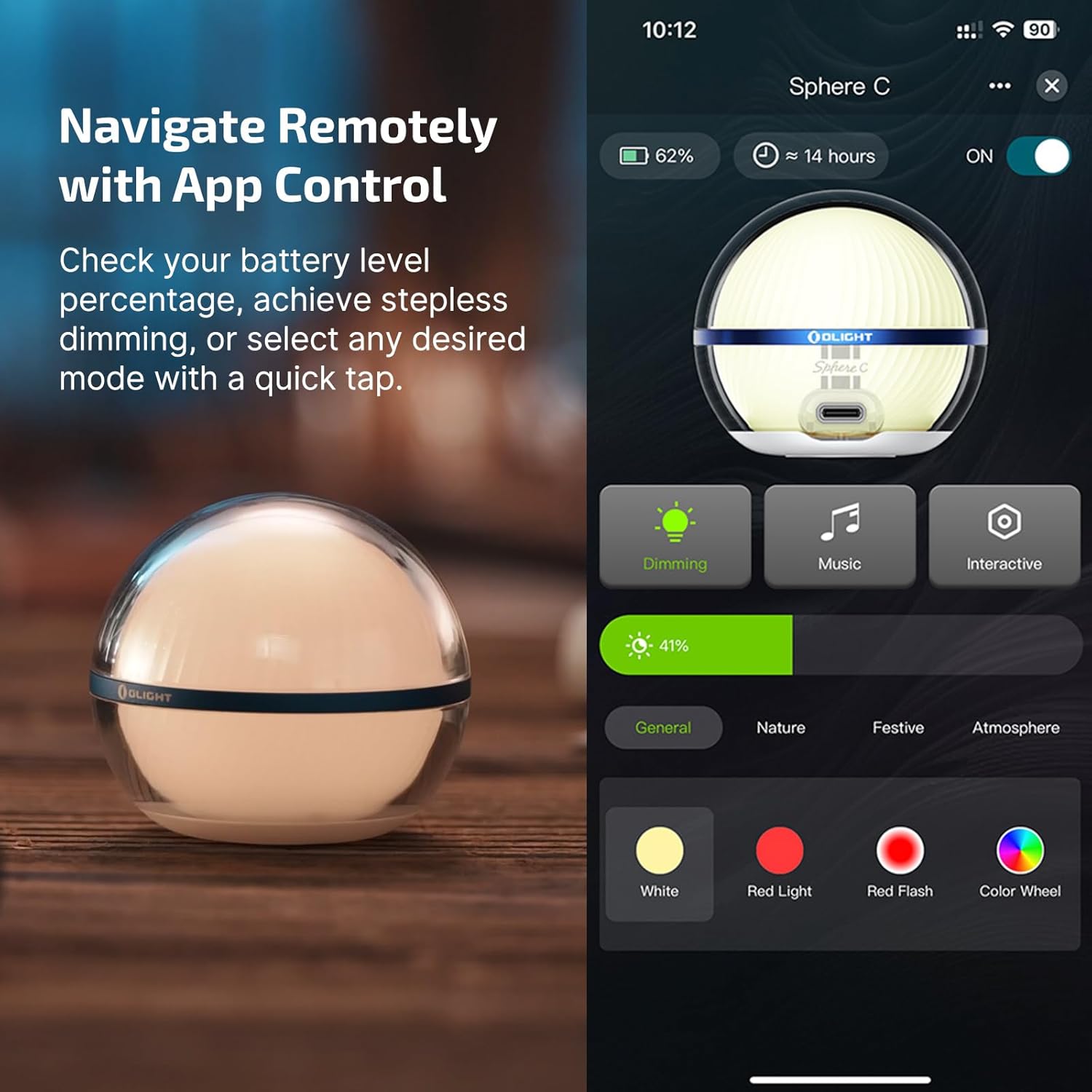
ചിത്രം 4.2: A screenshot of the OLIGHT app interface for the Sphere C, showing controls for dimming, music, interactive modes, battery level, and color selection (white, red, red flash, color wheel).
5. ചാർജിംഗ്
5.1 OLIGHT IMINI 2
The IMINI 2 features an integrated USB-A plug for convenient charging.
- Locate USB Plug: The USB-A plug is located at the tail end of the flashlight, revealed when the body is detached from the magnetic cap.
- പവറിലേക്ക് ബന്ധിപ്പിക്കുക: Insert the USB-A plug directly into any standard USB-A port (e.g., computer, wall adapter, power bank).
- ചാർജിംഗ് സൂചകം: The light will indicate charging status (refer to product packaging or OLIGHT website for specific indicator behavior).
- ചാർജിംഗ് സമയം: ഒരു പൂർണ്ണ ചാർജ് സാധാരണയായി ഏകദേശം 60 മിനിറ്റ് എടുക്കും.

ചിത്രം 5.1: The OLIGHT IMINI 2 flashlight plugged directly into a laptop's USB-A port, demonstrating its integrated USB charging capability.
5.2 OLIGHT Sphere C
The Sphere C uses a universal USB-C port for charging.
- Locate USB-C Port: The USB-C charging port is located on the base of the Sphere C.
- പവറിലേക്ക് ബന്ധിപ്പിക്കുക: Use a standard USB-C cable (not included) to connect the Sphere C to a USB power source (e.g., wall adapter, computer).
- ചാർജിംഗ് സൂചകം: The light will indicate charging status (refer to product packaging or OLIGHT website for specific indicator behavior).

ചിത്രം 5.2: A close-up of the OLIGHT Sphere C being charged via a USB-C cable, highlighting the charging port on its base.
6. പരിപാലനം
- വൃത്തിയാക്കൽ: Wipe the surfaces of both devices with a soft, damp തുണി. ഉരച്ചിലുകൾ ഉണ്ടാക്കുന്ന ക്ലീനറുകളോ ലായകങ്ങളോ ഒഴിവാക്കുക.
- സംഭരണം: Store both devices in a cool, dry place when not in use.
- ബാറ്ററി കെയർ: For optimal battery life, avoid fully discharging the devices frequently. Recharge them regularly.
- കാന്തിക പ്രതലങ്ങൾ: Keep the magnetic surfaces clean and free of debris to ensure proper function and secure attachment.
7. പ്രശ്നപരിഹാരം
7.1 OLIGHT IMINI 2
- ലൈറ്റ് ഓണാക്കുന്നില്ല:
- ഫ്ലാഷ്ലൈറ്റ് ബോഡി മാഗ്നറ്റിക് ക്യാപ്പിൽ നിന്ന് പൂർണ്ണമായും വേർപെടുത്തിയിട്ടുണ്ടെന്ന് ഉറപ്പാക്കുക.
- Check if the battery is charged. Connect to a USB-A port for charging.
- ചാര്ജ്ജ് ആകുന്നില്ല:
- Ensure the USB-A plug is fully inserted into a working USB-A port.
- Try a different USB-A port or power source.
7.2 OLIGHT Sphere C
- ലൈറ്റ് ഓണാക്കുന്നില്ല:
- Check if the battery is charged. Connect to a USB-C power source.
- Ensure the device is powered on via the app.
- ചാര്ജ്ജ് ആകുന്നില്ല:
- Ensure the USB-C cable is properly connected to both the Sphere C and a working USB power source.
- മറ്റൊരു USB-C കേബിളോ പവർ സ്രോതസ്സോ പരീക്ഷിച്ചുനോക്കൂ.
- ആപ്പ് കണക്റ്റിവിറ്റി പ്രശ്നങ്ങൾ:
- നിങ്ങളുടെ മൊബൈൽ ഉപകരണത്തിൽ ബ്ലൂടൂത്ത് പ്രവർത്തനക്ഷമമാക്കിയിട്ടുണ്ടെന്ന് ഉറപ്പാക്കുക.
- Make sure the Sphere C is within range of your mobile device.
- Restart the OLIGHT app and/or your mobile device.
- Try re-pairing the device through the app's settings.
8 സ്പെസിഫിക്കേഷനുകൾ
8.1 OLIGHT IMINI 2
| ഫീച്ചർ | വിശദാംശങ്ങൾ |
|---|---|
| ലൈറ്റ് ഔട്ട്പുട്ട് | 50 ല്യൂമെൻസ് |
| പവർ ഉറവിടം | ബാറ്ററി പവർ (ലിഥിയം അയോൺ) |
| ചാർജിംഗ് | Integrated USB-A Plug |
| മെറ്റീരിയൽ | അലുമിനിയം |
| പ്രത്യേക ഫീച്ചർ | Rechargeable, Magnetic Mount |
| ജല പ്രതിരോധം | വാട്ടർ റെസിസ്റ്റൻ്റ് അല്ല |
8.2 OLIGHT Sphere C
| ഫീച്ചർ | വിശദാംശങ്ങൾ |
|---|---|
| ലൈറ്റ് ഔട്ട്പുട്ട് | Up to 75 Lumens (Stepless Dimming) |
| പവർ ഉറവിടം | ബാറ്ററി പവർ (ലിഥിയം അയോൺ) |
| ചാർജിംഗ് | USB-C റീചാർജ് ചെയ്യാവുന്നത് |
| നിയന്ത്രണം | App Control, Stepless Dimming |
| മെറ്റീരിയൽ | പ്ലാസ്റ്റിക് |
| പ്രത്യേക ഫീച്ചർ | Magnetic Bottom, Ambient Lighting, Music Rhythm, Countdown Timer |
9. വാറൻ്റിയും പിന്തുണയും
OLIGHT products are manufactured with high-quality materials and craftsmanship. For warranty information, product registration, or technical support, please visit the official OLIGHT webസൈറ്റ് അല്ലെങ്കിൽ അവരുടെ ഉപഭോക്തൃ സേവനവുമായി നേരിട്ട് ബന്ധപ്പെടുക.
ഔദ്യോഗിക OLIGHT Webസൈറ്റ്: www.olightstore.com
വാറൻ്റി ക്ലെയിമുകൾക്കായി നിങ്ങളുടെ വാങ്ങിയതിൻ്റെ തെളിവ് സൂക്ഷിക്കുക.


