ആമുഖം
Thank you for choosing the Ceybo Original Solar Voice Remote Control. This remote is designed to provide seamless control over your compatible Samsung Smart TV, featuring convenient solar charging, voice command capabilities, and dedicated shortcut buttons for popular streaming services. This manual will guide you through the setup, operation, and maintenance of your new remote control.

ചിത്രം: മുന്നിലും പിന്നിലും view of the Ceybo Solar Voice Remote Control, showcasing its sleek design and solar charging panel on the rear.
സജ്ജമാക്കുക
1. റിമോട്ട് ചാർജ് ചെയ്യുന്നു
Your Ceybo remote control features an eco-friendly solar charging panel and a USB-C port for convenient power options.
- സോളാർ ചാർജിംഗ്: Place the remote control with its solar panel facing a light source (natural sunlight or indoor lighting) to charge the internal battery. For optimal charging, ensure the panel is exposed to light regularly.
- USB-C ചാർജിംഗ്: For faster charging or when light is insufficient, connect a USB-C cable (not included) to the remote's USB-C port and a power adapter.

Image: The Ceybo remote control positioned to receive sunlight, illustrating its solar charging capability.
2. Pairing with Your Samsung Smart TV
The Ceybo remote uses Bluetooth for connection. Follow these steps to pair it with your TV:
- നിങ്ങളുടെ ടിവി ഓണാക്കിയിട്ടുണ്ടെന്ന് ഉറപ്പാക്കുക.
- Point the remote towards your TV.
- ഒരേസമയം അമർത്തിപ്പിടിക്കുക മടങ്ങുക button (curved arrow) and the പ്ലേ/താൽക്കാലികമായി നിർത്തുക 3 സെക്കന്റോ അതിൽ കൂടുതലോ ബട്ടൺ.
- A red light on the remote will start blinking, indicating it is in pairing mode.
- A prompt will appear on your TV screen confirming that the remote is paired.
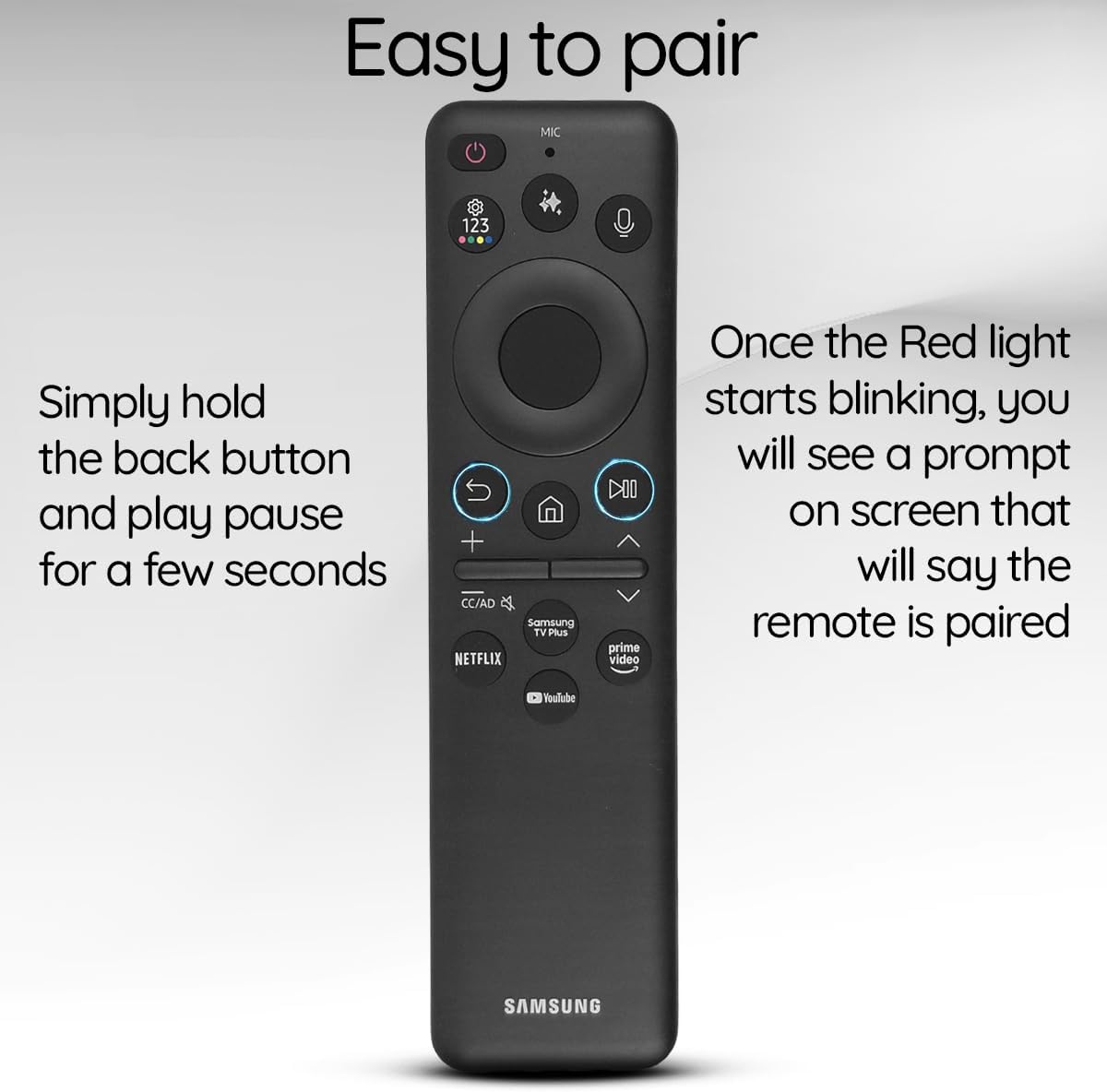
Image: The Ceybo remote control with a visual guide indicating the Return and Play/Pause buttons for pairing, and a text overlay explaining the pairing process.
റിമോട്ട് പ്രവർത്തിപ്പിക്കുന്നു
അടിസ്ഥാന പ്രവർത്തനങ്ങൾ
- പവർ ബട്ടൺ: Located at the top right, press to turn the TV on or off.
- വോളിയം ബട്ടണുകൾ (+/-): Adjust the TV's volume.
- Channel Buttons (Up/Down): ടിവി ചാനലുകൾ മാറ്റുക.
- Directional Pad (Circular): മെനുകളിലൂടെ നാവിഗേറ്റ് ചെയ്ത് ഇനങ്ങൾ തിരഞ്ഞെടുക്കുക.
- ഹോം ബട്ടണ്: Return to the TV's home screen.
- റിട്ടേൺ ബട്ടൺ: മുമ്പത്തെ സ്ക്രീനിലേക്കോ മെനുവിലേക്കോ മടങ്ങുക.
- പ്ലേ/താൽക്കാലികമായി നിർത്തുക ബട്ടൺ: മീഡിയ പ്ലേബാക്ക് നിയന്ത്രിക്കുക.
ശബ്ദ നിയന്ത്രണം
Utilize the built-in voice assistant for hands-free control:
- അമർത്തുക മൈക്രോഫോൺ button (located near the top, with a microphone icon).
- Speak your command clearly, such as "Open Netflix," "Change to Channel 5," or "Increase volume."
- The TV will respond to your voice command.

Image: The Ceybo remote control with a magnified view of the microphone button, illustrating its use for voice commands.
കുറുക്കുവഴി ബട്ടണുകൾ
Access your favorite streaming services instantly with dedicated shortcut buttons:
- അമർത്തുക നെറ്റ്ഫ്ലിക്സ് button to launch Netflix.
- അമർത്തുക പ്രധാന വീഡിയോ button to launch Amazon Prime Video.
- അമർത്തുക YouTube button to launch YouTube.
- അമർത്തുക സാംസങ് ടിവി പ്ലസ് button to access Samsung's free streaming service.

Image: The Ceybo remote control with a magnified view of the dedicated shortcut buttons for Netflix, Prime Video, YouTube, and Samsung TV Plus.
AI ബട്ടൺ
Some Samsung Smart TVs feature AI capabilities. If your TV supports it, press the AI ബട്ടൺ (often depicted with a sparkle or star icon) to access AI features such as live translation or intelligent recommendations.

Image: The Ceybo remote control with a magnified view of the AI button, indicating its function for accessing artificial intelligence features.
മെയിൻ്റനൻസ്
- വൃത്തിയാക്കൽ: Wipe the remote control with a soft, dry cloth. Avoid using liquid cleaners or abrasive materials.
- സോളാർ പാനൽ കെയർ: Keep the solar panel clean and free from obstructions to ensure efficient charging. Regularly expose the remote to light.
- സംഭരണം: Store the remote in a cool, dry place away from direct sunlight for prolonged periods if not in use, but ensure it receives light periodically to maintain charge.
ട്രബിൾഷൂട്ടിംഗ്
- റിമോട്ട് പ്രതികരിക്കുന്നില്ല:
- Ensure the remote is charged. Try charging via USB-C or exposing it to bright light.
- Re-pair the remote with your TV by holding the Return and Play/Pause buttons simultaneously for 3 seconds.
- Check for any obstructions between the remote and the TV.
- ശബ്ദ നിയന്ത്രണം പ്രവർത്തിക്കുന്നില്ല:
- Ensure the remote is properly paired.
- Speak clearly and directly into the microphone.
- Check your TV's settings to ensure voice control is enabled.
- Shortcut buttons not launching apps:
- നിങ്ങളുടെ ടിവി ഇന്റർനെറ്റുമായി ബന്ധിപ്പിച്ചിട്ടുണ്ടെന്ന് ഉറപ്പാക്കുക.
- Verify that the respective apps are installed and updated on your TV.
സ്പെസിഫിക്കേഷനുകൾ
| ഫീച്ചർ | വിശദാംശങ്ങൾ |
|---|---|
| മോഡൽ നമ്പർ | BN59-01480A |
| പവർ ഉറവിടം | Solar Charging, USB-C |
| കണക്റ്റിവിറ്റി | ബ്ലൂടൂത്ത് |
| പ്രത്യേക സവിശേഷതകൾ | Voice Search, Dedicated Shortcut Buttons (Netflix, Prime Video, YouTube, Samsung TV Plus), AI Button |
| അനുയോജ്യമായ ഉപകരണങ്ങൾ | Samsung Smart Televisions |
| നിറം | കറുപ്പ് |
| ഇനത്തിൻ്റെ ഭാരം | 3.2 ഔൺസ് |
| പാക്കേജ് അളവുകൾ | 5.55 x 1.97 x 0.55 ഇഞ്ച് |
അനുയോജ്യത
This Ceybo Solar Voice Remote Control (Model BN59-01480A) is compatible with a wide range of Samsung Smart TVs, including:
- Neo QLED 8K Series
- QLED Series
- Specific models include: QN42S90FAFXZA, QN43Q7FAAFXZA, QN43QN90FAFXZA, QN48S90FAFXZA, QN50Q7FAAFXZA, QN50QN90FAFXZA, QN55Q7FAAFXZA, QN55QN70FAFXZA, QN55QN80FAFXZA, QN55QN90FAFXZA, QN55S85FAFXZA, QN55S90FAFXZA, QN55S95FAFXZA, QN65Q7FAAFXZA, QN65QN70FAFXZA, QN65QN80FAFXZA, QN65QN900FFXZA, QN65QN90FAFXZA, QN65QN990FFXZA, QN65S85FAFXZA, QN65S90FAFXZA, QN65S95FAFXZA, QN75QN70FAFXZA, QN75QN80FAFXZA, QN75QN900FFXZA, QN75QN90FAFXZA, QN75QN990FFXZA, QN77S85FAFXZA, QN77S90FAFXZA, QN77S95FAFXZA, QN83S85FAFXZA, QN83S90FAFXZA, QN85Q7FAAFXZA, QN85QN70FAFXZA, QN85QN80FAFXZA, QN85QN900FFXZA, QN85QN90FAFXZA, QN85QN990FFXZA.

Image: The Ceybo remote control displayed alongside various Samsung Neo QLED and QLED televisions, illustrating its broad compatibility.

Image: A visual representation of the Ceybo remote control with a comprehensive list of compatible Samsung TV model numbers.
വാറൻ്റിയും പിന്തുണയും
വാറന്റി വിവരങ്ങൾക്കും ഉപഭോക്തൃ പിന്തുണയ്ക്കും, നിങ്ങളുടെ വാങ്ങലിനൊപ്പം നൽകിയിരിക്കുന്ന ഡോക്യുമെന്റേഷൻ പരിശോധിക്കുകയോ വിൽപ്പനക്കാരനെ നേരിട്ട് ബന്ധപ്പെടുകയോ ചെയ്യുക. ഏതെങ്കിലും വാറന്റി ക്ലെയിമുകൾക്കായി നിങ്ങളുടെ വാങ്ങലിന്റെ തെളിവ് സൂക്ഷിക്കുക.


