ആമുഖം
Welcome to the XBJ A2Pro Smart Projector user manual. This guide provides detailed instructions for setting up, operating, and maintaining your new projector. The XBJ A2Pro combines a portable projector with an interactive touch tablet, offering native 1080P resolution with 4K decoding support, auto-focus, auto-keystone correction, Wi-Fi 6, and Bluetooth 5.2 connectivity. It is designed for versatile use in various environments, from home theaters to outdoor settings.
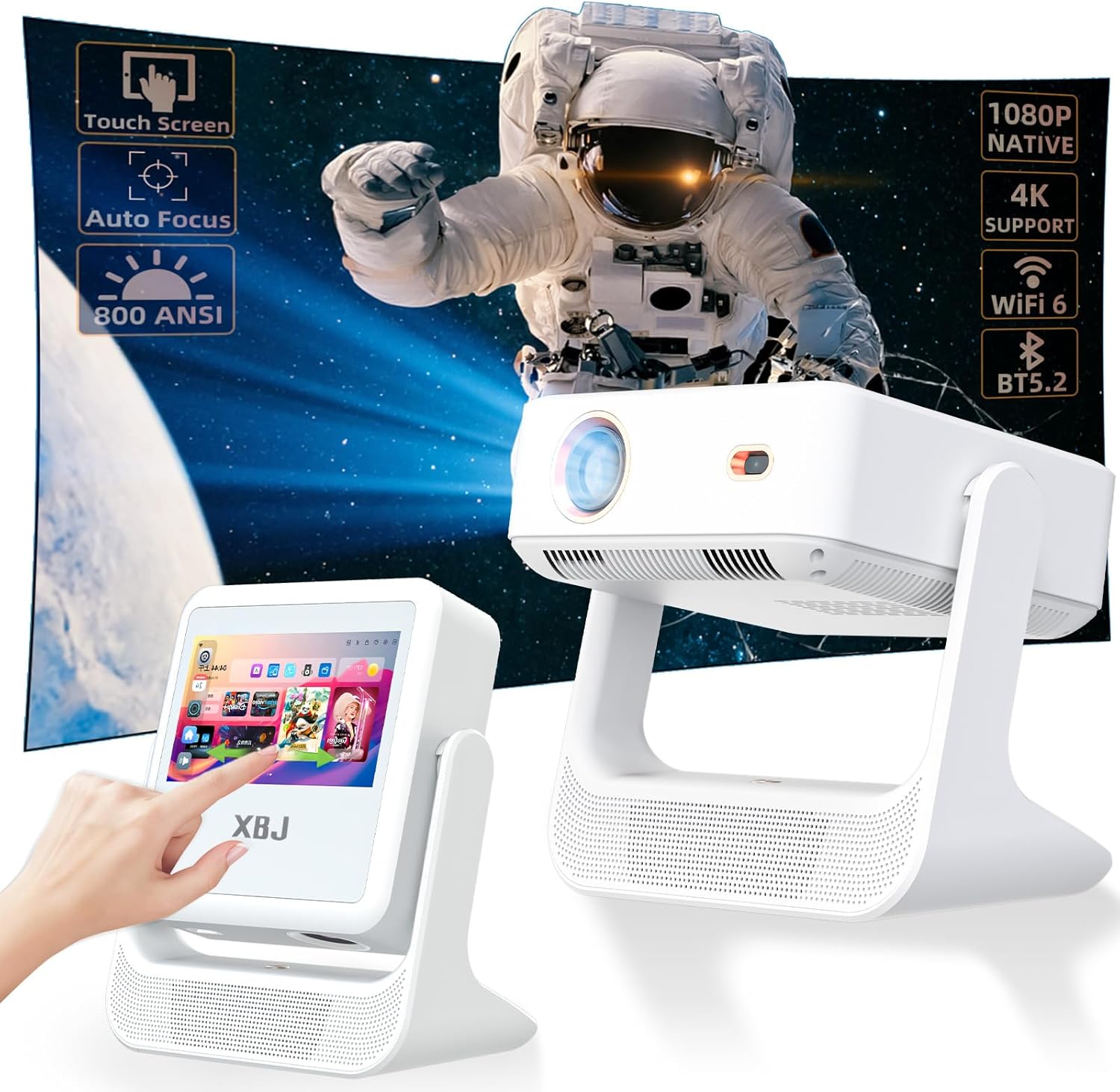
ചിത്രം 1: The XBJ A2Pro Smart Projector, showcasing its dual functionality as a touch tablet and a projector. Key features like touch screen, auto focus, 800 ANSI lumens, 1080P native resolution, 4K support, Wi-Fi 6, and Bluetooth 5.2 are highlighted.
ബോക്സിൽ എന്താണുള്ളത്
പാക്കേജിൽ എല്ലാ ഇനങ്ങളും ഉണ്ടെന്ന് ദയവായി പരിശോധിക്കുക:
- XBJ A2Pro Touchscreen Projector
- റിമോട്ട് കൺട്രോൾ
- HDMI കേബിൾ
- പവർ കോർഡ്
- ഉപയോക്തൃ മാനുവൽ (ഈ പ്രമാണം)
ഉൽപ്പന്നം കഴിഞ്ഞുview
The XBJ A2Pro Smart Projector offers a unique blend of portability and advanced features.
- Unique Touchscreen Design: Functions as both a touch tablet and a projector. Easily switch between the interactive smart panel for settings and navigation, and projecting content onto a large screen.
- Native 1080P with 4K Decoding: Delivers clear images with 800 ANSI lumens brightness. Features auto-focus and auto-keystone correction for optimal picture quality.
- Quiet and Portable: Equipped with an ultra-quiet cooling system (below 30dB). The 180° rotatable stand allows projection onto various surfaces.
- Smart Android System: Built-in Android OS with pre-installed apps.
- വേഗത്തിലുള്ള കണക്റ്റിവിറ്റി: Dual-band Wi-Fi 6 for low-latency streaming and Bluetooth 5.2 for audio device connections. Supports USB and HDMI inputs.

ചിത്രം 2: The XBJ A2Pro projector demonstrating its two operational modes: an 8-inch touch screen tablet mode and a traditional projector mode displaying content on a large screen.

ചിത്രം 3: The XBJ A2Pro projector positioned on a table, projecting an image onto a bedroom ceiling, illustrating its 180° rotatable stand for flexible projection angles.
സജ്ജമാക്കുക
- പവർ കണക്ഷൻ: Connect the provided power cord to the projector and then to a power outlet. The projector will typically power on or enter standby mode.
- പ്ലേസ്മെൻ്റ്: Position the projector on a stable surface. Utilize the 180° rotatable stand to adjust the projection angle as needed. The ideal projection distance ranges from 1.1 to 8 meters, with a recommended projection size of 30 to 250 inches.

ചിത്രം 4: An illustration of the XBJ A2Pro projector's projection capabilities, showing recommended distances (1.1 - 8m) and screen sizes (30" - 250"), with examples of 100", 200", and 300" projections.
- പ്രാരംഭ പവർ-ഓൺ: ഉപകരണം ഓണാക്കാൻ പ്രൊജക്ടറിലോ റിമോട്ട് കൺട്രോളിലോ പവർ ബട്ടൺ അമർത്തുക.
- Automatic Screen Adjustment: The projector features automatic focus and keystone correction. Upon startup or movement, the device will automatically adjust the image for clarity and correct geometric distortion.

ചിത്രം 5: Visual representation of the XBJ A2Pro's auto screen adjustment features, including auto keystone correction, auto focus, intelligent eye protection, and 100%-50% zoom functionality.
പ്രവർത്തന നിർദ്ദേശങ്ങൾ
- സ്വിച്ചിംഗ് മോഡുകൾ: The XBJ A2Pro can operate in two modes:
- ടാബ്ലെറ്റ് മോഡ്: Use the built-in 8-inch touchscreen for direct interaction with the Android OS and apps.
- പ്രൊജക്ടർ മോഡ്: Project content onto a larger screen. The touchscreen can still be used for navigation or the remote control can be used.
- കണക്റ്റിവിറ്റി:
- Wi-Fi 6: Connect to a 5G Wi-Fi network for optimal streaming performance and screen mirroring. Navigate to Settings > Network & Internet > Wi-Fi to connect.

ചിത്രം 6: The XBJ A2Pro projector illustrating its Dual-Band Wi-Fi 6 capability, showing faster streaming with 5G+2.4G Wi-Fi compared to 2.4G Wi-Fi.
- ബ്ലൂടൂത്ത് 5.2: Pair with external speakers or headphones for enhanced audio. Go to Settings > Connected devices > Pair new device.
- USB/HDMI: Connect external devices such as gaming consoles, laptops, or USB drives using the available ports.
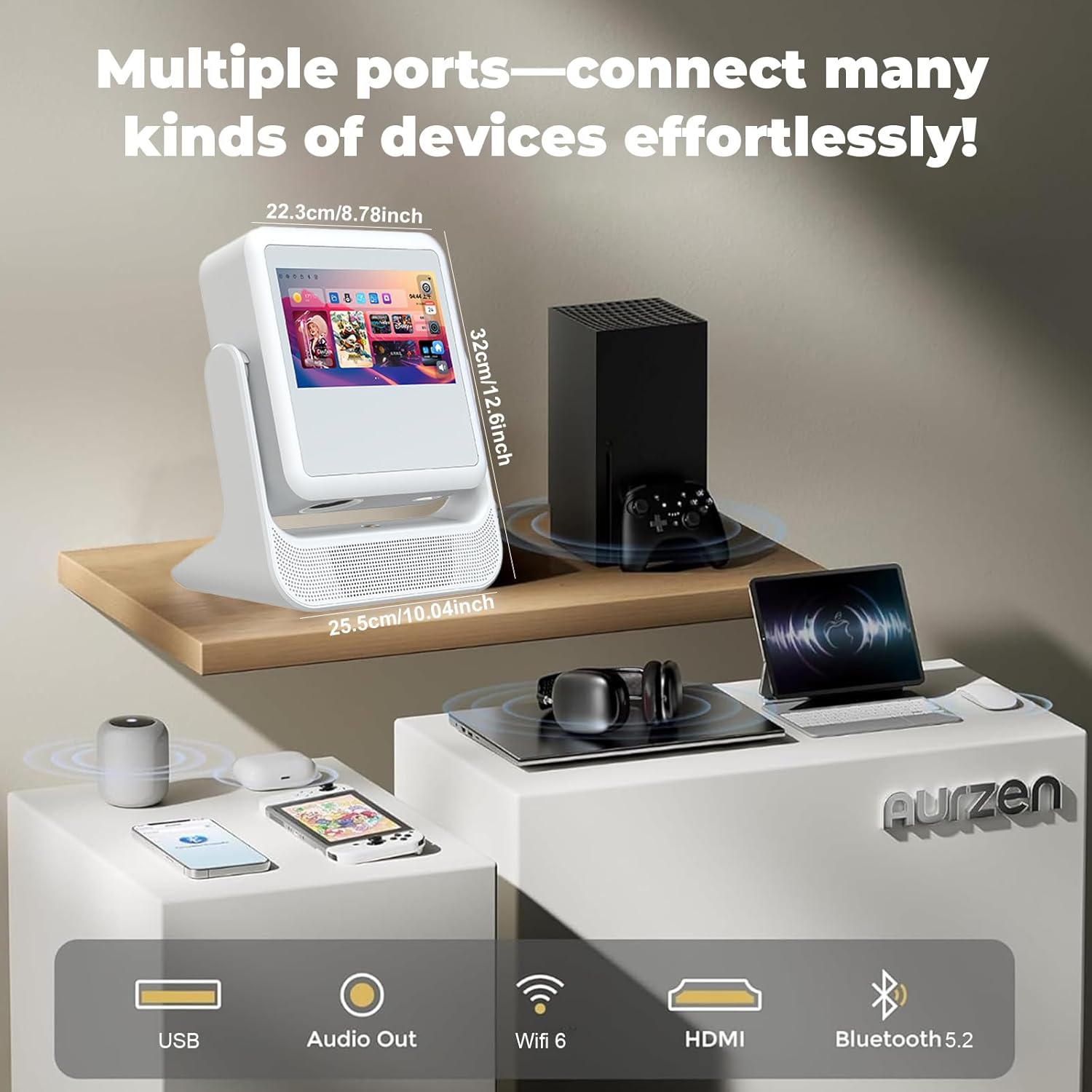
ചിത്രം 7: An image detailing the multiple connectivity options of the XBJ A2Pro projector, including USB, Audio Out, Wi-Fi 6, HDMI, and Bluetooth 5.2, with various devices connected.
- Wi-Fi 6: Connect to a 5G Wi-Fi network for optimal streaming performance and screen mirroring. Navigate to Settings > Network & Internet > Wi-Fi to connect.
- Smart Android System and Apps: The projector runs on an Android operating system. Access pre-installed applications or download new ones from the app store (if available). Navigate using the touchscreen or the remote control.
- സ്ക്രീൻ മിററിംഗ്: Use the Wi-Fi connection to mirror content from your smartphone or tablet. Refer to the specific screen mirroring instructions within the projector's Android interface (e.g., Miracast, Airplay, DLNA).
- റിമോട്ട് കൺട്രോൾ ഉപയോഗം: Point the remote control directly at the projector for optimal response. The remote allows navigation, volume control, input selection, and access to settings.
മെയിൻ്റനൻസ്
- ലെൻസ് വൃത്തിയാക്കൽ: പ്രൊജക്ടർ ലെൻസ് സൌമ്യമായി തുടയ്ക്കാൻ ഒപ്റ്റിക്കൽ ലെൻസുകൾക്കായി പ്രത്യേകം രൂപകൽപ്പന ചെയ്ത മൃദുവായ, ലിന്റ് രഹിത തുണി ഉപയോഗിക്കുക. ഉരച്ചിലുകളുള്ള വസ്തുക്കളോ കഠിനമായ രാസവസ്തുക്കളോ ഒഴിവാക്കുക.
- പുറം വൃത്തിയാക്കൽ: പ്രൊജക്ടറിന്റെ പുറംഭാഗം മൃദുവായതും ഉണങ്ങിയതുമായ തുണി ഉപയോഗിച്ച് തുടയ്ക്കുക. കഠിനമായ പാടുകൾക്ക്, അല്പം ഡി.amp തുണി ഉപയോഗിക്കാം, തുടർന്ന് ഉണങ്ങിയ തുണി ഉപയോഗിക്കാം.
- വെൻ്റിലേഷൻ: പ്രൊജക്ടറിന്റെ വെന്റിലേഷൻ ഓപ്പണിംഗുകൾ പൊടിയിൽ നിന്നും തടസ്സങ്ങളിൽ നിന്നും മുക്തമാണെന്ന് ഉറപ്പാക്കുക, അങ്ങനെ അമിതമായി ചൂടാകുന്നത് തടയുക. പ്രവർത്തന സമയത്ത് എയർ വെന്റുകൾ തടയരുത്.
- സംഭരണം: ദീർഘനേരം ഉപയോഗിക്കാത്തപ്പോൾ, പ്രൊജക്ടർ തണുത്തതും വരണ്ടതുമായ സ്ഥലത്ത് സൂക്ഷിക്കുക, നേരിട്ടുള്ള സൂര്യപ്രകാശത്തിൽ നിന്നും കടുത്ത താപനിലയിൽ നിന്നും അകറ്റി നിർത്തുക.
ട്രബിൾഷൂട്ടിംഗ്
If you encounter any issues or have questions regarding your XBJ A2Pro Smart Projector, please refer to the following common solutions:
| പ്രശ്നം | സാധ്യമായ പരിഹാരം |
|---|---|
| No Power / Projector Not Turning On |
|
| ചിത്രമില്ല / ശൂന്യമായ സ്ക്രീൻ |
|
| മങ്ങിയ ചിത്രം |
|
| Distorted Image (Trapezoid Shape) |
|
| ശബ്ദമില്ല / കുറഞ്ഞ വോളിയം |
|
| Wi-Fi / Bluetooth Connection Issues |
|
| Apps Not Working / Crashing |
|
സ്പെസിഫിക്കേഷനുകൾ
| ഫീച്ചർ | വിശദാംശങ്ങൾ |
|---|---|
| ബ്രാൻഡ് | XBJ |
| മോഡൽ നമ്പർ | TYYA2PRO-A001 |
| ഡിസ്പ്ലേ റെസല്യൂഷൻ | 1920 x 1080 (Native 1080P), 4K Support |
| തെളിച്ചം | 800 ആൻസി ലുമെൻസ് |
| കണക്റ്റിവിറ്റി ടെക്നോളജി | Wi-Fi 6 (Dual-Band), Bluetooth 5.2, HDMI, USB, 3.5mm Audio Jack |
| പ്രത്യേക സവിശേഷതകൾ | Touch Screen, Auto Focus, Digital Keystone Correction, Built-In Speaker, Portable, 180° Rotatable Stand, Built-In Wi-Fi |
| ശുപാർശ ചെയ്യുന്ന ഉപയോഗങ്ങൾ | ബിസിനസ്സ്, വിദ്യാഭ്യാസം, ഗെയിമിംഗ്, ഹോം സിനിമ |
| ഇനത്തിൻ്റെ ഭാരം | 4.81 പൗണ്ട് |
| ഉൽപ്പന്ന അളവുകൾ | 10.43 x 4.13 x 12.44 ഇഞ്ച് |
| നിറം | വെള്ള |
വാറൻ്റിയും പിന്തുണയും
XBJ products are designed for reliability and performance. For specific warranty details, please refer to the warranty card included with your product or contact XBJ customer support.
ഉപഭോക്തൃ പിന്തുണ
If you encounter any issues or have questions regarding your XBJ A2Pro Smart Projector, please contact our technical support team. We are committed to resolving any problems you may experience.
- ഇമെയിൽ: ESzxkj@outlook.com
- ലഭ്യത: 24/7 ഉപഭോക്തൃ പിന്തുണ
- സഹായം: Technical support, troubleshooting, and replacement services.

ചിത്രം 8: The XBJ brand logo, emphasizing their commitment to making technology simpler and more enjoyable.

ചിത്രം 9: An illustration representing XBJ customer support, highlighting 24/7 availability, email contact (ESzxkj@outlook.com), and replacement services.


