1. ആമുഖം
Thank you for choosing the InMotion ANC True Wireless Earbuds. This manual provides essential information for setting up, operating, and maintaining your earbuds to ensure optimal performance and longevity. Please read this manual thoroughly before use.
These earbuds feature Active Noise Cancelling (ANC) for an immersive audio experience, true wireless connectivity for freedom of movement, and intuitive touch controls. They are designed for comfort with suction tips and offer up to 6 hours of use on a single charge.
സുരക്ഷാ വിവരങ്ങൾ
- ഇയർബഡുകളോ ചാർജിംഗ് കേസോ ഉയർന്ന താപനിലയിലോ ഈർപ്പത്തിലോ ദ്രാവകങ്ങളിലോ തുറന്നുകാട്ടരുത്.
- ശക്തമായ ആഘാതങ്ങൾക്ക് ഉപകരണം ഇടുകയോ ഇടുകയോ ചെയ്യുന്നത് ഒഴിവാക്കുക.
- Do not attempt to disassemble or modify the earbuds or charging case.
- കുട്ടികൾക്ക് ലഭ്യമാകാതെ സൂക്ഷിക്കുക.
- നൽകിയിരിക്കുന്ന ചാർജിംഗ് കേബിളോ സാക്ഷ്യപ്പെടുത്തിയ തത്തുല്യമായതോ മാത്രം ഉപയോഗിക്കുക.
2. ബോക്സിൽ എന്താണുള്ളത്?
നിങ്ങളുടെ പാക്കേജിൽ എല്ലാ ഇനങ്ങളും ഉണ്ടെന്ന് ഉറപ്പാക്കുക:
- InMotion ANC True Wireless Earbuds (Left and Right)
- ചാർജിംഗ് കാരി കേസ്
- USB-C ചാർജിംഗ് കേബിൾ
- ഉപയോക്തൃ മാനുവൽ (ഈ പ്രമാണം)

Image: The InMotion ANC True Wireless Earbuds resting inside their open charging case, showcasing the sleek design and charging indicators.
3. സജ്ജീകരണം
3.1 ഇയർബഡുകളും കേസും ചാർജ് ചെയ്യുന്നു
ആദ്യമായി ഉപയോഗിക്കുന്നതിന് മുമ്പ്, ഇയർബഡുകളും ചാർജിംഗ് കേസും പൂർണ്ണമായും ചാർജ് ചെയ്യുക.
- ഇയർബഡുകൾ ചാർജിംഗ് കേസിൽ വയ്ക്കുക, അവ ശരിയായി ഇട്ടിട്ടുണ്ടെന്ന് ഉറപ്പാക്കുക.
- USB-C ചാർജിംഗ് കേബിൾ കേസിലെ ചാർജിംഗ് പോർട്ടിലേക്കും മറ്റേ അറ്റം ഒരു USB പവർ സ്രോതസ്സിലേക്കും (ഉദാ: വാൾ അഡാപ്റ്റർ, കമ്പ്യൂട്ടർ USB പോർട്ട്) ബന്ധിപ്പിക്കുക.
- കേസിലെ ഇൻഡിക്കേറ്റർ ലൈറ്റുകൾ ചാർജിംഗ് സ്റ്റാറ്റസ് കാണിക്കും. പൂർണ്ണമായി ചാർജ് ചെയ്തുകഴിഞ്ഞാൽ, ലൈറ്റുകൾ പൂർത്തിയായി അല്ലെങ്കിൽ ഓഫായി എന്ന് സൂചിപ്പിക്കും.
A full charge provides up to 6 hours of earbud use. The charging case provides multiple additional charges.
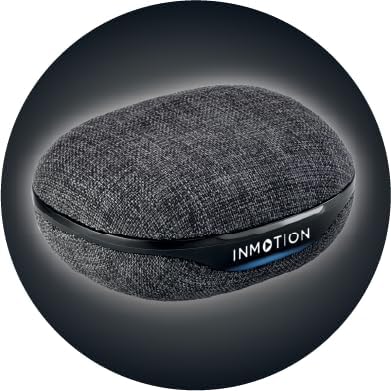
ചിത്രം: മുൻഭാഗം view of the InMotion ANC True Wireless Earbuds charging case, highlighting the charging port and indicator lights.
3.2 നിങ്ങളുടെ ഉപകരണവുമായി ജോടിയാക്കൽ (ഒറ്റ-ഘട്ട ജോടിയാക്കൽ)
The InMotion ANC True Wireless Earbuds feature one-step pairing for quick and easy connection.
- ഇയർബഡുകൾ ചാർജ് ചെയ്തിട്ടുണ്ടെന്നും ചാർജിംഗ് കെയ്സിനുള്ളിലാണെന്നും ഉറപ്പാക്കുക.
- ചാർജിംഗ് കെയ്സിന്റെ ലിഡ് തുറക്കുക. ഇയർബഡുകൾ സ്വയമേവ ജോടിയാക്കൽ മോഡിലേക്ക് പ്രവേശിക്കും.
- നിങ്ങളുടെ ഉപകരണത്തിൽ (സ്മാർട്ട്ഫോൺ, ടാബ്ലെറ്റ്, ലാപ്ടോപ്പ്), ബ്ലൂടൂത്ത് ക്രമീകരണങ്ങളിലേക്ക് പോയി ബ്ലൂടൂത്ത് ഓണാക്കുക.
- ഇതിനായി തിരയുക "InMotion ANC Earbuds" (or similar name) in the list of available devices.
- Select the earbuds to connect. Once connected, you will hear an audible confirmation, and the indicator lights on the earbuds may change.
ഉപകരണത്തിൽ ബ്ലൂടൂത്ത് പ്രവർത്തനക്ഷമമാക്കിയിട്ടുണ്ടെങ്കിൽ, കേസിൽ നിന്ന് നീക്കം ചെയ്യുമ്പോൾ ഇയർബഡുകൾ അവസാനമായി ജോടിയാക്കിയ ഉപകരണവുമായി യാന്ത്രികമായി വീണ്ടും കണക്റ്റുചെയ്യും.
4. പ്രവർത്തന നിർദ്ദേശങ്ങൾ
4.1 ടച്ച് നിയന്ത്രണങ്ങൾ
The earbuds are equipped with intuitive touch controls on each earbud. Specific functions may vary slightly by device, but common controls include:
- പ്ലേ/താൽക്കാലികമായി നിർത്തുക: ഇയർബഡുകളിൽ ഏതെങ്കിലുമൊന്നിൽ ഒറ്റ ടാപ്പ് ചെയ്യുക.
- അടുത്ത ട്രാക്ക്: വലതുവശത്തെ ഇയർബഡിൽ രണ്ടുതവണ ടാപ്പ് ചെയ്യുക.
- മുമ്പത്തെ ട്രാക്ക്: ഇടതുവശത്തെ ഇയർബഡിൽ രണ്ടുതവണ ടാപ്പ് ചെയ്യുക.
- ഉത്തരം/അവസാന കോൾ: ഇൻകമിംഗ് കോൾ വരുമ്പോൾ ഏത് ഇയർബഡിലും ഒറ്റ ടാപ്പ് ചെയ്യുക.
- കോൾ നിരസിക്കുക: ഇൻകമിംഗ് കോൾ വരുമ്പോൾ ഏതെങ്കിലും ഒരു ഇയർബഡിൽ അമർത്തിപ്പിടിക്കുക.
- വോയ്സ് അസിസ്റ്റന്റിനെ സജീവമാക്കുക: ഇയർബഡുകളിൽ ഏതെങ്കിലുമൊന്നിൽ മൂന്ന് തവണ ടാപ്പ് ചെയ്യുക.
- ANC/സുതാര്യത മോഡ് ടോഗിൾ ചെയ്യുക: Press and hold on either earbud (duration may vary, refer to specific product details if available).

ചിത്രം: വശം view of a single InMotion ANC True Wireless Earbud, illustrating its ergonomic design and the touch-sensitive area.
4.2 ആക്ടീവ് നോയ്സ് ക്യാൻസലിംഗ് (ANC)
The Active Noise Cancelling feature reduces ambient noise, allowing for a more immersive listening experience. To activate or deactivate ANC, use the designated touch control gesture (typically a press and hold). Some models may also feature a Transparency Mode, which allows you to hear your surroundings while still enjoying your audio.
5. പരിപാലനം
Proper maintenance ensures the longevity and performance of your InMotion ANC True Wireless Earbuds.
5.1 വൃത്തിയാക്കൽ
- മൃദുവായതും ഉണങ്ങിയതും ലിന്റ് രഹിതവുമായ ഒരു തുണി ഉപയോഗിച്ച് ഇയർബഡുകളും ചാർജിംഗ് കെയ്സും സൌമ്യമായി തുടയ്ക്കുക.
- അബ്രാസീവ് ക്ലീനറുകൾ, ആൽക്കഹോൾ, കെമിക്കൽ ലായകങ്ങൾ എന്നിവ ഉപയോഗിക്കരുത്.
- Carefully remove any earwax or debris from the ear tips and speaker mesh using a small, soft brush or cotton swab.
5.2 സംഭരണം
When not in use, store the earbuds in their charging case to protect them from dust, dirt, and damage. Store the case in a cool, dry place away from direct sunlight and extreme temperatures.

ചിത്രം: പിന്നിലേക്ക് view of the InMotion ANC True Wireless Earbuds charging case, showing its compact and portable design.
6. പ്രശ്നപരിഹാരം
നിങ്ങളുടെ ഇയർബഡുകളിൽ പ്രശ്നങ്ങൾ നേരിടുകയാണെങ്കിൽ, ഇനിപ്പറയുന്ന പരിഹാരങ്ങൾ പരീക്ഷിക്കുക:
| പ്രശ്നം | പരിഹാരം |
|---|---|
| ഇയർബഡുകൾ ജോടിയാക്കുന്നില്ല/കണക്റ്റ് ചെയ്യുന്നില്ല. |
|
| ഒന്നോ രണ്ടോ ഇയർബഡുകളിൽ നിന്ന് ശബ്ദമില്ല. |
|
| ചാർജിംഗ് കേസ് ചാർജ് ചെയ്യുന്നില്ല. |
|
| ANC ഫലപ്രദമായി പ്രവർത്തിക്കുന്നില്ല. |
|
7 സ്പെസിഫിക്കേഷനുകൾ
| ഫീച്ചർ | വിശദാംശങ്ങൾ |
|---|---|
| മോഡലിൻ്റെ പേര് | ANC ട്രൂ വയർലെസ് ഇയർബഡുകൾ |
| ശബ്ദ നിയന്ത്രണം | അഡാപ്റ്റീവ് നോയ്സ് റദ്ദാക്കൽ |
| കണക്റ്റിവിറ്റി ടെക്നോളജി | വയർലെസ് (ബ്ലൂടൂത്ത്) |
| ഉൾപ്പെടുത്തിയ ഘടകങ്ങൾ | ക്യാരി കേസ് ചാർജ് ചെയ്യുന്നു |
| അനുയോജ്യമായ ഉപകരണങ്ങൾ | ലാപ്ടോപ്പുകൾ, സ്മാർട്ട്ഫോൺ, ടാബ്ലെറ്റുകൾ |
| നിയന്ത്രണ രീതി | സ്പർശിക്കുക |
| ഓഡിയോ ഡ്രൈവർ തരം | ഡൈനാമിക് ഡ്രൈവർ |
| പ്രത്യേക ഫീച്ചർ | കോൾ ഉത്തരം നൽകുന്നു |
| നിർമ്മാതാവ് | ഇൻമോഷൻ |
| ഇനത്തിൻ്റെ ഭാരം | 3.2 ഔൺസ് |
| നിറം | കറുപ്പ് |
| ചെവി പ്ലേസ്മെൻ്റ് | ചെവിയിൽ |
| ഫോം ഫാക്ടർ | ചെവിയിൽ |
| പ്രതിരോധം | 16 ഓം |
| ബാറ്ററി ലൈഫ് (ഇയർബഡുകൾ) | 6 മണിക്കൂർ വരെ |
| ചാർജിംഗ് സമയം | Approx. 1.5 hours (for earbuds and case) |
8. വാറൻ്റിയും പിന്തുണയും
InMotion products are manufactured with high-quality standards. For warranty information and customer support, please refer to the warranty card included with your product or visit the official InMotion website. You can also contact InMotion customer service through their Amazon store page:
Visit the InMotion Store on Amazon
InMotion is committed to providing excellent customer service and support for their products.