ആമുഖം
This manual provides detailed instructions for the setup, operation, and maintenance of your Edifier S300 Hi-Fi Tabletop Speaker. Please read this manual thoroughly before using the product to ensure proper functionality and to maximize your listening experience. Keep this manual for future reference.

The Edifier S300 Hi-Fi Tabletop Speaker, showcasing its elegant black walnut finish and front grille.
പ്രധാനപ്പെട്ട സുരക്ഷാ നിർദ്ദേശങ്ങൾ
- ഈ നിർദ്ദേശങ്ങൾ ശ്രദ്ധാപൂർവ്വം വായിക്കുക.
- ഭാവി റഫറൻസിനായി ഈ നിർദ്ദേശങ്ങൾ സൂക്ഷിക്കുക.
- എല്ലാ മുന്നറിയിപ്പുകളും ശ്രദ്ധിക്കുക.
- എല്ലാ നിർദ്ദേശങ്ങളും പാലിക്കുക.
- വെള്ളത്തിനടുത്ത് ഈ ഉപകരണം ഉപയോഗിക്കരുത്.
- ഉണങ്ങിയ തുണി ഉപയോഗിച്ച് മാത്രം വൃത്തിയാക്കുക.
- വെന്റിലേഷൻ തുറസ്സുകളൊന്നും തടയരുത്. നിർമ്മാതാവിന്റെ നിർദ്ദേശങ്ങൾക്കനുസൃതമായി ഇൻസ്റ്റാൾ ചെയ്യുക.
- റേഡിയറുകൾ, ഹീറ്റ് രജിസ്റ്ററുകൾ, സ്റ്റൗകൾ, അല്ലെങ്കിൽ മറ്റ് ഉപകരണങ്ങൾ (ഉൾപ്പെടെ) പോലെയുള്ള താപ സ്രോതസ്സുകൾക്ക് സമീപം ഇൻസ്റ്റാൾ ചെയ്യരുത്. ampലൈഫയറുകൾ) ചൂട് ഉത്പാദിപ്പിക്കുന്നത്.
- പ്രത്യേകിച്ച് പ്ലഗുകൾ, കൺവീനിയൻസ് റെസെപ്റ്റക്കിളുകൾ, ഉപകരണത്തിൽ നിന്ന് പുറത്തുകടക്കുന്ന ഇടം എന്നിവയിൽ നടക്കുകയോ നുള്ളുകയോ ചെയ്യുന്നതിൽ നിന്ന് പവർ കോർഡ് സംരക്ഷിക്കുക.
- നിർമ്മാതാവ് വ്യക്തമാക്കിയ അറ്റാച്ച്മെൻ്റുകൾ/ആക്സസറികൾ മാത്രം ഉപയോഗിക്കുക.
- മിന്നൽ കൊടുങ്കാറ്റുകളുടെ സമയത്തോ ദീർഘനേരം ഉപയോഗിക്കാത്ത സമയത്തോ ഈ ഉപകരണം അൺപ്ലഗ് ചെയ്യുക.
- എല്ലാ സേവനങ്ങളും യോഗ്യതയുള്ള സേവന ഉദ്യോഗസ്ഥർക്ക് റഫർ ചെയ്യുക. പവർ സപ്ലൈ കോർഡ് അല്ലെങ്കിൽ പ്ലഗ് കേടാകുക, ദ്രാവകം ഒഴുകുകയോ ഉപകരണങ്ങൾ ഉപകരണത്തിലേക്ക് വീഴുകയോ ചെയ്യുക, ഉപകരണം മഴയോ ഈർപ്പമോ സമ്പർക്കം പുലർത്തുക, സാധാരണയായി പ്രവർത്തിക്കാത്തത് എന്നിങ്ങനെയുള്ള ഏതെങ്കിലും വിധത്തിൽ ഉപകരണത്തിന് കേടുപാടുകൾ സംഭവിക്കുമ്പോൾ സേവനം ആവശ്യമാണ്. , അല്ലെങ്കിൽ ഉപേക്ഷിച്ചു.
ബോക്സിൽ എന്താണുള്ളത്
അൺപാക്ക് ചെയ്യുമ്പോൾ, താഴെ പട്ടികപ്പെടുത്തിയിരിക്കുന്ന എല്ലാ ഇനങ്ങളും നിലവിലുണ്ടെന്നും നല്ല നിലയിലാണെന്നും ദയവായി പരിശോധിക്കുക:
- S300 Speaker × 1
- പവർ കേബിൾ × 1
- യുഎസ്ബി കേബിൾ × 1
- 3.5mm-to-3.5mm Audio Cable × 1
- വിദൂര നിയന്ത്രണം × 1
- AAA ബാറ്ററി × 2
- ദ്രുത ആരംഭ ഗൈഡ് × 1
- Important Safety Instructions × 1
ഒരു ഓവർview of all items included in the Edifier S300 package.
ഉൽപ്പന്നം കഴിഞ്ഞുview
ഫ്രണ്ട് പാനൽ നിയന്ത്രണങ്ങളും സൂചകങ്ങളും
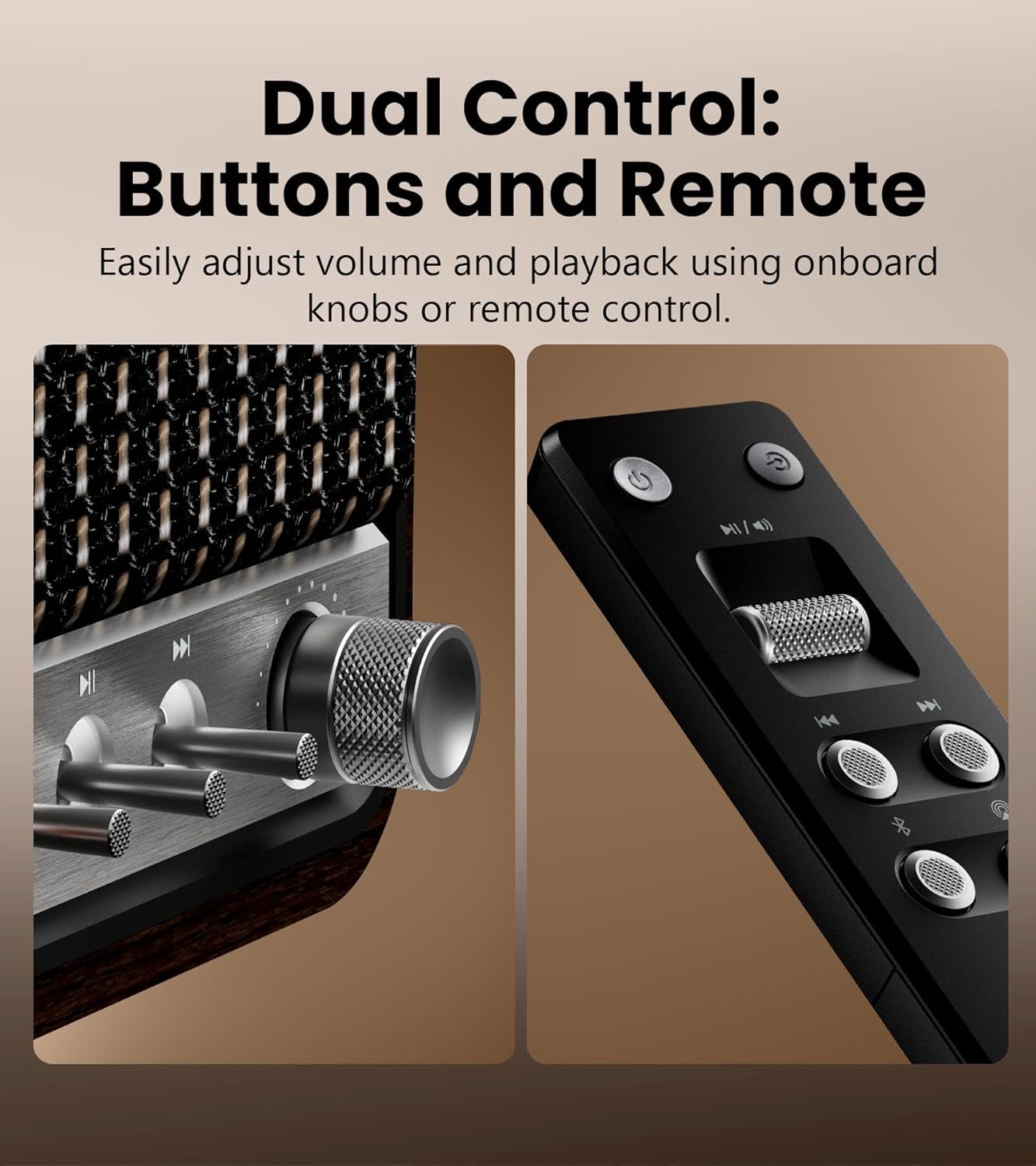
വിശദമായി view of the speaker's control knobs and the included remote control.
- Volume/Input Selector Knob: Rotate to adjust volume. Press to cycle through input sources (Bluetooth, AirPlay, USB-C, AUX).
- പ്ലേബാക്ക് നിയന്ത്രണങ്ങൾ: Buttons for Play/Pause, Previous Track, Next Track (functionality varies by input source).
- സ്റ്റാറ്റസ് ഇൻഡിക്കേറ്റർ ലൈറ്റ്: Displays current input mode and connection status.
പിൻ പാനൽ കണക്ഷനുകൾ

The rear panel of the Edifier S300, highlighting its various connectivity options.
- യുഎസ്ബി-സി ഇൻപുട്ട്: For connecting to computers or other USB-C audio sources.
- AUX ഇൻപുട്ട്: Standard 3.5mm audio jack for connecting to analog audio devices.
- പവർ ഇൻപുട്ട്: നൽകിയിരിക്കുന്ന വൈദ്യുതി കേബിൾ ഇവിടെ ബന്ധിപ്പിക്കുക.
സജ്ജമാക്കുക
സ്പീക്കർ പ്ലേസ്മെന്റ്
For optimal sound performance, place the Edifier S300 on a stable, flat surface. Ensure there is adequate space around the speaker for proper ventilation. Placing the speaker near a wall can enhance bass response, but avoid placing it directly in a corner, which might lead to boomy or unclear bass.

The dimensions of the Edifier S300 speaker, useful for placement planning.
പവർ കണക്ഷൻ
- Connect the power cable to the power input port on the rear of the speaker.
- പവർ കേബിളിന്റെ മറ്റേ അറ്റം ഒരു മതിൽ ഔട്ട്ലെറ്റിൽ പ്ലഗ് ചെയ്യുക.
- The speaker will power on automatically or can be turned on using the power button on the remote control.
പ്രവർത്തന നിർദ്ദേശങ്ങൾ
ഇൻപുട്ട് ഉറവിട തിരഞ്ഞെടുപ്പ്
The S300 supports multiple audio input sources. You can switch between them using the volume/input selector knob on the front panel or the dedicated input buttons on the remote control.
- ബ്ലൂടൂത്ത്: അനുയോജ്യമായ ഉപകരണങ്ങളിൽ നിന്നുള്ള വയർലെസ് ഓഡിയോ സ്ട്രീമിംഗിനായി.
- എയർപ്ലേ 2: For seamless multi-room audio and lossless streaming from Apple devices.
- യുഎസ്ബി-സി: For direct digital audio connection to computers or other USB-C sources.
- ഓക്സ്: For connecting traditional analog audio devices using a 3.5mm cable.
ബ്ലൂടൂത്ത് ജോടിയാക്കൽ

The Edifier S300 supports dual Bluetooth device pairing for convenient switching.
- Select Bluetooth input on the speaker. The status indicator will flash, indicating pairing mode.
- On your device (smartphone, tablet, computer), enable Bluetooth and search for "EDIFIER S300".
- Select "EDIFIER S300" to pair. Once connected, the indicator light will become solid.
- The S300 supports LDAC for high-resolution wireless audio on compatible Android 8.0+ devices.
- It also supports multi-device pairing, allowing two devices to be connected simultaneously.
AirPlay 2 Setup (for Apple Devices)

AirPlay 2 enables seamless multi-room audio and lossless streaming across your home.
- Ensure your S300 speaker is connected to the same Wi-Fi network as your Apple device.
- On your iOS device, open Control Center, tap the AirPlay icon, and select "EDIFIER S300".
- For multi-room audio, select multiple AirPlay 2 compatible speakers from the AirPlay menu.
- For stereo pairing, use the EDIFIER Home App to configure two S300 speakers as left and right channels.
Using the EDIFIER Home App
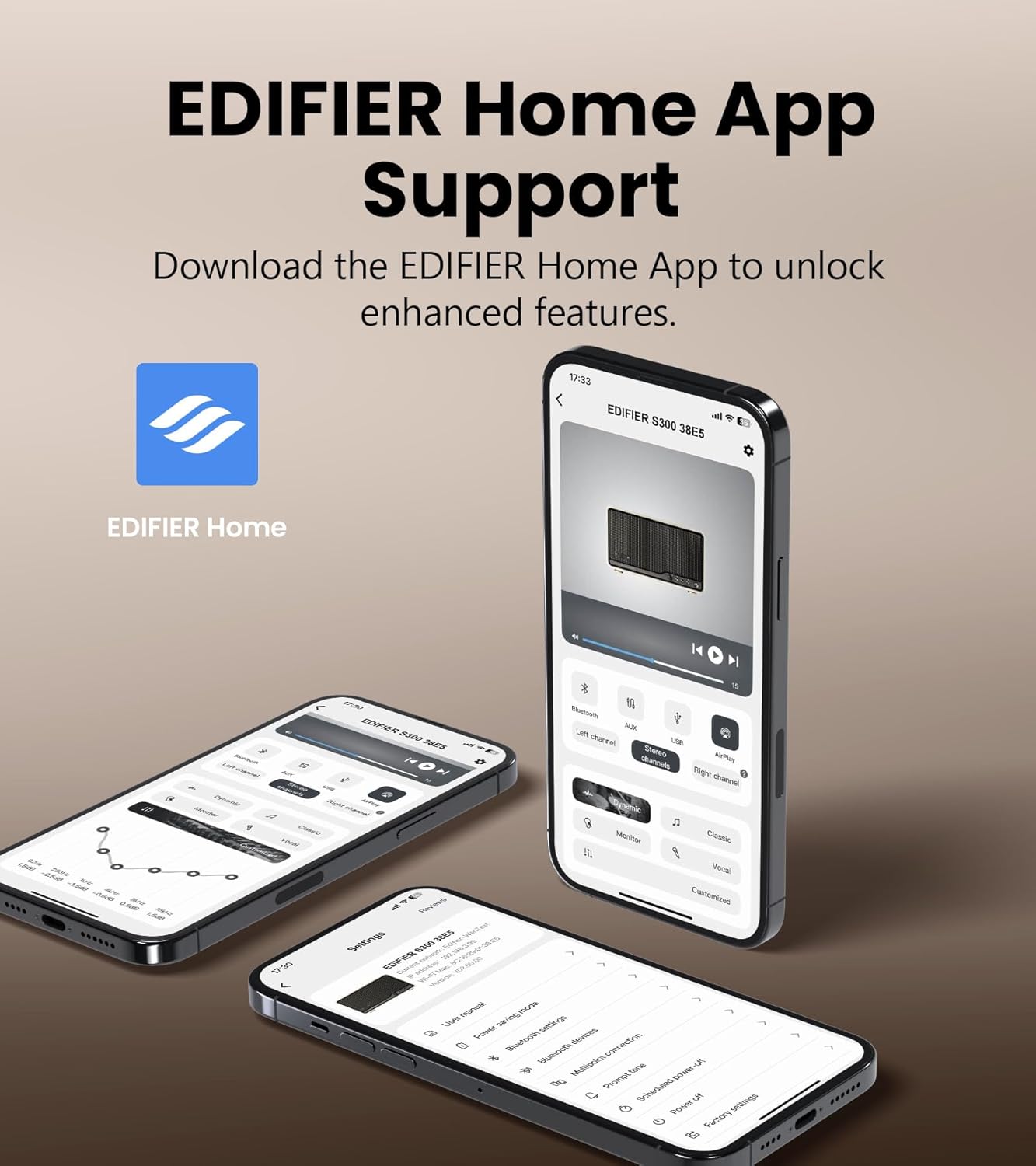
The EDIFIER Home App provides enhanced control and features for your S300 speaker.
Download the EDIFIER Home App from your device's app store to unlock enhanced features and control options for your S300 speaker. The app allows you to:
- Connect your speaker to a Wi-Fi network.
- Switch between input sources effortlessly.
- Control playback with ease.
- Customize sound effects to suit your preferences.
- Access the digital user manual anytime.
മെയിൻ്റനൻസ്
- വൃത്തിയാക്കൽ: Use a soft, dry cloth to clean the speaker's surface. Do not use liquid cleaners or aerosol sprays.
- വെൻ്റിലേഷൻ: അമിതമായി ചൂടാക്കുന്നത് തടയാൻ വെന്റിലേഷൻ ഓപ്പണിംഗുകൾ തടഞ്ഞിട്ടില്ലെന്ന് ഉറപ്പാക്കുക.
- സംഭരണം: If storing the speaker for an extended period, unplug it from the power outlet and store it in a cool, dry place.
ട്രബിൾഷൂട്ടിംഗ്
| പ്രശ്നം | സാധ്യമായ കാരണം | പരിഹാരം |
|---|---|---|
| ശബ്ദമില്ല | Power not connected; incorrect input source selected; volume too low. | Ensure power cable is securely plugged in. Select the correct input source. Increase volume. |
| ബ്ലൂടൂത്ത് കണക്ഷൻ പരാജയപ്പെടുന്നു | സ്പീക്കർ ജോടിയാക്കൽ മോഡിലല്ല; ഉപകരണം വളരെ അകലെയാണ്; ഇടപെടൽ. | Ensure speaker is in Bluetooth pairing mode. Move device closer to speaker. Avoid obstacles. Try re-pairing. |
| AirPlay 2 connection issues | Speaker and device on different Wi-Fi networks; network instability. | Verify both speaker and Apple device are on the same Wi-Fi network. Restart router and speaker. |
| വികലമായ ശബ്ദം | ശബ്ദം വളരെ കൂടുതലാണ്; ഓഡിയോ ഉറവിട നിലവാരം മോശമാണ്. | Reduce volume. Check audio source quality. |
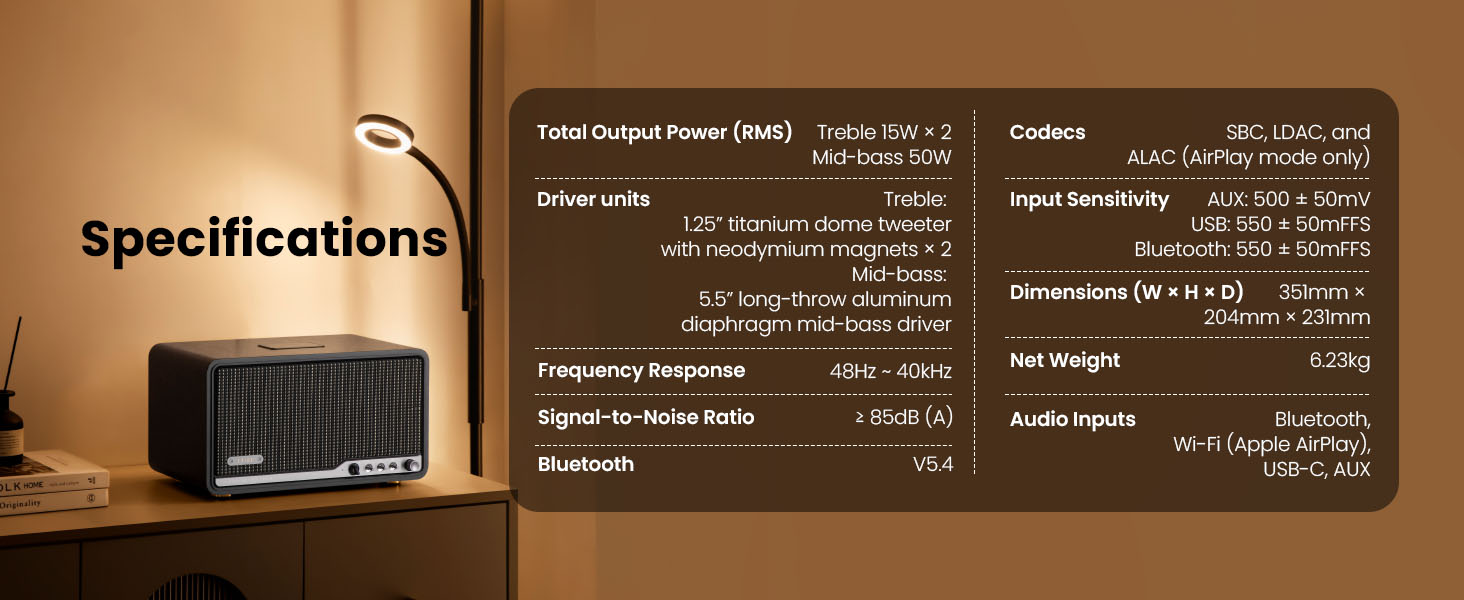
സ്പെസിഫിക്കേഷനുകൾ

Detailed technical specifications of the Edifier S300 speaker.
| ഫീച്ചർ | വിശദാംശങ്ങൾ |
|---|---|
| Total Output Power (RMS) | Treble 15W × 2, Mid-bass 50W |
| ഡ്രൈവർ യൂണിറ്റുകൾ | 1.25" titanium dome tweeter with neodymium magnets × 2, 5.5" long-throw aluminum diaphragm mid-bass driver |
| ഫ്രീക്വൻസി പ്രതികരണം | 48Hz ~ 40kHz |
| സിഗ്നൽ-ടു-നോയിസ് അനുപാതം | ≥ 85dB (A) |
| ബ്ലൂടൂത്ത് പതിപ്പ് | V5.4 |
| കോഡെക്കുകൾ | SBC, LDAC, and ALAC (AirPlay mode only) |
| ഇൻപുട്ട് സെൻസിറ്റിവിറ്റി | AUX: 500 ± 50mV, USB: 550 ± 50mFFS, Bluetooth: 550 ± 50mFFS |
| അളവുകൾ (W × H × D) | 351 മിമി × 204 മിമി × 231 മിമി (13.82" × 8.03" × 9.09") |
| മൊത്തം ഭാരം | 6.23 കിലോഗ്രാം (13.73 പൗണ്ട്) |
| ഓഡിയോ ഇൻപുട്ടുകൾ | Bluetooth, Wi-Fi (Apple AirPlay), USB-C, AUX |
വാറൻ്റിയും പിന്തുണയും
Edifier products are designed and manufactured to the highest quality standards. For information regarding warranty coverage, please refer to the warranty card included in your product packaging or visit the official Edifier webസൈറ്റ്.
For technical support, troubleshooting assistance, or service inquiries, please contact Edifier customer support through their official webസൈറ്റ് അല്ലെങ്കിൽ നിങ്ങളുടെ ഉൽപ്പന്ന ഡോക്യുമെന്റേഷനിൽ നൽകിയിരിക്കുന്ന ബന്ധപ്പെടാനുള്ള വിവരങ്ങൾ.
ഔദ്യോഗിക എഡിറ്റർ Webസൈറ്റ്: www.edifier.com