1. ആമുഖം
Thank you for choosing the Togo POWER A2000 Portable Power Station. This device is designed to provide reliable power for various applications, including emergency backup, outdoor activities, and home use. Please read this manual thoroughly before operating the unit to ensure safe and optimal performance. Keep this manual for future reference.
2. സുരക്ഷാ നിർദ്ദേശങ്ങൾ
യൂണിറ്റിന് പരിക്കുകളോ കേടുപാടുകളോ ഉണ്ടാകാതിരിക്കാൻ ഇനിപ്പറയുന്ന സുരക്ഷാ മുൻകരുതലുകൾ പാലിക്കുക:
- യൂണിറ്റ് ഡിസ്അസംബ്ലിംഗ്, റിപ്പയർ അല്ലെങ്കിൽ പരിഷ്ക്കരിക്കരുത്.
- Do not expose the unit to fire or extreme temperatures.
- വെള്ളവുമായോ മറ്റ് ദ്രാവകങ്ങളുമായോ സമ്പർക്കം ഒഴിവാക്കുക.
- കുട്ടികൾക്കും വളർത്തുമൃഗങ്ങൾക്കും ലഭ്യമാകാതെ സൂക്ഷിക്കുക.
- Use only approved accessories and charging cables.
- ഉപയോഗിക്കുമ്പോഴും ചാർജ് ചെയ്യുമ്പോഴും ശരിയായ വായുസഞ്ചാരം ഉറപ്പാക്കുക.
- വെൻ്റിലേഷൻ ഓപ്പണിംഗുകൾ തടയരുത്.
- If the unit emits smoke, odor, or unusual noise, discontinue use immediately and contact customer support.
3. പാക്കേജ് ഉള്ളടക്കം
എല്ലാ ഇനങ്ങളും നിങ്ങളുടെ പാക്കേജിൽ ഉൾപ്പെടുത്തിയിട്ടുണ്ടെന്ന് ഉറപ്പാക്കുക:
- 1x Togo POWER ADVANCE2000 Portable Power Station
- 1x എസി ചാർജിംഗ് കേബിൾ
- 1x Anderson to Car Charger Cable
- 1x ഉപയോക്തൃ മാനുവൽ
4. ഉൽപ്പന്നം കഴിഞ്ഞുview
The Togo POWER A2000 features a robust design with multiple input and output options. It includes a clear LCD display for monitoring status and integrated safety features.

ചിത്രം 4.1: ഫ്രണ്ട് view of the Togo POWER A2000 Portable Power Station, showing the LCD display, AC outlets, USB ports, and control buttons.
4.1 പ്രധാന സവിശേഷതകൾ
- ഉയർന്ന ശേഷി: 1799Wh LiFePO4 battery (44.4V/40.5Ah).
- ശക്തമായ ഔട്ട്പുട്ട്: 2000W AC output (4000W surge).
- ഒന്നിലധികം ഔട്ട്പുട്ട് പോർട്ടുകൾ: 3 AC outlets, 2 USB-C (Max 120W), 2 USB-A (Max 36W), 2 DC ports, 1 Cigarette Lighter Output.
- വയർലെസ് ചാർജിംഗ്: Built-in 10W wireless charging pad.
- LED ഫ്ലാഷ്ലൈറ്റ്: Integrated LED light with SOS mode.
- EPS Function: Uninterruptible Power Supply (EPS) mode with 10ms switchover time.
- ECO മോഡ്: Automatic power cut-off after 1 hour of no load to save energy.
- Advanced Battery Management System (BMS): മോണിറ്ററുകൾ വോളിയംtage, current, and temperature for protection.
- സമാന്തര കണക്ഷൻ: Supports connecting two units for increased capacity and output.

ചിത്രം 4.2: The Togo POWER A2000 powering various electronic devices simultaneously.

ചിത്രം 4.3: വിശദമായി view of the wireless charging pad, fast charging capability, SOS flashlight, and cooling vents.
5. സജ്ജീകരണം
5.1 പ്രാരംഭ ചാർജിംഗ്
Before first use, fully charge the Togo POWER A2000. Connect the provided AC charging cable to the AC input port on the power station and then to a wall outlet. The LCD display will show the charging status. A full charge typically takes approximately 1.5 hours.
5.2 എൽസിഡി ഡിസ്പ്ലേ മനസ്സിലാക്കൽ
എൽസിഡി സ്ക്രീൻ തത്സമയ വിവരങ്ങൾ നൽകുന്നു:
- ബാറ്ററി ലെവൽ ഇൻഡിക്കേറ്റർ
- കണക്കാക്കിയ ചാർജിംഗ് സമയം
- ഇൻപുട്ട്/ഔട്ട്പുട്ട് വാട്ട്tage
- Remaining Runtime
- താപനില അലേർട്ടുകൾ
- Low-Battery Warnings
6. പ്രവർത്തന നിർദ്ദേശങ്ങൾ
6.1 പവർ ഓൺ/ഓഫ്
Press and hold the main power button for a few seconds to turn the unit on or off. The LCD display will illuminate upon activation.
6.2 എസി ഔട്ട്ലെറ്റുകൾ ഉപയോഗിക്കുന്നത്
Press the AC power button to activate the AC outlets. Plug your devices into the 120V/60Hz AC ports. Ensure the total wattage of connected devices does not exceed 2000W (4000W surge).
6.3 Using DC and USB Ports
Press the DC power button to activate the DC and USB ports. Connect your devices to the appropriate USB-A, USB-C, DC, or Cigarette Lighter ports. The wireless charging pad is also activated with the DC power button.
6.4 LED Flashlight and SOS Mode
Press the LED light button to turn on the flashlight. Press again to cycle through brightness levels. To activate SOS mode, press and hold the LED light button for more than 3 seconds.
6.5 EPS (Emergency Power Supply) Mode
When the power station is connected to a main power supply and has devices plugged into its AC outlets, it can function as an EPS. In the event of a power outage, the unit will automatically switch to battery power within 10 milliseconds, providing an uninterrupted power supply to connected devices.

ചിത്രം 6.1: The EPS feature provides seamless power backup for essential appliances.
6.6 ECO മോഡ്
The ECO mode is designed to conserve energy. When activated, the unit will automatically shut down after 1 hour of no load (no devices drawing power). This prevents unnecessary battery drain. To disable ECO mode for continuous power to sensitive devices (e.g., CPAP machines, refrigerators), press the ECO button.

ചിത്രം 6.2: Explanation of ECO mode functionality.
6.7 സമാന്തര കണക്ഷൻ
The Togo POWER A2000 supports parallel connection, allowing two units to be linked together to double the capacity and output. Refer to the separate parallel connection cable manual for detailed instructions on how to set up this configuration.
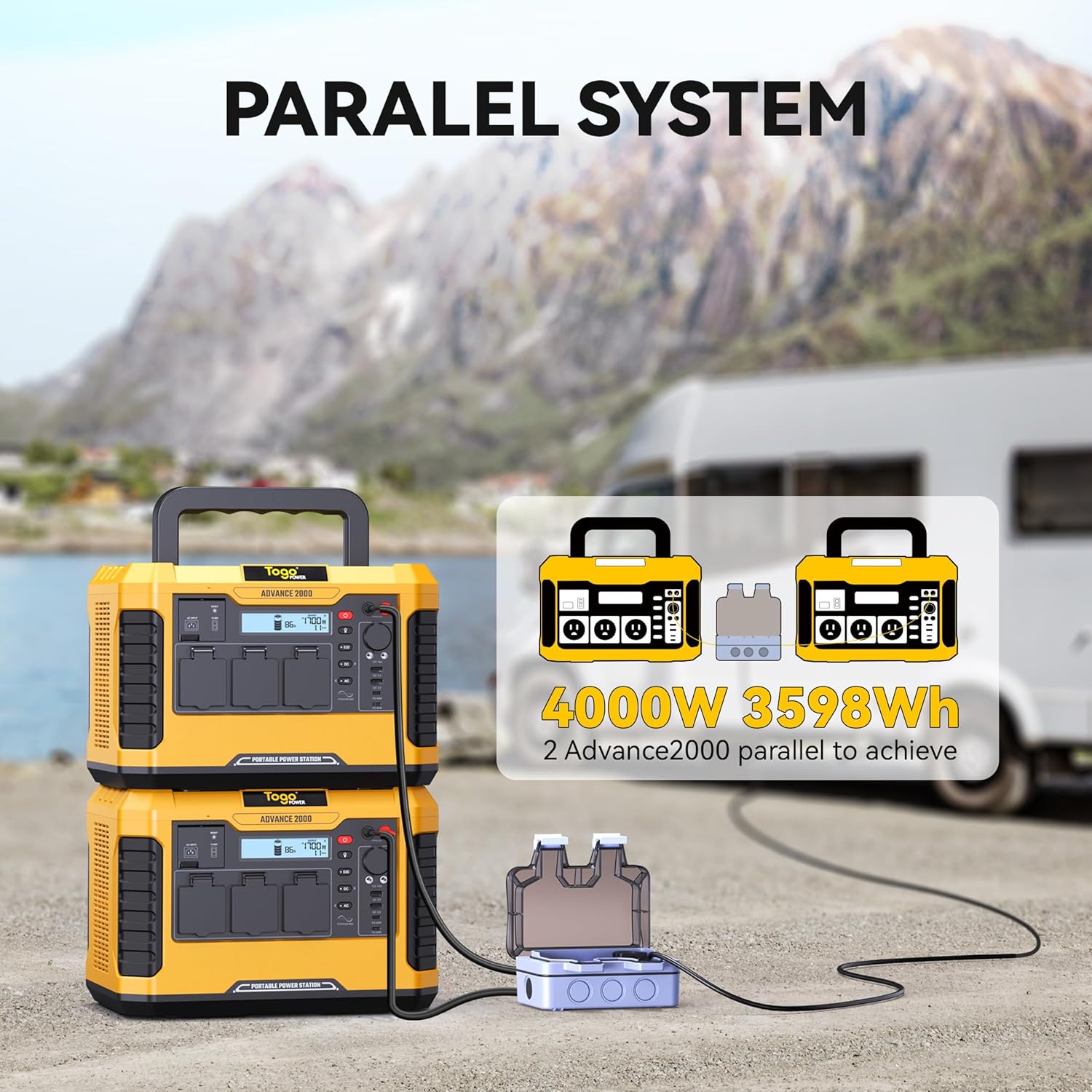
ചിത്രം 6.3: Two Togo POWER A2000 units connected in parallel.
7. ചാർജിംഗ് രീതികൾ
The Togo POWER A2000 can be charged using three primary methods:
- എസി വാൾ ചാർജർ: Connect the provided AC cable to a standard wall outlet. This method offers fast charging, reaching 100% in approximately 1.5 hours.
- കാർ ചാർജർ: Use the Anderson to Car Charger Cable to charge the unit from your vehicle's 12V car port.
- സോളാർ പാനൽ: Connect compatible solar panels (12-60V, 800W max) to the solar input port. The built-in MPPT controller optimizes solar charging efficiency.

ചിത്രം 7.1: Illustration of the three available charging methods: Car Charger, AC Charger, and Solar Charger.
8. പരിപാലനം
8.1 സംഭരണം
- Store the unit in a cool, dry place, away from direct sunlight and heat sources.
- For long-term storage, charge the unit to 50-80% every 3-6 months to prolong battery life.
8.2 വൃത്തിയാക്കൽ
- യൂണിറ്റിന്റെ പുറംഭാഗം വൃത്തിയാക്കാൻ ഉണങ്ങിയതും മൃദുവായതുമായ തുണി ഉപയോഗിക്കുക.
- ഉരച്ചിലുകളുള്ള ക്ലീനറുകളോ ലായകങ്ങളോ ഉപയോഗിക്കരുത്.
- Keep the ventilation openings free of dust and debris.
8.3 ബാറ്ററി കെയർ
The Togo POWER A2000 uses a LiFePO4 battery, known for its long cycle life. To maximize battery longevity, avoid fully discharging the unit frequently. Recharge promptly after use.
9. പ്രശ്നപരിഹാരം
If you encounter issues with your Togo POWER A2000, refer to the following common problems and solutions:
| പ്രശ്നം | സാധ്യമായ കാരണം | പരിഹാരം |
|---|---|---|
| യൂണിറ്റ് ഓണാക്കുന്നില്ല | ബാറ്ററി പൂർണ്ണമായും ഡിസ്ചാർജ് ചെയ്തു; പവർ ബട്ടൺ ശരിയായി അമർത്തിയിട്ടില്ല. | യൂണിറ്റ് ചാർജ് ചെയ്യുക; പവർ ബട്ടൺ കുറച്ച് സെക്കൻഡ് അമർത്തിപ്പിടിക്കുക. |
| എസി ഔട്ട്ലെറ്റുകൾ പ്രവർത്തിക്കുന്നില്ല | AC output not enabled; Overload protection activated; Device wattage exceeds limit. | Press the AC power button; Reduce the load; Check device wattage. |
| യൂണിറ്റ് ചാർജ് ചെയ്യുന്നില്ല | Charging cable not connected properly; Charger malfunction; Input source issue. | Ensure cables are securely connected; Try a different charging method/outlet; Contact support if charger is faulty. |
| LCD display shows error code/warning | Over-temperature, low battery, or other system alerts. | Refer to the specific error code in the full manual (if available) or contact customer support. Allow unit to cool down if temperature warning. |
If the problem persists after attempting these solutions, please contact Togo POWER customer support.
10 സ്പെസിഫിക്കേഷനുകൾ
| സ്പെസിഫിക്കേഷൻ | വിശദാംശങ്ങൾ |
|---|---|
| ബ്രാൻഡ് | ടോഗോ പവർ |
| മോഡൽ | അഡ്വാൻസ്2000 |
| ബാറ്ററി തരം | ലൈഫെപിഒ4 |
| ശേഷി | 1799Wh |
| എസി ഔട്ട്പുട്ട് | 2000W (4000W Peak), 120V/60Hz |
| USB-C ഔട്ട്പുട്ട് | 2 ports, Max 120W total |
| യുഎസ്ബി-എ put ട്ട്പുട്ട് | 2 ports, Max 36W total |
| ഡിസി put ട്ട്പുട്ട് | 2 തുറമുഖങ്ങൾ |
| സിഗരറ്റ് ലൈറ്റർ put ട്ട്പുട്ട് | 1 പോർട്ട് |
| വയർലെസ് ചാർജിംഗ് | 10W |
| എസി ഇൻപുട്ട് | 100-240V |
| സോളാർ ഇൻപുട്ട് | 12-60V, 800W പരമാവധി |
| അളവുകൾ (L x W x H) | 13.78" x 10.43" x 9.45" |
| ഭാരം | 31.1 പൗണ്ട് (14.1 കി.ഗ്രാം) |
| പ്രത്യേക സവിശേഷതകൾ | Digital Display, Lightweight, Overload Protection, Portable, Super Quiet, EPS, ECO Mode |
11. വാറൻ്റിയും പിന്തുണയും
Togo POWER offers a 24-month worry-free assurance for the ADVANCE2000 Portable Power Station, along with friendly lifetime customer support.
11.1 ബന്ധപ്പെടാനുള്ള വിവരങ്ങൾ
For technical assistance, warranty claims, or general inquiries, please contact Togo POWER customer support through the official website or your purchase platform. Please have your model number (ADVANCE2000) and purchase date available when contacting support.


