1. ആമുഖം
The Ulefone Armor 33 is a robust and versatile rugged smartphone designed for demanding environments. It features a large 25500mAh battery, a 6.95-inch 120Hz FHD+ display, and runs on Android 15. Equipped with advanced camera systems including a 64MP night vision camera, a powerful 118dB speaker, and a versatile LED light, this device is built to withstand harsh conditions while providing comprehensive functionality. Its IP68/IP69K and MIL-STD-810H certifications ensure durability against water, dust, and drops.
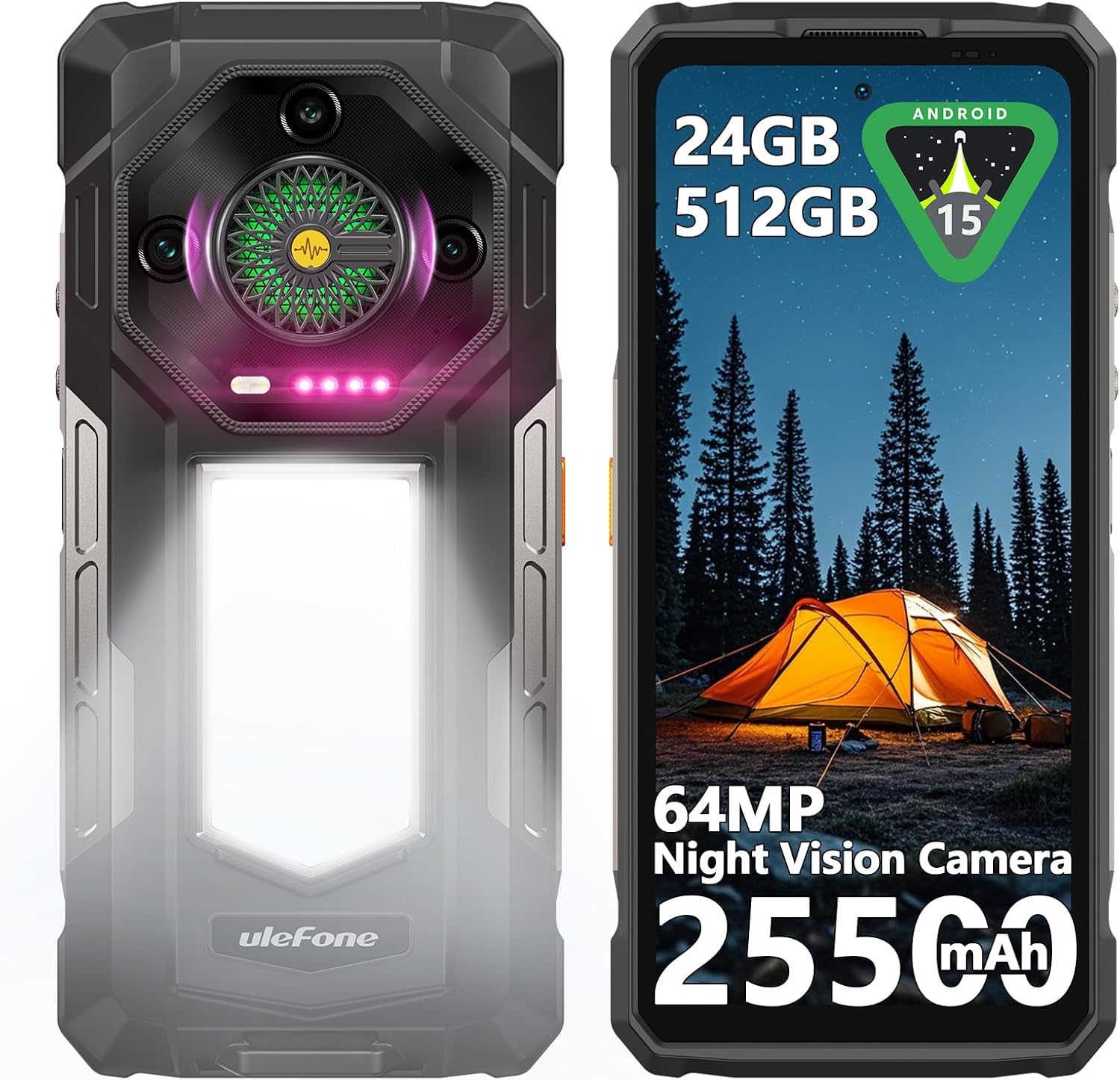
Figure 1: Ulefone Armor 33 Rugged Phone Overview
2. ബോക്സിൽ എന്താണുള്ളത്?
Please verify that all items are present upon unboxing your Ulefone Armor 33:
- Ulefone Armor 33 Smartphone
- AC Power Charger (100~240V)
- Type-C to Type-C Data Cable (100cm)
- സ്ക്രീൻ പ്രൊട്ടക്ടർ (മുമ്പ് പ്രയോഗിച്ചതോ ബോക്സിൽ ഉള്ളതോ)
- സിം ട്രേ എജക്ടർ
- ലാനിയാർഡ്
- ഉപയോക്തൃ മാനുവൽ (ഈ പ്രമാണം)
3. സജ്ജീകരണം
3.1. സിം കാർഡും മൈക്രോ എസ്ഡി കാർഡും ഇൻസ്റ്റാൾ ചെയ്യൽ
- ഉപകരണത്തിന്റെ വശത്ത് സിം കാർഡ് ട്രേ കണ്ടെത്തുക.
- ട്രേയുടെ അടുത്തുള്ള ചെറിയ ദ്വാരത്തിലേക്ക് സിം ട്രേ എജക്റ്റർ ടൂൾ തിരുകുക, ട്രേ പുറത്തേക്ക് വരുന്നത് വരെ ദൃഢമായി അമർത്തുക.
- Place your Nano-SIM cards and/or MicroSD card into the designated slots on the tray. Ensure the gold contacts are facing down. The phone supports 2 Nano-SIM cards and 1 MicroSD card simultaneously.
- ട്രേ അതിന്റെ സ്ഥാനത്ത് ക്ലിക്കായി വരുന്നത് വരെ ശ്രദ്ധാപൂർവ്വം ഫോണിലേക്ക് വീണ്ടും തിരുകുക.
3.2. പ്രാരംഭ ചാർജിംഗ്
Before first use, it is recommended to fully charge your Ulefone Armor 33.
- Connect the Type-C data cable to the charging port at the bottom of the phone.
- Connect the other end of the cable to the provided 66W AC power charger.
- Plug the charger into a power outlet. The phone supports 66W fast charging.
- The charging indicator will appear on the screen. Allow the phone to charge until it reaches 100% for optimal battery calibration.

Figure 2: Charging the Ulefone Armor 33
3.3. പവർ ഓൺ/ഓഫ്
- പവർ ഓണാക്കാൻ: Press and hold the Power button (located on the right side) until the Ulefone logo appears.
- പവർ ഓഫ് ചെയ്യാൻ: പവർ ബട്ടൺ അമർത്തിപ്പിടിക്കുക, തുടർന്ന് സ്ക്രീനിലെ ഓപ്ഷനുകളിൽ നിന്ന് 'പവർ ഓഫ്' തിരഞ്ഞെടുക്കുക.
- പുനരാരംഭിക്കാൻ: Press and hold the Power button, then select 'Restart' from the options on the screen.
4. പ്രവർത്തന നിർദ്ദേശങ്ങൾ
4.1. ഡിസ്പ്ലേയും നാവിഗേഷനും
The Ulefone Armor 33 features a 6.95-inch FHD+ display with a 120Hz refresh rate, protected by Corning Gorilla Glass 5. Navigate the Android 15 operating system using touch gestures.

Figure 3: Android 15 Interface on Armor 33
4.2. ബാറ്ററി മാനേജ്മെന്റ്
With its 25500mAh battery, the Armor 33 offers extended usage. In addition to 66W fast charging, it supports 10W reverse charging, allowing you to use your phone as a power bank for other devices.
- To enable Reverse Charging: Connect a compatible device to your Armor 33 using a Type-C cable. The phone will prompt you to select the charging mode.
4.3. ക്യാമറ സവിശേഷതകൾ
ആർമർ 33-ൽ വൈവിധ്യമാർന്ന ക്യാമറ സിസ്റ്റം സജ്ജീകരിച്ചിരിക്കുന്നു:
- പ്രധാന ക്യാമറ: ഉയർന്ന റെസല്യൂഷനുള്ള ഫോട്ടോകൾക്ക് 50MP.
- അൾട്രാ-വൈഡ് ക്യാമറ: വിശാലമായ ലാൻഡ്സ്കേപ്പ് ഷോട്ടുകൾക്ക് 50MP.
- Night Vision Camera: 64MP infrared camera for clear images in low-light or complete darkness.
- മുൻ ക്യാമറ: സെൽഫികൾക്കും വീഡിയോ കോളുകൾക്കും 32MP.
- Physical Camera Key: A dedicated button for quick camera access. Long press to launch the camera app, short press to capture a photo.

Figure 4: Ulefone Armor 33 Camera System
4.4. Versatile LED Light and Warning Light
The integrated LED light provides 1100 Lumens for various lighting needs, including maintenance, camping, hiking, and emergency situations. The Warning Light offers critical alerts.
- LED ലൈറ്റ് സജീവമാക്കുന്നു: Access the 'Camping Light' app or use the customizable key if configured. Adjust brightness and mode (Lighting, Sharp Light, SOS, AlwaysLighting).
- Activating Warning Light: Use the dedicated app or customizable key. It features 44 LED beads for high brightness and various modes (One-touch Emergency Alert, Constant Mode, Blink Mode).

Figure 5: Versatile LED Light and Warning Light in Use
വീഡിയോ 1: കഴിഞ്ഞുview of Ulefone Armor 33 features, including battery, speaker, camera, and LED light functionality.
Video 2: Demonstration of the Ulefone Armor 33's versatile LED and warning light features in practical scenarios.
4.5. 118dB Speaker and Infinite Halo 2.0
Experience powerful audio with the 118dB HiFi quality speaker. The Infinite Halo 2.0 provides dynamic lighting effects that respond to music, calls, notifications, and charging status.
4.6. uSmart എക്സ്പാൻഷൻ കണക്റ്റർ
The custom uSmart Expansion Connector allows for integration with professional accessories such as endoscopes, magnifiers, and night vision cameras. Compatible accessories include Ulefone uSmart E01/E02/E03 endoscopes and uSmart C01 microscope.
4.7. Google Gemini AI
The Armor 33 is equipped with Google Gemini AI, offering personalized assistance, streamlined tasks, and efficient voice interaction tailored to your preferences.

Figure 6: Google Gemini AI on Armor 33
4.8. മറ്റ് സവിശേഷതകൾ
- കണക്റ്റിവിറ്റി: NFC, GPS+GLONASS+Beidou+Galileo+QZSS, 4G.
- സുരക്ഷ: Fingerprint recognition, Face unlock.
- യൂട്ടിലിറ്റികൾ: Customizable key, IR transmitter, FM radio, 3.5mm audio jack, Digital toolbox.
5. പരിപാലനം
To ensure the longevity and optimal performance of your Ulefone Armor 33, follow these maintenance guidelines:
- വൃത്തിയാക്കൽ: ഒരു സോഫ്റ്റ്, ഡി ക്ലീനർ ഉപയോഗിച്ച് ഫോൺ തുടയ്ക്കുക.amp cloth. Avoid using harsh chemicals or abrasive materials. Ensure all port covers are securely closed before cleaning with water.
- വെള്ളവും പൊടിയും പ്രതിരോധം: The phone is IP68/IP69K rated. Ensure all port covers are tightly sealed before exposing the phone to water or dusty environments. Do not intentionally submerge the phone in corrosive liquids.
- താപനില: Avoid exposing the phone to extreme temperatures (below -30°C or above 55°C) as this can affect battery life and performance.
- ആഘാത സംരക്ഷണം: While rugged, avoid unnecessary drops or impacts. The MIL-STD-810H certification provides enhanced durability, but extreme force can still cause damage.
- സോഫ്റ്റ്വെയർ അപ്ഡേറ്റുകൾ: നിങ്ങളുടെ ഉപകരണത്തിന് ഏറ്റവും പുതിയ സുരക്ഷാ പാച്ചുകളും പ്രകടന മെച്ചപ്പെടുത്തലുകളും ഉണ്ടെന്ന് ഉറപ്പാക്കാൻ സിസ്റ്റം അപ്ഡേറ്റുകൾ പതിവായി പരിശോധിച്ച് ഇൻസ്റ്റാൾ ചെയ്യുക.

Figure 7: Ulefone Armor 33 Ruggedness
6. പ്രശ്നപരിഹാരം
If you encounter issues with your Ulefone Armor 33, refer to the following common solutions:
- ഫോൺ ഓണാക്കുന്നില്ല: ബാറ്ററി ചാർജ്ജ് ചെയ്തിട്ടുണ്ടെന്ന് ഉറപ്പാക്കുക. ഫോൺ ചാർജറുമായി ബന്ധിപ്പിച്ച് വീണ്ടും പവർ ചെയ്യാൻ ശ്രമിക്കുന്നതിന് മുമ്പ് കുറച്ച് മിനിറ്റ് കാത്തിരിക്കുക.
- Screen freezing or unresponsiveness: Press and hold the Power button for about 10-15 seconds to force a restart. If the issue persists, try clearing the cache of recently installed apps or performing a factory reset (back up your data first).
- Call issues (unable to complete calls): Check your SIM card installation and network signal. Ensure your mobile data is active if making Wi-Fi calls. Contact your carrier to verify service status.
- Keyboard not responding properly: Restart the phone. If the issue continues, try clearing the cache and data of your keyboard app (Settings > Apps > Keyboard App > Storage > Clear Cache/Data).
- Apps not receiving messages until opened: Check app notification settings (Settings > Apps > [App Name] > Notifications) and ensure battery optimization is not restricting background activity for essential apps.
- Cool Buddy AI dog on desktop: To disable the AI Pet app, open the 'AI Pet' app, go to settings, and turn off 'Cool pet on desktop' and 'Cool pet floating ball'.
7 സ്പെസിഫിക്കേഷനുകൾ
| ഫീച്ചർ | വിശദാംശങ്ങൾ |
|---|---|
| മോഡലിൻ്റെ പേര് | Ulefone Armor 33 4G |
| ഓപ്പറേറ്റിംഗ് സിസ്റ്റം | ആൻഡ്രോയിഡ് 15 |
| സ്ക്രീൻ വലിപ്പം | 6.95 ഇഞ്ച് |
| റെസലൂഷൻ | 2460x1080 FHD+ |
| സിപിയു മോഡൽ | മീഡിയടെക് ഹീലിയോ G100 |
| റാം | 12GB (up to 24GB with extended RAM) |
| സംഭരണ ശേഷി | 512GB (മൈക്രോ എസ്ഡി വഴി 2TB വരെ വികസിപ്പിക്കാവുന്നതാണ്) |
| ബാറ്ററി ശേഷി | 25500 mAh |
| ഫാസ്റ്റ് ചാർജിംഗ് | 66W |
| റിവേഴ്സ് ചാർജിംഗ് | 10W |
| പ്രധാന ക്യാമറ | 50എംപി |
| അൾട്രാ-വൈഡ് ക്യാമറ | 50എംപി |
| നൈറ്റ് വിഷൻ ക്യാമറ | 64എംപി |
| മുൻ ക്യാമറ | 32എംപി |
| പരുഷത | IP68/IP69K, MIL-STD-810H സർട്ടിഫൈഡ് |
| കണക്റ്റിവിറ്റി | 4G, GPS, GLONASS, Beidou, Galileo, QZSS, NFC |
| പ്രത്യേക സവിശേഷതകൾ | Versatile LED & Warning Light (1100 Lumens), 118dB Speaker, Infinite Halo 2.0, uSmart Expansion Connector, Google Gemini AI, Fingerprint Recognition, Face Unlock, Customizable Key, IR Transmitter, FM Radio, 3.5mm Jack, Digital Toolbox |
| അളവുകൾ | 8.19 x 4.29 x 3.62 ഇഞ്ച് (പാക്കേജ്) |
| ഇനത്തിൻ്റെ ഭാരം | 2.68 പൗണ്ട് |
8. വാറൻ്റിയും പിന്തുണയും
The Ulefone Armor 33 comes with a standard manufacturer's warranty. For specific warranty details, please refer to the warranty card included in your product packaging or visit the official Ulefone webസൈറ്റ്.
For technical support, FAQs, and further assistance, you can utilize the built-in service center app on your device. Alternatively, contact Ulefone customer support through their official channels.


