ആമുഖം
This manual provides comprehensive instructions for the Black Shark S3 Smartwatch. It covers setup, operation, maintenance, and troubleshooting to ensure optimal use of your device. The Black Shark S3 features a 1.43-inch AMOLED display, magnetic strap, Bluetooth calling, over 150 sport modes, built-in GPS, and extensive health monitoring capabilities.
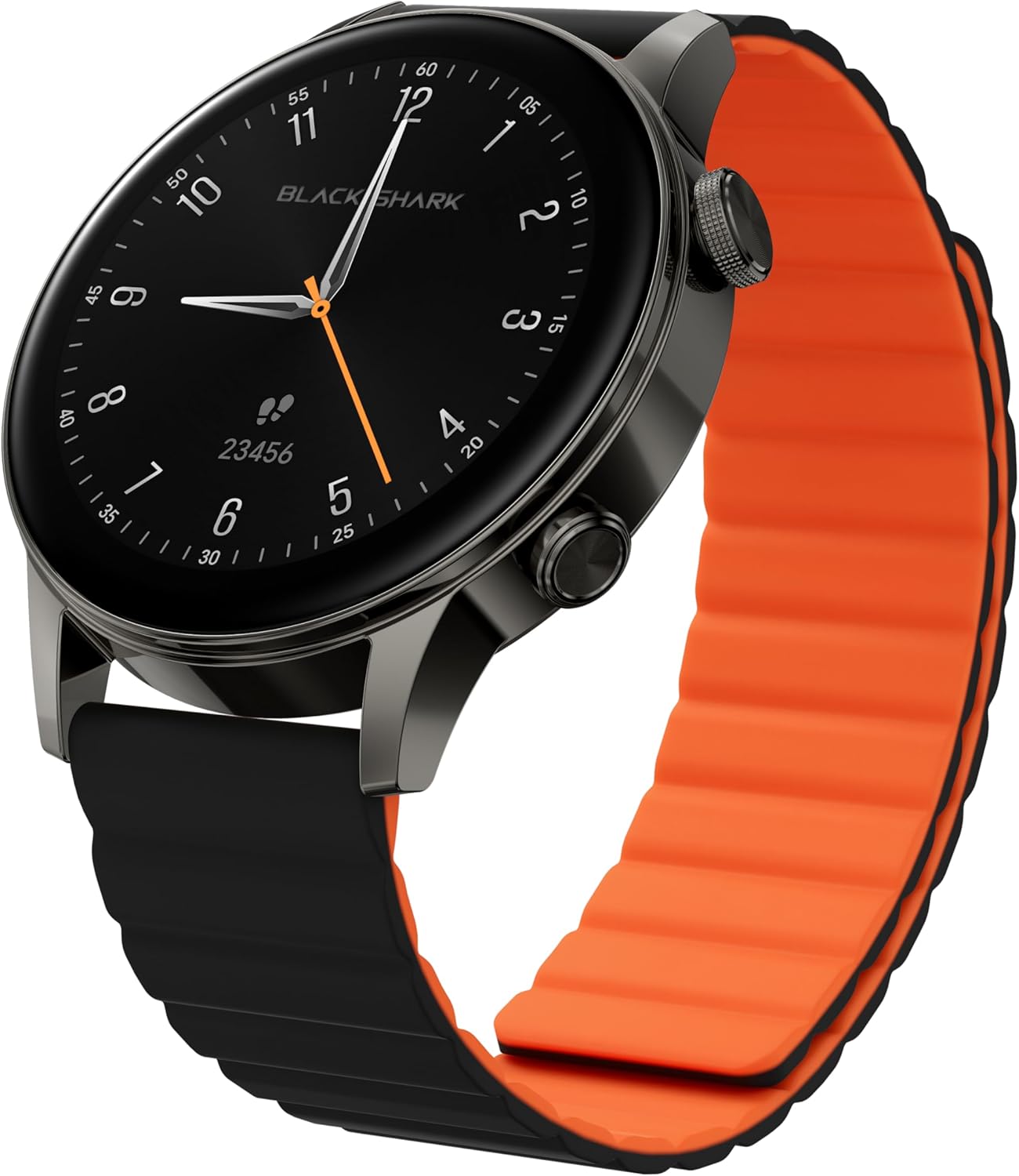
Image: Black Shark S3 Smartwatch, showcasing its round display and distinctive black and orange magnetic strap.
1. സജ്ജീകരണ ഗൈഡ്
1.1 അൺബോക്സിംഗും പ്രാരംഭ പരിശോധനയും
പാക്കേജിംഗിൽ നിന്ന് എല്ലാ ഘടകങ്ങളും ശ്രദ്ധാപൂർവ്വം നീക്കം ചെയ്യുക. ഇനിപ്പറയുന്ന ഇനങ്ങൾ ഉണ്ടെന്ന് ഉറപ്പാക്കുക:
- Black Shark S3 Smartwatch
- മാഗ്നെറ്റിക് ചാർജിംഗ് കേബിൾ
- ഉപയോക്തൃ മാനുവൽ (ഈ പ്രമാണം)
Inspect the smartwatch for any visible damage before proceeding.
1.2 സ്മാർട്ട് വാച്ച് ചാർജ് ചെയ്യുന്നു
Before first use, fully charge the Black Shark S3. Connect the magnetic charging cable to the charging contacts on the back of the watch and to a standard USB power adapter (not included).
- Align the magnetic end of the charging cable with the charging points on the back of the watch. The magnets will secure it in place.
- കേബിളിൻ്റെ USB-A അവസാനം ഒരു പവർ സ്രോതസ്സിലേക്ക് ബന്ധിപ്പിക്കുക.
- വാച്ച് ഡിസ്പ്ലേ ചാർജിംഗ് നില സൂചിപ്പിക്കും. പൂർണ്ണമായി ചാർജ് ചെയ്യാൻ സാധാരണയായി ഏകദേശം 2.5 മണിക്കൂർ എടുക്കും.

Image: The Black Shark S3 Smartwatch screen showing battery life indicators, illustrating the device's long battery performance.
1.3 Attaching the Magnetic Strap
The Black Shark S3 features a double-sided magnetic silicone strap for easy attachment and removal.
- Simply wrap the strap around your wrist.
- The magnetic ends will automatically connect and secure the watch.
- Adjust the strap for a comfortable and secure fit.

Image: A visual representation of the Black Shark S3's magnetic strap effortlessly securing around a wrist, highlighting its ease of use.
1.4 നിങ്ങളുടെ സ്മാർട്ട്ഫോണുമായി ജോടിയാക്കൽ
To unlock the full functionality of your Black Shark S3, pair it with the companion app on your smartphone.
- Download the official Black Shark Health App from your smartphone's app store (iOS App Store or Google Play Store).
- നിങ്ങളുടെ സ്മാർട്ട്ഫോണിൽ ബ്ലൂടൂത്ത് പ്രവർത്തനക്ഷമമാക്കിയിട്ടുണ്ടെന്ന് ഉറപ്പാക്കുക.
- Open the Black Shark Health App and follow the on-screen instructions to create an account or log in.
- ആപ്പിനുള്ളിൽ "ഉപകരണം ചേർക്കുക" അല്ലെങ്കിൽ സമാനമായ ഒരു ഓപ്ഷൻ തിരഞ്ഞെടുക്കുക.
- Choose "Black Shark S3" from the list of available devices.
- നിങ്ങളുടെ സ്മാർട്ട്ഫോണിലും സ്മാർട്ട് വാച്ചിലും പെയറിംഗ് അഭ്യർത്ഥന സ്ഥിരീകരിക്കുക.
- Once paired, the app will synchronize data and allow for further customization.
2. പ്രവർത്തന നിർദ്ദേശങ്ങൾ
2.1 അടിസ്ഥാന നാവിഗേഷൻ
The Black Shark S3 features a responsive 1.43-inch AMOLED touchscreen and two physical buttons for navigation.
- ടച്ച് സ്ക്രീൻ: മെനുകൾ, അറിയിപ്പുകൾ, വിജറ്റുകൾ എന്നിവയിലൂടെ നാവിഗേറ്റ് ചെയ്യാൻ ഇടത്തോട്ടോ വലത്തോട്ടോ മുകളിലോട്ടോ താഴോട്ടോ സ്വൈപ്പ് ചെയ്യുക. ഇനങ്ങൾ തിരഞ്ഞെടുക്കാൻ ടാപ്പ് ചെയ്യുക.
- Top Button (Crown): Press to return to the home screen or access the app list. Rotate to scroll through menus and lists.
- താഴെയുള്ള ബട്ടൺ: Customizable shortcut button, typically used for quick access to sport modes or a frequently used feature.

ചിത്രം: വിശദമായ ഒരു ചിത്രം view of the Black Shark S3's smart crown, highlighting its finely engraved pattern and functionality for precise control and navigation.
2.2 വാച്ച് ഫെയ്സുകൾ ഇഷ്ടാനുസൃതമാക്കൽ
Personalize your smartwatch with a variety of watch faces available through the Black Shark Health App.
- On the watch, long-press the current watch face to enter the watch face selection menu. Swipe left or right to browse pre-installed faces.
- For more options, open the Black Shark Health App on your smartphone, navigate to the watch face store, and download new designs.

Image: A selection of multifunctional watch faces available for the Black Shark S3, demonstrating customization options.
2.3 ബ്ലൂടൂത്ത് കോളിംഗ്
The S3 supports Bluetooth calls with ENC noise reduction, allowing you to make and receive calls directly from your wrist.
- നിങ്ങളുടെ വാച്ച് ബ്ലൂടൂത്ത് വഴി സ്മാർട്ട്ഫോണുമായി ബന്ധിപ്പിച്ചിട്ടുണ്ടെന്ന് ഉറപ്പാക്കുക.
- When a call comes in, you can answer or reject it directly on the watch screen.
- To make a call, access the call function from the watch's app list and select a contact or dial a number.
- The built-in speaker and microphone facilitate clear communication.

Image: A user making a call with the Black Shark S3 smartwatch, illustrating the convenience of its Bluetooth calling feature with noise reduction.
2.4 സ്പോർട്സ് മോഡുകളും ജിപിഎസും
The Black Shark S3 offers over 150 sport modes and built-in GPS for accurate activity tracking.
- Access the "Workout" or "Sport Modes" app on your watch.
- നിങ്ങൾക്ക് ആവശ്യമുള്ള പ്രവർത്തനം തിരഞ്ഞെടുക്കുക (ഉദാ: ഓട്ടം, സൈക്ലിംഗ്, നീന്തൽ).
- For outdoor activities, the built-in GPS will automatically activate to track your route, distance, and pace.
- Review your workout data on the watch or in the Black Shark Health App after completion.
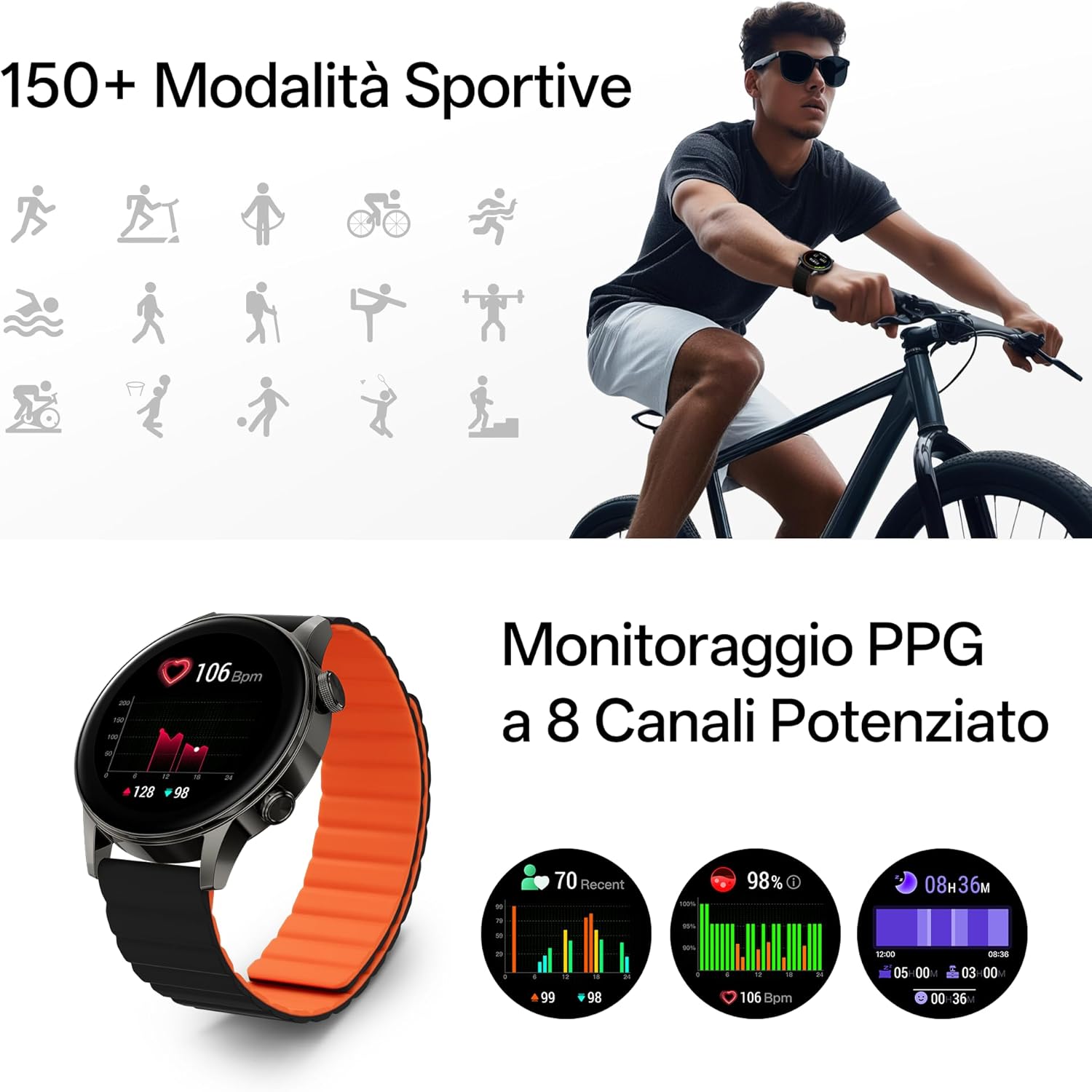
Image: The Black Shark S3 smartwatch showing various sport mode icons and detailed PPG health monitoring data, including heart rate and blood oxygen levels.

Image: The Black Shark S3 smartwatch screen showing GPS tracking with icons representing various satellite positioning systems (BeiDou, GPS, Galileo, QZSS, GLONASS).
2.5 ആരോഗ്യ നിരീക്ഷണം
The S3 provides 24/7 health monitoring for heart rate, blood oxygen (SpO₂), stress, steps, calories, and distance, along with advanced sleep tracking.
- ഹൃദയമിടിപ്പ്: വാച്ച് നിങ്ങളുടെ ഹൃദയമിടിപ്പ് തുടർച്ചയായി നിരീക്ഷിക്കുന്നു. View വാച്ചിലെ തത്സമയ ഡാറ്റ അല്ലെങ്കിൽ ആപ്പിലെ വിശദമായ ട്രെൻഡുകൾ.
- Blood Oxygen (SpO₂): നിങ്ങളുടെ രക്തത്തിലെ ഓക്സിജൻ സാച്ചുറേഷൻ അളവ് അളക്കുക.
- ഉറക്ക ട്രാക്കിംഗ്: Wear the watch to bed for analysis of your sleep stages (deep, light, REM) and overall sleep quality.
- സ്ട്രെസ് മോണിറ്ററിംഗ്: The watch estimates your stress levels throughout the day.
- പ്രവർത്തന ട്രാക്കിംഗ്: Tracks steps, distance, and calories burned automatically.

Image: A woman sleeping with the Black Shark S3 smartwatch on her wrist, illustrating the device's sleep tracking capability.
2.6 മറ്റ് സ്മാർട്ട് സവിശേഷതകൾ
The Black Shark S3 includes several additional smart features:
- കാലാവസ്ഥ: തത്സമയ കാലാവസ്ഥാ അപ്ഡേറ്റുകൾ നേടുക.
- കോമ്പസ്: A built-in compass for navigation.
- ശ്വസന പരിശീലനം: വിശ്രമത്തിനായി ഗൈഡഡ് ശ്വസന വ്യായാമങ്ങൾ.
- സംഗീത നിയന്ത്രണം: നിങ്ങളുടെ സ്മാർട്ട്ഫോണിൽ സംഗീത പ്ലേബാക്ക് നിയന്ത്രിക്കുക.
- Alarm, Stopwatch, Timer: Essential timekeeping functions.
- ഫ്ലാഷ്ലൈറ്റ്: Uses the screen as a temporary light source.
- SOS: Quick access to emergency contacts (requires setup in app).
- വോയ്സ് അസിസ്റ്റന്റ്: Interact with your smartphone's voice assistant.
- ക്യാമറ നിയന്ത്രണം: നിങ്ങളുടെ സ്മാർട്ട്ഫോണിന്റെ ക്യാമറ ഷട്ടർ വിദൂരമായി പ്രവർത്തനക്ഷമമാക്കുക.
- കലണ്ടർ: View നിങ്ങളുടെ ഷെഡ്യൂൾ.

Image: A grid of icons illustrating the diverse smart features of the Black Shark S3, including weather, compass, music control, and SOS.
3. പരിപാലനം
3.1 നിങ്ങളുടെ സ്മാർട്ട് വാച്ച് വൃത്തിയാക്കൽ
Regular cleaning helps maintain the appearance and functionality of your Black Shark S3.
- മൃദുവായ, ലിന്റ് രഹിത തുണി ഉപയോഗിച്ച് സ്ക്രീനും വാച്ച് ബോഡിയും തുടയ്ക്കുക.
- കഠിനമായ പാടുകൾക്ക്, ചെറുതായി dampതുണിയിൽ വെള്ളം ഒഴിക്കുക. കഠിനമായ രാസവസ്തുക്കളോ ഉരച്ചിലുകളോ ഉള്ള വസ്തുക്കൾ ഉപയോഗിക്കുന്നത് ഒഴിവാക്കുക.
- Clean the charging contacts periodically to ensure proper charging.
- The magnetic strap can be wiped clean with a damp തുണി.
3.2 ജല പ്രതിരോധ മാർഗ്ഗനിർദ്ദേശങ്ങൾ
The Black Shark S3 has a 5ATM water resistance rating, meaning it can withstand pressures equivalent to a depth of 50 meters.
- It is suitable for swimming, showering, and training in various weather conditions.
- Avoid exposing the watch to hot water, steam, or high-velocity water (e.g., high-pressure washing).
- വെള്ളത്തിനടിയിൽ ബട്ടണുകൾ പ്രവർത്തിപ്പിക്കരുത്.
- ഉപ്പുവെള്ളത്തിൽ സ്പർശിച്ച ശേഷം, വാച്ച് ശുദ്ധജലം ഉപയോഗിച്ച് കഴുകി നന്നായി ഉണക്കുക.

Image: A person swimming while wearing the Black Shark S3 smartwatch, demonstrating its 50m water resistance.
3.3 ബാറ്ററി കെയർ
ബാറ്ററി ആയുസ്സ് പരമാവധിയാക്കാൻ:
- തീവ്രമായ താപനില ഒഴിവാക്കുക.
- ബാറ്ററി ഇടയ്ക്കിടെ പൂർണ്ണമായും ഡിസ്ചാർജ് ചെയ്യരുത്.
- വാച്ച് ദീർഘനേരം സൂക്ഷിക്കുകയാണെങ്കിൽ, സൂക്ഷിക്കുന്നതിന് മുമ്പ് ഏകദേശം 50% വരെ ചാർജ് ചെയ്യുക.
4. പ്രശ്നപരിഹാരം
4.1 വാച്ച് ഓണാക്കുന്നില്ല
- വാച്ച് പൂർണ്ണമായും ചാർജ് ചെയ്തിട്ടുണ്ടെന്ന് ഉറപ്പാക്കുക. കുറഞ്ഞത് 30 മിനിറ്റെങ്കിലും ചാർജറുമായി ബന്ധിപ്പിക്കുക.
- Press and hold the top button (crown) for 10-15 seconds to attempt a force restart.
4.2 ജോടിയാക്കൽ പ്രശ്നങ്ങൾ
- നിങ്ങളുടെ സ്മാർട്ട്ഫോണിൽ ബ്ലൂടൂത്ത് പ്രവർത്തനക്ഷമമാക്കിയിട്ടുണ്ടെന്നും വാച്ച് പരിധിക്കുള്ളിലാണെന്നും ഉറപ്പാക്കുക.
- നിങ്ങളുടെ സ്മാർട്ട്ഫോണും സ്മാർട്ട് വാച്ചും പുനരാരംഭിക്കുക.
- Forget the device in your smartphone's Bluetooth settings and attempt to pair again through the Black Shark Health App.
- Ensure the Black Shark Health App is updated to the latest version.
4.3 Inaccurate GPS Tracking
- നിങ്ങൾ ഒരു തുറന്ന പുറംഭാഗത്താണെന്ന് ഉറപ്പാക്കുക, അവിടെ തെളിഞ്ഞ കാലാവസ്ഥയാണ്. view ഒപ്റ്റിമൽ ജിപിഎസ് സിഗ്നൽ സ്വീകരണത്തിനായി ആകാശത്തിൻ്റെ.
- Wait a few moments after starting an outdoor activity for the GPS to acquire a strong signal.
- Ensure the watch's firmware is up to date via the Black Shark Health App.
4.4 കുറഞ്ഞ ബാറ്ററി ലൈഫ്
- സ്ക്രീൻ തെളിച്ചം കുറയ്ക്കുക.
- Disable "Always-On Display" if enabled.
- Limit continuous heart rate or SpO₂ monitoring to less frequent intervals if not needed 24/7.
- അനാവശ്യമായ അറിയിപ്പുകൾ ഓഫാക്കുക.
- Ensure the watch's firmware is up to date.
5. ഉൽപ്പന്ന സവിശേഷതകൾ
| ബ്രാൻഡ് | കറുത്ത സ്രാവ് |
| മോഡൽ നമ്പർ | S3 |
| പ്രദർശിപ്പിക്കുക | 1.43-inch AMOLED, 466x466 resolution, 326 PPI, 60Hz Refresh Rate |
| കണക്റ്റിവിറ്റി | ബ്ലൂടൂത്ത് |
| ജിപിഎസ് | Built-in GNSS (BeiDou, GPS, Galileo, QZSS, GLONASS) |
| ജല പ്രതിരോധം | 5ATM (50 മീറ്റർ വരെ) |
| ബാറ്ററി ലൈഫ് | Up to 15 days (typical use), 30 days (ultra-long standby) |
| ചാർജിംഗ് സമയം | ഏകദേശം 2.5 മണിക്കൂർ |
| ആരോഗ്യ നിരീക്ഷണം | Heart Rate, SpO₂, Sleep Tracking, Stress Monitoring, Steps, Calories, Distance |
| കായിക മോഡുകൾ | 150+ |
| സ്ട്രാപ്പ് തരം | Magnetic Silicone Strap |
| ഇനത്തിൻ്റെ ഭാരം | 15.2 ഔൺസ് (0.43 കിലോഗ്രാം) |
| പാക്കേജ് അളവുകൾ | 4.17 x 4.13 x 2.68 ഇഞ്ച് |
| ഓപ്പറേറ്റിംഗ് സിസ്റ്റം | Android (as per product data, typically proprietary for smartwatches) |
6. വാറൻ്റി വിവരങ്ങൾ
Black Shark products are covered by a limited warranty. For specific warranty terms and conditions, please refer to the warranty card included with your product or visit the official Black Shark webസൈറ്റ്. വാറന്റി ക്ലെയിമുകൾക്കായി നിങ്ങളുടെ വാങ്ങലിന്റെ തെളിവ് സൂക്ഷിക്കുക.
7. ഉപഭോക്തൃ പിന്തുണ
If you encounter any issues or have questions regarding your Black Shark S3 Smartwatch, please contact Black Shark customer support. Contact information can typically be found on the official Black Shark website or within the Black Shark Health App.
For the latest FAQs and support resources, please visit the official Black Shark support page.


