1. ആമുഖം
Thank you for choosing the TECKNET Wireless Backlit Keyboard and Mouse Combo. This manual provides detailed instructions for the proper setup, operation, and maintenance of your new wireless peripheral set. This combo offers a comfortable typing experience, adjustable backlighting, and broad compatibility for various operating systems.

Image 1.1: The TECKNET Wireless Backlit Keyboard and Mouse Combo, featuring a black keyboard with illuminated keys and a matching black wireless mouse, alongside the USB receiver.
2. പാക്കേജ് ഉള്ളടക്കം
- TECKNET Wireless Backlit Keyboard
- ടെക്നെറ്റ് വയർലെസ് മൗസ്
- 2-in-1 USB Receiver (stored inside the mouse)
- USB-C ചാർജിംഗ് കേബിൾ
- ഉപയോക്തൃ മാനുവൽ

Image 2.1: The TECKNET keyboard, mouse, USB charging cable, and user manual laid out on a marble surface, indicating the items included in the package.
3. സജ്ജീകരണ നിർദ്ദേശങ്ങൾ
നിങ്ങളുടെ TECKNET വയർലെസ് കീബോർഡും മൗസും കോമ്പോ സജ്ജീകരിക്കാൻ ഈ ഘട്ടങ്ങൾ പാലിക്കുക:
- ഉപകരണങ്ങൾ ചാർജ് ചെയ്യുക: Before first use, ensure both the keyboard and mouse are fully charged using the provided USB-C cable. The keyboard and mouse have built-in rechargeable batteries.
- യുഎസ്ബി റിസീവർ കണ്ടെത്തുക: The 2-in-1 USB receiver is conveniently stored in a compartment on the underside of the mouse. Gently open the compartment and remove the receiver.
- റിസീവർ ബന്ധിപ്പിക്കുക: Insert the USB receiver into an available USB-A port on your computer (desktop, laptop, or tablet). If your device only has USB-C ports, use a USB-A to USB-C adapter (not included).
- പവർ ഓൺ: Locate the power switch on the top right edge of the keyboard and on the underside of the mouse. Slide both switches to the "ON" position.
- യാന്ത്രിക കണക്ഷൻ: The keyboard and mouse should automatically connect to your device. No additional drivers are typically required for Windows, Mac, or Android systems.

Image 3.1: A visual representation of the easy plug-and-play setup, showing the keyboard and mouse connecting wirelessly via a 2.4GHz USB receiver to a computer, highlighting the 33ft wireless range.
4. പ്രവർത്തന നിർദ്ദേശങ്ങൾ
4.1 കീബോർഡ് സവിശേഷതകൾ
- കത്രിക-സ്വിച്ച് കീകൾ: Designed for a comfortable, responsive, and quiet typing experience.
- Ergonomic Tilt: Features a 7% ergonomic tilt angle to reduce wrist strain during extended use.
- കോംപാക്റ്റ് ഡിസൈൻ: സ്ലിം പ്രോfile (15 x 5.35 x 0.78 inches) saves desk space and enhances portability.

Image 4.1: A close-up of the keyboard highlighting the scissor-switch key mechanism and the 7-degree ergonomic tilt for comfortable and quiet typing.
4.2 മൗസ് സവിശേഷതകൾ
- അൾട്രാ-തിൻ ഡിസൈൻ: The mouse is designed to be slim and lightweight, ideal for portability.
- നിശബ്ദ ക്ലിക്കുകൾ: Left and right buttons feature silent click technology to minimize noise.
- പ്ലഗ് ആൻഡ് പ്ലേ: Connects instantly via the shared USB receiver without additional setup.

Image 4.2: The ergonomic design of the mouse, illustrating its sleek curvature for comfortable hand placement and silent click functionality.
4.3 ബാക്ക്ലൈറ്റ് നിയന്ത്രണം
വ്യത്യസ്ത ലൈറ്റിംഗ് സാഹചര്യങ്ങളിൽ മെച്ചപ്പെട്ട ദൃശ്യപരതയ്ക്കായി കീബോർഡിൽ ക്രമീകരിക്കാവുന്ന ബാക്ക്ലൈറ്റിംഗ് ഉണ്ട്.
- ബാക്ക്ലൈറ്റ് നിറം മാറ്റുക: അമർത്തുക Fn + Alt simultaneously to cycle through 7 vibrant color options.
- തെളിച്ചം ക്രമീകരിക്കുക: അമർത്തുക Fn + Light Bulb Icon Key to cycle through 4 adjustable brightness levels (High, Medium, Low, Off).

Image 4.3: A visual guide demonstrating how to switch between 7 backlight colors using Fn+Alt and adjust 4 brightness levels using the Fn+Light Bulb key.
4.4 സിസ്റ്റം സ്വിച്ചിംഗ്
The keyboard is compatible with multiple operating systems. Switch between layouts as needed:
- Mac Layout: അമർത്തുക Fn + Q
- Windows Layout: അമർത്തുക Fn + E
- Android Layout: അമർത്തുക Fn + W
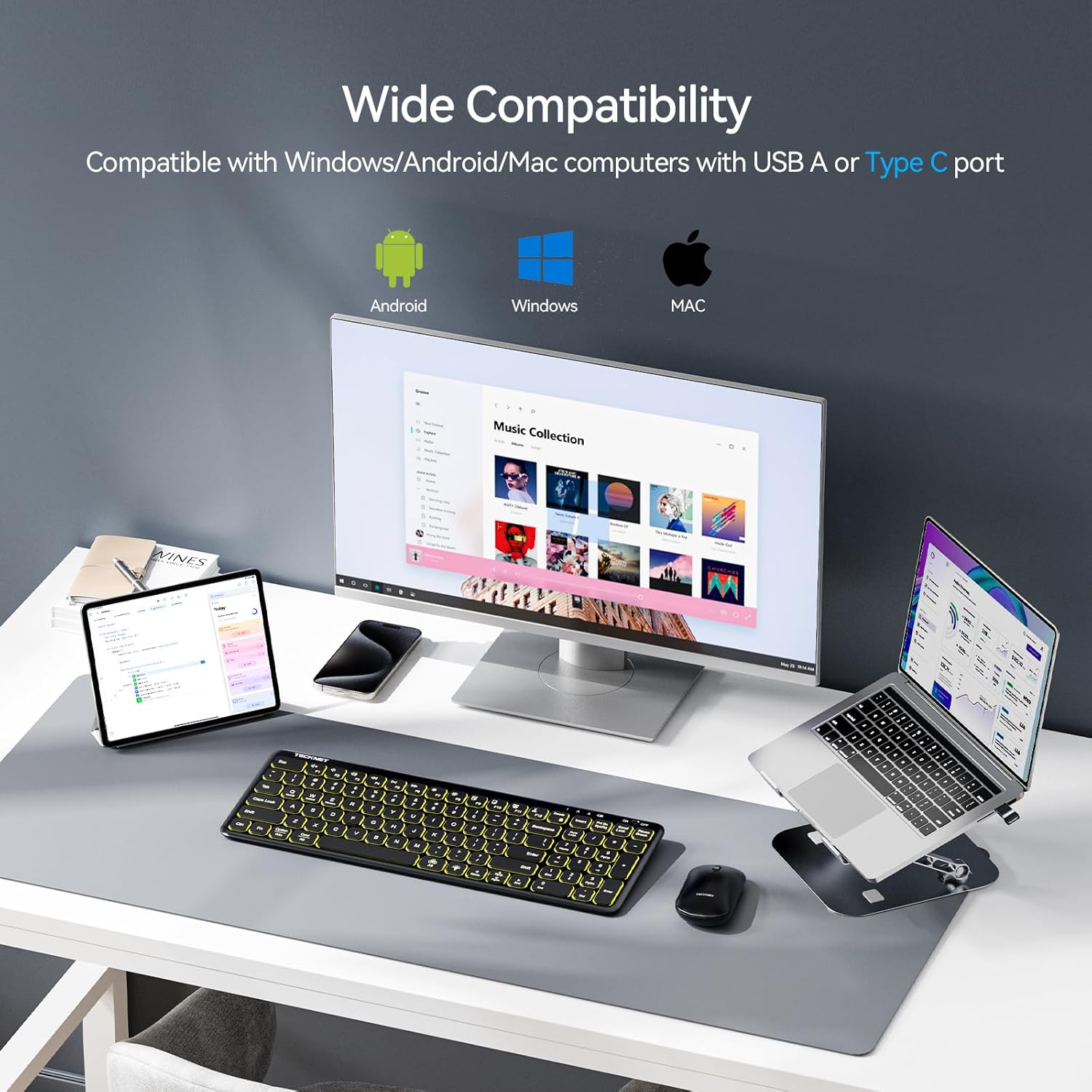
Image 4.4: The keyboard and mouse combo connected to various devices (tablet, desktop, laptop) demonstrating wide compatibility with Android, Windows, and Mac operating systems.
4.5 ഫംഗ്ഷൻ കീകൾ
The keyboard includes 13 function keys for quick access to common commands. To use these, press the Fn ആവശ്യമുള്ള ഫംഗ്ഷൻ കീയുമായി സംയോജിപ്പിച്ച കീ.
| കോമ്പിനേഷൻ | ഫംഗ്ഷൻ |
|---|---|
| Fn + F1 | നിശബ്ദമാക്കുക/അൺമ്യൂട്ടുചെയ്യുക |
| Fn + F2 | വോളിയം ഡൗൺ |
| Fn + F3 | വോളിയം കൂട്ടുക |
| Fn + F4 | മുമ്പത്തെ ട്രാക്ക് |
| Fn + F5 | പ്ലേ/താൽക്കാലികമായി നിർത്തുക |
| Fn + F6 | അടുത്ത ട്രാക്ക് |
| Fn + F7 | സ്ക്രീൻ തെളിച്ചം കുറയ്ക്കുക |
| Fn + F8 | സ്ക്രീൻ തെളിച്ചം കൂട്ടുക |
| Fn + F9 | എല്ലാം തിരഞ്ഞെടുക്കുക |
| Fn + F10 | പകർത്തുക |
| Fn + F11 | ഒട്ടിക്കുക |
| Fn + F12 | മുറിക്കുക |
| Fn + ഇല്ലാതാക്കുക | Lock/Unlock Fn Key |

Image 4.5: An illustration of the keyboard highlighting the F1-F12 keys and their corresponding functions when used with the Fn key, such as volume control, media playback, and screen brightness adjustment.
5. പവർ മാനേജ്മെന്റും ബാറ്ററി ലൈഫും
The combo is designed for energy efficiency and extended battery life.
- റീചാർജ് ചെയ്യാവുന്ന ബാറ്ററികൾ: Both the keyboard and mouse feature built-in rechargeable batteries.
- ഓട്ടോ-സ്ലീപ്പ് മോഡ്: To conserve power, the keyboard enters auto-sleep mode after 10 minutes of inactivity. Press any key to wake it up. The keyboard backlight automatically turns off after 1 minute of inactivity.
- വിപുലീകൃത സ്റ്റാൻഡ്ബൈ: The keyboard supports up to 180 days of standby time.
- കുറഞ്ഞ ബാറ്ററി അലേർട്ട്: A low battery indicator will flash to notify you when charging is required.
- Optimization Tip: For maximum battery life, especially during travel, set the backlight to the lowest brightness level or turn it off when not needed.

Image 5.1: The keyboard and mouse connected via charging cables, illustrating features like automatic sleep mode, memory function for settings, low battery alert, and an impressive 180-day standby time.
6. പരിപാലനം
നിങ്ങളുടെ TECKNET വയർലെസ് കീബോർഡിന്റെയും മൗസിന്റെയും കോമ്പോയുടെ ദീർഘായുസ്സും മികച്ച പ്രകടനവും ഉറപ്പാക്കാൻ, ഈ പരിപാലന മാർഗ്ഗനിർദ്ദേശങ്ങൾ പാലിക്കുക:
- വൃത്തിയാക്കൽ: കീബോർഡിന്റെയും മൗസിന്റെയും പ്രതലങ്ങൾ വൃത്തിയാക്കാൻ മൃദുവായതും ഉണങ്ങിയതും ലിന്റ് രഹിതവുമായ ഒരു തുണി ഉപയോഗിക്കുക. കഠിനമായ അഴുക്കിന്, ചെറുതായി dampതുണിയിൽ വെള്ളം അല്ലെങ്കിൽ നേരിയ ക്ലീനിംഗ് ലായനി ഉപയോഗിക്കുക. കഠിനമായ രാസവസ്തുക്കളോ ഉരച്ചിലുകളോ ഉള്ള വസ്തുക്കൾ ഒഴിവാക്കുക.
- ചാർജിംഗ്: Charge the devices regularly, especially when the low battery indicator flashes. Avoid completely draining the battery frequently to prolong its lifespan.
- സംഭരണം: When not in use for extended periods, turn off both the keyboard and mouse to conserve battery. Store them in a cool, dry place away from direct sunlight and extreme temperatures.
- USB റിസീവർ: Keep the USB receiver in a safe place, preferably in its designated storage slot within the mouse, to prevent loss or damage.
7. പ്രശ്നപരിഹാരം
If you encounter issues with your TECKNET Wireless Keyboard and Mouse Combo, refer to the following troubleshooting tips:
- കണക്ഷൻ ഇല്ല/കാലതാമസം:
- കീബോർഡും മൗസും ഓണാക്കിയിട്ടുണ്ടെന്ന് ഉറപ്പാക്കുക.
- Verify the USB receiver is securely plugged into a working USB port on your computer.
- Check the battery levels of both devices and recharge if necessary.
- Move the keyboard and mouse closer to the USB receiver (within 33 feet/10 meters).
- Avoid placing the receiver near other wireless devices or large metal objects that might cause interference.
- നിങ്ങളുടെ കമ്പ്യൂട്ടറിലെ മറ്റൊരു USB പോർട്ടിലേക്ക് USB റിസീവർ പ്ലഗ് ചെയ്യാൻ ശ്രമിക്കുക.
- Keys Not Responding/Double Presses:
- Recharge the keyboard battery. Low battery can affect key responsiveness.
- Ensure no debris is lodged under the keys. Gently clean the keyboard.
- Restart your computer and reconnect the USB receiver.
- Mouse Not Moving/Erratic Cursor:
- Check the mouse battery level and recharge if needed.
- Ensure the mouse optical sensor is clean and free from obstructions.
- Use the mouse on a suitable surface; reflective or uneven surfaces can affect tracking.
- USB റിസീവർ വീണ്ടും ബന്ധിപ്പിക്കുക.
- ബാക്ക്ലൈറ്റ് പ്രവർത്തിക്കുന്നില്ല:
- കീബോർഡ് ചാർജ് ചെയ്തിട്ടുണ്ടെന്ന് ഉറപ്പാക്കുക.
- അമർത്തുക Fn + Light Bulb Icon Key to adjust brightness or turn the backlight on.
8 സ്പെസിഫിക്കേഷനുകൾ
| ഫീച്ചർ | വിശദാംശങ്ങൾ |
|---|---|
| ബ്രാൻഡ് | ടെക്നെറ്റ് |
| മോഡൽ | Wireless Backlit Keyboard and Mouse Combo |
| കണക്റ്റിവിറ്റി ടെക്നോളജി | 2.4 GHz വയർലെസ് (USB റിസീവർ) |
| വയർലെസ് ശ്രേണി | 33 അടി വരെ (10 മീറ്റർ) |
| കീബോർഡ് ബാക്ക്ലൈറ്റ് | 7 Colors, 4 Brightness Levels |
| കീബോർഡ് കീ തരം | Scissor-Switch Low-Profile |
| കീബോർഡ് അളവുകൾ | ഏകദേശം 15 x 5.35 x 0.78 ഇഞ്ച് |
| ഇനത്തിൻ്റെ ഭാരം | 1.72 പൗണ്ട് (കോംബോ) |
| ബാറ്ററികൾ | Rechargeable (1 Nonstandard Battery included for each device) |
| Standby Time (Keyboard) | 180 ദിവസം വരെ |
| അനുയോജ്യമായ ഉപകരണങ്ങൾ | Laptop, Personal Computer, Tablet (Windows, Android, Mac) |
9. വാറൻ്റിയും പിന്തുണയും
TECKNET products are designed to meet high-quality standards. For warranty information or technical support, please refer to the warranty card included in your package or visit the official TECKNET webസൈറ്റ്. പിന്തുണയുമായി ബന്ധപ്പെടുമ്പോൾ നിങ്ങളുടെ ഉൽപ്പന്ന മോഡലും വാങ്ങൽ വിശദാംശങ്ങളും തയ്യാറായി വയ്ക്കുക.
കൂടുതൽ സഹായത്തിന്, നിങ്ങൾക്ക് ആമസോണിലെ ഉൽപ്പന്ന പേജും പരിശോധിക്കാവുന്നതാണ്: ടെക്നെറ്റ് വയർലെസ് കീബോർഡും മൗസും കോമ്പോ


