1. ആമുഖം
വാങ്ങിയതിന് നന്ദി.asing the Paladone Stitch Alarm Clock. This device combines a functional alarm clock with a charming Stitch figure, a soft night light, and a musical alarm. Designed for ease of use, it is a portable and decorative addition to any room. This manual provides detailed instructions for setup, operation, and maintenance to ensure you get the most out of your product.

ചിത്രം 1: മുൻഭാഗം view of the Paladone Stitch Alarm Clock, displaying the digital time and control buttons.
2 സുരക്ഷാ വിവരങ്ങൾ
- ജലത്തിൽ നിന്നും ഈർപ്പത്തിൽ നിന്നും ഉപകരണം അകറ്റി നിർത്തുക.
- Do not expose to direct sunlight or extreme temperatures.
- Use only the specified battery type (3 x AA batteries).
- പഴയതും പുതിയതുമായ ബാറ്ററികളോ വ്യത്യസ്ത തരം ബാറ്ററികളോ മിക്സ് ചെയ്യരുത്.
- ഉപകരണം ദീർഘനേരം ഉപയോഗിക്കുന്നില്ലെങ്കിൽ ബാറ്ററികൾ നീക്കം ചെയ്യുക.
- This product is not a toy. Keep out of reach of small children.
3. സജ്ജീകരണം
3.1 ബാറ്ററി ഇൻസ്റ്റാളേഷൻ
- Locate the battery compartment on the underside of the alarm clock.
- ബാറ്ററി കമ്പാർട്ട്മെൻ്റ് കവർ തുറക്കുക.
- Insert 3 x AA batteries (not included), ensuring correct polarity (+/-) as indicated inside the compartment.
- ബാറ്ററി കമ്പാർട്ട്മെൻ്റ് കവർ സുരക്ഷിതമായി അടയ്ക്കുക.
The digital display should now illuminate, indicating the clock is powered on.
4. പ്രവർത്തന നിർദ്ദേശങ്ങൾ
4.1 സമയം ക്രമീകരിക്കുന്നു
- അമർത്തിപ്പിടിക്കുക സെറ്റ് button (often represented by a clock icon) located on the front panel until the hour digits begin to flash.
- ഉപയോഗിക്കുക + ഒപ്പം - മണിക്കൂർ ക്രമീകരിക്കാനുള്ള ബട്ടണുകൾ.
- അമർത്തുക സെറ്റ് button again to move to the minute digits.
- ഉപയോഗിക്കുക + ഒപ്പം - മിനിറ്റ് ക്രമീകരിക്കാൻ ബട്ടണുകൾ.
- അമർത്തുക സെറ്റ് button one more time to confirm the time and exit setting mode.
4.2 അലാറം സജ്ജമാക്കുന്നു
- അമർത്തിപ്പിടിക്കുക അലാറം button (often represented by an alarm icon) until the alarm hour digits begin to flash.
- ഉപയോഗിക്കുക + ഒപ്പം - അലാറം സമയം ക്രമീകരിക്കാനുള്ള ബട്ടണുകൾ.
- അമർത്തുക അലാറം button again to move to the alarm minute digits.
- ഉപയോഗിക്കുക + ഒപ്പം - അലാറം മിനിറ്റ് ക്രമീകരിക്കാനുള്ള ബട്ടണുകൾ.
- അമർത്തുക അലാറം button one more time to confirm the alarm time. The alarm icon on the display will illuminate, indicating the alarm is active.
4.3 Activating the Night Light
The integrated night light is activated by gently pressing down on Stitch's head figure located on top of the alarm clock. Pressing it again will turn the night light off.
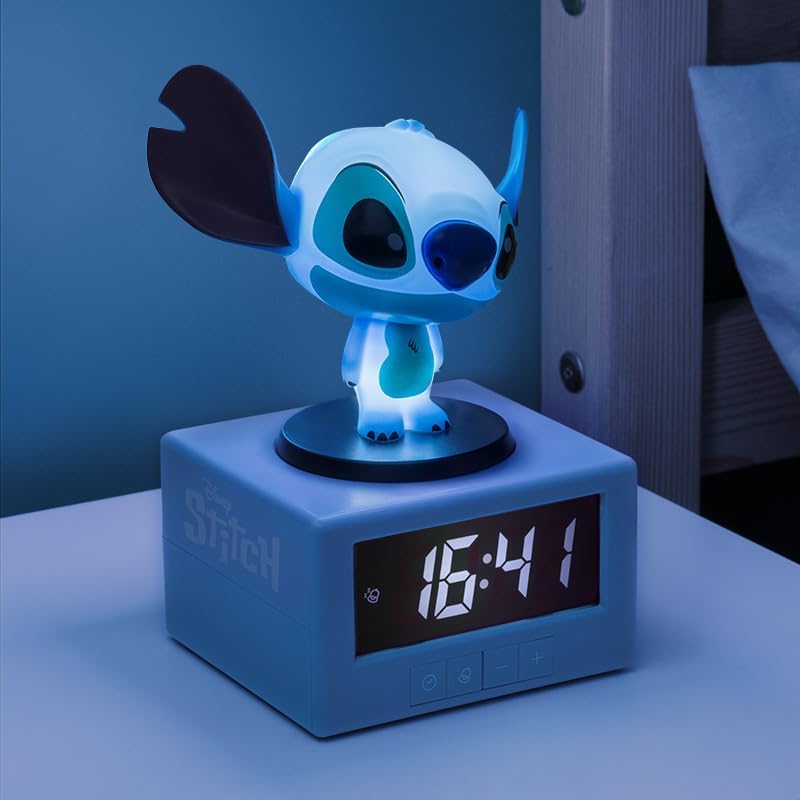
Figure 2: The Stitch Alarm Clock with its night light feature activated, illuminating the Stitch figure.
4.4 സ്നൂസ് ഫംഗ്ഷൻ
When the alarm sounds, press down on Stitch's head to activate the snooze function. The alarm will temporarily pause and sound again after approximately 5-10 minutes (duration may vary by model). To turn off the alarm completely, press any other button on the front panel.
5. പരിപാലനം
5.1 വൃത്തിയാക്കൽ
To clean the alarm clock, gently wipe the surface with a soft, dry cloth. Do not use abrasive cleaners, solvents, or immerse the device in water. Ensure the device is turned off and batteries are removed before cleaning.
5.2 ബാറ്ററി മാറ്റിസ്ഥാപിക്കൽ
When the display dims or the alarm function becomes unreliable, it is time to replace the batteries. Follow the battery installation steps in Section 3.1.
6. പ്രശ്നപരിഹാരം
- ഡിസ്പ്ലേ ഇല്ല / ഉപകരണം ഓണാക്കുന്നില്ല:
Ensure batteries are inserted correctly with the right polarity. Replace with fresh AA batteries. - അലാറം മുഴങ്ങുന്നില്ല:
Verify that the alarm time is set correctly and the alarm icon is visible on the display. Check battery level. - രാത്രി വെളിച്ചം സജീവമാകുന്നില്ല:
Ensure Stitch's head is pressed firmly. Check battery level. - തെറ്റായ സമയ പ്രദർശനം:
Reset the time following the instructions in Section 4.1.
7 സ്പെസിഫിക്കേഷനുകൾ
| മോഡൽ നമ്പർ | പിപി14273എൽഎസ് |
| അളവുകൾ (L x W x H) | 10.5 x 3.81 x 12 സെ.മീ |
| ഭാരം | 250 ഗ്രാം |
| പവർ ഉറവിടം | 3 x AA ബാറ്ററികൾ (ഉൾപ്പെടുത്തിയിട്ടില്ല) |
| ഡിസ്പ്ലേ തരം | ഡിജിറ്റൽ |
| പ്രത്യേക സവിശേഷതകൾ | Illuminated, Musical Alarm, Snooze Function, Night Light |
8. വാറൻ്റിയും പിന്തുണയും
For warranty information and customer support, please refer to the documentation provided at the time of purchase or visit the official Paladone webസൈറ്റ്. ഏതെങ്കിലും വാറന്റി ക്ലെയിമുകൾക്ക് നിങ്ങളുടെ വാങ്ങലിന്റെ തെളിവ് സൂക്ഷിക്കുക.
For further assistance, you may contact Paladone customer service through their official channels. Details can typically be found on the product packaging or the brand's webസൈറ്റ്.


