1. ആമുഖം
This manual provides essential instructions for the safe operation, maintenance, and troubleshooting of your Bagotte Robot Vacuum and Mop Combo, Model A21. Please read this manual thoroughly before using the product and retain it for future reference.
The Bagotte A21 is a versatile 3-in-1 cleaning device designed to vacuum, sweep, and mop various floor types, including hard floors and low-pile carpets. It features strong suction, smart navigation, and multiple control options for convenient home cleaning.
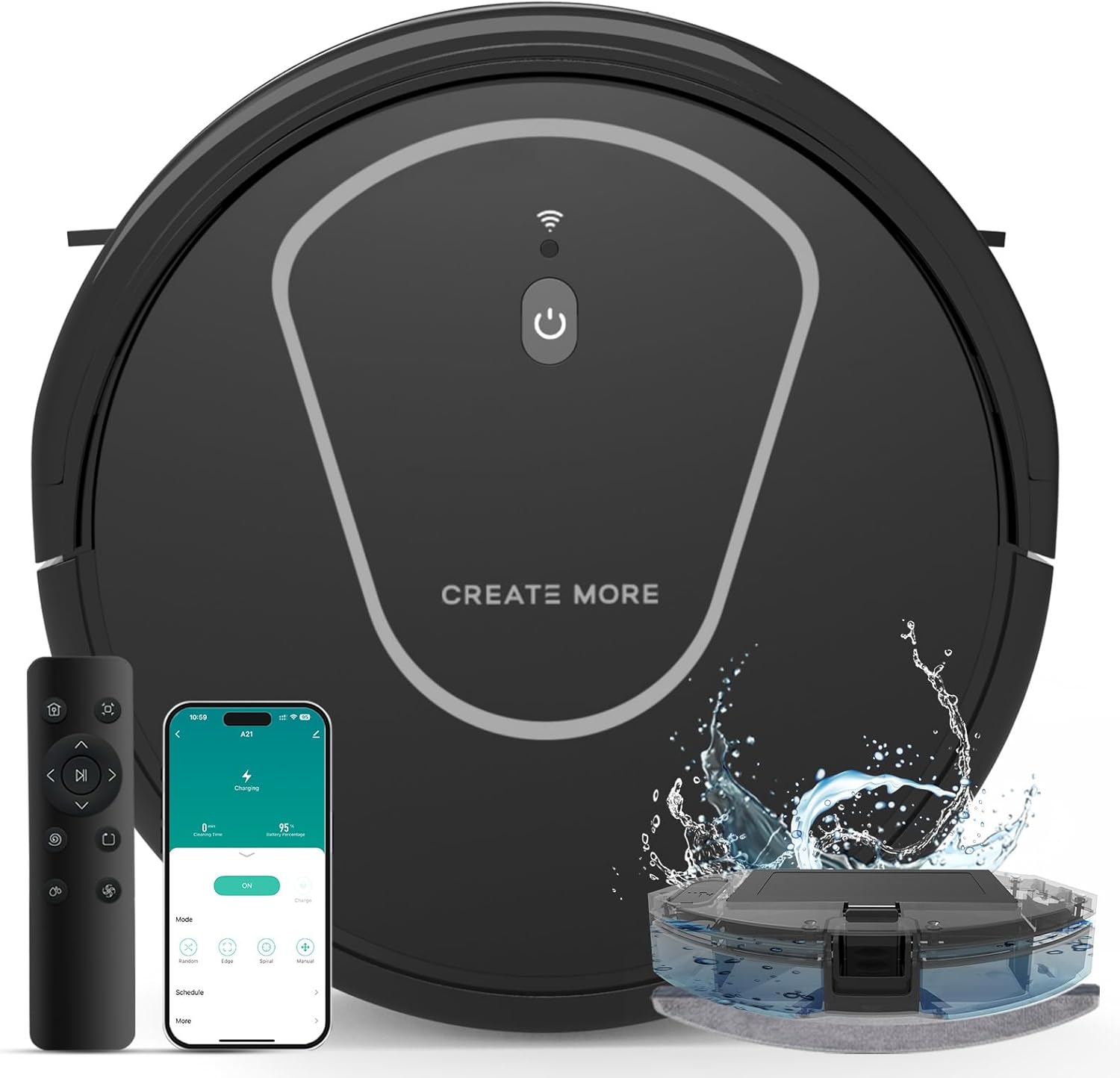
Image 1.1: Bagotte Robot Vacuum and Mop Combo Model A21 with remote control, mobile app interface, and mopping tank.
2. ഉൽപ്പന്നം കഴിഞ്ഞുview ഘടകങ്ങളും
2.1 പ്രധാന യൂണിറ്റ് സവിശേഷതകൾ
- 5000Pa ശക്തമായ സക്ഷൻ: Efficiently removes debris, pet hair, and dust.
- 3-ഇൻ-1 പ്രവർത്തനം: Sweeps, vacuums, and mops.
- സ്ലിം ഡിസൈൻ: 3-inch height allows cleaning under furniture.
- സ്വയം ചാർജിംഗ്: Automatically returns to the charging dock when battery is low or cleaning is complete.
- ഒന്നിലധികം നിയന്ത്രണ രീതികൾ: App, remote control, and voice commands (Google Assistant compatible).
- നീണ്ട ബാറ്ററി ലൈഫ്: Up to 120 minutes runtime, covering approximately 1,600 sq.ft.
2.2 ഉൾപ്പെടുത്തിയ ഘടകങ്ങൾ
പാക്കേജിൽ സാധാരണയായി ഇനിപ്പറയുന്ന ഇനങ്ങൾ ഉൾപ്പെടുന്നു:
- Bagotte Robot Vacuum and Mop Combo (Model A21)
- ചാർജിംഗ് ഡോക്ക്
- പവർ അഡാപ്റ്റർ
- റിമോട്ട് കൺട്രോൾ (4 AAA ബാറ്ററികൾ ഉൾപ്പെടെ)
- സൈഡ് ബ്രഷുകൾ (സെറ്റ്)
- Floor Brush (main rolling brush)
- ഡസ്റ്റ്ബിൻ
- വാട്ടർ ടാങ്ക് (200ml)
- കഴുകാവുന്ന മോപ്പിംഗ് തുണി
- ഉയർന്ന കാര്യക്ഷമതയുള്ള ഫിൽട്ടർ
- ഉപയോക്തൃ മാനുവൽ

ചിത്രം 2.1: കഴിഞ്ഞുview of the Bagotte A21 robot vacuum highlighting features like 5000Pa suction, infrared sensors for obstacle avoidance and anti-fall, and the 200ml mopping water tank.
3. സജ്ജീകരണം
3.1 ചാർജിംഗ് ഡോക്ക് പ്ലേസ്മെന്റ്
Place the charging dock against a wall in an open, uncluttered area. Ensure there is at least 1 meter (3 feet) of clear space on both sides of the dock and 2 meters (6 feet) in front of it. This allows the robot to easily locate and return to the dock for charging.
3.2 പ്രാരംഭ ചാർജിംഗ്
Connect the power adapter to the charging dock and plug it into a wall outlet. Place the robot onto the charging dock, ensuring the charging contacts on the robot align with those on the dock. The robot's indicator light will show charging status. Fully charge the robot before its first use, which may take several hours.
3.3 Side Brush Installation
Attach the side brushes by pressing them onto the posts at the bottom of the robot until they click into place. Ensure the left (L) and right (R) brushes are installed on the corresponding posts.
3.4 ആപ്പ് കണക്ഷൻ (ഓപ്ഷണൽ)
To utilize smart features, download the Tuya Smart App from your device's app store. Follow the in-app instructions to connect your robot vacuum to your home's 2.4GHz Wi-Fi network. The app allows for remote control, scheduling, and mode selection.

Image 3.1: A user interacting with the Bagotte A21 robot vacuum via the Tuya Smart App, demonstrating app control functionality.
4. പ്രവർത്തന നിർദ്ദേശങ്ങൾ
4.1 ആരംഭിക്കലും നിർത്തലും വൃത്തിയാക്കൽ
- ആരംഭിക്കാൻ: Press the power button on the robot or the 'Clean' button on the remote/app. The robot will begin cleaning in Auto mode.
- താൽക്കാലികമായി നിർത്താൻ: Press the power button on the robot or the 'Pause' button on the remote/app during cleaning.
- പുനരാരംഭിക്കാൻ: Press the power button or 'Clean' button again.
- നിർത്താൻ: Press and hold the power button on the robot for a few seconds, or use the 'Stop' function in the app.
4.2 ക്ലീനിംഗ് മോഡുകൾ
The Bagotte A21 offers several cleaning modes to suit different needs:
- ഓട്ടോ ക്ലീനിംഗ് മോഡ്: The robot navigates automatically to clean the entire floor area.
- സ്പോട്ട് ക്ലീനിംഗ് മോഡ്: The robot cleans a specific area in a spiral pattern, ideal for concentrated dirt.
- എഡ്ജ് ക്ലീനിംഗ് മോഡ്: റോബോട്ട് ചുവരുകളിലും ഫർണിച്ചറിന്റെ അരികുകളിലും വൃത്തിയാക്കുന്നു.
- Manual Cleaning Mode: Control the robot's direction using the remote control or app.

Image 4.1: Illustration of the four cleaning modes: Auto, Spot, Edge, and Manual, demonstrating their respective cleaning patterns.
4.3 വാക്വമിംഗും മോപ്പിംഗും
The robot can vacuum and mop simultaneously or separately. For mopping, fill the water tank with clean water and attach the mopping cloth. Insert the water tank into the robot. The app allows for adjustment of water flow levels and suction power.

Image 4.2: The Bagotte A21 robot vacuum demonstrating its 3-in-1 functionality, showing the water tank and dustbin components, and adjustable water flow and suction levels.
4.4 ഷെഡ്യൂളിംഗ് ക്ലീനിംഗ്
Use the Tuya Smart App to set cleaning schedules. You can program the robot to clean at specific times and days, ensuring your floors are maintained automatically.

Image 4.3: The Tuya Smart App interface showing options for scheduled cleaning and various cleaning modes.
4.5 ശബ്ദ നിയന്ത്രണം
The robot is compatible with Google Assistant. Once connected through the Tuya Smart App, you can use voice commands to start, stop, or send the robot back to its charging dock.

Image 4.4: A user interacting with the Bagotte A21 robot vacuum using voice commands through a smart speaker.
5. പരിപാലനം
പതിവ് അറ്റകുറ്റപ്പണികൾ ഒപ്റ്റിമൽ പ്രകടനം ഉറപ്പാക്കുകയും നിങ്ങളുടെ റോബോട്ട് വാക്വമിന്റെ ആയുസ്സ് വർദ്ധിപ്പിക്കുകയും ചെയ്യുന്നു.
5.1 ഡസ്റ്റ്ബിൻ ശൂന്യമാക്കൽ
Empty the dustbin after each cleaning cycle. Press the release button to remove the dustbin, open its lid, and discard collected debris. Clean the filter regularly.
5.2 Cleaning the Water Tank and Mopping Cloth
After mopping, empty any remaining water from the tank and rinse it thoroughly. Remove the mopping cloth, wash it, and allow it to air dry completely before reattaching or storing.

Image 5.1: Components of the Bagotte A21 robot vacuum, including the 250ml dustbin with high-efficiency filter, 200ml electric control water tank, and washable mopping cloth.
5.3 ക്ലീനിംഗ് ബ്രഷുകൾ
- പ്രധാന ബ്രഷ്: Remove the main brush cover and lift out the brush. Use the cleaning tool (if provided) to remove hair and debris tangled around the brush.
- സൈഡ് ബ്രഷുകൾ: Periodically remove the side brushes and clean any hair or debris. Replace worn or damaged brushes.
5.4 സെൻസറുകളും ചാർജിംഗ് കോൺടാക്റ്റുകളും വൃത്തിയാക്കൽ
Wipe the anti-drop sensors, infrared sensors, and charging contacts on both the robot and the charging dock with a clean, dry cloth. This prevents dust buildup from affecting navigation and charging.
6. പ്രശ്നപരിഹാരം
നിങ്ങളുടെ റോബോട്ട് വാക്വം ക്ലീനറിൽ പ്രശ്നങ്ങൾ നേരിടുകയാണെങ്കിൽ, ഇനിപ്പറയുന്ന പൊതുവായ പ്രശ്നങ്ങളും പരിഹാരങ്ങളും പരിശോധിക്കുക:
| പ്രശ്നം | സാധ്യമായ കാരണം | പരിഹാരം |
|---|---|---|
| റോബോട്ട് ഓണാക്കുന്നില്ല | ബാറ്ററി കുറവാണ്; പവർ സ്വിച്ച് ഓഫ് | Charge the robot; Ensure power switch is on |
| റോബോട്ടിന് ചാർജ് ചെയ്യാൻ കഴിയില്ല | Charging contacts dirty; Dock not powered | Clean charging contacts; Check power connection to dock |
| റോബോട്ട് ഇടയ്ക്കിടെ കുടുങ്ങുന്നു | Obstacles; Low clearance areas | Clear cables/small objects; Block off low areas |
| മോശം ക്ലീനിംഗ് പ്രകടനം | Full dustbin; Clogged brushes/filter | Empty dustbin; Clean brushes and filter |
| മോപ്പിംഗ് പ്രവർത്തനം പ്രവർത്തിക്കുന്നില്ല. | Empty water tank; Clogged water outlet | Fill water tank; Clean water outlet |
| ആപ്പ് കണക്ഷൻ പ്രശ്നങ്ങൾ | Incorrect Wi-Fi (not 2.4GHz); Router too far | 2.4GHz വൈ-ഫൈ ഉറപ്പാക്കുക; റോബോട്ടിനെ റൂട്ടറിന് അടുത്തേക്ക് നീക്കുക |
7 സ്പെസിഫിക്കേഷനുകൾ
| ഫീച്ചർ | സ്പെസിഫിക്കേഷൻ |
|---|---|
| ബ്രാൻഡ് | ബാഗോട്ടെ |
| മോഡലിൻ്റെ പേര് | A21 |
| സക്ഷൻ പവർ | 5000പ |
| ഉൽപ്പന്ന അളവുകൾ | 11"L x 11"W x 3"H |
| ബാറ്ററി ലൈഫ് | 120 മിനിറ്റ് |
| ഡസ്റ്റ്ബിൻ കപ്പാസിറ്റി | 250 മില്ലി |
| വാട്ടർ ടാങ്ക് കപ്പാസിറ്റി | 200 മില്ലി |
| ഫിൽട്ടർ തരം | സ്പോഞ്ച് |
| കണക്റ്റിവിറ്റി | 2.4GHz Wi-Fi, App Control, Remote Control, Voice Control (Google Assistant) |
| പ്രത്യേക സവിശേഷതകൾ | Anti-Fall, Edge Cleaning, Self-Charging |
| ഇനത്തിൻ്റെ ഭാരം | 7.26 പൗണ്ട് |
8. വാറൻ്റിയും പിന്തുണയും
Bagotte provides a two-year warranty for this product. This warranty covers manufacturing defects and issues arising from normal use. For technical support, warranty claims, or any product-related inquiries, please contact Bagotte customer service through the official webസൈറ്റ് അല്ലെങ്കിൽ നിങ്ങളുടെ ഉൽപ്പന്ന പാക്കേജിംഗിൽ നൽകിയിരിക്കുന്ന ബന്ധപ്പെടാനുള്ള വിവരങ്ങൾ.
Lifetime technical support is available to assist you with any questions or operational guidance you may need throughout the product's lifespan.


