1. ആമുഖം
The DJI Mic 3 Transmitter is a compact, intuitive wireless microphone designed for high-quality audio capture. It features multi-channel support, adaptive gain control, advanced noise-cancelling capabilities, and 32-bit float internal recording. This manual provides detailed instructions for its setup, operation, and maintenance, ensuring professional recording results for various applications including vlogging, interviews, and streaming.

The compact DJI Mic 3 Transmitter, featuring the DJI logo on its front face.
2. ബോക്സിൽ എന്താണുള്ളത്?
The DJI Mic 3 Transmitter package includes the following components:
- DJI Mic 3 Transmitter x 1
- DJI Mic 3 Transmitter Magnetic Charging Cable x 1
- DJI Mic 3 Windscreen (Black/Gray) x 1
- DJI Mic 3 Windscreen (Black) x 1
- DJI Mic 3 Magnet x 1
- DJI Mic 3 Magnetic Clip x 1
- DJI Mic 3 Compact Carrying Pouch x 1

ഒരു ഓവർview of the items included with the DJI Mic 3 Transmitter: the transmitter unit, magnetic charging cable, windscreens, magnet, magnetic clip, and carrying pouch.
3. ഉൽപ്പന്നം കഴിഞ്ഞുview ഫീച്ചറുകളും
3.1. രൂപകൽപ്പനയും പോർട്ടബിലിറ്റിയും
The DJI Mic 3 Transmitter is designed to be lightweight and compact, making it highly portable for various recording scenarios. It offers multiple wearing styles, including magnetic attachment and a rotatable clip for flexible placement on clothing or accessories.
Demonstration of the DJI Mic 3 Transmitter's versatile wearing options, including magnetic attachment and clip-on for various clothing types.
3.2. Audio Quality and Recording
The transmitter ensures consistent and balanced audio. It features adaptive gain control to maintain crisp audio quality in diverse environments. Users can select from three voice tones and utilize two levels of noise cancellation to optimize sound. The dual-file 32-bit float internal recording captures every audio detail, providing a professional-grade backup and preventing clipping.
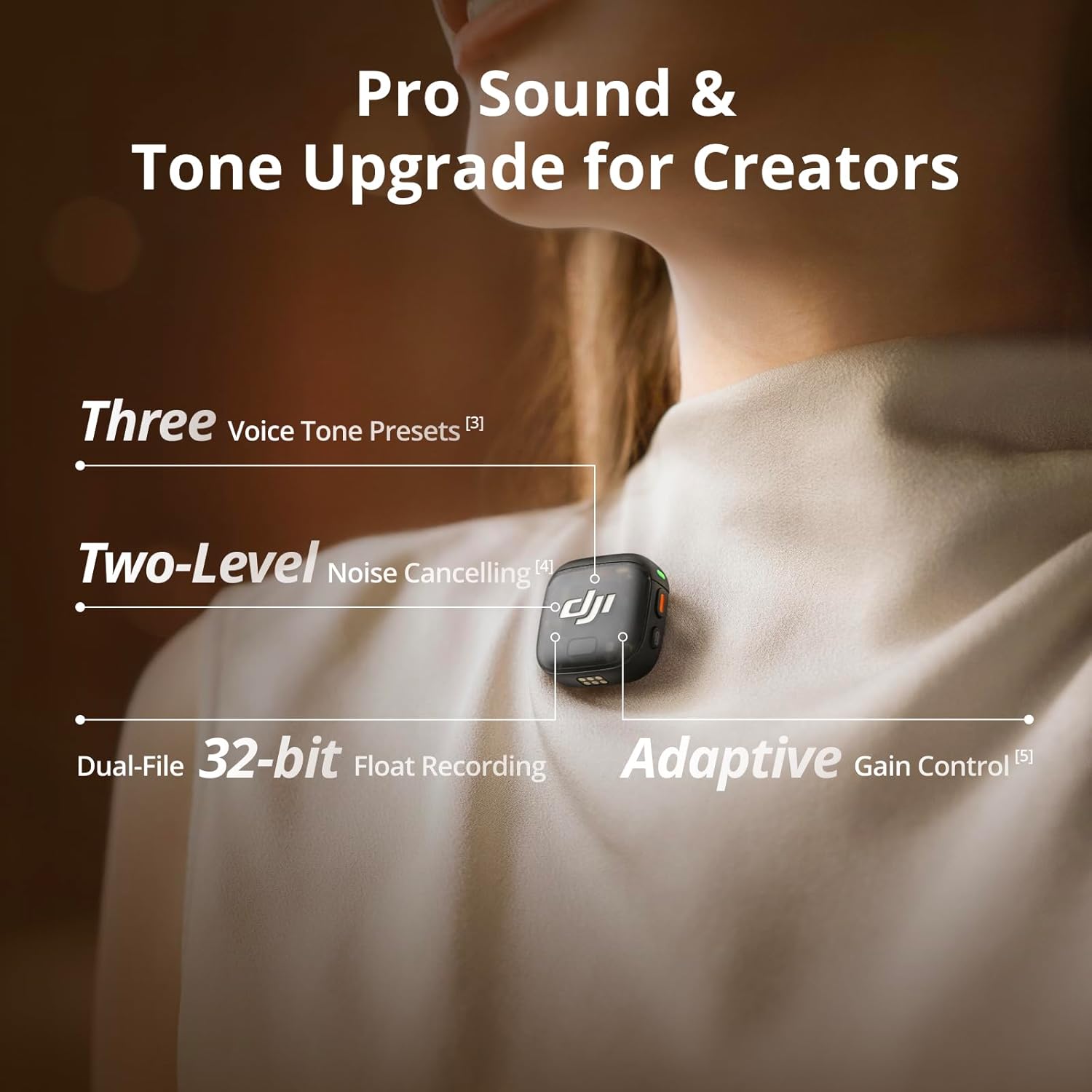
A close-up of the DJI Mic 3 Transmitter showing its features like 32-bit float recording, adaptive gain control, voice tone presets, and noise cancellation.
3.3. കണക്റ്റിവിറ്റി
The DJI Mic 3 Transmitter offers versatile connectivity options:
- Bluetooth Direct-To-Phone: Connects directly to smartphones via Bluetooth, allowing use with third-party recording applications.
- OsmoAudio Connection: Seamlessly connects to compatible DJI Osmo devices such as Osmo 360, Osmo Action 5 Pro, and Osmo Pocket 3 for a streamlined, receiver-free setup.
- റിസീവർ അനുയോജ്യത: Can be paired with a DJI Mic 3 Receiver (sold separately) for connection to cameras, computers, and other devices via TRS, TRRS, or USB-C ports.

The DJI Mic 3 Transmitter demonstrating its compatibility with multiple devices, including direct connection to DJI Osmo products and Bluetooth pairing with smartphones.
3.4. Multi-Channel Support and Transmission
The system supports up to 4 transmitters and 8 receivers simultaneously, enabling four-channel output for flexible mixing and precise editing. Dual-band anti-interference technology ensures stable, lossless audio transmission over a maximum range of 400 meters in open, unobstructed environments.

An illustration of the DJI Mic 3 system supporting multiple transmitters and receivers for multi-person recording scenarios.
4. സജ്ജീകരണം
4.1. പ്രാരംഭ ജോടിയാക്കൽ
To use the DJI Mic 3 Transmitter, it must first be paired with a compatible device or receiver.
- With DJI Mic 3 Receiver: Place the transmitter and receiver in the charging case. They will automatically pair. Alternatively, use the receiver's touchscreen to initiate pairing.
- With Smartphone (Bluetooth): Enable Bluetooth on your smartphone. Open a compatible third-party recording app. The transmitter should appear as an available device for connection.
- With DJI Osmo Devices: The transmitter connects directly to Osmo 360, Osmo Action 5 Pro, or Osmo Pocket 3 via OsmoAudio. Refer to your Osmo device's manual for specific connection steps.
4.2. Attaching the Transmitter
Use the magnetic clip or magnetic attachment to secure the transmitter to clothing. Ensure the microphone is positioned optimally for clear audio capture, typically near the speaker's mouth.
5. പ്രവർത്തന നിർദ്ദേശങ്ങൾ
5.1. റെക്കോർഡിംഗ്
The DJI Mic 3 Transmitter supports internal recording. When connected to a receiver or compatible device, it will automatically begin recording when the main recording device starts. For standalone use, activate internal recording via the DJI Mimo app or receiver settings.
5.2. ഓഡിയോ ക്രമീകരണങ്ങൾ
ഒപ്റ്റിമൽ ശബ്ദ നിലവാരത്തിനായി ഓഡിയോ ക്രമീകരണങ്ങൾ ക്രമീകരിക്കുക:
- Voice Tones: Choose from 'Regular' (clean, natural), 'Rich' (fuller, powerful), or 'Bright' (clear, sparkling) via the DJI Mimo app or receiver.
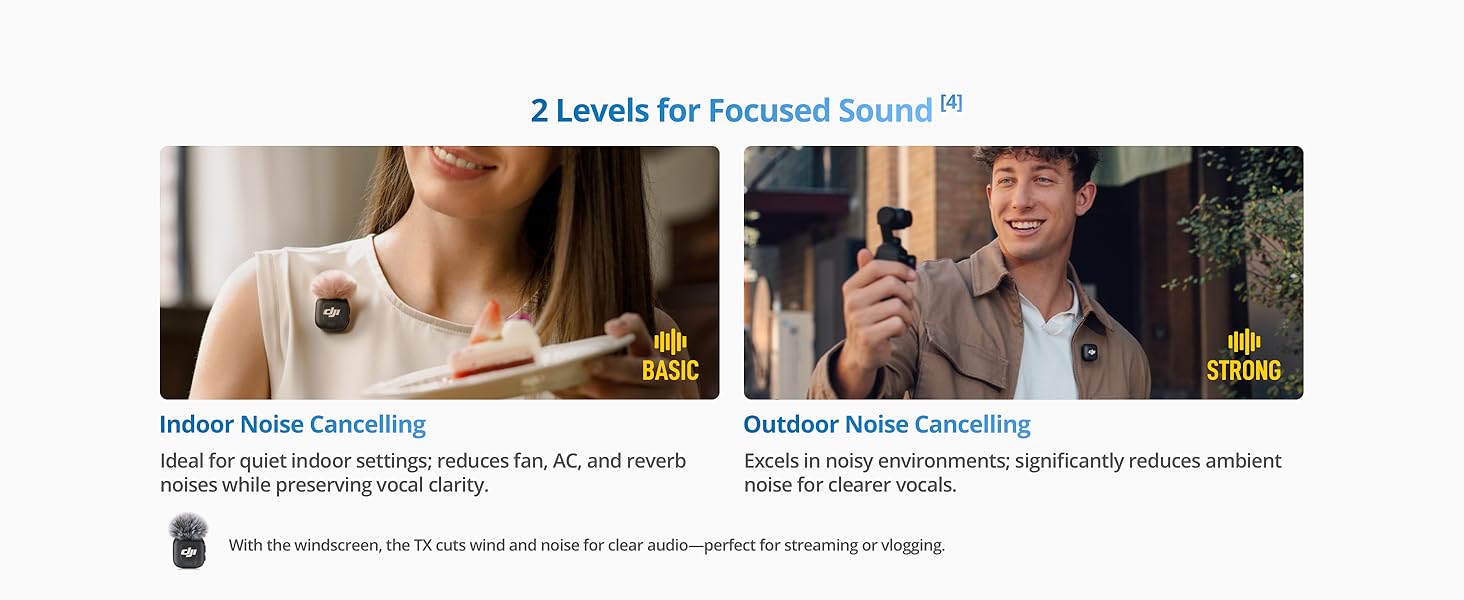
- ശബ്ദം റദ്ദാക്കൽ: Select 'Basic' for quiet indoor settings (reduces fan, AC, reverb) or 'Strong' for noisy outdoor environments (significantly reduces ambient noise). Use the included windscreens for additional wind noise reduction.
- Adaptive Gain Control: The system automatically adjusts gain. 'Automatic Mode' prevents clipping in outdoor settings with sudden volume changes. 'Dynamic Mode' ensures consistent loudness in quiet indoor settings.

The three selectable voice styles (Regular, Rich, Bright) available on the DJI Mic 3 for different audio preferences.
The two levels of noise cancellation (Basic and Strong) offered by the DJI Mic 3 for effective sound isolation in various environments.
5.3. Timecode Synchronization
When used with a compatible receiver, the DJI Mic 3 supports integrated timecode for precise synchronization across multiple cameras or audio recorders, simplifying post-production workflows.

The DJI Mic 3's integrated timecode feature for precise synchronization in multi-camera editing workflows.
5.4. File കയറ്റുമതി
രേഖപ്പെടുത്തി files can be exported directly to your device using the charging case and a USB-C cable, or via the DJI Mimo app for convenient management and transfer.
6. പരിപാലനം
6.1. ചാർജിംഗും ബാറ്ററി ലൈഫും
The DJI Mic 3 Transmitter offers extended battery life. For quick charging, place the transmitter in the charging case. A 5-minute charge can provide approximately 2 hours of use. The fully charged charging case can provide multiple charges to the transmitter.

Information on the DJI Mic 3's extended battery life and 5-minute quick charge capability.
6.2. പവർ മാനേജ്മെന്റ്
The transmitter features intelligent power management:
- Auto Power-Saving: The transmitter automatically sleeps and reconnects to conserve power.
- ഓട്ടോ പവർ-ഓഫ്: The transmitter and receiver will auto power off after 15 minutes of inactivity.
- Auto On/Off with Camera: When connected via a 3.5mm cable or hot shoe, the system can automatically turn on/off with your camera.
- ചാർജ് ചെയ്യുമ്പോൾ ഉപയോഗിക്കുക: The transmitter can be used while charging the phone and receiver via USB-C.

Details on the DJI Mic 3's intelligent power management functions, including auto power-saving and charging options.
7. പ്രശ്നപരിഹാരം
7.1. Compatibility Questions
- Q: What are the differences between different DJI Mic 3 combos?
A: The DJI Mic 3 (2 TX + 1 RX + Charging Case) includes two transmitters, one receiver, and a charging case, suitable for two-person recording and extended battery life. The DJI Mic 3 (1 TX + 1 RX) includes one transmitter and one receiver, ideal for single-person recording. The DJI Mic 3 Transmitter (this product) includes one transmitter and basic accessories for solo creation or expanding an existing system. - Q: Are the DJI Mic 3's USB-C and Lightning adapters interchangeable with mobile phone adapters of DJI Mic, DJI Mic 2, and DJI Pocket 2?
ഉ: ഇല്ല. - Q: Are the DJI Mic 3's transmitters and receiver compatible with those of DJI Mic, DJI Mic 2, and DJI Mic Mini?
ഉ: ഇല്ല.
7.2. Audio Signal and Polar Pattern
- Q: How do DJI Mic 3 transmitters receive audio signals? Is the polar pattern directional or omnidirectional?
A: The DJI Mic 3 transmitters utilize an omnidirectional polar pattern, capturing sound equally from all directions.
8 സ്പെസിഫിക്കേഷനുകൾ
| ഫീച്ചർ | സ്പെസിഫിക്കേഷൻ |
|---|---|
| ഉൽപ്പന്ന അളവുകൾ | 1.13 x 1.11 x 0.64 ഇഞ്ച് |
| ഇനത്തിൻ്റെ ഭാരം | 0.413 ഔൺസ് |
| മോഡൽ നമ്പർ | DMT03 |
| ബാറ്ററികൾ | 1 സി ബാറ്ററി ആവശ്യമാണ് (ഉൾപ്പെടുത്തിയിരിക്കുന്നു) |
| നിർമ്മാതാവ് | ഡിജെഐ |
| ആദ്യ തീയതി ലഭ്യമാണ് | ഓഗസ്റ്റ് 28, 2025 |
9. വാറൻ്റിയും പിന്തുണയും
DJI products come with an official warranty, providing one-stop technical support. For detailed warranty information, service terms, or to contact support, please visit the official DJI website or your regional DJI service center.
For additional resources and firmware updates, refer to the DJI Mimo app or the DJI official webസൈറ്റ്.


