1. ആമുഖം
Thank you for choosing the MONTECH X5-White ATX Mid-Tower Gaming PC Case. This case is designed to provide excellent airflow and hardware compatibility for your gaming PC build. It features a sleek design with carbon print accents, a tempered glass side panel, and comes with pre-installed ARGB fans for vibrant lighting and efficient cooling. This manual will guide you through the setup, operation, and maintenance of your new PC case.
2. പാക്കേജ് ഉള്ളടക്കം
ഇൻസ്റ്റാളേഷൻ ആരംഭിക്കുന്നതിന് മുമ്പ് എല്ലാ ഇനങ്ങളും ഉണ്ടെന്ന് ഉറപ്പാക്കുക:
- MONTECH X5-White ATX Mid-Tower Gaming PC Case
- 3 x 140mm ARGB Front Fans (Pre-installed)
- 1 x 120mm ARGB Rear Fan (Pre-installed)
- Integrated GPU Holder
- Accessory Box (Screws, zip ties, etc.)
3. സജ്ജീകരണവും ഇൻസ്റ്റാളേഷനും
Before starting, ensure you have a clean, static-free workspace. Refer to your motherboard and component manuals for specific installation steps.
3.1 കേസ് അൺപാക്ക് ചെയ്യുന്നു
Carefully remove the case from its packaging. The tempered glass side panel is fragile; handle with care. Place the case on a stable surface.

ചിത്രം 3.1: മുൻ-ഇടത് view of the MONTECH X5-White case, showcasing its spacious interior and pre-installed rear ARGB fan. The front mesh panel allows for high airflow.
3.2 ഘടക ഇൻസ്റ്റാളേഷൻ
The MONTECH X5-White case offers excellent hardware compatibility.

Figure 3.2: Internal dimensions for component compatibility. The case supports GPUs up to 410mm, CPU coolers up to 165mm, and power supplies up to 230mm.
3.2.1 മദർബോർഡ് ഇൻസ്റ്റാളേഷൻ
- Remove the tempered glass side panel.
- Install the necessary standoffs for your ATX or Micro ATX motherboard.
- സ്ക്രൂ ദ്വാരങ്ങൾ വിന്യസിച്ചുകൊണ്ട്, നിങ്ങളുടെ മദർബോർഡ് സ്റ്റാൻഡ്ഓഫുകളിൽ ശ്രദ്ധാപൂർവ്വം വയ്ക്കുക.
- നൽകിയിരിക്കുന്ന സ്ക്രൂകൾ ഉപയോഗിച്ച് മദർബോർഡ് സുരക്ഷിതമാക്കുക.
3.2.2 പവർ സപ്ലൈ യൂണിറ്റ് (PSU) ഇൻസ്റ്റാളേഷൻ
The case supports standard ATX PSUs with a bottom mount design.
- Locate the PSU shroud at the bottom rear of the case.
- Slide your PSU into the designated area from the rear of the case.
- Secure the PSU with screws from the outside of the case.
3.2.3 Graphics Processing Unit (GPU) Installation
The case supports GPUs up to 410mm in length and includes an adjustable GPU holder for stability.
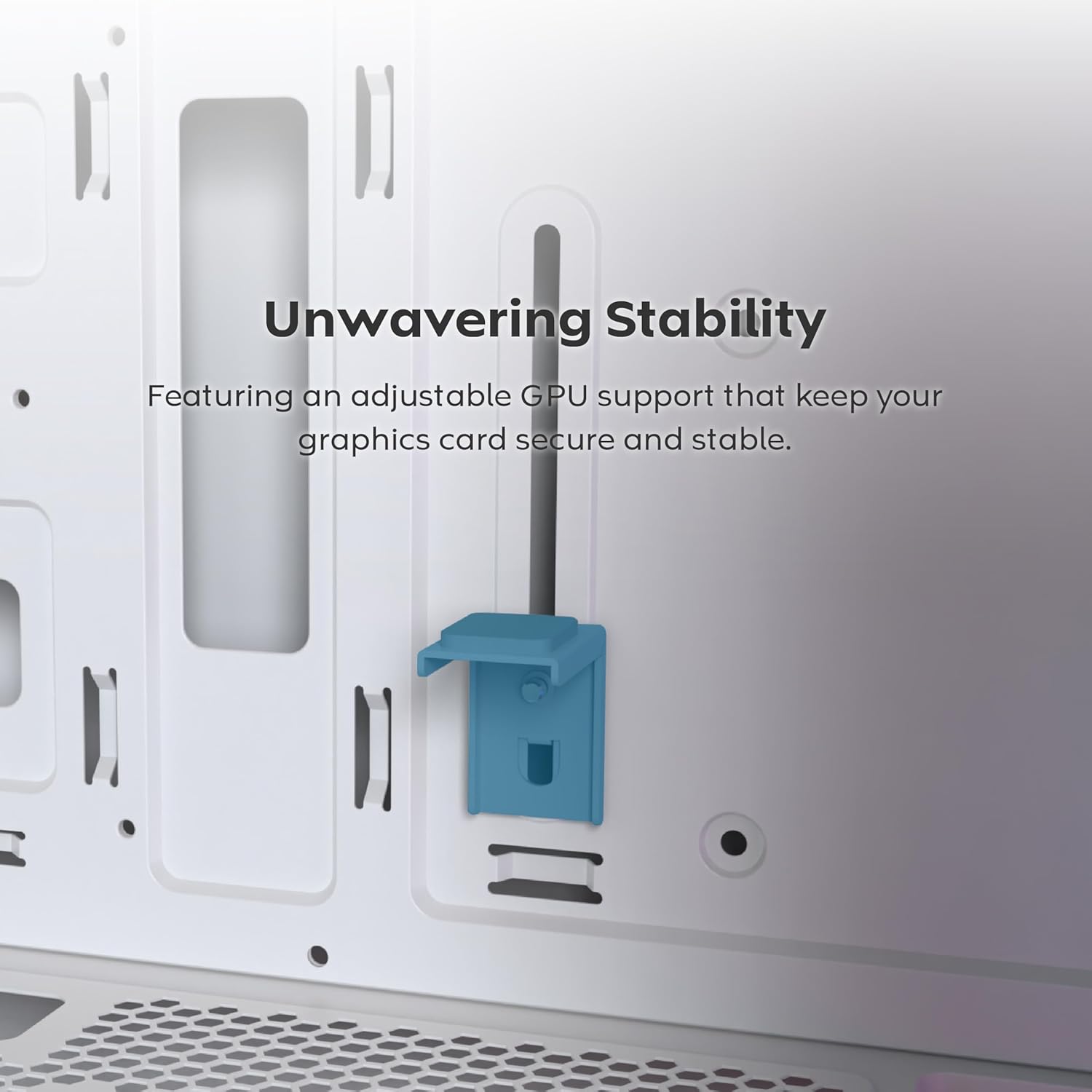
Figure 3.3: The adjustable GPU support stand provides reliable physical support for graphics cards, preventing sag.
- കേസിന്റെ പിൻഭാഗത്ത് നിന്ന് ആവശ്യമായ PCIe സ്ലോട്ട് കവറുകൾ നീക്കം ചെയ്യുക.
- Insert your GPU into the appropriate PCIe slot on your motherboard.
- സ്ക്രൂകൾ ഉപയോഗിച്ച് GPU ഉറപ്പിക്കുക.
- Adjust the integrated GPU holder to support the graphics card, ensuring it is stable.
3.2.4 Storage Drive Installation (SSD/HDD)
The case provides dedicated mounting points for SSDs and HDDs.
- Locate the drive bays/mounts behind the motherboard tray or within the PSU shroud.
- Secure your 2.5" SSDs or 3.5" HDDs using the provided screws.
3.2.5 കൂളിംഗ് സിസ്റ്റം ഇൻസ്റ്റലേഷൻ
The X5-White comes with three 140mm ARGB fans pre-installed at the front and one 120mm ARGB fan at the rear. It supports extensive cooling configurations, including 360mm AIOs.
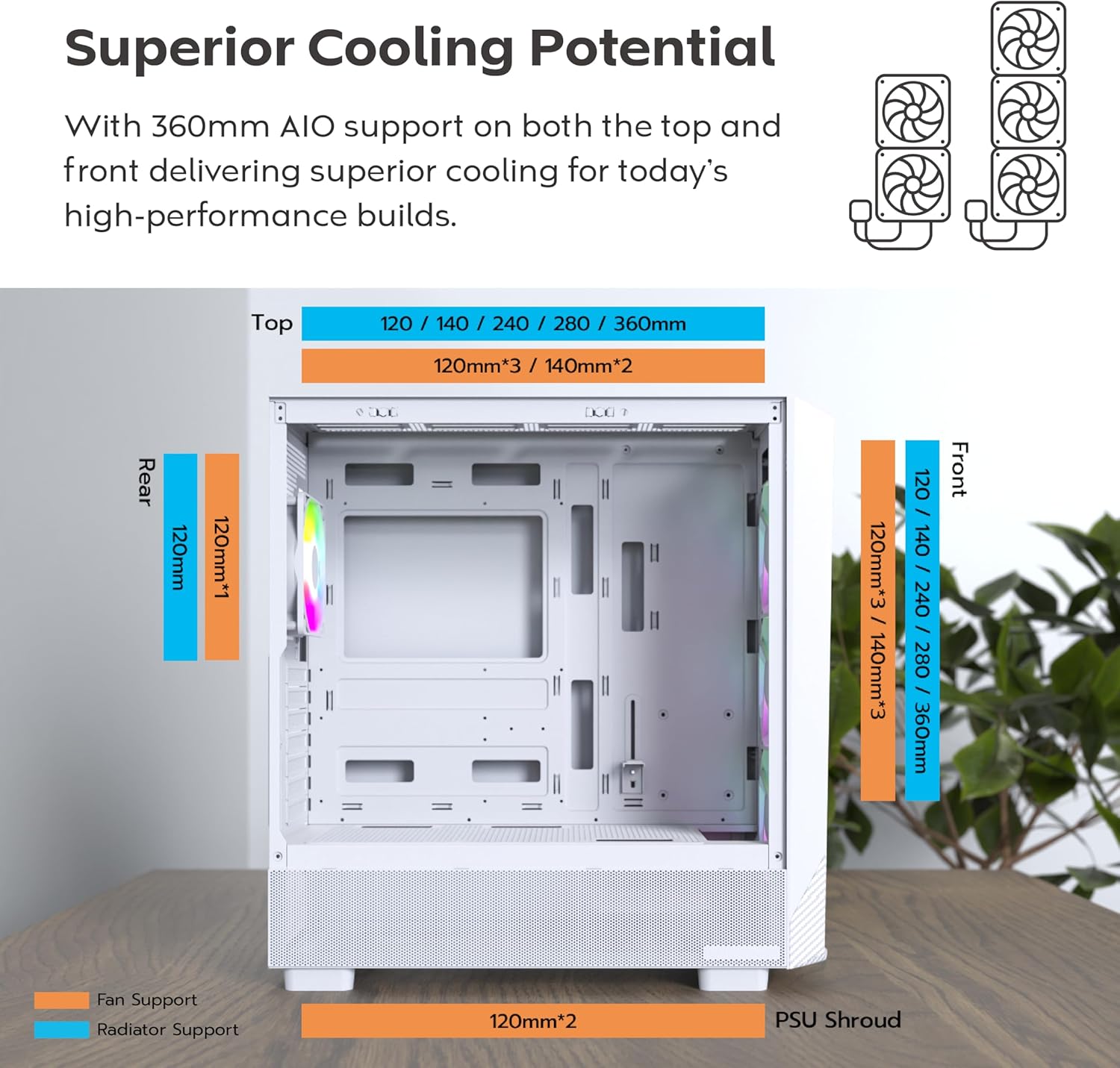
Figure 3.4: Fan and radiator compatibility. The case supports up to 360mm radiators on both the top and front, and a 120mm radiator at the rear.

Figure 3.5: Airflow demonstration with pre-installed 140mm front fans and 120mm rear fan, ensuring efficient cooling.
- അധിക ആരാധകർ: You can install additional fans on the top (up to 2x 140mm or 3x 120mm) and bottom (2x 120mm).
- റേഡിയറുകൾ: The case supports radiators up to 360mm on the front and top, and 120mm on the rear.
3.3 കേബിൾ മാനേജ്മെന്റ്
The MONTECH X5-White features an extra-large PSU shroud and expanded routing space behind the motherboard tray, making cable management easier and cleaner. Utilize the provided zip ties and routing channels to organize cables for improved airflow and aesthetics.

Figure 3.6: The case with components installed, demonstrating the visual appeal of the ARGB fans and organized interior.
4. കേസ് പ്രവർത്തിപ്പിക്കൽ
4.1 ഫ്രണ്ട് പാനൽ കണക്റ്റിവിറ്റി
മുൻവശത്തെ I/O പാനൽ അത്യാവശ്യ പോർട്ടുകളിലേക്കും നിയന്ത്രണങ്ങളിലേക്കും സൗകര്യപ്രദമായ പ്രവേശനം നൽകുന്നു.

Figure 4.1: Front panel connectivity includes USB 2.0, USB 3.0, USB Type-C, Mic & Audio jacks, an LED button for ARGB control, and the Power button.
- പവർ ബട്ടൺ: Press to power on/off your PC.
- LED ബട്ടൺ: Cycles through 25 built-in ARGB lighting modes for the pre-installed fans.
- USB പോർട്ടുകൾ: Includes USB 2.0, USB 3.0, and USB Type-C for data transfer and peripheral connectivity.
- Mic & Audio Jacks: ഹെഡ്ഫോണുകളും മൈക്രോഫോണുകളും ബന്ധിപ്പിക്കുന്നതിന്.
4.2 ARGB ഫാൻ നിയന്ത്രണം
മുൻകൂട്ടി ഇൻസ്റ്റാൾ ചെയ്ത ARGB ഫാനുകൾ രണ്ട് തരത്തിൽ നിയന്ത്രിക്കാം:
- Case LED Button: Use the dedicated LED button on the front I/O panel to cycle through 25 pre-set lighting effects.
- മദർബോർഡ് സോഫ്റ്റ്വെയർ: If your motherboard supports ARGB synchronization (e.g., ASUS Aura Sync, MSI Mystic Light Sync, GIGABYTE RGB Fusion, ASRock Polychrome Sync), you can connect the fan ARGB cables to your motherboard's 3-pin 5V ARGB header for full software control.
5. പരിപാലനം
നിങ്ങളുടെ പിസി ഘടകങ്ങളുടെ ഒപ്റ്റിമൽ പ്രകടനവും ദീർഘായുസ്സും ഉറപ്പാക്കാൻ പതിവ് അറ്റകുറ്റപ്പണികൾ സഹായിക്കുന്നു.
5.1 കേസ് വൃത്തിയാക്കൽ
- പുറം: ഒരു സോഫ്റ്റ് ഉപയോഗിക്കുക, ഡിamp പുറംഭാഗങ്ങൾ തുടയ്ക്കാൻ തുണി ഉപയോഗിക്കുക.
- പൊടി ഫിൽട്ടറുകൾ: The case features a magnetic dust filter on the top panel and a removable filter at the bottom for the PSU. Regularly remove and clean these filters by rinsing them with water and allowing them to dry completely before reinstallation.
- ഇൻ്റീരിയർ: Use compressed air to blow out dust from inside the case, especially from fans and heatsinks. Do this in a well-ventilated area.
5.2 ഫാൻ മെയിന്റനൻസ്
Ensure fans are free from dust buildup to maintain optimal airflow and prevent noise. If a fan becomes noisy or stops spinning, check for obstructions or loose connections.
6. പ്രശ്നപരിഹാരം
നിങ്ങൾ നേരിട്ടേക്കാവുന്ന പൊതുവായ പ്രശ്നങ്ങളെ ഈ വിഭാഗം അഭിസംബോധന ചെയ്യുന്നു.
6.1 Fans Not Spinning or RGB Not Working
- പവർ കണക്ഷൻ: Ensure all fan power cables (e.g., Molex, 3-pin, 4-pin) are securely connected to the power supply or motherboard fan headers.
- ARGB കണക്ഷൻ: For RGB lighting, verify that the ARGB cables are correctly connected to the case's ARGB controller or your motherboard's 3-pin 5V ARGB header. Some Molex connectors for RGB might have an unconnected 3-pin wire that needs to be removed for the RGB to function.
- Motherboard Settings: If using motherboard software for RGB control, ensure the software is installed and configured correctly. Check BIOS/UEFI settings for fan control.
6.2 Poor Airflow or High Temperatures
- പൊടിപടലങ്ങൾ: മെയിന്റനൻസ് വിഭാഗത്തിൽ വിവരിച്ചിരിക്കുന്നതുപോലെ എല്ലാ പൊടി ഫിൽട്ടറുകളും ആന്തരിക ഘടകങ്ങളും വൃത്തിയാക്കുക.
- ഫാൻ ഓറിയന്റേഷൻ: Ensure fans are oriented correctly for optimal airflow (front fans typically intake, rear/top fans exhaust).
- കേബിൾ മാനേജുമെന്റ്: Poor cable management can obstruct airflow. Reorganize cables to improve air circulation.
6.3 Components Not Fitting
- അളവുകൾ പരിശോധിക്കുക: Refer to the Specifications section and Figure 3.2 to confirm component compatibility with the case's maximum dimensions for GPU, CPU cooler, and PSU.
- Re-evaluate Installation: Ensure components are aligned correctly and not obstructed by other parts or cables.
7 സ്പെസിഫിക്കേഷനുകൾ
Detailed specifications for the MONTECH X5-White ATX Mid-Tower Gaming PC Case:
| ഫീച്ചർ | സ്പെസിഫിക്കേഷൻ |
|---|---|
| മോഡലിൻ്റെ പേര് | X5-White |
| കേസ് തരം | മിഡ് ടവർ |
| മദർബോർഡ് അനുയോജ്യത | ATX, മൈക്രോ ATX |
| മെറ്റീരിയൽ | Plastic with Carbon Fiber Accents, Tempered Glass Side Panel |
| നിറം | വെള്ള |
| അളവുകൾ (L x W x H) | 21.65 x 20.87 x 10.63 ഇഞ്ച് (പാക്കേജ് അളവുകൾ) |
| ഇനത്തിൻ്റെ ഭാരം | 14.3 പൗണ്ട് |
| മുൻകൂട്ടി ഇൻസ്റ്റാൾ ചെയ്ത ഫാനുകൾ | 3 x 140mm ARGB (Front), 1 x 120mm ARGB (Rear) |
| ഫാൻ പിന്തുണ (പരമാവധി) | Front: 3x 140mm / 3x 120mm മുകളിൽ: 2x 140mm / 3x 120mm പിൻ: 1x 120mm Bottom: 2x 120mm |
| റേഡിയേറ്റർ പിന്തുണ (പരമാവധി) | മുൻവശം: 360 മിമി വരെ മുകളിൽ: 360 മിമി വരെ പിൻഭാഗം: 120 മിമി |
| ജിപിയു ക്ലിയറൻസ് | 410 മില്ലിമീറ്റർ വരെ |
| CPU Cooler Height Clearance | 165 മില്ലിമീറ്റർ വരെ |
| PSU Length Clearance | 230 മില്ലിമീറ്റർ വരെ |
| ഡ്രൈവ് ബേകൾ | SSD, HDD support (specific quantities not provided) |
| I/O പോർട്ടുകൾ | 1x USB 2.0, 1x USB 3.0, 1x USB Type-C, Mic & Audio, LED Button, Power Button |
| പവർ സപ്ലൈ മൗണ്ടിംഗ് തരം | താഴെയുള്ള മൗണ്ട് |
| തണുപ്പിക്കൽ രീതി | വെള്ളം, വായു |
8. വാറൻ്റിയും പിന്തുണയും
Information regarding product warranty and customer support is not provided within this manual. Please refer to the product packaging or the manufacturer's official webവാറന്റി വിശദാംശങ്ങൾക്കും സാങ്കേതിക പിന്തുണയ്ക്കായി ബന്ധപ്പെടാനുള്ള വിവരങ്ങൾക്കും സൈറ്റ്.


