ഉൽപ്പന്നം കഴിഞ്ഞുview
The Quntis Curved Monitor Light Bar is designed to provide optimal lighting for 34"+ curved screens, offering both front task lighting and RGB ambient backlighting. It features adjustable color temperature, brightness, and smart auto-dimming for eye comfort and enhanced productivity or immersive entertainment.

ബോക്സിൽ എന്താണുള്ളത്
- Quntis Curved Monitor Light Bar
- റിമോട്ട് കൺട്രോൾ
- പവർ കേബിൾ (USB-C)
- അഡാപ്റ്റർ

സജ്ജീകരണ നിർദ്ദേശങ്ങൾ
ലൈറ്റ് ബാർ മൌണ്ട് ചെയ്യുന്നു
The Quntis Curved Monitor Light Bar features a patented dual-axis clamp designed for easy and secure installation on curved monitors 34 inches and larger, including 1000R/1800R curvatures.
- Adjust the dual-axis clamp to fit the thickness of your monitor. The clamp supports monitors from ultra-thin to thick (up to 3.54 inches).
- Ensure the silicone anti-slip pad at the base provides enhanced grip without damaging your screen.
- Position the light bar on top of your monitor, ensuring the counterweight block provides stable balance.
- The foldable design allows for optimal viewing angles and illumination.


പവർ ബന്ധിപ്പിക്കുന്നു
Connect the provided USB-C power cable to the light bar and the adapter, then plug the adapter into a power outlet.
റിമോട്ട് കൺട്രോൾ സജ്ജീകരണം
The remote control requires 3 AA batteries (not included). Insert the batteries into the remote. Remove any protective film from the remote's sensor area if present.
പ്രവർത്തന നിർദ്ദേശങ്ങൾ
പവർ ഓൺ/ഓഫ്
Press the power button on the remote control to turn the light bar on or off.
തെളിച്ചം ക്രമീകരിക്കുന്നു
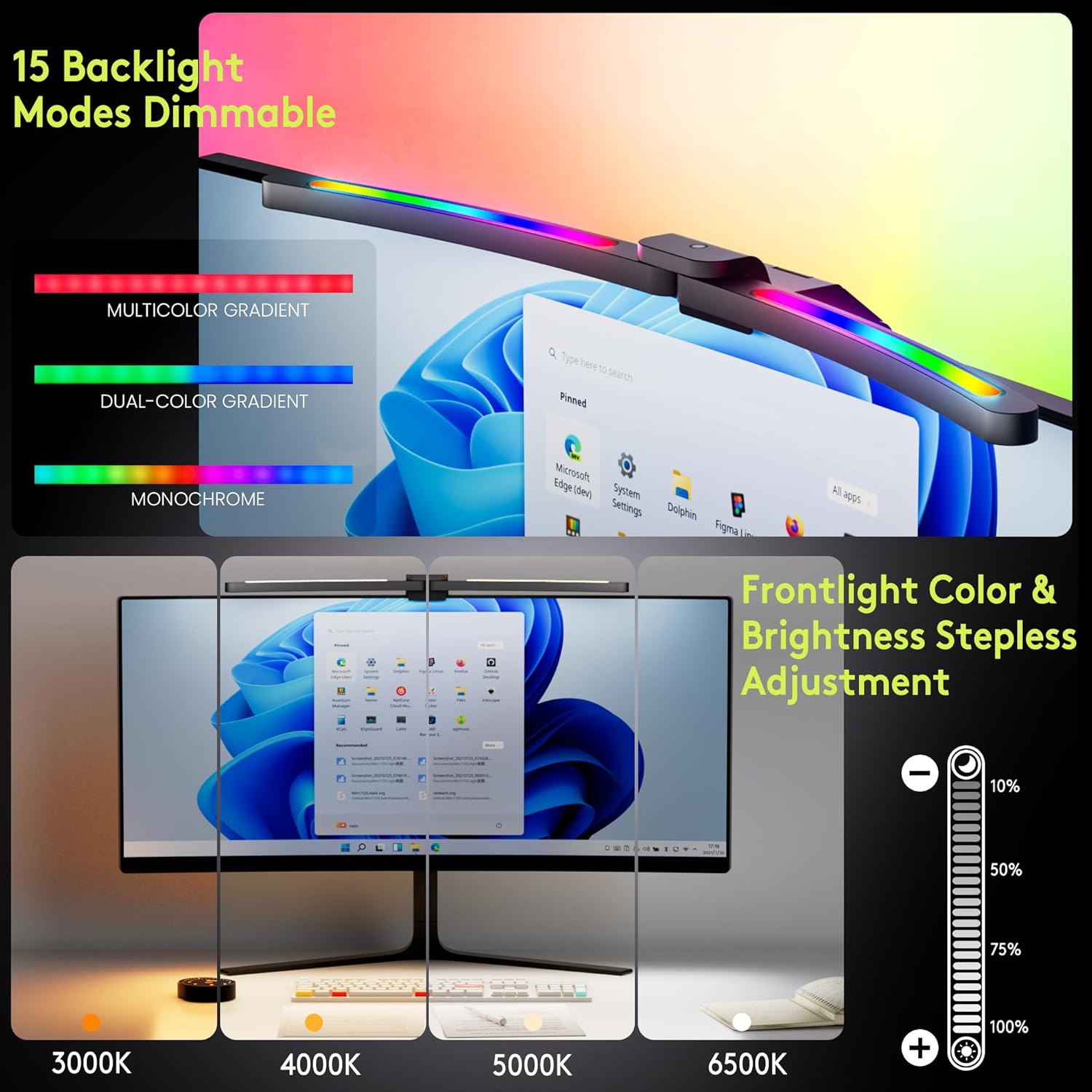
Use the '+' and '-' buttons on the remote to adjust the brightness. A long press allows for stepless dimming.
വർണ്ണ താപനില ക്രമീകരിക്കുന്നു
Use the color temperature button (thermometer icon) on the remote to cycle through color temperature settings from 3000K (warm) to 6500K (cool).

RGB ബാക്ക്ലൈറ്റ് മോഡുകൾ
Press the RGB button on the remote to activate and cycle through 15 RGB backlight modes, including flowing colors and breathing effects, to customize your ambiance.
Smart Auto-Dimming
Activate the smart auto-dimming feature (sun icon) on the remote. The light bar will automatically adjust its brightness based on the surrounding ambient light conditions, preventing glare or excessive dimming.

പവർ-ഓഫ് മെമ്മറി ഫംഗ്ഷൻ
The light bar retains your last used settings (brightness, color temperature, RGB mode) when powered off and restores them upon turning on.
പ്രവർത്തന രീതികൾ
The foldable dual-head design allows for three distinct working modes:
- വർക്ക് മോഡ്: Provides focused task lighting on your desk.
- Immersive Mode: Utilizes both front and RGB backlighting for an enhanced entertainment experience.
- Design Mode: Offers precise, shadow-free illumination for detailed tasks.

നേത്ര പരിചരണ സവിശേഷതകൾ
- 45° Asymmetric Lighting: Eliminates screen glare and reflections, directing light only onto your desk.
- High Color Rendering Index (Ra98): Faithfully reproduces real-world colors, crucial for tasks like color-calibrating.
- RG0 Blue Light Certification: Reduces harmful blue light exposure, minimizing visual fatigue during long sessions.
- ഫ്ലിക്കർ-ഫ്രീ: Provides a stable light source to protect your eyes from strain.


മീഡിയ ഗാലറി
Video: Curved Monitor Light Bar 15 RGB Backlight for 34"+ Screens. This video provides an overview of the light bar's features and how it enhances a monitor setup.
Video: Quntis ScreenLinear Curved RGB Monitor Light Bar. This video showcases the design and functionality of the Quntis ScreenLinear Curved RGB Monitor Light Bar.
മെയിൻ്റനൻസ്
To maintain optimal performance, regularly clean the light bar and remote control with a soft, dry cloth. Avoid using abrasive cleaners or solvents. Ensure the light bar is unplugged before cleaning.
ട്രബിൾഷൂട്ടിംഗ്
- ലൈറ്റ് ഓണാക്കുന്നില്ല:
- Check if the power cable is securely connected to the light bar, adapter, and power outlet.
- പവർ ഔട്ട്ലെറ്റ് പ്രവർത്തനക്ഷമമാണെന്ന് ഉറപ്പാക്കുക.
- റിമോട്ട് പ്രതികരിക്കുന്നില്ല:
- Verify that the 3 AA batteries in the remote are correctly inserted and not depleted. Replace if necessary.
- Ensure no obstructions are between the remote and the light bar.
- പൊരുത്തമില്ലാത്ത തെളിച്ചം/നിറം:
- If auto-dimming is enabled, ambient light changes may cause adjustments. Disable auto-dimming to manually control.
- Ensure the light bar is clean and free from dust.
സ്പെസിഫിക്കേഷനുകൾ
| ബ്രാൻഡ് | കുണ്ടിസ് |
| മോഡൽ | B0F9LBFHJZ |
| പ്രത്യേക ഫീച്ചർ | Color/Brightness Adjustment, Foldable dual-head monitor light bar, Smart Auto-Dimming, Ultrawide screen curved monitor light bar |
| പ്രത്യേക ഉപയോഗങ്ങൾ | Gaming, Movie, Reading, Study, Work from home office |
| യൂണിറ്റ് എണ്ണം | 1.0 എണ്ണം |
| വർണ്ണ താപനില | 3000K-6500K |
| തെളിച്ചം | 500~1000 Lux (up to 1400 Lux max desk illumination) |
| ആകൃതി | ദീർഘചതുരം |
| മെറ്റീരിയൽ | അലുമിനിയം |
| പ്രകാശ സ്രോതസ്സ് തരം | എൽഇഡി |
| നിയന്ത്രണ രീതി | റിമോട്ട് |
| ശൈലി | ആധുനികം |
| നിറം | കറുപ്പ് |
| ഇനത്തിൻ്റെ ഭാരം | 2.68 പൗണ്ട് |
| ഉൽപ്പന്ന അളവുകൾ | 17.3 x 5.5 x 4 ഇഞ്ച് |
| ബാറ്ററികൾ (റിമോട്ട്) | 3 AA ബാറ്ററികൾ ആവശ്യമാണ് (ഉൾപ്പെടുത്തിയിട്ടില്ല) |
| ഉൾപ്പെടുത്തിയ ഘടകങ്ങൾ | Adapter, Power Cable, Remote |
വാറൻ്റിയും പിന്തുണയും
For warranty information, technical support, or customer service inquiries, please refer to the official Quntis webസൈറ്റിൽ പ്രവേശിക്കുക അല്ലെങ്കിൽ അവരുടെ ഉപഭോക്തൃ പിന്തുണയുമായി നേരിട്ട് ബന്ധപ്പെടുക.


