1. ആമുഖം
Thank you for choosing the Fockety Electric Cycling Panel. This LCD display is designed to enhance your electric bike experience by providing essential riding data, user-friendly controls, and convenient features like a USB charging port. This manual provides detailed instructions for installation, operation, and maintenance to ensure optimal performance and longevity of your device. Please read this manual thoroughly before use.
2 സുരക്ഷാ വിവരങ്ങൾ
- Always ensure the device is securely mounted before riding.
- Do not attempt to disassemble or modify the panel, as this may void the warranty and cause damage.
- ഡിസ്പ്ലേ വൃത്തിയായും വരണ്ടതായും സൂക്ഷിക്കുക. തീവ്രമായ താപനിലയിലോ നേരിട്ടുള്ള സൂര്യപ്രകാശത്തിലോ ദീർഘനേരം എക്സ്പോഷർ ചെയ്യുന്നത് ഒഴിവാക്കുക.
- Ensure all connections are secure and waterproof where applicable.
- Operate your electric bike safely and adhere to all local traffic laws and regulations.
3. ഉൽപ്പന്നം കഴിഞ്ഞുview
The Fockety Electric Cycling Panel is a robust and feature-rich display for electric bicycles. It features a color LCD screen with a thoughtful backlight for clear visibility in various lighting conditions. The panel is constructed from durable ABS plastic, ensuring resilience and protection for its internal components.
പ്രധാന സവിശേഷതകൾ:
- ഉപയോക്തൃ സൗഹൃദ ബട്ടണുകൾ: External buttons provide comfortable control and efficient operation.
- Backlight Design: Ensures clear visibility day and night.
- നീണ്ടുനിൽക്കുന്ന നിർമ്മാണം: Made from lightweight and sturdy ABS plastic.
- യുഎസ്ബി ചാർജിംഗ് പോർട്ട്: 5V 500MA output allows for convenient charging of mobile devices.
- അനുയോജ്യത: Designed to fit KT controllers for seamless integration.
ഘടകങ്ങൾ:
- LCD ഡിസ്പ്ലേ സ്ക്രീൻ
- Control Buttons (Up, Power, Down)
- മൗണ്ട് Clamp
- കണക്ഷൻ കേബിൾ
- USB ചാർജിംഗ് പോർട്ട്
4. സജ്ജീകരണവും ഇൻസ്റ്റാളേഷനും
Follow these steps to properly install your Electric Cycling Panel on your electric bike.
- മൗണ്ടിംഗ് ലൊക്കേഷൻ തിരഞ്ഞെടുക്കുക: Select a suitable position on your handlebar, typically near the left grip, that allows for easy viewing and access to buttons without obstructing your riding.
- മൗണ്ടിംഗ് Cl അറ്റാച്ചുചെയ്യുകamp: മൗണ്ടിംഗ് cl തുറക്കുകamp and position it around the handlebar. Securely tighten the screws to fix the display in place. Ensure the display is oriented correctly for optimal viewing.
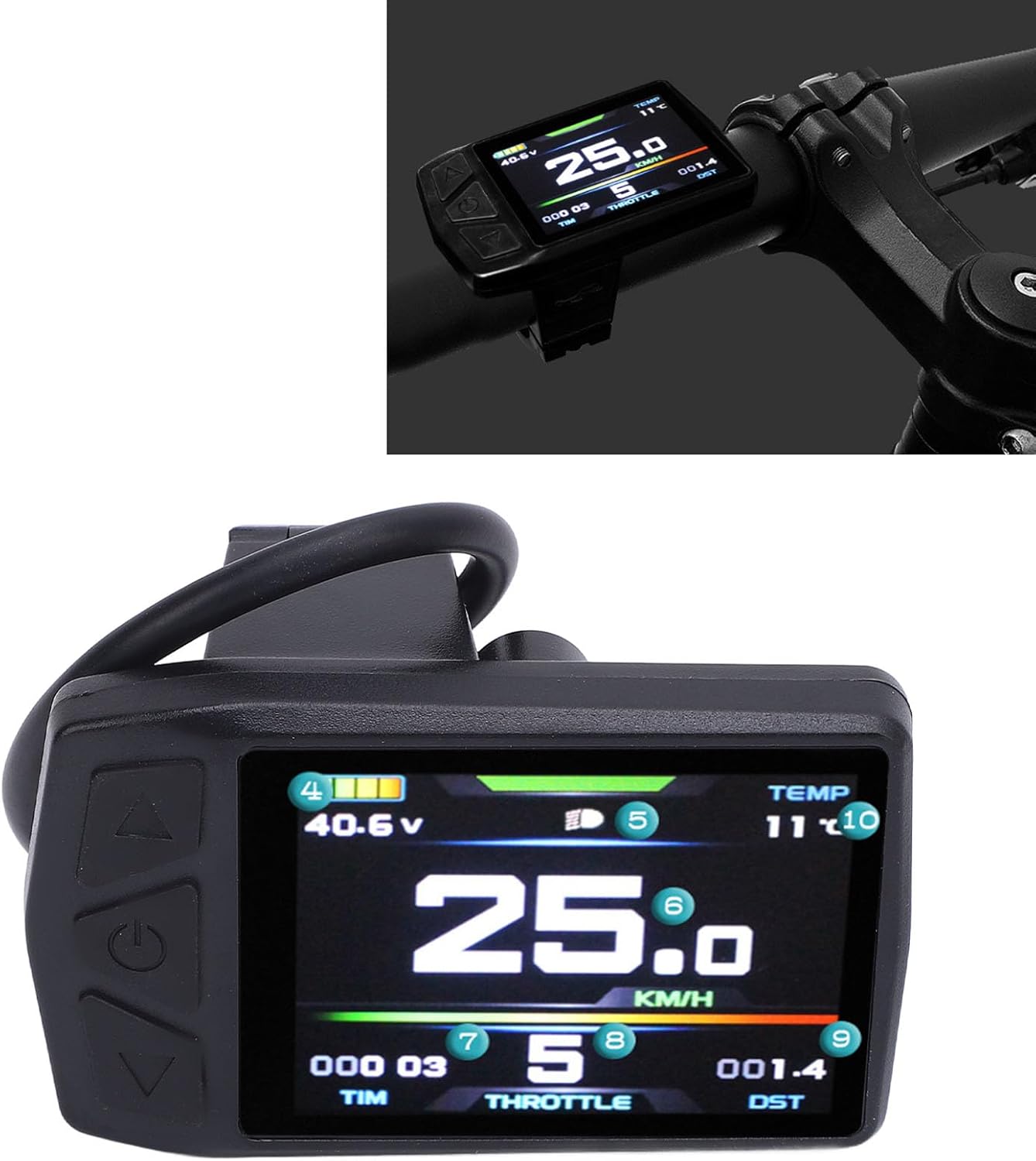
Image: The Electric Cycling Panel securely mounted on a bicycle handlebar, showing its position relative to the rider's view.

ചിത്രം: ഒരു പിൻഭാഗം view of the cycling panel, highlighting the robust mounting clamp and the integrated connection cable.
- Connect to KT Controller: Locate the appropriate connection port on your KT controller. Carefully align and plug the display's cable into the controller. Ensure a firm and secure connection.
- കേബിൾ മാനേജുമെന്റ്: Route the cable neatly along your bike frame, securing it with cable ties if necessary, to prevent interference with moving parts and protect it from damage.
- പ്രാരംഭ പവർ ഓൺ: After installation, press the power button on the display to turn it on. The screen should illuminate and display initial information.
5. പ്രവർത്തന നിർദ്ദേശങ്ങൾ
This section details how to operate your Electric Cycling Panel and understand its display.
ബട്ടൺ പ്രവർത്തനങ്ങൾ:
- Power Button (Middle): Press and hold to turn the display ON/OFF. Short press to cycle through display modes or confirm selections.
- Up Button (Top): Increases values, navigates up in menus, or increases assist level.
- Down Button (Bottom): Decreases values, navigates down in menus, or decreases assist level.
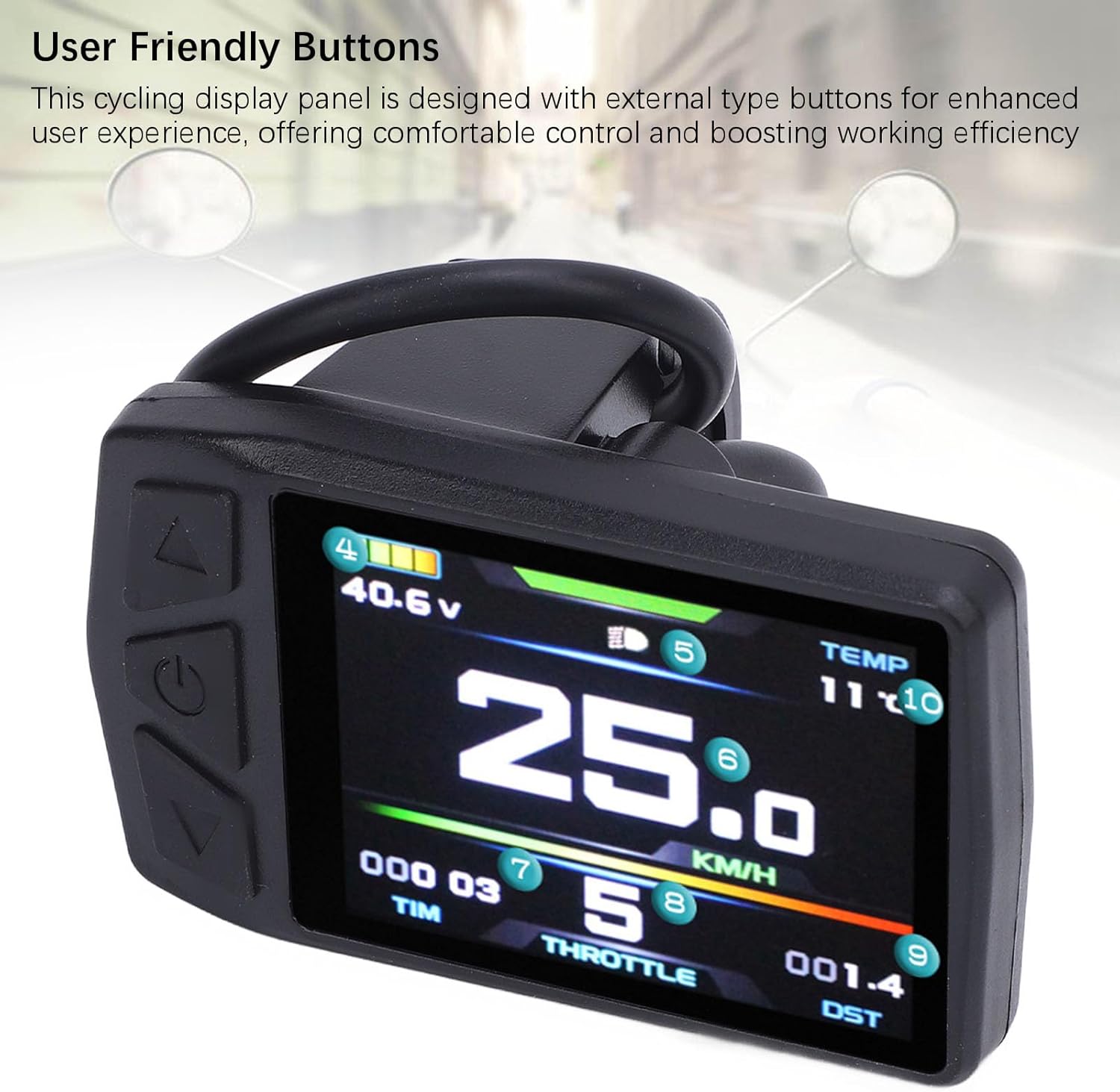
ചിത്രം: വിശദമായ ഒരു ചിത്രം view of the panel's control buttons (Up, Power, Down) and the illuminated display.
വിവരങ്ങൾ പ്രദർശിപ്പിക്കുക:
The color LCD screen provides various real-time riding metrics. Refer to the image below for numbered indicators:
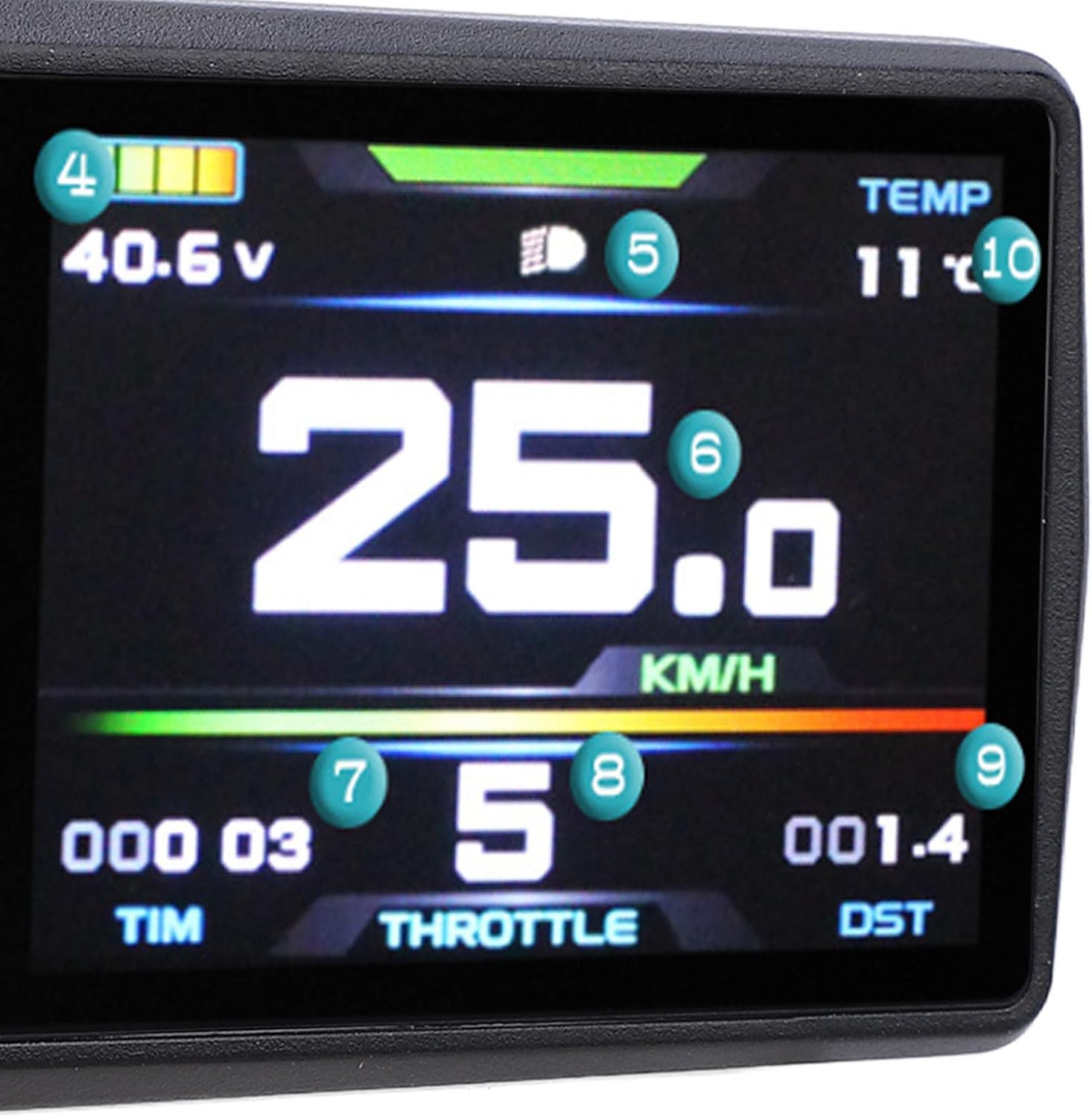
Image: The display screen with numbered labels pointing to different data readouts.
- ബാറ്ററി ലെവൽ ഇൻഡിക്കേറ്റർ: Shows the current charge level of your e-bike battery.
- വാല്യംtagഇ ഡിസ്പ്ലേ: നിലവിലെ ബാറ്ററി വോള്യംtagഇ (ഉദാ, 40.6V).
- ഹെഡ്ലൈറ്റ് ഇൻഡിക്കേറ്റർ: ഹെഡ്ലൈറ്റുകൾ സജീവമാകുമ്പോൾ പ്രകാശിക്കുന്നു.
- നിലവിലെ വേഗത: Displays your real-time speed (e.g., 25.0 KM/H).
- സഹായ നില: Indicates the current pedal assist level (e.g., 5).
- Trip Time (TIM): Shows the duration of your current ride.
- Throttle Indicator (THROTTLE): May indicate throttle activity or power output.
- Distance Traveled (DST): Displays the distance covered during the current trip.
- താപനില (TEMP): അന്തരീക്ഷ ഊഷ്മാവ് കാണിക്കുന്നു.
USB ചാർജിംഗ് പ്രവർത്തനം:
The panel includes a 5V 500MA USB output port, allowing you to charge your mobile phone or other small electronic devices while riding.
- Locate the USB port on the side or bottom of the display.
- Connect your device using a compatible USB cable.
- Ensure your e-bike's power is on for the USB port to function.
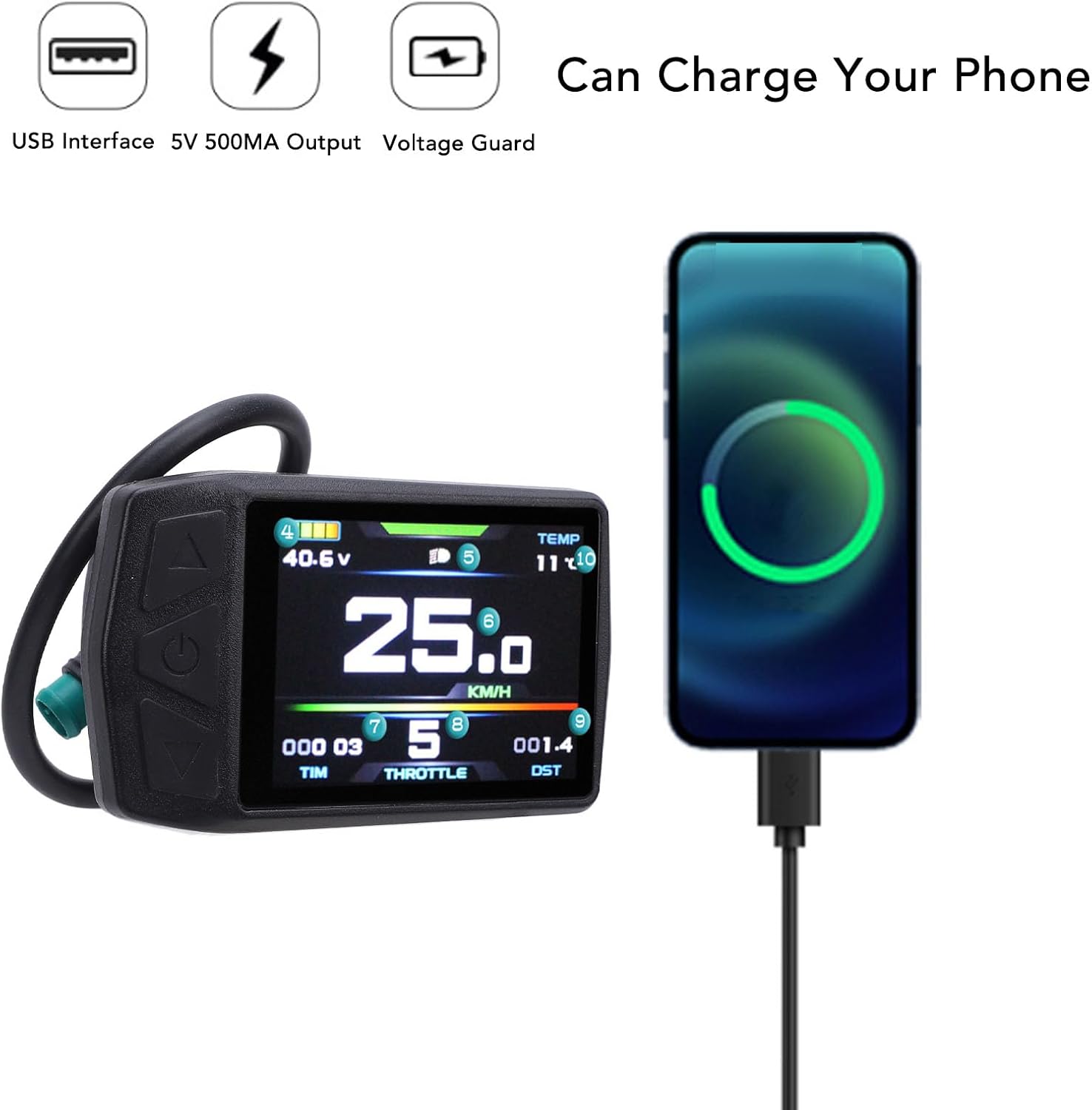
Image: The cycling panel actively charging a smartphone via its integrated USB port, demonstrating its versatility.
6. പരിപാലനം
Proper maintenance ensures the longevity and reliability of your cycling panel.
- വൃത്തിയാക്കൽ: ഡിസ്പ്ലേ സ്ക്രീനും ബോഡിയും ഒരു സോഫ്റ്റ്, ഡി ക്ലീനർ ഉപയോഗിച്ച് തുടയ്ക്കുക.amp തുണി. പ്ലാസ്റ്റിക്കിനോ സ്ക്രീനിനോ കേടുവരുത്തുന്ന അബ്രാസീവ് ക്ലീനറുകളോ ലായകങ്ങളോ ഉപയോഗിക്കുന്നത് ഒഴിവാക്കുക.
- കണക്ഷനുകൾ: എല്ലാ കേബിൾ കണക്ഷനുകളും സുരക്ഷിതമാണെന്നും നാശമോ കേടുപാടുകളോ ഇല്ലാത്തതാണെന്നും ഉറപ്പാക്കാൻ ഇടയ്ക്കിടെ പരിശോധിക്കുക.
- സംഭരണം: When not in use for extended periods, store the e-bike and display in a cool, dry place away from direct sunlight.
- പരിശോധന: Regularly inspect the mounting clamp for tightness and signs of wear.
7. പ്രശ്നപരിഹാരം
If you encounter issues with your Electric Cycling Panel, refer to the following common problems and solutions:
- ഡിസ്പ്ലേ ഓണാക്കുന്നില്ല:
- Ensure the e-bike battery is charged and turned on.
- Check all cable connections between the display and the KT controller for looseness or damage.
- പവർ ബട്ടൺ ആവശ്യമുള്ള സമയം അമർത്തിപ്പിടിച്ചിട്ടുണ്ടെന്ന് ഉറപ്പാക്കുക.
- തെറ്റായ വേഗത/ദൂര റീഡിംഗുകൾ:
- Verify that the wheel circumference setting in your KT controller (if adjustable) is correct.
- Check the speed sensor and its magnet for proper alignment and function.
- USB Charging Not Working:
- Ensure the e-bike system is powered on.
- Check the USB cable for damage and try a different cable or device.
- Display Backlight Not Working:
- Check display settings for backlight intensity or auto-on features.
പ്രശ്നങ്ങൾ നിലനിൽക്കുകയാണെങ്കിൽ, കൂടുതൽ സഹായത്തിനായി ഉപഭോക്തൃ പിന്തുണയുമായി ബന്ധപ്പെടുക.
8 സ്പെസിഫിക്കേഷനുകൾ
| ഫീച്ചർ | സ്പെസിഫിക്കേഷൻ |
|---|---|
| മോഡൽ നമ്പർ | Focketyp1riwvkte7 |
| മെറ്റീരിയൽ | എബിഎസ് പ്ലാസ്റ്റിക് |
| വാല്യംtagഇ അനുയോജ്യത | 24-48V |
| Meter Size (L x W) | ഏകദേശം 73 x 44.8 മിമി / 2.9 x 1.8 ഇഞ്ച് |
| Clamp വ്യാസം | Approx. 22.2mm / 0.9in |
| USB ഔട്ട്പുട്ട് | 5V 500MA |
| അനുയോജ്യത | KT Controller |
| ഇനത്തിൻ്റെ ഭാരം | 3.46 ഔൺസ് |
| ഉൽപ്പന്ന അളവുകൾ | 4.33 x 3.15 x 2.36 ഇഞ്ച് |

Image: A visual representation of the panel's dimensions, including length, width, and clamp വ്യാസം.
9. വാറൻ്റിയും പിന്തുണയും
This product comes with a standard manufacturer's warranty. Please refer to the warranty card included in your package for specific terms and conditions. For technical support, troubleshooting assistance, or warranty claims, please contact your retailer or the manufacturer directly.
നിർമ്മാതാവ്: ഫോക്കറ്റി