1. ആമുഖം
This manual provides detailed instructions for the installation, operation, and maintenance of your BAFANG DZ41 Ebike Display. Please read this manual thoroughly before using the product to ensure proper function and safety. The DZ41 display is designed for electric bicycles equipped with specific BAFANG CAN protocol mid-drive motors.

Image 1.1: The BAFANG DZ41 Ebike Display, illustrating its compact design and clear digital interface for speed, pedal assist level, and battery status.
2 അനുയോജ്യത
The BAFANG DZ41 display is specifically designed for use with BAFANG CAN protocol mid-drive motors. It is compatible with the following BAFANG motor models:
- BAFANG BBS NEWEST (CAN Version)
- BAFANG M620
- BAFANG M600
- BAFANG M560
- BAFANG M510
- BAFANG M420
പ്രധാനപ്പെട്ടത്: This display is അല്ല compatible with BAFANG UART protocol motors or other brands' motors. Please verify your motor's protocol and connector type before installation.

Image 2.1: A visual guide illustrating the compatibility of the DZ41 display with various BAFANG mid-drive motors (CAN protocol) and highlighting incompatibility with UART protocol and other motor types. It also shows the distinct 5-pin male triangular CAN connector versus a 5-pin female round UART connector.
The display supports DC 24V, 36V, and 48V systems.
3. സജ്ജീകരണവും ഇൻസ്റ്റാളേഷനും
3.1. പ്രീ-ഇൻസ്റ്റലേഷൻ പരിശോധന
Before beginning installation, ensure your ebike's motor uses the CAN protocol and has a compatible 5-pin male triangular connector. The DZ41 display features a 5-pin male connector.
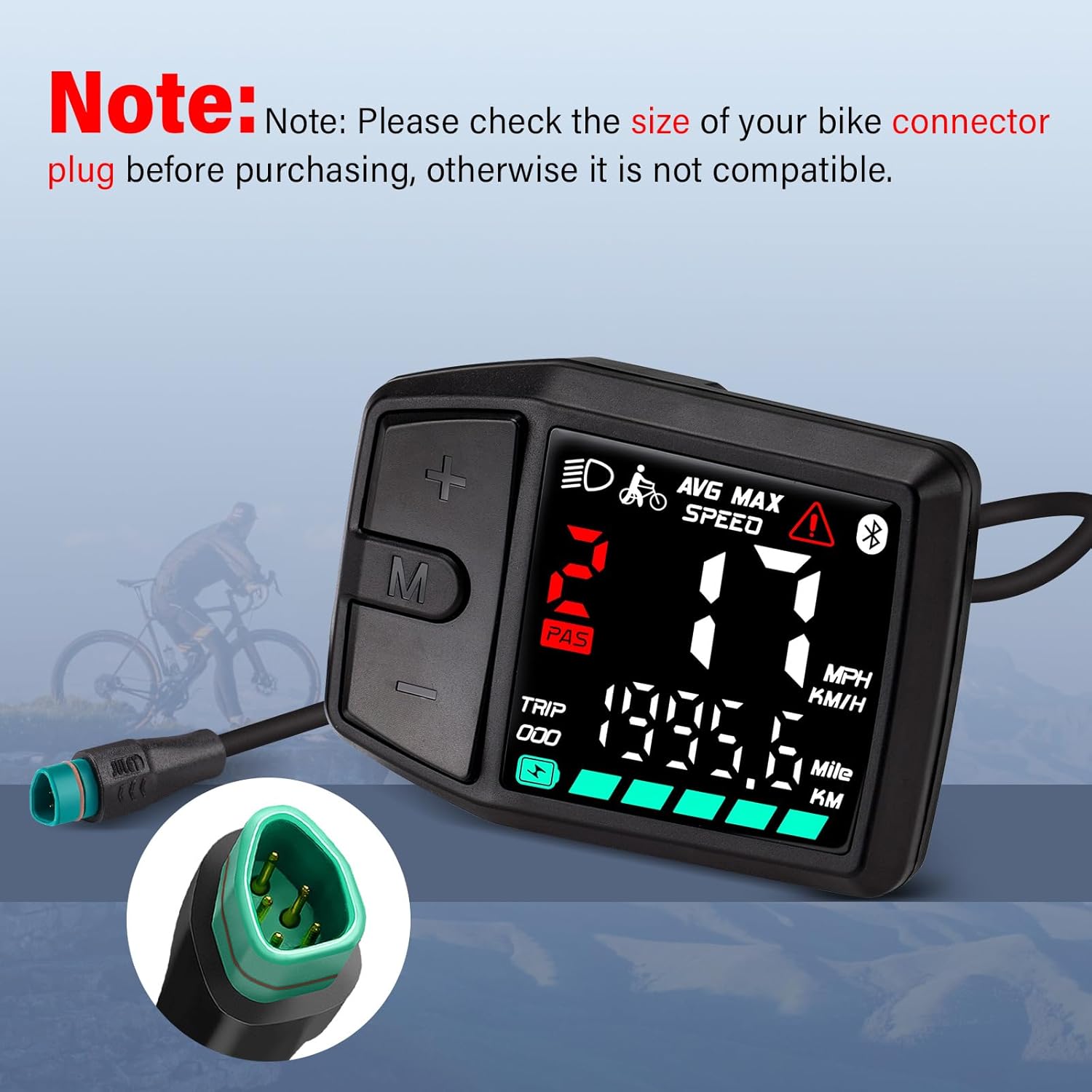
ചിത്രം 3.1: വിശദമായ view of the DZ41 display's 5-pin male triangular connector, emphasizing the importance of checking your bike's connector plug for compatibility before purchase.
3.2. Mounting the Display
The BAFANG DZ41 display is designed to be mounted on handlebars with a diameter of 22mm. Follow these steps:
- cl അഴിക്കുകamp screw on the display's mounting bracket.
- Position the display on your handlebar in a location that provides clear visibility and easy access to the buttons.
- cl മുറുക്കുകamp screw securely, ensuring the display is stable and does not rotate. Do not overtighten.

Image 3.2: Technical drawing detailing the physical dimensions of the DZ41 display (66.5mm x 49.3mm) and its handlebar clamp (22.2mm diameter), along with cable lengths (24cm total, 21cm to connector).
3.3. വൈദ്യുതി ബന്ധം
Connect the 5-pin male triangular connector from the DZ41 display to the corresponding 5-pin female triangular connector on your ebike's wiring harness. Ensure the connection is firm and secure.

ചിത്രം 3.3: ഒരു വ്യക്തമായ view of the 5-pin male connector extending from the DZ41 display, indicating its readiness for connection to the ebike's system.
4. പ്രവർത്തന നിർദ്ദേശങ്ങൾ
4.1. ഡിസ്പ്ലേ ഓവർview
The DZ41 display provides essential riding information on its 1.8-inch screen. Key indicators include:
- വേഗത: നിലവിലെ റൈഡിംഗ് വേഗത.
- PAS ലെവൽ: പെഡൽ അസിസ്റ്റ് സിസ്റ്റം ലെവൽ (0-9).
- ബാറ്ററി നില: Remaining battery charge.
- യാത്ര: Distance traveled for the current trip.
- ODO: Total odometer reading.
- AVG MAX SPEED: Average and maximum speed indicators.
- ഹെഡ്ലൈറ്റ് ഇൻഡിക്കേറ്റർ: Shows when headlights are active.
- മുന്നറിയിപ്പ് സൂചകം: Alerts to system issues.
- ബ്ലൂടൂത്ത് സൂചകം: (Note: This display is not Bluetooth-enabled despite the icon. Refer to compatibility section.)
- യൂണിറ്റ്: Speed unit (MPH/KMH).
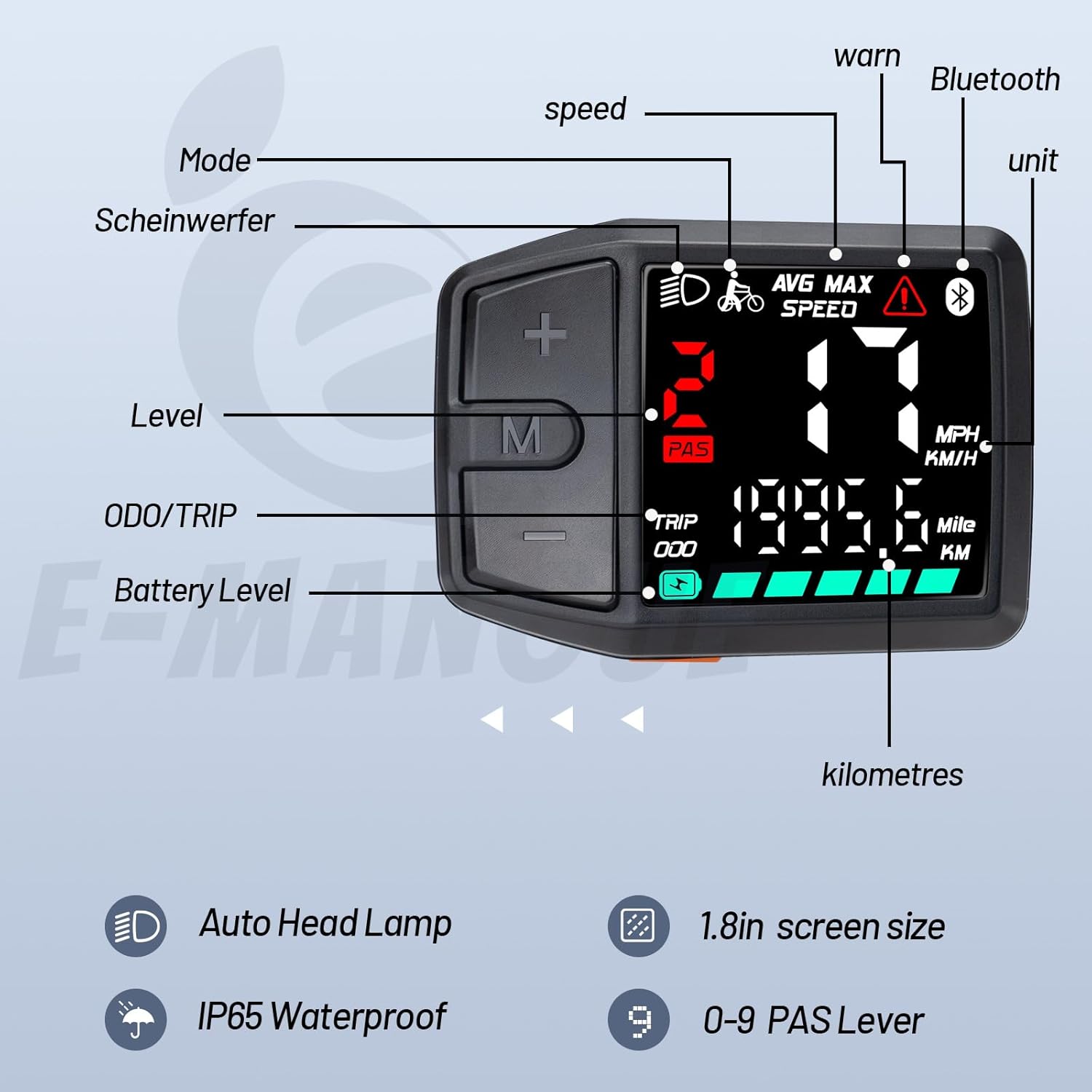
Image 4.1: A comprehensive diagram labeling each element of the DZ41 display, including Mode, Headlight, Level, ODO/TRIP, Battery Level, Speed, Warning, Bluetooth icon, and Unit (MPH/KMH).
4.2. ബട്ടൺ പ്രവർത്തനങ്ങൾ
The display features three buttons: '+', '-', and 'M' (Mode).
- പവർ ഓൺ/ഓഫ്: Press and hold the 'M' button to power the display on or off.
- Adjust PAS Level: Use the '+' and '-' buttons to increase or decrease the pedal assist level (0-9). Level 0 provides no motor assistance.
- Cycle Display Modes: Press the 'M' button briefly to cycle through different display information, such as TRIP distance and ODO (total distance).
- ഹെഡ്ലൈറ്റ് നിയന്ത്രണം: Double-press the '+' button to turn the headlights on or off.

Image 4.2: The DZ41 display mounted on a handlebar, showing a hand interacting with the '+' and 'M' buttons, illustrating the simple and intuitive control interface.

Image 4.3: The DZ41 display clearly showing "PAS 9", indicating the highest pedal assist level, demonstrating the range of assistance available.
5. പരിപാലനവും പരിചരണവും
5.1. വൃത്തിയാക്കൽ
ഒരു സോഫ്റ്റ്, ഡി ക്ലീനർ ഉപയോഗിച്ച് ഡിസ്പ്ലേ പതിവായി വൃത്തിയാക്കുക.amp തുണി. അബ്രാസീവ് ക്ലീനറുകൾ, ലായകങ്ങൾ, അല്ലെങ്കിൽ കഠിനമായ രാസവസ്തുക്കൾ എന്നിവ ഉപയോഗിക്കുന്നത് ഒഴിവാക്കുക, കാരണം ഇവ സ്ക്രീനിനോ സി.asing. വൃത്തിയാക്കുന്നതിനുമുമ്പ് ഡിസ്പ്ലേ ഓഫാണെന്ന് ഉറപ്പാക്കുക.
5.2. ജല പ്രതിരോധം
The DZ41 display has an IP65 waterproof rating, meaning it is protected against dust ingress and low-pressure water jets from any direction. It can function reliably in light to moderate rain. However, it is not designed for submersion in water or exposure to high-pressure water streams.

Image 5.1: A visual representation of the DZ41 display's IP65 waterproof capability, showing it resisting water splashes.
5.3. Material Durability
The display is constructed from durable ABS plastic and metal components, designed for longevity and resilience in various riding conditions.
6. പ്രശ്നപരിഹാരം
6.1. Display Not Powering On
- കണക്ഷനുകൾ പരിശോധിക്കുക: Ensure the 5-pin connector is securely plugged into the ebike's wiring harness.
- ബാറ്ററി നില: Verify that your ebike's battery has sufficient charge.
- പവർ ബട്ടൺ: Confirm you are pressing and holding the 'M' button for a few seconds to power on.
6.2. Incorrect Readings or No Motor Assistance
- അനുയോജ്യത: Re-verify that your motor is a BAFANG CAN protocol mid-drive motor. The display will not function with UART protocol motors or other brands.
- സെൻസർ പ്രശ്നങ്ങൾ: If speed or PAS levels are incorrect, check for any loose or damaged motor sensors.
- പിശക് കോഡുകൾ: If a warning indicator is present, consult your ebike's motor manual for specific error code interpretations.
6.3. Display Screen Issues
- ദൃശ്യപരത: The display features high brightness for outdoor visibility. If visibility is poor, ensure the screen is clean and free from glare.
- നാശം: If the screen is physically damaged or shows persistent anomalies, contact customer support.
7 സ്പെസിഫിക്കേഷനുകൾ
| ഫീച്ചർ | വിശദാംശങ്ങൾ |
|---|---|
| മോഡൽ നമ്പർ | DZ41 |
| അനുയോജ്യത | BAFANG CAN Protocol Mid-Drive Motors (M620, M600, M560, M510, M420, BBS NEWEST CAN Version) |
| കണക്റ്റർ തരം | 5-pin Male Triangular |
| വാല്യംtage | DC 24V / 36V / 48V |
| ഡിസ്പ്ലേ തരം | എൽസിഡി, എൽഇഡി |
| സ്ക്രീൻ വലിപ്പം | 1.8 ഇഞ്ച് (22 മിമി) |
| PAS ലെവലുകൾ | 0-3 / 0-5 / 0-9 (Configurable) |
| വാട്ടർപ്രൂഫ് റേറ്റിംഗ് | IP65 |
| മെറ്റീരിയൽ | എബിഎസ് പ്ലാസ്റ്റിക്, മെറ്റൽ |
| മൗണ്ടിംഗ് വ്യാസം | 22 മി.മീ |
| അളവുകൾ (ഡിസ്പ്ലേ) | ഏകദേശം 66.5mm x 49.3mm |
| ഭാരം | 200 ഗ്രാം |
| പാക്കേജ് ഉള്ളടക്കം | 1x BAFANG DZ41 Display |


